Skip to content
  • Categories
  • Recent
  • Popular
  • Support
  • MyRoute-app
Collapse
Brand Logo

MRA Community Forum

  1. Home
  2. The MyRoute-app
  3. [App] Problems, Bugs and other Issues
  4. Navigation Settings

Navigation Settings

Scheduled Pinned Locked Moved [App] Problems, Bugs and other Issues
9 Posts 4 Posters 1.4k Views 3 Watching
  • Oldest to Newest
  • Newest to Oldest
  • Most Votes
Reply
  • Reply as topic
Log in to reply
This topic has been deleted. Only users with topic management privileges can see it.
  • Donald 4 Offline
    Donald 4 Offline
    Donald 4
    wrote on last edited by
    #1

    Does anyone know how to check with version number I am using? I imagine the app updates all the time to the most recent version but I am editing navigation settings on 2 different iphones and I get a different menu on each phone eg on one phone I don't get the 'search for fuel stations along route' as an option to switch on or off. So I wonder if one iphone is using an older version of the navigation.
    (I am a Gold member so I should have full functionality)

    Jörgen Stefan Hummelink Donald 4 3 Replies Last reply
    0
    • Donald 4 Donald 4

      Does anyone know how to check with version number I am using? I imagine the app updates all the time to the most recent version but I am editing navigation settings on 2 different iphones and I get a different menu on each phone eg on one phone I don't get the 'search for fuel stations along route' as an option to switch on or off. So I wonder if one iphone is using an older version of the navigation.
      (I am a Gold member so I should have full functionality)

      Jörgen Online
      Jörgen Online
      Jörgen
      Valued contributor
      wrote on last edited by
      #2

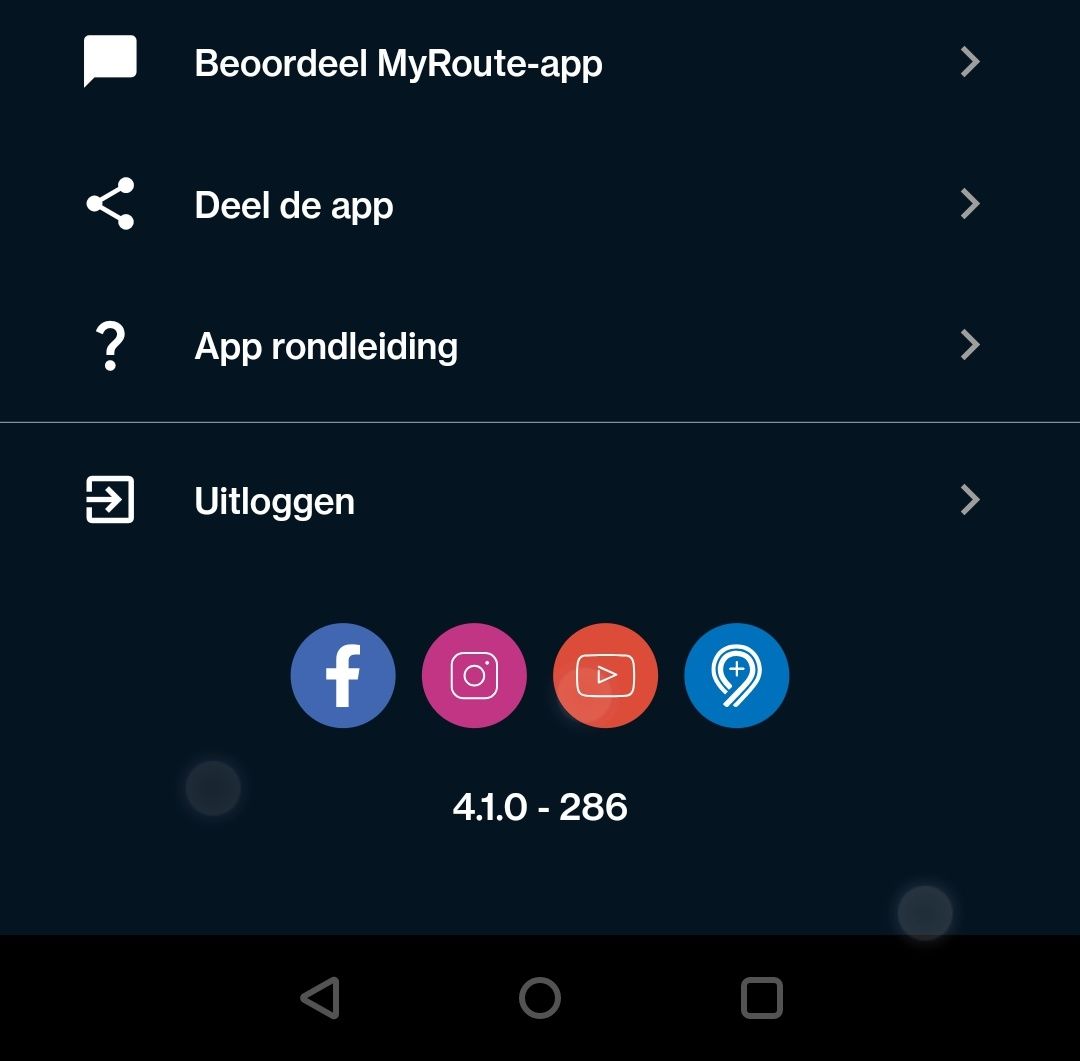
      @Donald-4 Go to your account profile in the App and scroll up. At the end you find the version.

      Hardware
      iPhone 12 pro (iOS 26.2.1)
      iPad (7.Gen.) 18.7.3
      Oukitel RT3 Pro (Andr. 14)
      Wireless CarPlay mit (Elebest C650)
      Wired CarPlay (SEAT Arona - 2021)
      MRA Workshops in Deutsch sind hier zu finden
      Donald 4 1 Reply Last reply
      0
      • Donald 4 Donald 4

        Does anyone know how to check with version number I am using? I imagine the app updates all the time to the most recent version but I am editing navigation settings on 2 different iphones and I get a different menu on each phone eg on one phone I don't get the 'search for fuel stations along route' as an option to switch on or off. So I wonder if one iphone is using an older version of the navigation.
        (I am a Gold member so I should have full functionality)

        Stefan Hummelink Offline
        Stefan Hummelink Offline
        Stefan Hummelink
        Alpha tester
        wrote on last edited by
        #3

        @Donald-4 Here it is on the bottom of the profile page as @Jörgen said:
        Screenshot_20240327-180825.jpg

        Manks bu'j te bange.

        1 Reply Last reply
        1
        • Donald 4 Donald 4

          Does anyone know how to check with version number I am using? I imagine the app updates all the time to the most recent version but I am editing navigation settings on 2 different iphones and I get a different menu on each phone eg on one phone I don't get the 'search for fuel stations along route' as an option to switch on or off. So I wonder if one iphone is using an older version of the navigation.
          (I am a Gold member so I should have full functionality)

          Donald 4 Offline
          Donald 4 Offline
          Donald 4
          wrote on last edited by
          #4
          This post is deleted!
          1 Reply Last reply
          0
          • Jörgen Jörgen

            @Donald-4 Go to your account profile in the App and scroll up. At the end you find the version.

            Donald 4 Offline
            Donald 4 Offline
            Donald 4
            wrote on last edited by
            #5

            @Jörgen Thank you very much for this.
            So one phone is showing version 4.1.0-286 and the other is showing 4.0.4-216. I imagine the 4.1.0 is the newer version so on the phone showing 4.0.4 I signed out of my account and signed back in but I still have the old version. Any idea how I upload the new version?

            Jörgen 1 Reply Last reply
            0
            • richtea999 Offline
              richtea999 Offline
              richtea999
              Valued contributor
              wrote on last edited by
              #6

              @Donald-4 Depending on your device, visit here:
              https://play.google.com/store/apps/details?id=com.cloudmax.myrouteapp
              or here:
              https://apps.apple.com/gb/app/myroute-app/id969030524

              You'll see an update option if there's one available.

              It will depend on how old your device is, of course.
              (As in older devices may not be able to upgrade any more.)

              1 Reply Last reply
              0
              • Donald 4 Donald 4

                @Jörgen Thank you very much for this.
                So one phone is showing version 4.1.0-286 and the other is showing 4.0.4-216. I imagine the 4.1.0 is the newer version so on the phone showing 4.0.4 I signed out of my account and signed back in but I still have the old version. Any idea how I upload the new version?

                Jörgen Online
                Jörgen Online
                Jörgen
                Valued contributor
                wrote on last edited by
                #7

                @Donald-4 yes 4.1.0-286 is the latest.

                Hardware
                iPhone 12 pro (iOS 26.2.1)
                iPad (7.Gen.) 18.7.3
                Oukitel RT3 Pro (Andr. 14)
                Wireless CarPlay mit (Elebest C650)
                Wired CarPlay (SEAT Arona - 2021)
                MRA Workshops in Deutsch sind hier zu finden

                Donald 4 1 Reply Last reply
                0
                • Jörgen Jörgen

                  @Donald-4 yes 4.1.0-286 is the latest.

                  Donald 4 Offline
                  Donald 4 Offline
                  Donald 4
                  wrote on last edited by
                  #8

                  @Jörgen Thanks Jorgen
                  I've tried uploading the app off the apple store but that just gets me to version 4.0.5-228 although I wonder if the reason for this is its an old iphone with IOS version 16.6 (20G75)

                  1 Reply Last reply
                  0
                  • Donald 4 Offline
                    Donald 4 Offline
                    Donald 4
                    wrote on last edited by
                    #9

                    Thanks guys and please ignore previous post. I updated the IOS on the old phone then updated myrouteapp as suggested and now I am on the most up to date myrouteapp version on my old phone. Thanks for your help here.

                    1 Reply Last reply
                    0

                    Hello! It looks like you're interested in this conversation, but you don't have an account yet.

                    Getting fed up of having to scroll through the same posts each visit? When you register for an account, you'll always come back to exactly where you were before, and choose to be notified of new replies (either via email, or push notification). You'll also be able to save bookmarks and upvote posts to show your appreciation to other community members.

                    With your input, this post could be even better 💗

                    Register Login
                    Reply
                    • Reply as topic
                    Log in to reply
                    • Oldest to Newest
                    • Newest to Oldest
                    • Most Votes


                    ACTIVE USERS
                    Jörgen
                    Jörgen
                    richtea999
                    richtea999
                    Stefan Hummelink
                    Stefan Hummelink
                    Donald 4
                    Donald 4
                    POPULAR TOPICS
                    • "The selected profile only works in the HERE / TomTom map"
                      Rob Verhoeff
                      Rob Verhoeff
                      0
                      19
                      282

                    • Google maps and Streetview
                      Stevedo 6 0
                      Stevedo 6 0
                      1
                      20
                      795

                    • Carpuride BMW unit stalling or restarting
                      siebo vd berg
                      siebo vd berg
                      0
                      17
                      531

                    • Transport modes?
                      John S Parry
                      John S Parry
                      0
                      3
                      74

                    • Sena 30K Headset with MESH and navigation instructions
                      Peter Zehentreiter
                      Peter Zehentreiter
                      0
                      2
                      11

                    • New Zealand Routes
                      Marinus van Deudekom
                      Marinus van Deudekom
                      1
                      2
                      20

                    • Navigation Route Line Colour
                      Rob Verhoeff
                      Rob Verhoeff
                      5
                      5
                      928

                    • Little issues, night mode in tunnel, recalculation
                      Hubert Thoring
                      Hubert Thoring
                      0
                      11
                      105

                    MY GROUPS
                    • Login

                    • Login or register to search.
                    • First post
                      Last post
                    0
                    • Categories
                    • Recent
                    • Popular
                    • Support
                    • MyRoute-app