Skip to content
  • Categories
  • Recent
  • Popular
  • Support
  • MyRoute-app
Collapse
Brand Logo

MRA Community Forum

  1. Home
  2. The MyRoute-app
  3. [App] Problems, Bugs and other Issues
  4. NO INTERNET MESSAGE

NO INTERNET MESSAGE

Scheduled Pinned Locked Moved [App] Problems, Bugs and other Issues
6 Posts 4 Posters 902 Views 3 Watching
  • Oldest to Newest
  • Newest to Oldest
  • Most Votes
Reply
  • Reply as topic
Log in to reply
This topic has been deleted. Only users with topic management privileges can see it.
  • Dominic Bannister 0undefined Offline
    Dominic Bannister 0undefined Offline
    Dominic Bannister 0
    wrote on last edited by
    #1

    Hi all,
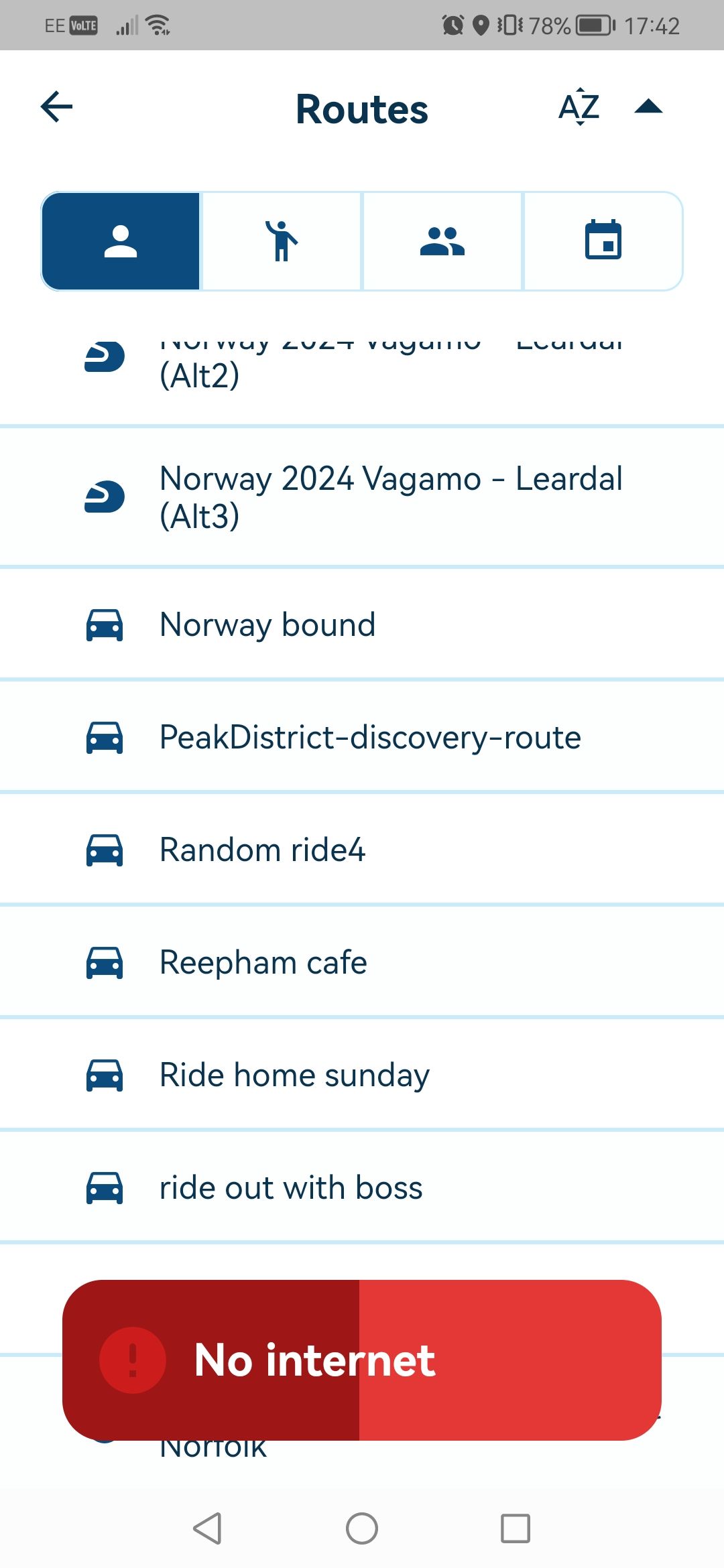
    Just made a new route which i can view on the pc, but all i get when i try and veiw it on the app is Screenshot_20240127_174210_com.cloudmax.myrouteapp.jpg All my other routes work fine . bit confused . Any help would be much appreciated
    Raycerundefined 1 Reply Last reply
    0
    • Thomas sundefined Offline
      Thomas sundefined Offline
      Thomas s
      wrote on last edited by
      #2

      Hi Dominic, I do see this issue as well every now and than. The last time it was just recently on a new route where I could reproduce it. When adding the 92 route point the "no internet" message comes up. With 91 route points all is ok. Independent which one of the 92 route points I remove the issue is gone. Workaround of course is to split the long route ...
      Although I must say, I saw the message as well on routes with less than 90 route points. Especially sometimes a route works and the same route then again shows the "no internet" message. No real prediction on the behaviour. Just frustrating when it comes up while being on the road.
      Regards Tom

      Dominic Bannister 0undefined 1 Reply Last reply
      0
      • Thomas sundefined Thomas s

        Hi Dominic, I do see this issue as well every now and than. The last time it was just recently on a new route where I could reproduce it. When adding the 92 route point the "no internet" message comes up. With 91 route points all is ok. Independent which one of the 92 route points I remove the issue is gone. Workaround of course is to split the long route ...
        Although I must say, I saw the message as well on routes with less than 90 route points. Especially sometimes a route works and the same route then again shows the "no internet" message. No real prediction on the behaviour. Just frustrating when it comes up while being on the road.
        Regards Tom

        Dominic Bannister 0undefined Offline
        Dominic Bannister 0undefined Offline
        Dominic Bannister 0
        wrote on last edited by
        #3

        @Thomas-s Thanks mate, all sorted i just split the route into tow routes.

        Thomas sundefined 1 Reply Last reply
        0
        • Dominic Bannister 0undefined Dominic Bannister 0

          @Thomas-s Thanks mate, all sorted i just split the route into tow routes.

          Thomas sundefined Offline
          Thomas sundefined Offline
          Thomas s
          wrote on last edited by
          #4

          @Dominic-Bannister-0 Splitting is a workaround. However if you rely on MyRouteApp to potentially work on a route, then you have no chance once the error comes up. And to my experience there is no fixed number of route points when this happens. It may even work well now and the next time it fails and vice versa. Have seen all of those occassions.
          At least I see this as a bug that requires mid-term a fix. Unless the MyRouteApp team knows otherwise how to avoid it.

          1 Reply Last reply
          0
          • Corjan Meijerinkundefined Online
            Corjan Meijerinkundefined Online
            Corjan Meijerink
            Developer
            wrote on last edited by
            #5

            In the next update I've fixed the incorrect "No Internet" message 🙂

            For now, available to all automatically, I've enhanced the performance of loading large routes reducing the chance of getting this message and actually being able to load the (long) route 🎉

            1 Reply Last reply
            3
            • Dominic Bannister 0undefined Dominic Bannister 0

              Hi all,
              Just made a new route which i can view on the pc, but all i get when i try and veiw it on the app is Screenshot_20240127_174210_com.cloudmax.myrouteapp.jpg All my other routes work fine . bit confused . Any help would be much appreciated

              Raycerundefined Offline
              Raycerundefined Offline
              Raycer
              wrote on last edited by
              #6
              This post is deleted!
              1 Reply Last reply
              0

              Hello! It looks like you're interested in this conversation, but you don't have an account yet.

              Getting fed up of having to scroll through the same posts each visit? When you register for an account, you'll always come back to exactly where you were before, and choose to be notified of new replies (either via email, or push notification). You'll also be able to save bookmarks and upvote posts to show your appreciation to other community members.

              With your input, this post could be even better 💗

              Register Login
              Reply
              • Reply as topic
              Log in to reply
              • Oldest to Newest
              • Newest to Oldest
              • Most Votes


              ACTIVE USERS
              Corjan Meijerinkundefined
              Corjan Meijerink
              Raycerundefined
              Raycer
              Thomas sundefined
              Thomas s
              Dominic Bannister 0undefined
              Dominic Bannister 0
              POPULAR TOPICS
              • deleting entries from the device limit list
                Corjan Meijerinkundefined
                Corjan Meijerink
                0
                5
                90

              • Managing POIs and Favorites - Do POIs show up in other routes?
                Nick Carthewundefined
                Nick Carthew
                0
                4
                61

              • Exporteren vanuit MRA naar Garmin XT lukt niet.
                Hans van de Ven MR.MRAundefined
                Hans van de Ven MR.MRA
                0
                5
                109

              • Please bring back GPX export from Navigation mode
                Marinus van Deudekomundefined
                Marinus van Deudekom
                0
                2
                85

              • POI import anomalies
                Mzokkundefined
                Mzokk
                0
                4
                152

              • Android beta 5.1
                undefined
                2
                1
                23

              • Hulp gevraagd bij instellingen
                Rob Verhoeffundefined
                Rob Verhoeff
                0
                5
                275

              • Navigation stopped working during Tour
                Rob Verhoeffundefined
                Rob Verhoeff
                1
                24
                2.3k

              MY GROUPS
              • Login

              • Login or register to search.
              • First post
                Last post
              0
              • Categories
              • Recent
              • Popular
              • Support
              • MyRoute-app