Going from Beta to public version.
-

I was wondering if it would be a good idea to move to the public version as I continue to have some problems with Beta, so decided to do it.
I followed the instructions to uninstall the beta version and then get the public version from Play store. When I went back to the Play store it only offered me the beta version. I reinstalled this and then found that all my downloaded maps were gone so I had to download again the ones that I wanted. As soon as I had done that there was a message saying there was a map update and did I want to up date. Doing this I found that all the newly downloaded maps had to be re-downloaded and this takes a LOT OF Time!
So, I am still using the beta version, should I change and is so, can I do it without losing all my downloaded maps? -
I was wondering if it would be a good idea to move to the public version as I continue to have some problems with Beta, so decided to do it.
I followed the instructions to uninstall the beta version and then get the public version from Play store. When I went back to the Play store it only offered me the beta version. I reinstalled this and then found that all my downloaded maps were gone so I had to download again the ones that I wanted. As soon as I had done that there was a message saying there was a map update and did I want to up date. Doing this I found that all the newly downloaded maps had to be re-downloaded and this takes a LOT OF Time!
So, I am still using the beta version, should I change and is so, can I do it without losing all my downloaded maps?
@Roger-Doidge The current beta version and public version of MyRoute-app are identical. Personally, I would stick with the beta version as you’ll have access to any updates sooner than the public version.
A complete uninstall of beta and re-install to public, which I believe you need to do to change, will mean that any maps that you had downloaded will need downloading again.Always willing to help if I can.
Triumph Tiger 1200 XRT called Tina.
MRA Navigation Next and SilverFox BJ8 -
@Roger-Doidge The current beta version and public version of MyRoute-app are identical. Personally, I would stick with the beta version as you’ll have access to any updates sooner than the public version.
A complete uninstall of beta and re-install to public, which I believe you need to do to change, will mean that any maps that you had downloaded will need downloading again.
@Nick-Carthew OK thanks, I'll stick with the Beta.
-

@Roger-Doidge said in Going from Beta to public version.:
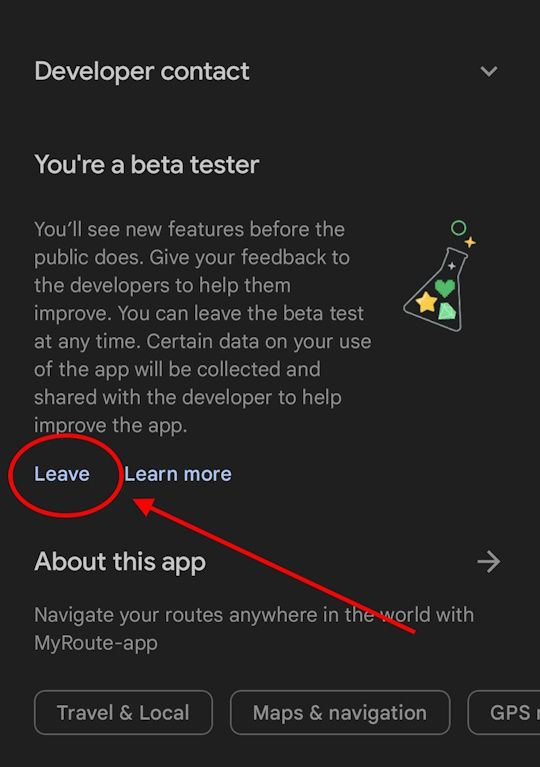
When I went back to the Play store it only offered me the beta version.
Just supposing, at some future point in time, you want to stop using the beta version, you have to actively leave the beta program. In Google's Play Store, go to the MRA app page, scroll down the page to the 'You're a beta tester' section, and then 'Leave' (see screenshot below).
You can rejoin the beta again at any time, so apart from losing your app data, it is risk-free.
But as Nick suggests, the beta versions have been stable and actively useful in the past few months compared to the live version.
Hello! It looks like you're interested in this conversation, but you don't have an account yet.
Getting fed up of having to scroll through the same posts each visit? When you register for an account, you'll always come back to exactly where you were before, and choose to be notified of new replies (either via email, or push notification). You'll also be able to save bookmarks and upvote posts to show your appreciation to other community members.
With your input, this post could be even better 💗
Register Login-
 1414863
-
 1583
1583
-
 05155
05155
-
 06176
06176
-
 0442
0442
-
 0566
0566
-
0391
-
 03138
03138