Offline routes don't work (and suggestion for improvement)
-

I was typing this in the "New Beta" thread but it became to long and I think this issue (and suggestion) deserves it's own topic

@Corjan-Meijerink said in New Beta! (v3.2.12):
Routes can be saved offline by clicking download and scrolling to the bottom “available for offline use”
Hmm, been testing this, but does not work on Android I'm afraid. I downloaded one route for offline use like you said, and put my phone in flightmode. Now when I start MRA Mobile, and go into to routes list, I immediately get the "something went wrong" message. When I open my account and go into the downloads, I find my downloaded route. But if I click it the app crashes (however still active in the background, as a blank screen).
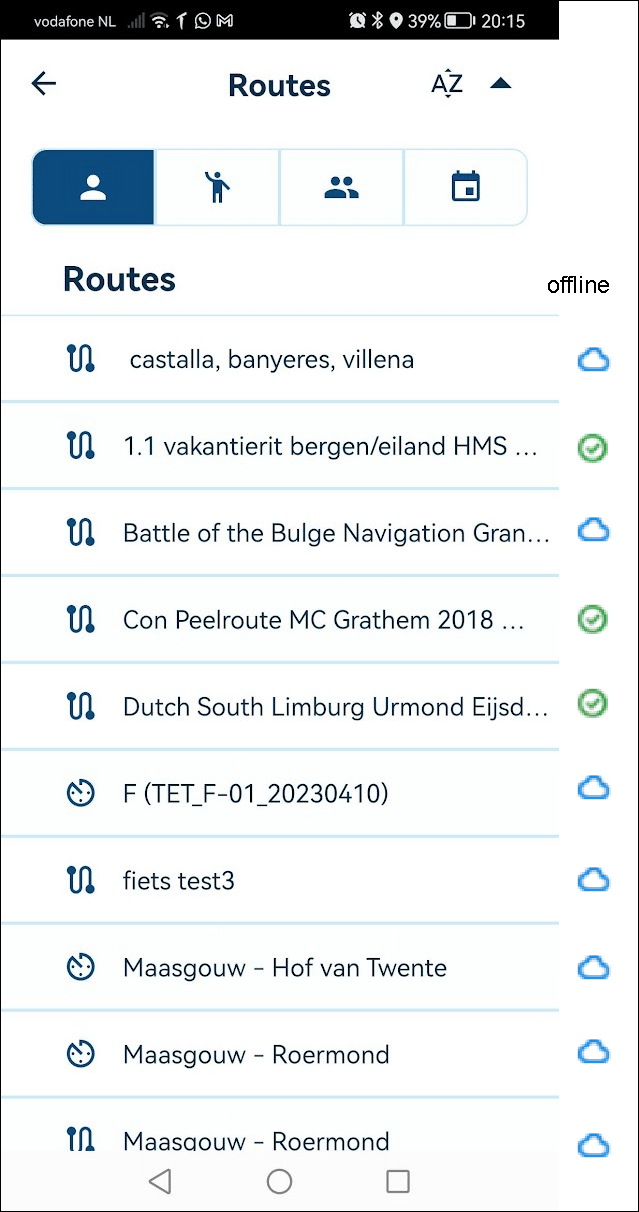
Maybe too much for anytime soon, but I would suggest to integrate offline routes with the regular routes list, like you did with the offline maps: list the routes with an icon of a "download arrow" or cloud symbol, that can be tapped to download, and show a green checkmark if a file is available offline. While offline, the list would show only the available items, or even better: a pre-cached complete filelist, including the mentioned icons.
Also I think a started route needs to be available for offline usage at least for a certain amount of days, similar to how the current Navigation app handles that (in Android, that is...)
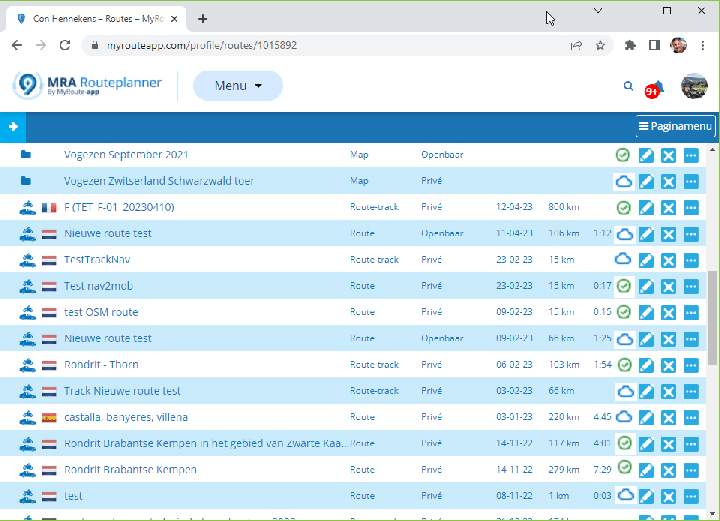
This functionality could be expanded to the on-line Planner. When routes are checkmarked for off-line usage in the on-line planner, the Mobile App could sync those immediately after opening the app. So you can already in the planner opt for off-line usage (and disable them for offline too).
So... Something like this:
-
I was typing this in the "New Beta" thread but it became to long and I think this issue (and suggestion) deserves it's own topic
@Corjan-Meijerink said in New Beta! (v3.2.12):
Routes can be saved offline by clicking download and scrolling to the bottom “available for offline use”
Hmm, been testing this, but does not work on Android I'm afraid. I downloaded one route for offline use like you said, and put my phone in flightmode. Now when I start MRA Mobile, and go into to routes list, I immediately get the "something went wrong" message. When I open my account and go into the downloads, I find my downloaded route. But if I click it the app crashes (however still active in the background, as a blank screen).
Maybe too much for anytime soon, but I would suggest to integrate offline routes with the regular routes list, like you did with the offline maps: list the routes with an icon of a "download arrow" or cloud symbol, that can be tapped to download, and show a green checkmark if a file is available offline. While offline, the list would show only the available items, or even better: a pre-cached complete filelist, including the mentioned icons.
Also I think a started route needs to be available for offline usage at least for a certain amount of days, similar to how the current Navigation app handles that (in Android, that is...)
This functionality could be expanded to the on-line Planner. When routes are checkmarked for off-line usage in the on-line planner, the Mobile App could sync those immediately after opening the app. So you can already in the planner opt for off-line usage (and disable them for offline too).
So... Something like this:

@Con-Hennekens the 'make available offline' works with no problems on my Pixel 6 Pro (Android 13). I have been able to load these downloaded routes, start navigation and have forced recalculation offline with no issues. From my experience so far, the offline has been working really well.
By the way, I do like your suggestion for the icons to know what is downloaded for offline etc. Would be great if this easy view could be implemented by the team.
Kind Regards. Help where I can.
Ducati Multistrada V4 Rally
iPhone 18 Pro
CHIGEE AIO-6 LTE
Google Pixel 6 Pro - mounted on SP Connect Plus
Ex Garmin XT2 and XT1 as well as Ex TomTom Rider User -
@Con-Hennekens the 'make available offline' works with no problems on my Pixel 6 Pro (Android 13). I have been able to load these downloaded routes, start navigation and have forced recalculation offline with no issues. From my experience so far, the offline has been working really well.
By the way, I do like your suggestion for the icons to know what is downloaded for offline etc. Would be great if this easy view could be implemented by the team.
@Dave-J-0, Oh, thats really strange. I thought perhaps it was a flightmode issue, so I tried again with just wifi and data disabled, but I get the exact same thing... @Corjan-Meijerink, it strikes a remarkable resemblance to the problem I had with the first betas, crashing when starting a route, remember?
EDIT:
On my CAT phone it seems to work, on my Huawei it does not.I am just an enthusiastic MRA user, and hope you will be one too!
Most motorcycle problems are caused by the nut that connects the handlebar to the saddle.
Check out RideSleepRepeat.eu, a biker community for sharing stays across Europe
-
@Dave-J-0, Oh, thats really strange. I thought perhaps it was a flightmode issue, so I tried again with just wifi and data disabled, but I get the exact same thing... @Corjan-Meijerink, it strikes a remarkable resemblance to the problem I had with the first betas, crashing when starting a route, remember?
EDIT:
On my CAT phone it seems to work, on my Huawei it does not.
@Con-Hennekens did the same as you and it works fine at the moment. Will do some more testing tomorrow.
-
I was typing this in the "New Beta" thread but it became to long and I think this issue (and suggestion) deserves it's own topic
@Corjan-Meijerink said in New Beta! (v3.2.12):
Routes can be saved offline by clicking download and scrolling to the bottom “available for offline use”
Hmm, been testing this, but does not work on Android I'm afraid. I downloaded one route for offline use like you said, and put my phone in flightmode. Now when I start MRA Mobile, and go into to routes list, I immediately get the "something went wrong" message. When I open my account and go into the downloads, I find my downloaded route. But if I click it the app crashes (however still active in the background, as a blank screen).
Maybe too much for anytime soon, but I would suggest to integrate offline routes with the regular routes list, like you did with the offline maps: list the routes with an icon of a "download arrow" or cloud symbol, that can be tapped to download, and show a green checkmark if a file is available offline. While offline, the list would show only the available items, or even better: a pre-cached complete filelist, including the mentioned icons.
Also I think a started route needs to be available for offline usage at least for a certain amount of days, similar to how the current Navigation app handles that (in Android, that is...)
This functionality could be expanded to the on-line Planner. When routes are checkmarked for off-line usage in the on-line planner, the Mobile App could sync those immediately after opening the app. So you can already in the planner opt for off-line usage (and disable them for offline too).
So... Something like this:

@Con-Hennekens quick reply from my phone, you deserve longer answers
Downloaded routes can only be opened from the Account > Downloads page. From there on, if the maps for navigation are offline available, it should all work (@Dave-J-0 thanks for confirming).
The suggestion you have, is the ambition for a future update! Almost identical to how you suggested. But well….priorities
 (I know you understand).
The crash might be related to the same emergency fix we did for iOS. For Android it doesn’t seem to be an issue as big but the same issue is currently in the Android Beta. We will look into that during office hours
-
@Con-Hennekens quick reply from my phone, you deserve longer answers
Downloaded routes can only be opened from the Account > Downloads page. From there on, if the maps for navigation are offline available, it should all work (@Dave-J-0 thanks for confirming).
The suggestion you have, is the ambition for a future update! Almost identical to how you suggested. But well….priorities
(I know you understand).The crash might be related to the same emergency fix we did for iOS. For Android it doesn’t seem to be an issue as big but the same issue is currently in the Android Beta. We will look into that during office hours
@Corjan-Meijerink, Thanks for the quick answer. I will wait for the longer one too
I am just an enthusiastic MRA user, and hope you will be one too!
Most motorcycle problems are caused by the nut that connects the handlebar to the saddle.
Check out RideSleepRepeat.eu, a biker community for sharing stays across Europe
-
@Corjan-Meijerink, Thanks for the quick answer. I will wait for the longer one too
@Con-Hennekens
 if my phone answer was not to your satisfaction you can let me know
 -
@Con-Hennekens
if my phone answer was not to your satisfaction you can let me know
@Corjan-Meijerink, Haha, the longer answer I am hoping to be the "we fixed it" one
I am glad to hear you are planning something like I visualized earlier. I am hoping that it wil be a method to open those routes too. Actually the Android version of the old Navigation app did a great job concerning this. Only the fact that it was undocumented spoiled it for many people. Just the routes that were in bold characters were available locally, and could be started right out of the usual route list, without a detour through the user profile. -

@Con-Hennekens Here the same problem. Also the app crashes when open the downloaded route with the phone "offline" in flightmodus.
After try again it seems to work. Also a few times the message something went wrong.
Phone Google Pixel 7. I'am sure they work on it
Hello! It looks like you're interested in this conversation, but you don't have an account yet.
Getting fed up of having to scroll through the same posts each visit? When you register for an account, you'll always come back to exactly where you were before, and choose to be notified of new replies (either via email, or push notification). You'll also be able to save bookmarks and upvote posts to show your appreciation to other community members.
With your input, this post could be even better 💗
Register Login-
 010168
-
 2872
2872
-
 0663
0663
-
 012249
-
015399
-
 0632
0632
-
018980
-
1331475