MRA - weird "detour" created
-

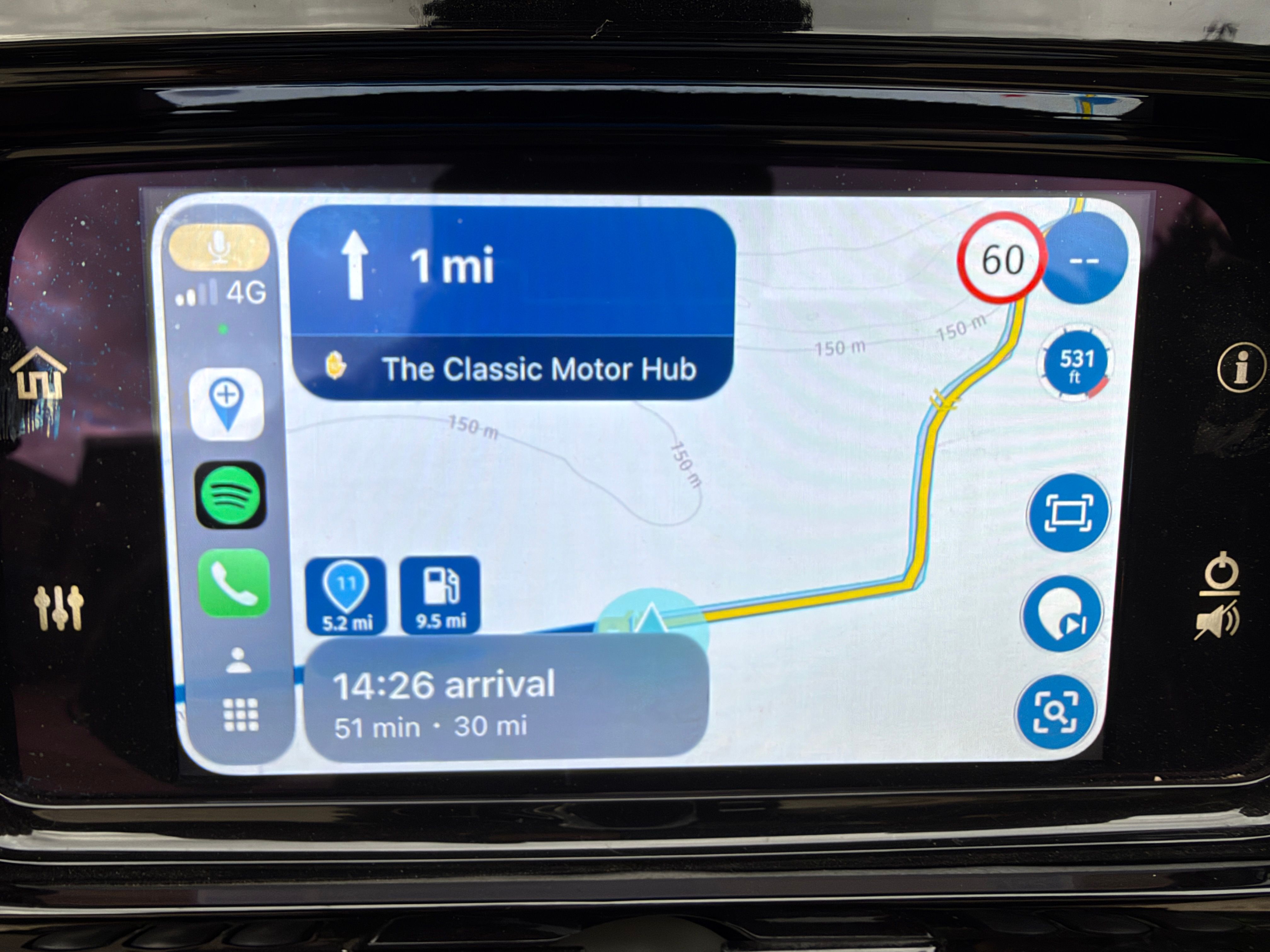
I got some weird thing appear when i plan some of my maps, and despite how many waypoint i added to avoid this.. it's still there.. it create a little ryde into a dead-end.. so we need to do a U-Turn..
So, as i share those map with other, i know that bug and took the right turn.. but other will follow my shared map.. and will be confused (or upset) about why i sent them there....
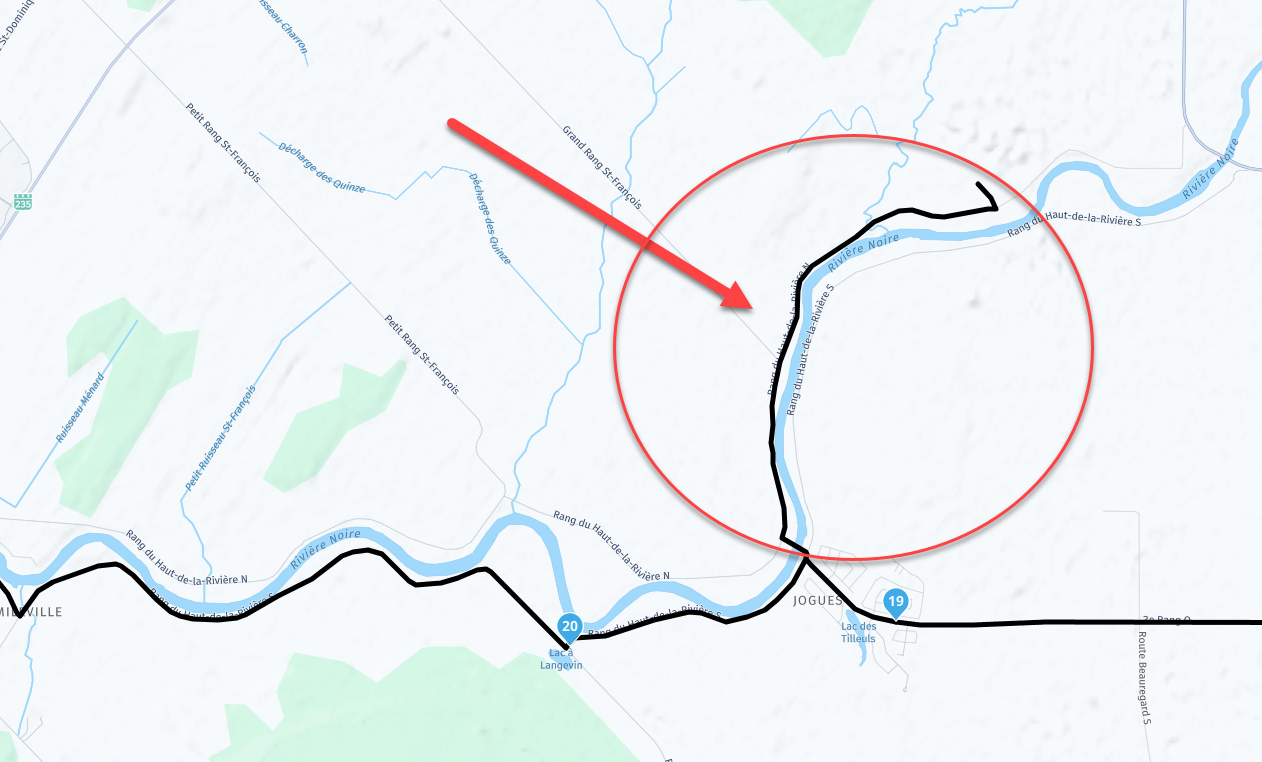
Here the shared map : https://www.myrouteapp.com/fr/social/route/11470838?mode=share
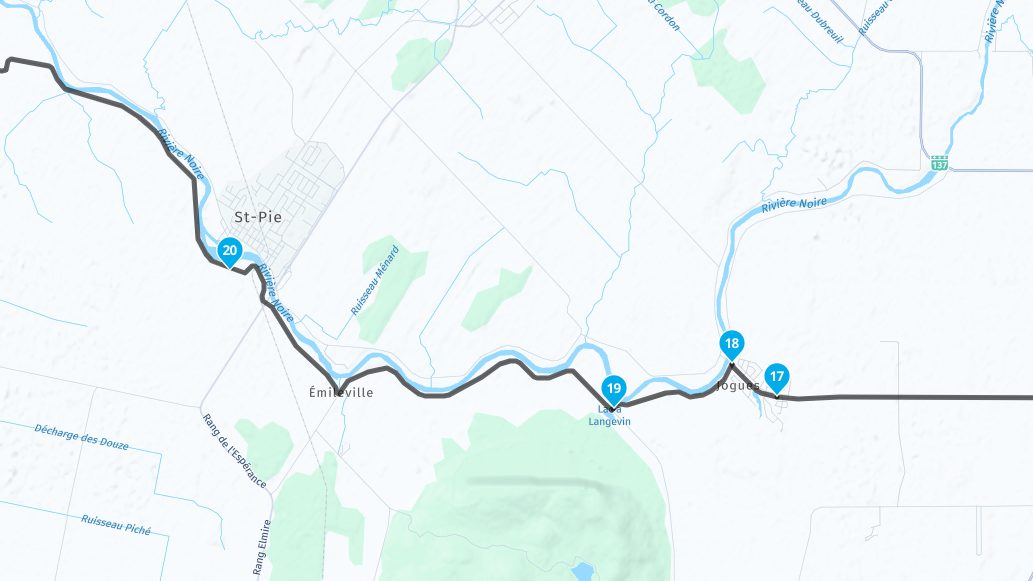
- it's between poit # 19 and # 20
- originaly, i create a stop at # 18, and the the point 20.
- in other software i used before for doing my ryde, but i stop using it because lack of Android Auto support, here how it was configure there
- is was using "HERE!" for this. When i try "TomTom" and "OpenStreetMap", and the weird "sent to dead-end" diseaper.
- So, if i want to avoid closed road, i need Here .. but "Here" create those issues, so i select TomTom or OpenStreetMap.. but those 2 will not show me traffic and closed road
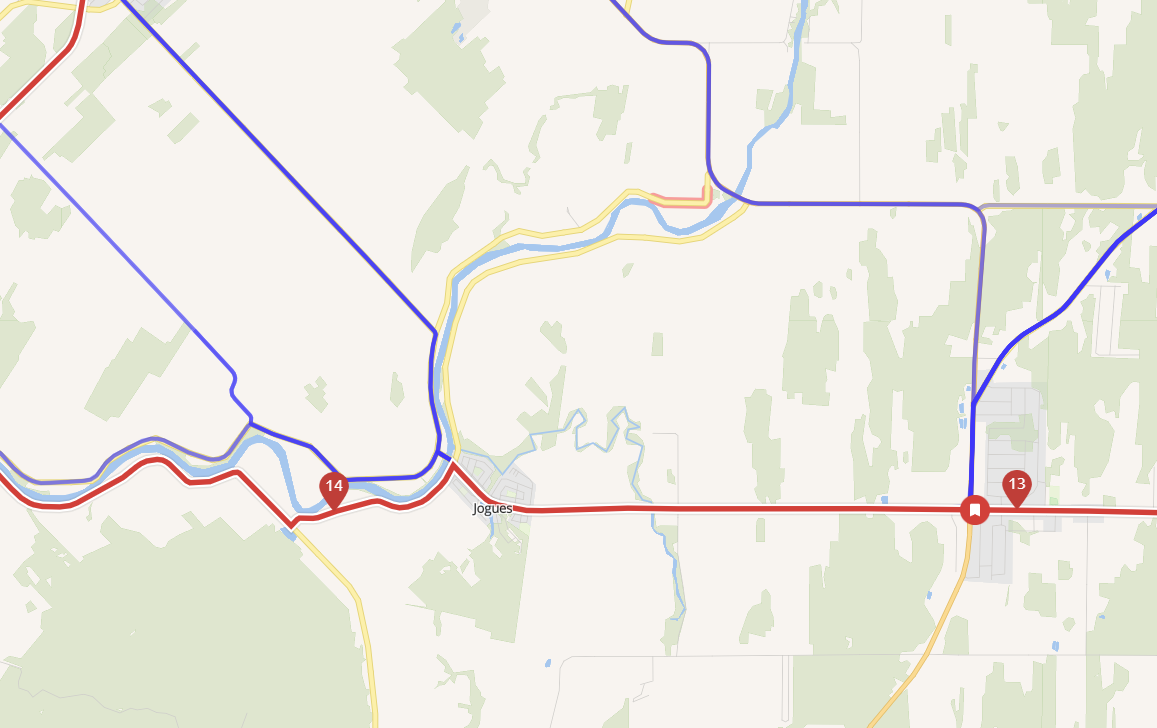
- you can see that i only need to set point # 13.. and point # 14.. and the line is correct.
- it's not doing the weird move to a dead-end
The way i temporary fix it, is to create a new way point "as near as possible" to this intersection (now called Waypoint 20 - Don't go There"... (it's in the shared link i create)
So.. if i want "HERE" to be used.. is there a way to add "something" there to avoid this weird "send to deadend" (Detour)
-
I got some weird thing appear when i plan some of my maps, and despite how many waypoint i added to avoid this.. it's still there.. it create a little ryde into a dead-end.. so we need to do a U-Turn..
So, as i share those map with other, i know that bug and took the right turn.. but other will follow my shared map.. and will be confused (or upset) about why i sent them there....
Here the shared map : https://www.myrouteapp.com/fr/social/route/11470838?mode=share
- it's between poit # 19 and # 20
- originaly, i create a stop at # 18, and the the point 20.
- in other software i used before for doing my ryde, but i stop using it because lack of Android Auto support, here how it was configure there
- is was using "HERE!" for this. When i try "TomTom" and "OpenStreetMap", and the weird "sent to dead-end" diseaper.
- So, if i want to avoid closed road, i need Here .. but "Here" create those issues, so i select TomTom or OpenStreetMap.. but those 2 will not show me traffic and closed road
- you can see that i only need to set point # 13.. and point # 14.. and the line is correct.
- it's not doing the weird move to a dead-end
The way i temporary fix it, is to create a new way point "as near as possible" to this intersection (now called Waypoint 20 - Don't go There"... (it's in the shared link i create)
So.. if i want "HERE" to be used.. is there a way to add "something" there to avoid this weird "send to deadend" (Detour)

@Banshees, exactly where you placed WP18 the detour get's shortened to the a few meters, this will be visible once navigating. Dunno, must be some map fault about not being abled to turn left at the crossing. But I don't see that in streetview. Adding WP 18 does what you want, doesn't it?
-

It has happened to me several times too. Changing the maps from Here to Tomtom or OpenStreetMap on a PC solves the problem, However, since Here maps are used when navigating by motorbike or car, the problem recurs. As far as I am concerned, I solved it by entering a waypoint before taking the wrong road and adding a note that the correct road is on the right or left. During the journey, the app gives me a voice description of the waypoint so that I can take the right road.
-
I open a ticket with support... and got a very fast response ! awesome.
So as i share my map, i then add a warning before that error, and tell on the warning (in both Language in Quebec, Canada) : tourner à gauche - Turn Left.
But they also sent me the HERE link (and they report to them the issues), where i can signal an error on their map (like this one). They
I also open an account on HERE, to see how it doing.. and it's the same

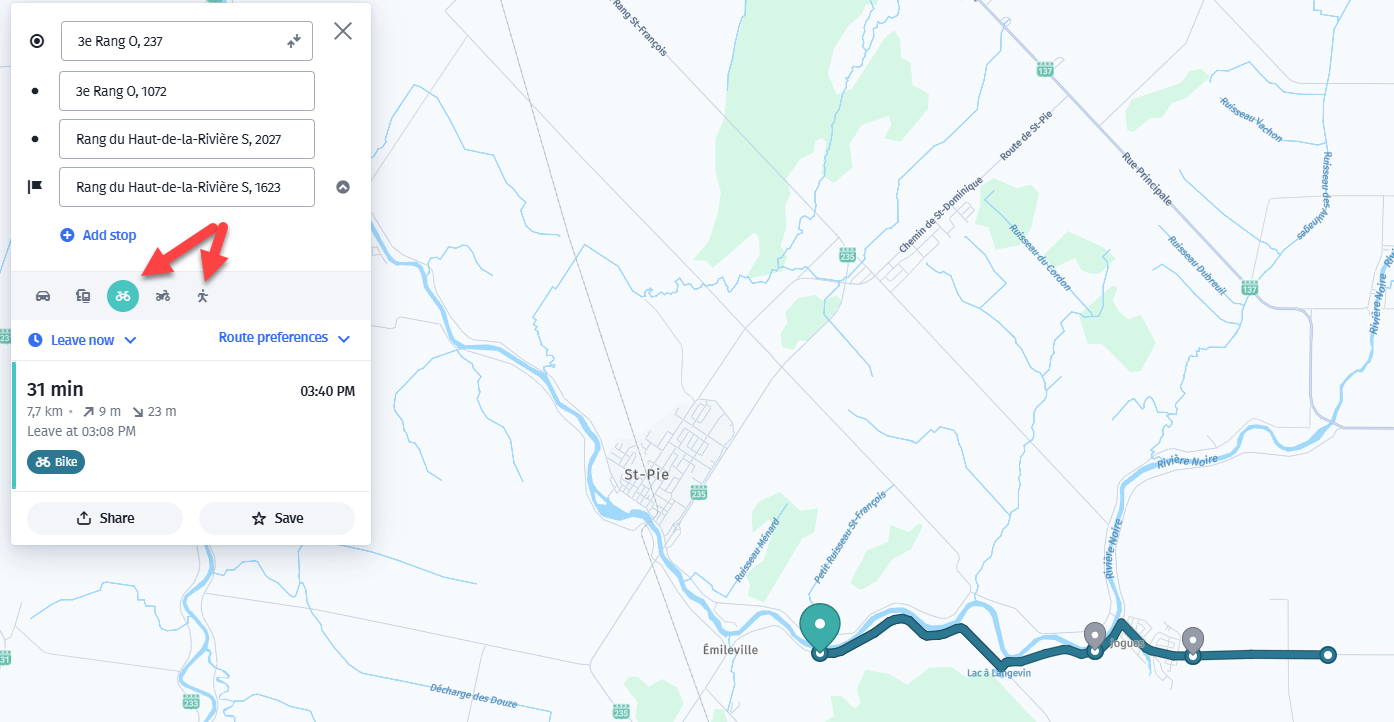
- if yo uselect "bicycle" or "walking".. it's show the proper path
- if you select CAR or Motorcycle.. it's doing the weird thing...
\|///
\ - - //
( @ @ )
-oOOo-()-oOOo---------------------------------------------
Banshees
MRA Gold & Nav - Life
--------------Oooo-----------------------------------------
oooO ( )
( ) ) /
\ ( (/
_) -
I open a ticket with support... and got a very fast response ! awesome.
So as i share my map, i then add a warning before that error, and tell on the warning (in both Language in Quebec, Canada) : tourner à gauche - Turn Left.
But they also sent me the HERE link (and they report to them the issues), where i can signal an error on their map (like this one). They
I also open an account on HERE, to see how it doing.. and it's the same
- if yo uselect "bicycle" or "walking".. it's show the proper path
- if you select CAR or Motorcycle.. it's doing the weird thing...

possibly a Here mapping error, seems to be a left turn restriction at the junction
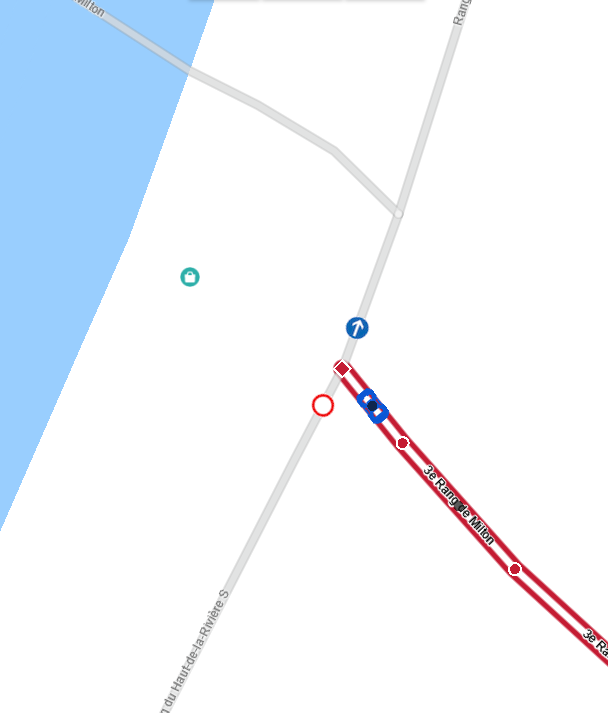
maybe someone made an edit for temporary construction work & it has never been reverted
if you believe the left turn restriction is in error, you can edit the map at https://mapcreator.here.comBlackView BV7100, Android 12
Navigate "Routes as Tracks" in Offline mode with Offline Maps
No Wifi, no internet, no interruptions, works well -
possibly a Here mapping error, seems to be a left turn restriction at the junction
maybe someone made an edit for temporary construction work & it has never been reverted
if you believe the left turn restriction is in error, you can edit the map at https://mapcreator.here.com
@Brian-McG, that confirms my thought, thanks for looking it up.
@ginogino said in MRA - weird "detour" created:
During the journey, the app gives me a voice description of the waypoint so that I can take the right road.
You mean the left road?

Yeah, sometimes you must be creative.

Hello! It looks like you're interested in this conversation, but you don't have an account yet.
Getting fed up of having to scroll through the same posts each visit? When you register for an account, you'll always come back to exactly where you were before, and choose to be notified of new replies (either via email, or push notification). You'll also be able to save bookmarks and upvote posts to show your appreciation to other community members.
With your input, this post could be even better 💗
Register Login-
 01841
01841
-
 01054
01054
-
 0463
0463
-
 0325
0325
-
 04162
04162
-
1246
-
 06175
06175