Skip to content
  • Categories
  • Recent
  • Popular
  • Support
  • MyRoute-app
Collapse
Brand Logo

MRA Community Forum

  1. Home
  2. Routes & Tracks
  3. Garmin

Garmin

Scheduled Pinned Locked Moved Routes & Tracks
8 Posts 6 Posters 2.4k Views 1 Watching
  • Oldest to Newest
  • Newest to Oldest
  • Most Votes
Reply
  • Reply as topic
Log in to reply
This topic has been deleted. Only users with topic management privileges can see it.
  • Dietmar Frensemeyerundefined Offline
    Dietmar Frensemeyerundefined Offline
    Dietmar Frensemeyer
    wrote on last edited by
    #1

    Garmin Drive Smart 55 changes the route completely after transfer from Myroutes
    How to manage this better ?

    Hans van de Ven MR.MRAundefined 1 Reply Last reply
    0
    • Dietmar Frensemeyerundefined Dietmar Frensemeyer

      Garmin Drive Smart 55 changes the route completely after transfer from Myroutes
      How to manage this better ?

      Hans van de Ven MR.MRAundefined Offline
      Hans van de Ven MR.MRAundefined Offline
      Hans van de Ven MR.MRA
      Valued contributor
      wrote on last edited by
      #2

      @Dietmar-Frensemeyer

      Use the track instemde of the route

      Garmin Zumo XT3/XT2/XT/BMW Connected Ride Navigator/MyRouteapp (The App)/...
      Een dag niet gelachen is een dag niet geleefd / Een route is net zo goed als deze uitgezet is.

      1 Reply Last reply
      0
      • Phil Beharrellundefined Offline
        Phil Beharrellundefined Offline
        Phil Beharrell
        wrote on last edited by
        #3

        Hello, thanks for the reply. I also have this issue whereby upon export to a Drivesmart 65 unit, it saves the waypoints but joins them with straight lines. I believe I exported as GPX 1.1 'route, track, POI'.

        Can you advise if this is right or if there is a better way to export that will preserve the track i.e. aligned to the actual tarmac'd bits?

        Malundefined Mick Loftusundefined 2 Replies Last reply
        0
        • PAD 0undefined Offline
          PAD 0undefined Offline
          PAD 0
          wrote on last edited by
          #4

          @Dietmar-Frensemeyer @Phil-Beharrell Try exporting from MRA as a .gpx 1.0 file, rather than 1.1.

          Phil Beharrellundefined 1 Reply Last reply
          0
          • PAD 0undefined PAD 0

            @Dietmar-Frensemeyer @Phil-Beharrell Try exporting from MRA as a .gpx 1.0 file, rather than 1.1.

            Phil Beharrellundefined Offline
            Phil Beharrellundefined Offline
            Phil Beharrell
            wrote on last edited by
            #5

            @PAD-0 I'll do that and report back asap, thanks.

            1 Reply Last reply
            0
            • PAD 0undefined Offline
              PAD 0undefined Offline
              PAD 0
              wrote on last edited by PAD 0
              #6

              A quick look on the web isn’t very revealing but, looking at the features available on these Drivesmart devices, I think they probably are Android based, like the Zūmo XT. Garmin seem very cagey about revealing their adoption of the Android OS - I haven’t a clue why though (maybe not wanting to frighten off users of iOS?). If I’m right, then they should be able to use .gpx 1.1, but trying 1.0 might just sort you out (backwards compatibility).

              Of course, thinking on, there is also the Zumo XT (GPX 1.1) option in MRA Connector’s ‘select your device’ dropdown. That has to be worth trying too. Maybe I should have thought of that as an option earlier, but I hope I’ll be forgiven as I’m still using a (apparently horrendously ancient😏) Zūmo 390 perfectly happily and with great reliability!🙂Again, I haven’t a clue why the XT needs its own ‘special version’ of what is the global standard file type??? But then, Garmin should've been using 1.1 for many years yet chose to stick with 1.0 until very recently, so maybe they just think of themselves as a bit ‘special’!

              I hope one, the other (or both) option gets you sorted out.

              1 Reply Last reply
              0
              • Phil Beharrellundefined Phil Beharrell

                Hello, thanks for the reply. I also have this issue whereby upon export to a Drivesmart 65 unit, it saves the waypoints but joins them with straight lines. I believe I exported as GPX 1.1 'route, track, POI'.

                Can you advise if this is right or if there is a better way to export that will preserve the track i.e. aligned to the actual tarmac'd bits?

                Malundefined Offline
                Malundefined Offline
                Mal
                wrote on last edited by
                #7

                @Phil-Beharrell
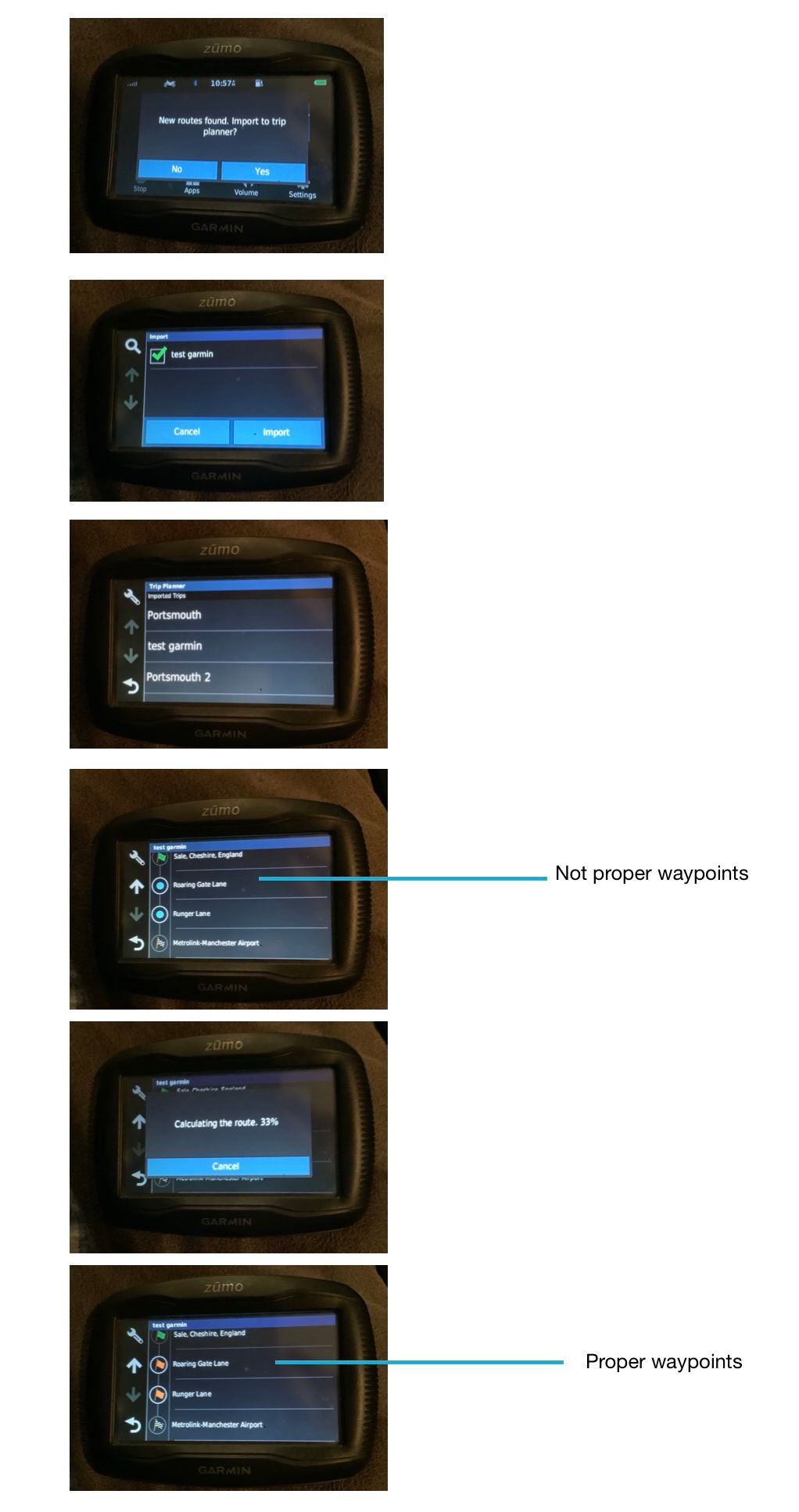
                I’m fairly new to this and also use a Garmin (zumo 395 for motorcycles). Here’s what you can do to solve your problem…

                1. Import the new route as promoted by your Garmin
                2. Open the route in Apps/ Trip Planner
                3. You will see what might look like waypoints, but they aren’t, they have circle markers not waypoint flags.
                4. Tap the circle of your first ‘fake waypoint’… the Garmin will calculate briefly, them turn it into a proper waypoint
                5. Do this for each waypoint….. bit of a ball ache if you have a huge route

                I’ve created a quick MRA route called Test Garmin from my house to Manchester Airport non motorway. See pic for screen shots illustrating the above.61FFA637-F093-40AF-88A3-1CC8809E758E.jpeg

                1 Reply Last reply
                0
                • Phil Beharrellundefined Phil Beharrell

                  Hello, thanks for the reply. I also have this issue whereby upon export to a Drivesmart 65 unit, it saves the waypoints but joins them with straight lines. I believe I exported as GPX 1.1 'route, track, POI'.

                  Can you advise if this is right or if there is a better way to export that will preserve the track i.e. aligned to the actual tarmac'd bits?

                  Mick Loftusundefined Offline
                  Mick Loftusundefined Offline
                  Mick Loftus
                  wrote on last edited by
                  #8

                  @Phil-Beharrell If you get straight lines, alter route to curvy roads, let it recalculate, then change it back to faster route, or visa versa, works for me on my BMW NAV VI ( Garmin ) Motorcycle satnav

                  1 Reply Last reply
                  0

                  Hello! It looks like you're interested in this conversation, but you don't have an account yet.

                  Getting fed up of having to scroll through the same posts each visit? When you register for an account, you'll always come back to exactly where you were before, and choose to be notified of new replies (either via email, or push notification). You'll also be able to save bookmarks and upvote posts to show your appreciation to other community members.

                  With your input, this post could be even better 💗

                  Register Login
                  Reply
                  • Reply as topic
                  Log in to reply
                  • Oldest to Newest
                  • Newest to Oldest
                  • Most Votes


                  ACTIVE USERS
                  Hans van de Ven MR.MRAundefined
                  Hans van de Ven MR.MRA
                  Mick Loftusundefined
                  Mick Loftus
                  Dietmar Frensemeyerundefined
                  Dietmar Frensemeyer
                  PAD 0undefined
                  PAD 0
                  Malundefined
                  Mal
                  Phil Beharrellundefined
                  Phil Beharrell
                  POPULAR TOPICS
                  • Following a track
                    RetiredWingManundefined
                    RetiredWingMan
                    2
                    5
                    45

                  • Route draait terug
                    Kris Lemaireundefined
                    Kris Lemaire
                    0
                    5
                    136

                  • Update 5.1 - CarPlay / Android Auto improvements and more!
                    Ewout Dundefined
                    Ewout D
                    15
                    35
                    1.7k

                  • Cameraknop
                    Arjan de Vriesundefined
                    Arjan de Vries
                    0
                    7
                    200

                  • Route omkeren
                    Rob Verhoeffundefined
                    Rob Verhoeff
                    0
                    4
                    97

                  • Use Silverfox C1 to skip waypoints
                    Makroundefined
                    Makro
                    0
                    3
                    87

                  • unable to dismiss "Resume Navigation?" overlay with remote
                    Con Hennekensundefined
                    Con Hennekens
                    0
                    5
                    138

                  • Kaartweergave na gebruik pijltoetsen remote
                    CD130undefined
                    CD130
                    0
                    3
                    85

                  MY GROUPS
                  • Login

                  • Login or register to search.
                  • First post
                    Last post
                  0
                  • Categories
                  • Recent
                  • Popular
                  • Support
                  • MyRoute-app