Skip to content
  • Categories
  • Recent
  • Popular
  • Support
  • MyRoute-app
Collapse
Brand Logo

MRA Community Forum

  1. Home
  2. General Discussion
  3. MRA Next.

MRA Next.

Scheduled Pinned Locked Moved General Discussion
4 Posts 2 Posters 984 Views 2 Watching
  • Oldest to Newest
  • Newest to Oldest
  • Most Votes
Reply
  • Reply as topic
Log in to reply
This topic has been deleted. Only users with topic management privileges can see it.
  • Iain Cochrane 0
    Iain Cochrane 0
    Iain Cochrane 0
    wrote on last edited by
    #1

    Sorry, learner navigator back again.
    Something's not right. When I create my route, I'm choosing HERE and using waypoints, via points etc, but when I save the route it tells me it wasn't saved as HERE and hence will loose the route info. Anyone know where I am going wrong ?

    Rob Verhoeff 1 Reply Last reply
    0
    • Iain Cochrane 0 Iain Cochrane 0

      Sorry, learner navigator back again.
      Something's not right. When I create my route, I'm choosing HERE and using waypoints, via points etc, but when I save the route it tells me it wasn't saved as HERE and hence will loose the route info. Anyone know where I am going wrong ?

      Rob Verhoeff
      Rob Verhoeff
      Rob Verhoeff
      Alpha tester
      wrote on last edited by
      #2

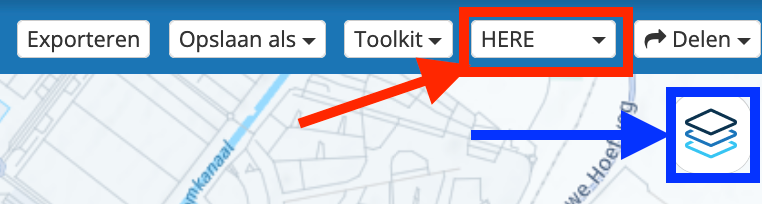
      @Iain-Cochrane-0 Which Here map do you use to create the route? The Here map from the red frame or the blue frame? You need to use the map in the red frame to save it as a Here route. The maps in the blue frame are overlay maps. For example, I like to plan using the Michelin map.

      By the way, routes are automatically saved in the website's cloud. Or do you use the "save as" option from the menu bar?
      Menubalk met overlay.png

      🏍️ BMW K1600GT-P (2013) | Nolan N100-5 with Sena 30K
      📱 iOS on iPhone 13 & 16 (mounted on Quadlock or AliExpress extention on BMW-cradle)
      🚙 Apple CarPlay in VW T-Roc
      💻 Routelab on MacBook Air & iMac (Tahoe & Ventura)

      1 Reply Last reply
      0
      • Iain Cochrane 0
        Iain Cochrane 0
        Iain Cochrane 0
        wrote on last edited by
        #3

        @Rob-Verhoeff Hi Rob, thanks for that. That's really interesting.
        I've obviously been using what are, now that you've explained it, overlay maps, hence the information isn't being saved. So thanks for pointing me in the right direction there.
        I am using the "save as" option and choosing:
        .gpx 1.0 (route, track, POI)
        Is that the best option ?

        Rob Verhoeff 1 Reply Last reply
        0
        • Iain Cochrane 0 Iain Cochrane 0

          @Rob-Verhoeff Hi Rob, thanks for that. That's really interesting.
          I've obviously been using what are, now that you've explained it, overlay maps, hence the information isn't being saved. So thanks for pointing me in the right direction there.
          I am using the "save as" option and choosing:
          .gpx 1.0 (route, track, POI)
          Is that the best option ?

          Rob Verhoeff
          Rob Verhoeff
          Rob Verhoeff
          Alpha tester
          wrote on last edited by
          #4

          @Iain-Cochrane-0 said in MRA Next.:

          I am using the "save as" option and choosing:
          .gpx 1.0 (route, track, POI)

          Unless you need to export the route to another device (e.g., Garmin or TomTom), it is not necessary to export routes. If you also have a subscription to the MRA navigation module, you can simply navigate with the app and open the routes you created from your own account! I would recommend exporting them as .gpx 1.1 (route, track, POI).

          🏍️ BMW K1600GT-P (2013) | Nolan N100-5 with Sena 30K
          📱 iOS on iPhone 13 & 16 (mounted on Quadlock or AliExpress extention on BMW-cradle)
          🚙 Apple CarPlay in VW T-Roc
          💻 Routelab on MacBook Air & iMac (Tahoe & Ventura)

          1 Reply Last reply
          0

          Hello! It looks like you're interested in this conversation, but you don't have an account yet.

          Getting fed up of having to scroll through the same posts each visit? When you register for an account, you'll always come back to exactly where you were before, and choose to be notified of new replies (either via email, or push notification). You'll also be able to save bookmarks and upvote posts to show your appreciation to other community members.

          With your input, this post could be even better 💗

          Register Login
          Reply
          • Reply as topic
          Log in to reply
          • Oldest to Newest
          • Newest to Oldest
          • Most Votes


          ACTIVE USERS
          Rob Verhoeff
          Rob Verhoeff
          Iain Cochrane 0
          Iain Cochrane 0
          POPULAR TOPICS
          • New Zealand Routes
            Marinus van Deudekom
            Marinus van Deudekom
            1
            13
            374

          • Insert Pause removed from navigation
            JP d
            JP d
            0
            5
            128

          • Question about a long trip I've planned---download?
            Mike wiruth
            Mike wiruth
            0
            7
            136

          • Off-road niet zichtbaar in Android Auto
            M. Schrijver
            M. Schrijver
            0
            3
            56

          • IOS 27
            Stephen Rowland
            Stephen Rowland
            0
            3
            25

          • Verkeersbewuste routeberekening…..
            wim GS
            wim GS
            1
            9
            2.1k

          • Naar vorig routepunt
            Rob Verhoeff
            Rob Verhoeff
            0
            2
            43

          • Getal in begin logo
            Rob Verhoeff
            Rob Verhoeff
            0
            2
            39

          MY GROUPS
          • Login

          • Login or register to search.
          • First post
            Last post
          0
          • Categories
          • Recent
          • Popular
          • Support
          • MyRoute-app