
Skip to content
  • Categories
  • Recent
  • Popular
  • Support
  • MyRoute-app
Collapse
Brand Logo

MRA Community Forum

  1. Home
  2. MyRoute-app Routeplanner
  3. [Web] Problems, Bugs and other Issues
  4. Export to Motorrad VI

Export to Motorrad VI

Scheduled Pinned Locked Moved [Web] Problems, Bugs and other Issues
5 Posts 3 Posters 914 Views 2 Watching
  • Oldest to Newest
  • Newest to Oldest
  • Most Votes
Reply
  • Reply as topic
Log in to reply
This topic has been deleted. Only users with topic management privileges can see it.
  • PIT 3undefined Offline
    PIT 3undefined Offline
    PIT 3
    wrote on last edited by
    #1

    Hello, what is the best way to export routes to a Motorrad VI ?
    Thanks

    John S Parryundefined 1 Reply Last reply
    0
    • PIT 3undefined PIT 3

      Hello, what is the best way to export routes to a Motorrad VI ?
      Thanks

      John S Parryundefined Offline
      John S Parryundefined Offline
      John S Parry
      wrote on last edited by John S Parry
      #2

      @PIT-3 There are a few methods. MRA has its own Connector tool, but I haven't used it yet. But I have a friend who does, and he confirms to me that it works.

      The method I'm currently using is to copy the saved MRA 1.1 GPX file directly to the GPX folder on my Zumo XT. Plug your Nav into your computer. And then, from File Explorer (PC) or Android File Transfer (Mac), drag the GPX file to the GPX folder on the Nav. Unplug the Nav, turn it on, go into Trip Planner, you'll get a message telling you there is a new route ready for import. Click the check box, and you're done.

      PIT 3undefined 1 Reply Last reply
      0
      • John S Parryundefined John S Parry

        @PIT-3 There are a few methods. MRA has its own Connector tool, but I haven't used it yet. But I have a friend who does, and he confirms to me that it works.

        The method I'm currently using is to copy the saved MRA 1.1 GPX file directly to the GPX folder on my Zumo XT. Plug your Nav into your computer. And then, from File Explorer (PC) or Android File Transfer (Mac), drag the GPX file to the GPX folder on the Nav. Unplug the Nav, turn it on, go into Trip Planner, you'll get a message telling you there is a new route ready for import. Click the check box, and you're done.

        PIT 3undefined Offline
        PIT 3undefined Offline
        PIT 3
        wrote on last edited by
        #3

        @John-S-Parry thanks a lot 🙂

        Hubert Thoringundefined 1 Reply Last reply
        0
        • PIT 3undefined PIT 3

          @John-S-Parry thanks a lot 🙂

          Hubert Thoringundefined Offline
          Hubert Thoringundefined Offline
          Hubert Thoring
          Valued contributor
          wrote on last edited by Hubert Thoring
          #4

          @PIT-3 : das geht auch vom Handy oder iPad wenn man unterwegs ist, da hat man ja eigentlich keinen Laptop oder PC mehr dabei …

          Einfach aus der MyRoute-App (Next) direkt herunterladen damit Exportieren als GPX 1.1 und unter Dateien in das / Garmin / GPX Verzeichnis kopieren

          Das geht als Basis User (kostenlose) mit der MyRoute-App, denn du hast Zugriff auf deine in Web geplanten Routen 👍

          hier mit einem iPhone Xr sollte mit einem Android Handy auch gehen.
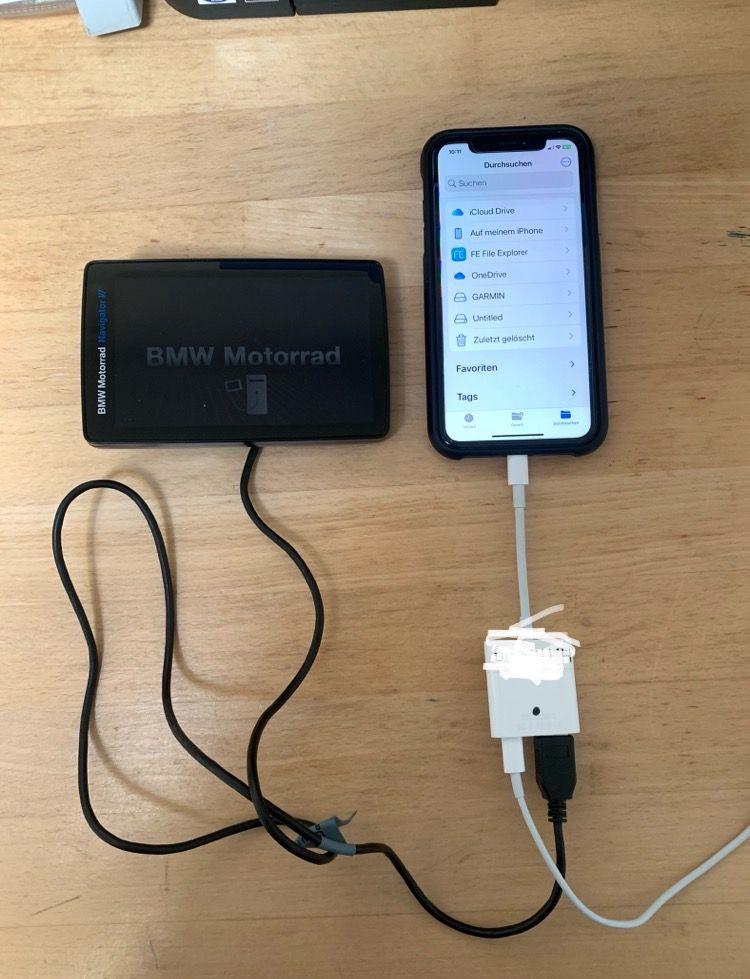
          IMG_3433.jpg

          VG Hubert
          Beta Test "Next App" dazu die Hardware .
          iPad 9. Gen iOS 26.5 / iPhone 16e iOS 26.5/ Navi iPhone Xr iOS 18.7.9 / PC mit MS Win11 /❗️MyRoute-App im Cradel und Remotek-One❗️ Info zu MRA & Remotek One

          John S Parryundefined 1 Reply Last reply
          1
          • Hubert Thoringundefined Hubert Thoring

            @PIT-3 : das geht auch vom Handy oder iPad wenn man unterwegs ist, da hat man ja eigentlich keinen Laptop oder PC mehr dabei …

            Einfach aus der MyRoute-App (Next) direkt herunterladen damit Exportieren als GPX 1.1 und unter Dateien in das / Garmin / GPX Verzeichnis kopieren

            Das geht als Basis User (kostenlose) mit der MyRoute-App, denn du hast Zugriff auf deine in Web geplanten Routen 👍

            hier mit einem iPhone Xr sollte mit einem Android Handy auch gehen.

            IMG_3433.jpg

            John S Parryundefined Offline
            John S Parryundefined Offline
            John S Parry
            wrote on last edited by
            #5

            @Hubert-Thoring Very Nice! I generally have my laptop with me on longer trips for creating/transferring new routes, but I see situations where your approach can be useful.

            I'm going to order a Lightning to USB adapter and have this as an option. Thanks!

            1 Reply Last reply
            0

            Hello! It looks like you're interested in this conversation, but you don't have an account yet.

            Getting fed up of having to scroll through the same posts each visit? When you register for an account, you'll always come back to exactly where you were before, and choose to be notified of new replies (either via email, or push notification). You'll also be able to save bookmarks and upvote posts to show your appreciation to other community members.

            With your input, this post could be even better 💗

            Register Login
            Reply
            • Reply as topic
            Log in to reply
            • Oldest to Newest
            • Newest to Oldest
            • Most Votes


            ACTIVE USERS
            Hubert Thoringundefined
            Hubert Thoring
            John S Parryundefined
            John S Parry
            PIT 3undefined
            PIT 3
            POPULAR TOPICS
            • unable to dismiss "Resume Navigation?" overlay with remote
              Guzzistundefined
              Guzzist
              0
              4
              75

            • Rondreis Schotland en VK
              Alida Veenstraundefined
              Alida Veenstra
              0
              10
              416

            • Zoom Out in north Up view
              Jörgenundefined
              Jörgen
              0
              4
              32

            • MRA V5.1.0 (462) In CarPlay no selection of the nearest gas station possible via icon on the display
              Hubert Thoringundefined
              Hubert Thoring
              0
              3
              19

            • Following a track
              RetiredWingManundefined
              RetiredWingMan
              1
              3
              10

            • Export waypoints to Google Maps on mobile
              Con Hennekensundefined
              Con Hennekens
              0
              3
              87

            • MRA 5.1.0 (462) Turn the card to stop and continue driving after a break
              Con Hennekensundefined
              Con Hennekens
              0
              3
              29

            • Update 5.1 - CarPlay / Android Auto improvements and more!
              Corjan Meijerinkundefined
              Corjan Meijerink
              14
              32
              1.4k

            MY GROUPS
            • Login

            • Login or register to search.
            • First post
              Last post
            0
            • Categories
            • Recent
            • Popular
            • Support
            • MyRoute-app




