Unpaved road not recognized in Windows Route Planner
-

Hi everyone,
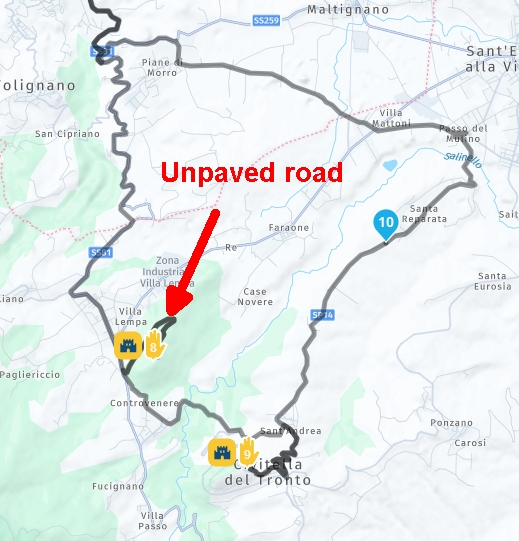
I had planned an itinerary with the filter of avoiding unpaved roads, however during navigation I had reached the turning point for a detour but the MRA app warned me that the indicated road was unpaved.
Why did the Windows route planner grant me that route while the MRA app denied it to me?Thanks a lot
-
Hi everyone,
I had planned an itinerary with the filter of avoiding unpaved roads, however during navigation I had reached the turning point for a detour but the MRA app warned me that the indicated road was unpaved.
Why did the Windows route planner grant me that route while the MRA app denied it to me?Thanks a lot

@Corrado-Miniati-0, If you place a waypoint ON an unpaved road, the avoidance of an unpaved road is of course not possible.
-
Hi everyone,
I had planned an itinerary with the filter of avoiding unpaved roads, however during navigation I had reached the turning point for a detour but the MRA app warned me that the indicated road was unpaved.
Why did the Windows route planner grant me that route while the MRA app denied it to me?Thanks a lot
Hi Con and thanks for the feedback, but so the route planner doesn't prevent you from placing a way point or via point on an unpaved road if the option is enabled to avoid them?
If so then should I check all streets with StreetView?
Impossible to do on a practical level.... -
Hi Con and thanks for the feedback, but so the route planner doesn't prevent you from placing a way point or via point on an unpaved road if the option is enabled to avoid them?
If so then should I check all streets with StreetView?
Impossible to do on a practical level....
@Corrado-Miniati-0 I agree. The app will, provide a warning if you turn onto a dirt road because a waypoint had been placed there. It makes sense that the planner web site should provide a warning if you place a waypoint on a dirt road or highway or toll road if you have set the option to avoid those roads.
Would be a nice enhancement for the web planner.
2010 GL1800 Goldwing using Samsung Galaxy S20 5G Android 13.
-
@Corrado-Miniati-0 I agree. The app will, provide a warning if you turn onto a dirt road because a waypoint had been placed there. It makes sense that the planner web site should provide a warning if you place a waypoint on a dirt road or highway or toll road if you have set the option to avoid those roads.
Would be a nice enhancement for the web planner.
@RetiredWingMan
Thanks a lot for the feedback.
@Corjan: will there be updates in the future?Thank you very much
-
@RetiredWingMan
Thanks a lot for the feedback.
@Corjan: will there be updates in the future?Thank you very much

@Corrado-Miniati-0 said in Unpaved road not recognized in Windows Route Planner:
@Corjan: will there be updates in the future?
Apparantly not. But I too would appreciate being able to identify (avoid) dirt roads, on rhe map.
Hello! It looks like you're interested in this conversation, but you don't have an account yet.
Getting fed up of having to scroll through the same posts each visit? When you register for an account, you'll always come back to exactly where you were before, and choose to be notified of new replies (either via email, or push notification). You'll also be able to save bookmarks and upvote posts to show your appreciation to other community members.
With your input, this post could be even better 💗
Register Login-
 115117
-
 01392
01392
-
 01184
01184
-
 01054
01054
-
0743
-
0749
-
0619
-
 0618
0618