Skip to content
  • Categories
  • Recent
  • Popular
  • Support
  • MyRoute-app
Collapse
Brand Logo

MRA Community Forum

  1. Home
  2. MyRoute-app Routeplanner
  3. [Web] Problems, Bugs and other Issues
  4. How to (re)use POIs in planning after splitting route

How to (re)use POIs in planning after splitting route

Scheduled Pinned Locked Moved [Web] Problems, Bugs and other Issues
1 Posts 1 Posters 378 Views 1 Watching
  • Oldest to Newest
  • Newest to Oldest
  • Most Votes
Reply
  • Reply as topic
Log in to reply
This topic has been deleted. Only users with topic management privileges can see it.
  • No6671undefined Offline
    No6671undefined Offline
    No6671
    wrote on last edited by
    #1

    Hi.

    Ich just planned my next Route des Grandes Alpes tour. This time I'd like to use some of my POI like Passknacker.

    1. I made a complete route. From Thonon-les-Baines to Nice.
    2. Then I marked all my POIs along that route.
    3. After that, I splittet the route into several parts. For that I took the original (00 RDGA), copied it and deleted the unnecessary points.

    Problem one:
    Sometimes HERE calculates wired routes. Especially in cities. So I used TomTom. And sometimes I used HERE. Maybe my problem comes from this circumstance?

    Problem two:
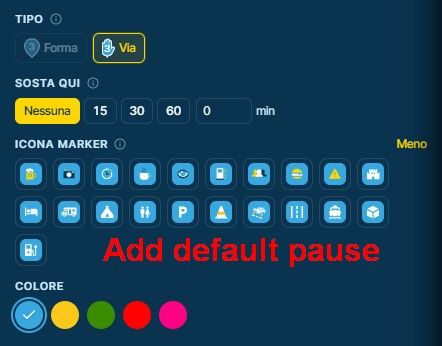
    My POIs show up on my splittet routes, but I cannot reactivate them. If I click on them, a box opens, where I can rename it, trash it. But not the usual stuff with color, pictogram etc. So I made a new stop nearby the POI. Is it possible to use those POIs again somehow?

    thanks

    --
    Goran
    Get up. Travel. Make friends. Sleep. Repeat.

    1 Reply Last reply
    0

    Hello! It looks like you're interested in this conversation, but you don't have an account yet.

    Getting fed up of having to scroll through the same posts each visit? When you register for an account, you'll always come back to exactly where you were before, and choose to be notified of new replies (either via email, or push notification). You'll also be able to save bookmarks and upvote posts to show your appreciation to other community members.

    With your input, this post could be even better 💗

    Register Login
    Reply
    • Reply as topic
    Log in to reply
    • Oldest to Newest
    • Newest to Oldest
    • Most Votes


    ACTIVE USERS
    No6671undefined
    No6671
    POPULAR TOPICS
    • GPX Versions 1.1 vs 1.2 for Garmin Visually Explained
      Steve Jarrellundefined
      Steve Jarrell
      7
      65
      3.1k

    • Move blocks of routepoints
      Marinus van Deudekomundefined
      Marinus van Deudekom
      0
      19
      509

    • Quad lock (or other) Phone mount ?
      LennyOundefined
      LennyO
      0
      9
      106

    • Download itn,gpx etc on android app - Folder location
      Peter Zehentreiterundefined
      Peter Zehentreiter
      0
      5
      151

    • Seasonal closures affect not only seasonal road closures (mountain passes and the like) but also closures due to roadworks. This is why the route takes you through the closure even during planning, even though Here is actually aware of it.
      LennyOundefined
      LennyO
      3
      14
      881

    • v5.2 (473) Feedback
      C.A. Kielenundefined
      C.A. Kielen
      1
      15
      750

    • MRA V5.2.1 (486) Photo in the track recording is rotated; photo orientation is ambiguous.
      undefined
      0
      1
      16

    • MRA V5.2.1 (486) The old track marker (yellow) remained on the map; the map rotated with a delay to match the changed direction of travel.
      undefined
      0
      1
      14

    MY GROUPS
    • Login

    • Login or register to search.
    • First post
      Last post
    0
    • Categories
    • Recent
    • Popular
    • Support
    • MyRoute-app