Skip to content
  • Categories
  • Recent
  • Popular
  • Support
  • MyRoute-app
Collapse
Brand Logo

MRA Community Forum

  1. Home
  2. MRA Routeplanner Next Beta
  3. [Web-Beta] Suggestions and Discussions
  4. Shaping points placement for legacy routes - snap to road

Shaping points placement for legacy routes - snap to road

Scheduled Pinned Locked Moved [Web-Beta] Suggestions and Discussions
7 Posts 3 Posters 66 Views 2 Watching
  • Oldest to Newest
  • Newest to Oldest
  • Most Votes
Reply
  • Reply as topic
Log in to reply
This topic has been deleted. Only users with topic management privileges can see it.
  • Rob Kelley
    Rob Kelley
    Rob Kelley
    wrote last edited by
    #1

    Hi
    With the new system dropped waypoints auto snap to the road which is great, is there a way to to check a legacy/imported route for waypoint placement and snap them to the road if they're not on it?
    If not, could there be?
    Thanks

    GSA1250
    HD Street Glide
    XT500 x 2

    1 Reply Last reply
    0
    • Corjan Meijerink
      Corjan Meijerink
      Corjan Meijerink
      Developer
      wrote last edited by Corjan Meijerink
      #2

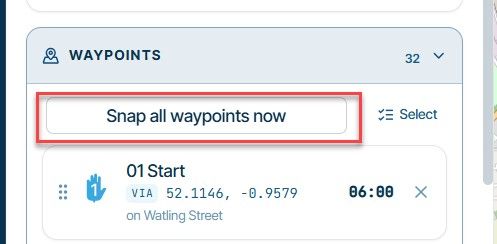
      Thanks for the kind words about the auto-snap! You can already do this for an existing or imported route: open the route in the planner, click the gear button on the map three dots in the sidebar and switch "Snap waypoints to road" off and then back on. When you switch it on, every waypoint of the open route moves onto the road in one go. A waypoint that sits more than 250 m from any road stays where it is, and you'll get a message listing which ones those are. If you don't like the result, Undo puts everything back. We agree this is hard to find, so we're looking at adding a clear "Snap all waypoints now" button.

      Peter Zehentreiter 1 Reply Last reply
      0
      • Corjan Meijerink Corjan Meijerink

        Thanks for the kind words about the auto-snap! You can already do this for an existing or imported route: open the route in the planner, click the gear button on the map three dots in the sidebar and switch "Snap waypoints to road" off and then back on. When you switch it on, every waypoint of the open route moves onto the road in one go. A waypoint that sits more than 250 m from any road stays where it is, and you'll get a message listing which ones those are. If you don't like the result, Undo puts everything back. We agree this is hard to find, so we're looking at adding a clear "Snap all waypoints now" button.

        Peter Zehentreiter
        Peter Zehentreiter
        Peter Zehentreiter
        wrote last edited by
        #3

        @Corjan-Meijerink Hi Corjan,
        The new planner is absolutely brilliant – many thanks for your fantastic work, the quick updates and the constant updates on what’s new.

        I have a question about the gear button that’s supposed to be on the map to activate the function for waypoints on the road.

        Does a specific layout need to be open for this?

        Perhaps I’ve been a bit overwhelmed by all the new features, but I can’t find the gear button on the map.

        BMW R 1250 GS
        MRA Navigation & SilverFox C1 Controller
        DMD-NOR7E 7"
        SPC Universal mount
        Motorola Edge 40 "offline"
        Sena SLR 3
        Sena 50 R

        1 Reply Last reply
        0
        • Corjan Meijerink
          Corjan Meijerink
          Corjan Meijerink
          Developer
          wrote last edited by Corjan Meijerink
          #4

          Oops 🙂 I was looking at something else while typing this message.
          I've edited it.
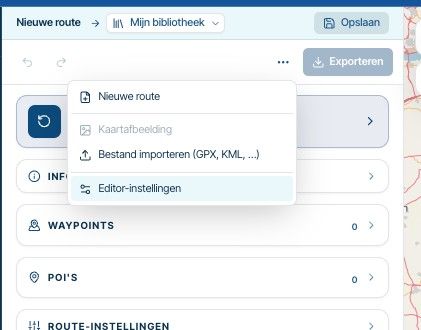
          image.jpeg

          It's that button (the horizontal dots).

          Peter Zehentreiter 1 Reply Last reply
          0
          • Corjan Meijerink Corjan Meijerink

            Oops 🙂 I was looking at something else while typing this message.
            I've edited it.

            image.jpeg

            It's that button (the horizontal dots).

            Peter Zehentreiter
            Peter Zehentreiter
            Peter Zehentreiter
            wrote last edited by
            #5

            @Corjan-Meijerink Got it, thank you

            BMW R 1250 GS
            MRA Navigation & SilverFox C1 Controller
            DMD-NOR7E 7"
            SPC Universal mount
            Motorola Edge 40 "offline"
            Sena SLR 3
            Sena 50 R

            1 Reply Last reply
            0
            • Rob Kelley
              Rob Kelley
              Rob Kelley
              wrote last edited by Rob Kelley
              #6

              Do you think this is possible?:

              image.jpeg

              GSA1250
              HD Street Glide
              XT500 x 2

              1 Reply Last reply
              0
              • Corjan Meijerink
                Corjan Meijerink
                Corjan Meijerink
                Developer
                wrote last edited by
                #7

                Yes, it's possible.
                But no, I don't want it there.
                I've added it at the settings page where you can enable / disable the snap setting.

                1 Reply Last reply
                0
                • Corjan Meijerink Corjan Meijerink locked this topic

                Hello! It looks like you're interested in this conversation, but you don't have an account yet.

                Getting fed up of having to scroll through the same posts each visit? When you register for an account, you'll always come back to exactly where you were before, and choose to be notified of new replies (either via email, or push notification). You'll also be able to save bookmarks and upvote posts to show your appreciation to other community members.

                With your input, this post could be even better 💗

                Register Login
                Reply
                • Reply as topic
                Log in to reply
                • Oldest to Newest
                • Newest to Oldest
                • Most Votes


                ACTIVE USERS
                Corjan Meijerink
                Corjan Meijerink
                Rob Kelley
                Rob Kelley
                Peter Zehentreiter
                Peter Zehentreiter
                POPULAR TOPICS
                • MRA 6.0.0 (532) Display schaltet um auf Standby?
                  Hubert Thoring
                  Hubert Thoring
                  0
                  8
                  73

                • Route in planner komt niet overeen met app
                  Marinus van Deudekom
                  Marinus van Deudekom
                  0
                  12
                  141

                • Difference in online and offline
                  MotoCon
                  MotoCon
                  0
                  4
                  61

                • Route probleem
                  Corjan Meijerink
                  Corjan Meijerink
                  0
                  4
                  40

                • issue when downloading a route and importing the file back into planner:
                  Parantapa
                  Parantapa
                  0
                  4
                  28

                • Map Layer: 'HERE could not be loaded...'
                  Andy Nicholson
                  Andy Nicholson
                  0
                  12
                  123

                • F036 Fuel warning at 70 km with "No vehicle" displayed?
                  Hubert Thoring
                  Hubert Thoring
                  0
                  3
                  9

                • In camper stand kan je niet naar openstreetmap
                  Nico bogerd
                  Nico bogerd
                  0
                  3
                  22

                MY GROUPS
                • Login

                • Login or register to search.
                • First post
                  Last post
                0
                • Categories
                • Recent
                • Popular
                • Support
                • MyRoute-app