Setting waypoint stops by keyboard
-

Hello,
I've noticed that once you get used to working with the keyboard, many operations become faster and more convenient.
In the Planner's left-hand menu, the various waypoints and their settings can also be selected by moving forward and backward using TAB and SHIFT+TAB.
Once the waypoint icon (the hand symbol) is selected, I found that you can change the icon color by pressing Space or Enter, cycling through the available colors sequentially.
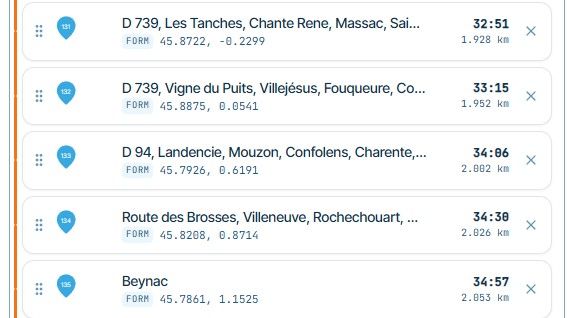
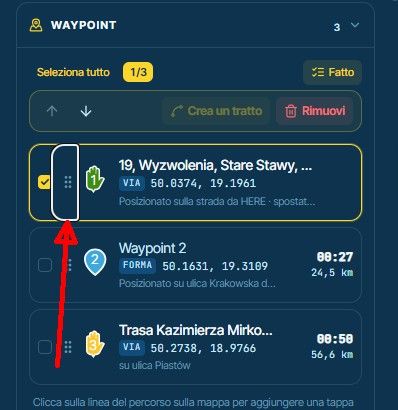
I have two suggestions I'd like to propose:1-Waypoint and shapepoint icons are not highlighted with the small white border that appears around the six-dot menu (see attached below) and the other options when they are selected.
Would it be possible to add the same visual highlight, so that it's easier to tell when one of these icons is selected?2-Would it be possible to add a button or button's combination keyboard shortcut to set predefined stop durations of 15, 30, 45, and 60 minutes (the most common stop durations for fuel, restroom breaks, coffee, food etc.), cycling through them sequentially using the same logic as the color selection?
Thanks a lot
-

Thanks for sharing! I’ll make some improvements

Hello! It looks like you're interested in this conversation, but you don't have an account yet.
Getting fed up of having to scroll through the same posts each visit? When you register for an account, you'll always come back to exactly where you were before, and choose to be notified of new replies (either via email, or push notification). You'll also be able to save bookmarks and upvote posts to show your appreciation to other community members.
With your input, this post could be even better 💗
Register Login-
 029976
-
1110130
-
 0620
-
 0576
-
 0431
-
0413
-
0427
-
 1392