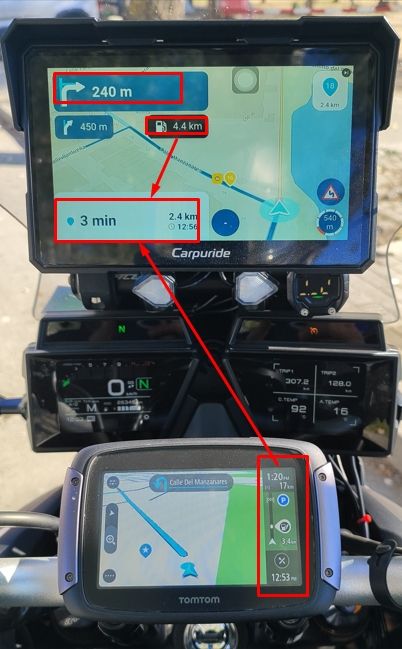
Detailed personal feedback on version 6.0.0-532 using Android Auto
-

After several days of using it with Android Auto in my car, plus a “little ride” today of 450 km on my motorcycle across all kinds of roads (motorways, mountain passes, back roads, areas with and without mobile coverage... etc., etc.), I think I’m finally ready to share my thoughts with a bit more firsthand experience!
I just have to CONGRATULATE the entire team for the incredible work you’ve done. It is STUNNING.
My feedback and suggestions are based on daily use through Android Auto, which is what I use on my setups:
• Android Auto in my Mazda car.
• Chigee AIO-6 with the WonderWheel on my BMW motorcycle.
Though I’m sure many of these points apply just as well to smartphone use.WORKING PERFECTLY:
• The route now centers properly on the Chigee.
• Automatic zoom.
• Manual zoom control.
• Tilt settings.
• Automatic skipping of waypoints.
• Manual skipping of waypoints.
• Directions in the top-left corner:
o Main instruction.
o Secondary instruction.
o Multi-lane guidance.
• Speed camera warnings on screen.
• Average speed display for sectional speed cameras.
• Voice alerts for waypoints.
• Route sharing (my partner is thrilled when she’s not riding with me... hehe).
• Using the smartphone as a remote control (more practical in the car than on the bike; on the bike, I only use the WonderWheel).
• IT HASN'T CRASHED, FROZEN, OR FAILED ONCE SINCE THE UPDATE.
• From 0 to 10, I give it a solid 9!!! Truly, CONGRATULATIONS AGAIN.SUGGESTIONS FOR IMPROVEMENT:
What’s missing to make it a 10 out of 10 (in my humble opinion... hehehe)?
• When waypoint details are displayed, time and distance are missing (they do appear in the smartphone version).
• It would be great to have voice alerts for speed cameras, not just a simple "beep".
• Many speed cameras are missing (I assume this is due to HERE data, but I wonder if integrating an alternative speed camera database would be possible).
• Waypoint names appear right below the top-left directional cues, which is fantastic... but if the description is a bit long, it gets cut off (on smartphones, it scrolls to the left).
• Add a button to save route locations directly to Favorites. It doesn't need to be on the main screen—having it in a submenu is totally fine.
• Just like we have different vehicle profiles in the planner, it would be brilliant to have different configuration profiles for the navigator itself. Using the navigator directly on my smartphone is quite different from using Android Auto on the Mazda (11” screen) or the Chigee (6” screen).
And the points I’ve previously mentioned in other threads:
• On the Chigee (and I suppose other 6” displays too), the speed and altitude disappear whenever the menu opens (the catch is that the menu triggers every time I touch the turn signal switch, since it's used to control the WonderWheel).
• We lack distinct icons to easily tell apart the different arrival times (destination, waypoint, end of route).
• The numbers indicating which exit to take at roundabouts are not clear enough.
Please, I hope the team takes these recommendations purely as a positive brainstorming session, and never as criticism. Even if nothing at all were changed, the experience for me would still be completely delightful!
P.S. I wrote this in Spanish and used automatic translation, so if anything sounds a bit awkward, please forgive me!Òscar.
An absolute fan of MRACreator and administrator of the largest MRA groups.
- https://t.me/MRa_by_b0hd1
- https://www.myrouteapp.com/group/messages/7007
- YouTube: @demco17
- Ex-routexpert, current beta tester and MRA expert. Creator of tutorials, manuals, and MRA user trainer.
-

Ich verwende auch das AIO-6 mit Android Auto. Gerade beim Zoom muss ich aber Kritik geben. Das Autozoom ist nur bei der dynamischen Ansicht vorhanden. Bei der Ansicht Fahrtrichtung gibt es kein Autozoom und damit ist die v6 App für mich nicht nutzbar. Weiterhin sollten die Zoom-Buttons + und - direkt auf dem Display angezeigt werden und nicht erst über ein zusätzlichen Button eingeblendet werden. Ich hoffe, hier gibt's noch mal eine Optimierung


-
After several days of using it with Android Auto in my car, plus a “little ride” today of 450 km on my motorcycle across all kinds of roads (motorways, mountain passes, back roads, areas with and without mobile coverage... etc., etc.), I think I’m finally ready to share my thoughts with a bit more firsthand experience!
I just have to CONGRATULATE the entire team for the incredible work you’ve done. It is STUNNING.
My feedback and suggestions are based on daily use through Android Auto, which is what I use on my setups:
• Android Auto in my Mazda car.
• Chigee AIO-6 with the WonderWheel on my BMW motorcycle.
Though I’m sure many of these points apply just as well to smartphone use.WORKING PERFECTLY:
• The route now centers properly on the Chigee.
• Automatic zoom.
• Manual zoom control.
• Tilt settings.
• Automatic skipping of waypoints.
• Manual skipping of waypoints.
• Directions in the top-left corner:
o Main instruction.
o Secondary instruction.
o Multi-lane guidance.
• Speed camera warnings on screen.
• Average speed display for sectional speed cameras.
• Voice alerts for waypoints.
• Route sharing (my partner is thrilled when she’s not riding with me... hehe).
• Using the smartphone as a remote control (more practical in the car than on the bike; on the bike, I only use the WonderWheel).
• IT HASN'T CRASHED, FROZEN, OR FAILED ONCE SINCE THE UPDATE.
• From 0 to 10, I give it a solid 9!!! Truly, CONGRATULATIONS AGAIN.SUGGESTIONS FOR IMPROVEMENT:
What’s missing to make it a 10 out of 10 (in my humble opinion... hehehe)?
• When waypoint details are displayed, time and distance are missing (they do appear in the smartphone version).
• It would be great to have voice alerts for speed cameras, not just a simple "beep".
• Many speed cameras are missing (I assume this is due to HERE data, but I wonder if integrating an alternative speed camera database would be possible).
• Waypoint names appear right below the top-left directional cues, which is fantastic... but if the description is a bit long, it gets cut off (on smartphones, it scrolls to the left).
• Add a button to save route locations directly to Favorites. It doesn't need to be on the main screen—having it in a submenu is totally fine.
• Just like we have different vehicle profiles in the planner, it would be brilliant to have different configuration profiles for the navigator itself. Using the navigator directly on my smartphone is quite different from using Android Auto on the Mazda (11” screen) or the Chigee (6” screen).
And the points I’ve previously mentioned in other threads:
• On the Chigee (and I suppose other 6” displays too), the speed and altitude disappear whenever the menu opens (the catch is that the menu triggers every time I touch the turn signal switch, since it's used to control the WonderWheel).
• We lack distinct icons to easily tell apart the different arrival times (destination, waypoint, end of route).
• The numbers indicating which exit to take at roundabouts are not clear enough.
Please, I hope the team takes these recommendations purely as a positive brainstorming session, and never as criticism. Even if nothing at all were changed, the experience for me would still be completely delightful!
P.S. I wrote this in Spanish and used automatic translation, so if anything sounds a bit awkward, please forgive me!Òscar.
An absolute fan of MRA -
After several days of using it with Android Auto in my car, plus a “little ride” today of 450 km on my motorcycle across all kinds of roads (motorways, mountain passes, back roads, areas with and without mobile coverage... etc., etc.), I think I’m finally ready to share my thoughts with a bit more firsthand experience!
I just have to CONGRATULATE the entire team for the incredible work you’ve done. It is STUNNING.
My feedback and suggestions are based on daily use through Android Auto, which is what I use on my setups:
• Android Auto in my Mazda car.
• Chigee AIO-6 with the WonderWheel on my BMW motorcycle.
Though I’m sure many of these points apply just as well to smartphone use.WORKING PERFECTLY:
• The route now centers properly on the Chigee.
• Automatic zoom.
• Manual zoom control.
• Tilt settings.
• Automatic skipping of waypoints.
• Manual skipping of waypoints.
• Directions in the top-left corner:
o Main instruction.
o Secondary instruction.
o Multi-lane guidance.
• Speed camera warnings on screen.
• Average speed display for sectional speed cameras.
• Voice alerts for waypoints.
• Route sharing (my partner is thrilled when she’s not riding with me... hehe).
• Using the smartphone as a remote control (more practical in the car than on the bike; on the bike, I only use the WonderWheel).
• IT HASN'T CRASHED, FROZEN, OR FAILED ONCE SINCE THE UPDATE.
• From 0 to 10, I give it a solid 9!!! Truly, CONGRATULATIONS AGAIN.SUGGESTIONS FOR IMPROVEMENT:
What’s missing to make it a 10 out of 10 (in my humble opinion... hehehe)?
• When waypoint details are displayed, time and distance are missing (they do appear in the smartphone version).
• It would be great to have voice alerts for speed cameras, not just a simple "beep".
• Many speed cameras are missing (I assume this is due to HERE data, but I wonder if integrating an alternative speed camera database would be possible).
• Waypoint names appear right below the top-left directional cues, which is fantastic... but if the description is a bit long, it gets cut off (on smartphones, it scrolls to the left).
• Add a button to save route locations directly to Favorites. It doesn't need to be on the main screen—having it in a submenu is totally fine.
• Just like we have different vehicle profiles in the planner, it would be brilliant to have different configuration profiles for the navigator itself. Using the navigator directly on my smartphone is quite different from using Android Auto on the Mazda (11” screen) or the Chigee (6” screen).
And the points I’ve previously mentioned in other threads:
• On the Chigee (and I suppose other 6” displays too), the speed and altitude disappear whenever the menu opens (the catch is that the menu triggers every time I touch the turn signal switch, since it's used to control the WonderWheel).
• We lack distinct icons to easily tell apart the different arrival times (destination, waypoint, end of route).
• The numbers indicating which exit to take at roundabouts are not clear enough.
Please, I hope the team takes these recommendations purely as a positive brainstorming session, and never as criticism. Even if nothing at all were changed, the experience for me would still be completely delightful!
P.S. I wrote this in Spanish and used automatic translation, so if anything sounds a bit awkward, please forgive me!Òscar.
An absolute fan of MRA
This post is very well done; it's clear you took notes to write it.
Although I rarely use CP/AA, I have noticed the following (in my car):
-
The exit numbers on roundabouts are too small (they're very visible in the app).
-
The turning line (arrow) drawn when entering should be complete in the roundabout to also indicate the exit. This applies to turns with very little distance between one sign and the next, which doesn't give enough time to see the complete turn.
-
There's a greater number of speed cameras and maintenance, although yes, that's a Here issue.
Overall, I'm very happy with the update, and the navigation directly in the app (which I use every day) is simply fantastic.
Thanks @òscar for this summary!
Regards,
(automatic translation by google) -
-

Happy with this report!

I'll be able to improve the roundabout number representation.
The rest is extremely low priority / impossible to achieve / a data issue with HERE.Thanks for sharing this good experience.
-
Happy with this report!
I'll be able to improve the roundabout number representation.
The rest is extremely low priority / impossible to achieve / a data issue with HERE.Thanks for sharing this good experience.
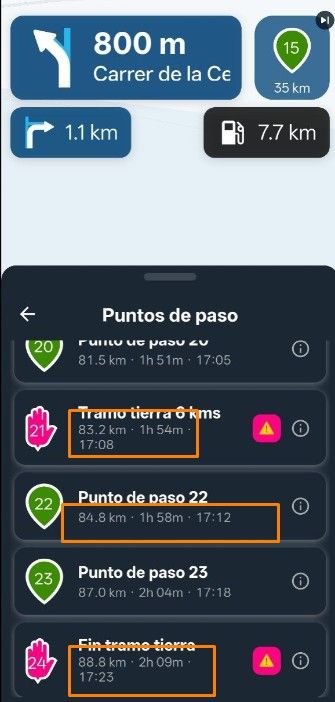
@Corjan-Meijerink I understand and appreciate your response. Of all the areas for improvement I’ve proposed, I would sell my soul to the devil for just this one..
 For me, it’s the one that offers the best on-road experience of all.
• When waypoint details are displayed, time and distance are missing (they do appear in the smartphone version).
This information is the best thing for me.

I’m sure you’ll come up with one of your brilliant ideas. Best wishes!
-
That's possible
Hello! It looks like you're interested in this conversation, but you don't have an account yet.
Getting fed up of having to scroll through the same posts each visit? When you register for an account, you'll always come back to exactly where you were before, and choose to be notified of new replies (either via email, or push notification). You'll also be able to save bookmarks and upvote posts to show your appreciation to other community members.
With your input, this post could be even better 💗
Register Login-
0754
-
 06148
-
 0537
-
 517736
-
 0572
-
 07223
-
 0415
-
0492