I just want to browse the map!
-

Apologies if this has been covered before. I tried searching the community forum but did not come up with anything useful (the fact that a significant portion of the forum is in "foreign" does not help!).
I just want to browse the maps and overlays without actually creating a new route. Currently, the only way I can see to browse the maps and overlays is to create a new route and then go back afterwards and delete the route! I don't always want to create a route! Surely I must be missing something that's staring me in the face.
-
Not that I'm aware of.
Why don't you simply create a new route, call it Browse, and use this every time you only want to look at the maps. -
Apologies if this has been covered before. I tried searching the community forum but did not come up with anything useful (the fact that a significant portion of the forum is in "foreign" does not help!).
I just want to browse the maps and overlays without actually creating a new route. Currently, the only way I can see to browse the maps and overlays is to create a new route and then go back afterwards and delete the route! I don't always want to create a route! Surely I must be missing something that's staring me in the face.

@Stevedo-6-0 You can already browse the overlay maps directly from the website's home screen. The only thing to keep in mind is that the square tool in the top-left corner of the map, which is used to create a Scenic Route, remains active. Other than that, you can scroll through all the overlay maps and view them one by one.
Is it a bit annoying? Yes, it is. Another option is to create a single route called something like "Test" with just one route point. Whenever you want to browse the planning maps and/or overlay maps, simply open this route and you're free to explore without having to create a new one each time.
Hopefully this will be improved in the future once the website has been completely redesigned. A lot of effort is currently being invested in that.
-
Not that I'm aware of.
Why don't you simply create a new route, call it Browse, and use this every time you only want to look at the maps.
Not that I'm aware of.
Why don't you simply create a new route, call it Browse, and use this every time you only want to look at the maps.The whole point is that I don't want, or need, to create a route if I'm just going to browse the map. I would consider it a step forward for the planner if creating a route first wasn't necessary. I was asking in my original post if I'd missed anything obvious in trying to just browse the map. Apparently I haven't.
-
@Stevedo-6-0 You can already browse the overlay maps directly from the website's home screen. The only thing to keep in mind is that the square tool in the top-left corner of the map, which is used to create a Scenic Route, remains active. Other than that, you can scroll through all the overlay maps and view them one by one.
Is it a bit annoying? Yes, it is. Another option is to create a single route called something like "Test" with just one route point. Whenever you want to browse the planning maps and/or overlay maps, simply open this route and you're free to explore without having to create a new one each time.
Hopefully this will be improved in the future once the website has been completely redesigned. A lot of effort is currently being invested in that.
@Stevedo-6-0 You can already browse the overlay maps directly from the website's home screen. The only thing to keep in mind is that the square tool in the top-left corner of the map, which is used to create a Scenic Route, remains active. Other than that, you can scroll through all the overlay maps and view them one by one.
Is it a bit annoying? Yes, it is. Another option is to create a single route called something like "Test" with just one route point. Whenever you want to browse the planning maps and/or overlay maps, simply open this route and you're free to explore without having to create a new one each time.
Hopefully this will be improved in the future once the website has been completely redesigned. A lot of effort is currently being invested in that.
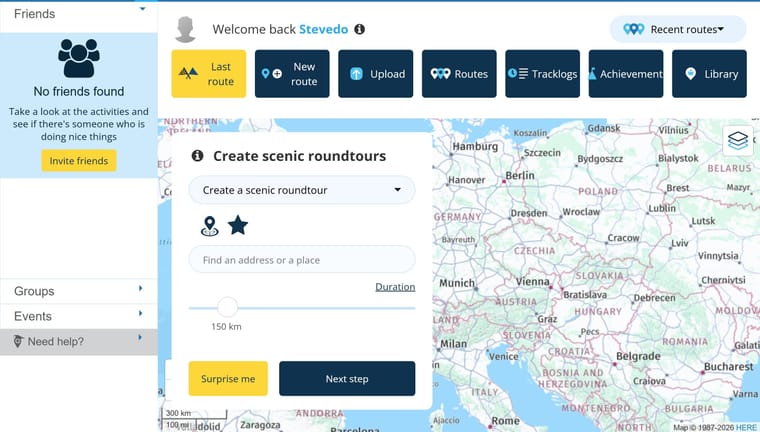
This is a really poor interface just to browse the map, even when I put my browser into full screen mode and collapse the pane on the left hand side.
As you say, hopefully this will be improved in the future.
-
@Stevedo-6-0 You can already browse the overlay maps directly from the website's home screen. The only thing to keep in mind is that the square tool in the top-left corner of the map, which is used to create a Scenic Route, remains active. Other than that, you can scroll through all the overlay maps and view them one by one.
Is it a bit annoying? Yes, it is. Another option is to create a single route called something like "Test" with just one route point. Whenever you want to browse the planning maps and/or overlay maps, simply open this route and you're free to explore without having to create a new one each time.
Hopefully this will be improved in the future once the website has been completely redesigned. A lot of effort is currently being invested in that.
This is a really poor interface just to browse the map, even when I put my browser into full screen mode and collapse the pane on the left hand side.
As you say, hopefully this will be improved in the future.
This is a really poor interface
As I said... annoying! But the alternative really works fine. Just create one route and use it for all times.
-
Not that I'm aware of.
Why don't you simply create a new route, call it Browse, and use this every time you only want to look at the maps.The whole point is that I don't want, or need, to create a route if I'm just going to browse the map. I would consider it a step forward for the planner if creating a route first wasn't necessary. I was asking in my original post if I'd missed anything obvious in trying to just browse the map. Apparently I haven't.
Not that I'm aware of.
Why don't you simply create a new route, call it Browse, and use this every time you only want to look at the maps.The whole point is that I don't want, or need, to create a route if I'm just going to browse the map. I would consider it a step forward for the planner if creating a route first wasn't necessary. I was asking in my original post if I'd missed anything obvious in trying to just browse the map. Apparently I haven't.
Sorry for trying to be helpful
-

Perhaps in future there might be an option to close this frame; for example, a cross in the top right-hand corner of the frame. That way, you’d have the full screen for the map!
Misschien is er in de toekomst een optie mogelijk om dit kader te sluiten; bijvoorbeeld een kruis in de rechter bovenhoek van het kader. Dan heb je wel de volledige ruimte met de kaart!
-
Apologies if this has been covered before. I tried searching the community forum but did not come up with anything useful (the fact that a significant portion of the forum is in "foreign" does not help!).
I just want to browse the maps and overlays without actually creating a new route. Currently, the only way I can see to browse the maps and overlays is to create a new route and then go back afterwards and delete the route! I don't always want to create a route! Surely I must be missing something that's staring me in the face.

@Stevedo-6-0, What is "foreign" for you is not foreign for everyone. Your remark of "just browsing the map", I do understand, but it is the first time I see this on the forum. In the current web planner not much development will be done anymore, since a completely new web-planner is in the works. The workaround above seems to work just fine. It is true that the current webplanner is mainly targeted to planning routes. I can imagine the new web planner will be more similar to the current app planner workflow, but we will have to wait and see, and be patient.
Hello! It looks like you're interested in this conversation, but you don't have an account yet.
Getting fed up of having to scroll through the same posts each visit? When you register for an account, you'll always come back to exactly where you were before, and choose to be notified of new replies (either via email, or push notification). You'll also be able to save bookmarks and upvote posts to show your appreciation to other community members.
With your input, this post could be even better 💗
Register Login-
 01232
01232
-
 0649
0649
-
 0515
0515
-
 0831
0831
-
 0330
0330
-
0320
-
0430
-
05167