Skip to content
  • Categories
  • Recent
  • Popular
  • Support
  • MyRoute-app
Collapse
Brand Logo

MRA Community Forum

  1. Home
  2. Export assistance
  3. [Export] BMW ConnectedRide
  4. Visible waypoint

Visible waypoint

Scheduled Pinned Locked Moved [Export] BMW ConnectedRide
3 Posts 2 Posters 81 Views 2 Watching
  • Oldest to Newest
  • Newest to Oldest
  • Most Votes
Reply
  • Reply as topic
Log in to reply
This topic has been deleted. Only users with topic management privileges can see it.
  • Eric 20undefined Offline
    Eric 20undefined Offline
    Eric 20
    wrote last edited by
    #1

    Hi,

    How do I get a visible waypoint for a resting place or refueling place. I tried to use a POI but I did not succeed.

    pls advice

    1 Reply Last reply
    0
    • white.mouseundefined Offline
      white.mouseundefined Offline
      white.mouse
      Valued contributor
      wrote last edited by white.mouse
      #2

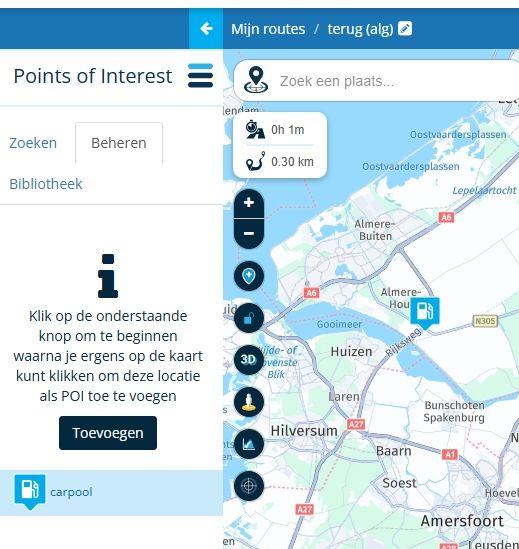
      Open your route and click the hamburger menu on the left in the list of route points.
      Then select "Point of Interest" from the options and follow the instructions.
      Click "Add" and mark the desired point with the cursor (using the cross on the screen).
      A new screen will appear where you can give the point a name and a symbol. Choose a name and symbol that make sense to you.
      Finally, click "Accept" to close this screen, and you will now see your point listed on the left. When you drive the route, you will also see it on your screen.

      The list you are creating now is only for this route.
      If you want to use these points in other lists as well, you will need to create them anew in each route!
      ScreenShot-001.jpg
      My MRA is in Dutch, so the English translation may not be entirely accurate.

      met een R1250RT met TFT en BMW Connected Ride App (die dus nog steeds niet voldoet!) ;
      de Garmin Zumo XT en M.R.A. in combinatie met de Carpuride W702 (voor Android op de Motor!)

      Eric 20undefined 1 Reply Last reply
      0
      • white.mouseundefined white.mouse

        Open your route and click the hamburger menu on the left in the list of route points.
        Then select "Point of Interest" from the options and follow the instructions.
        Click "Add" and mark the desired point with the cursor (using the cross on the screen).
        A new screen will appear where you can give the point a name and a symbol. Choose a name and symbol that make sense to you.
        Finally, click "Accept" to close this screen, and you will now see your point listed on the left. When you drive the route, you will also see it on your screen.

        The list you are creating now is only for this route.
        If you want to use these points in other lists as well, you will need to create them anew in each route!
        ScreenShot-001.jpg
        My MRA is in Dutch, so the English translation may not be entirely accurate.

        Eric 20undefined Offline
        Eric 20undefined Offline
        Eric 20
        wrote last edited by
        #3

        @white.mouse Hi,

        Tks for yr answer. All clear. However, if I export the route into bmw navigation 3 choices appear. 1 route with the amount of waypoints I made. 1 with the amount of waypoints the bmw navigator creates (a lot). 1 with the poi created.

        First and second one shows no poi. The last one shows only poi’s. Clearly I am doing something wrong

        1 Reply Last reply
        0

        Hello! It looks like you're interested in this conversation, but you don't have an account yet.

        Getting fed up of having to scroll through the same posts each visit? When you register for an account, you'll always come back to exactly where you were before, and choose to be notified of new replies (either via email, or push notification). You'll also be able to save bookmarks and upvote posts to show your appreciation to other community members.

        With your input, this post could be even better 💗

        Register Login
        Reply
        • Reply as topic
        Log in to reply
        • Oldest to Newest
        • Newest to Oldest
        • Most Votes


        ACTIVE USERS
        Eric 20undefined
        Eric 20
        white.mouseundefined
        white.mouse
        POPULAR TOPICS
        • Navigation stopped working during Tour
          Thomas Neumeyerundefined
          Thomas Neumeyer
          1
          89
          6.1k

        • Routes laden zonder wifi / data verbinding
          Nick Carthewundefined
          Nick Carthew
          0
          11
          145

        • Font for the distance to the next turn to smal
          Rob Verhoeffundefined
          Rob Verhoeff
          2
          34
          843

        • Black screen during navigating
          Ed Lauwerens 0undefined
          Ed Lauwerens 0
          0
          3
          86

        • Public Groups?
          Lenny Oundefined
          Lenny O
          0
          3
          45

        • Laden route gaat mis
          Wim Heijnisundefined
          Wim Heijnis
          0
          3
          43

        • Achievements anomolies
          Marinus van Deudekomundefined
          Marinus van Deudekom
          0
          6
          103

        • MyRoute-App on the TomTom Rider
          b0hd1undefined
          b0hd1
          3
          14
          1.3k

        MY GROUPS
        • Login

        • Login or register to search.
        • First post
          Last post
        0
        • Categories
        • Recent
        • Popular
        • Support
        • MyRoute-app