Skip to content
  • Categories
  • Recent
  • Popular
  • Support
  • MyRoute-app
Collapse
Brand Logo

MRA Community Forum

  1. Home
  2. MRA Routeplanner Next Beta
  3. [Web-Beta] Suggestions and Discussions
  4. Move a GPS point on the map

Move a GPS point on the map

Scheduled Pinned Locked Moved [Web-Beta] Suggestions and Discussions
3 Posts 2 Posters 14 Views 1 Watching
  • Oldest to Newest
  • Newest to Oldest
  • Most Votes
Reply
  • Reply as topic
Log in to reply
This topic has been deleted. Only users with topic management privileges can see it.
  • Corrado Miniati
    Corrado Miniati
    Corrado Miniati
    Valued contributor
    wrote last edited by Corrado Miniati
    #1

    Hi,
    1.jpg

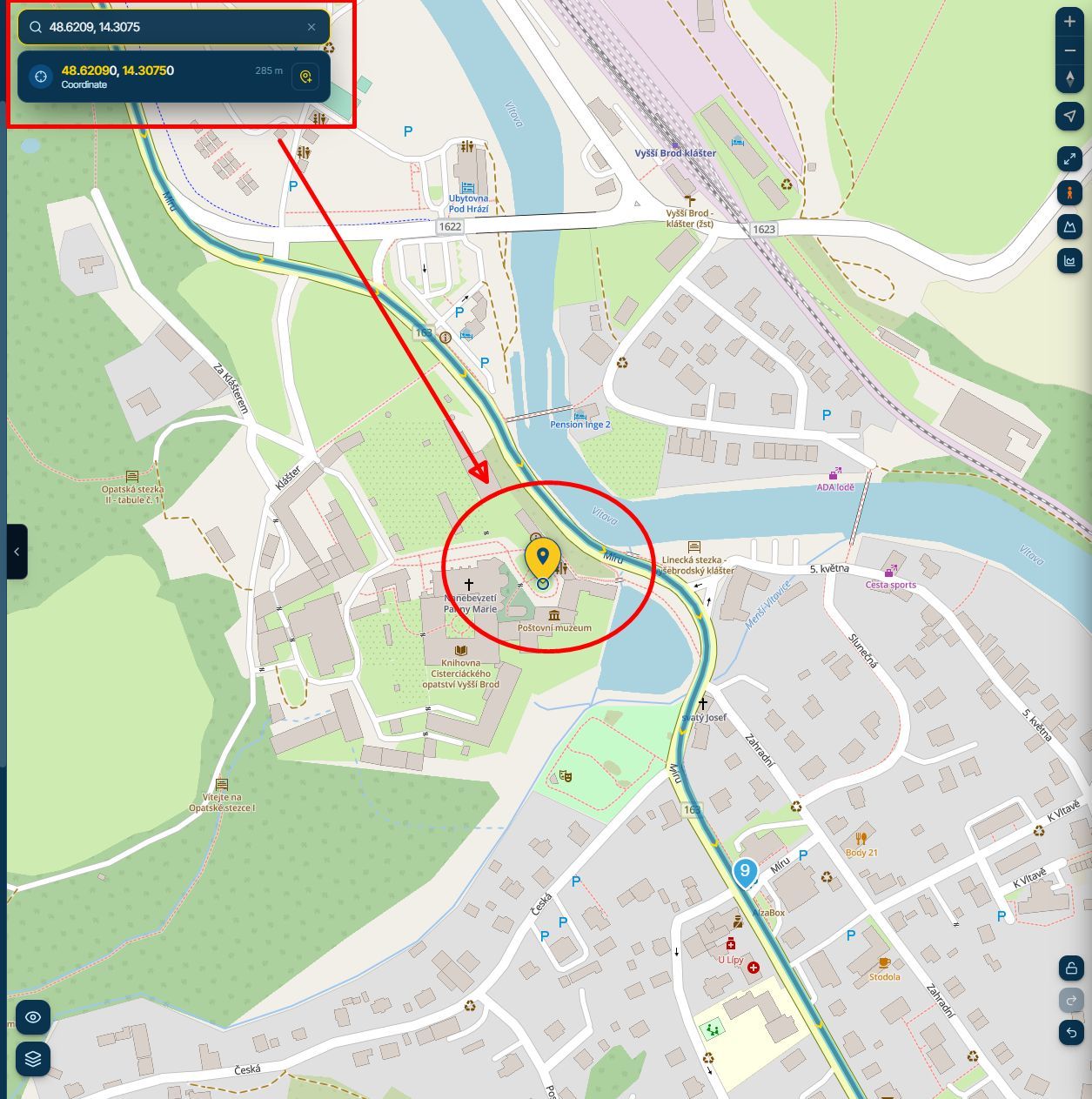
    When searching for a location on the map using GPS coordinates, the result is often not 100% accurate.
    The corresponding yellow marker cannot be moved, but it would be very useful to be able to drag it and place it at the exact location after verifying the correct position on the map, and then convert it into a waypoint.

    Thanks

    TorqueRider 1 Reply Last reply
    0
    • Corrado Miniati Corrado Miniati

      Hi,
      1.jpg

      When searching for a location on the map using GPS coordinates, the result is often not 100% accurate.
      The corresponding yellow marker cannot be moved, but it would be very useful to be able to drag it and place it at the exact location after verifying the correct position on the map, and then convert it into a waypoint.

      Thanks

      TorqueRider
      TorqueRider
      TorqueRider
      wrote last edited by
      #2

      @Corrado-Miniati
      The yellow marker represents the exact center point of the coordinates you provided. The surface area covered by your coordinates may vary, as different types of coordinate systems have different levels of precision.
      The yellow marker appears at that location, but it is not yet a waypoint. Did a screen appear asking if you wanted to set that location as a waypoint on the map? If you accepted that, you will see the familiar blue marker, which you can then move around as you please.

      Corrado Miniati 1 Reply Last reply
      0
      • TorqueRider TorqueRider

        @Corrado-Miniati
        The yellow marker represents the exact center point of the coordinates you provided. The surface area covered by your coordinates may vary, as different types of coordinate systems have different levels of precision.
        The yellow marker appears at that location, but it is not yet a waypoint. Did a screen appear asking if you wanted to set that location as a waypoint on the map? If you accepted that, you will see the familiar blue marker, which you can then move around as you please.

        Corrado Miniati
        Corrado Miniati
        Corrado Miniati
        Valued contributor
        wrote last edited by
        #3

        @TorqueRider
        Thanks for the feedback.
        Yes, I did that, but what I was asking for is simpler with fewer steps: first move the yellow icon and then convert it into a via waypoint.

        1 Reply Last reply
        0

        Hello! It looks like you're interested in this conversation, but you don't have an account yet.

        Getting fed up of having to scroll through the same posts each visit? When you register for an account, you'll always come back to exactly where you were before, and choose to be notified of new replies (either via email, or push notification). You'll also be able to save bookmarks and upvote posts to show your appreciation to other community members.

        With your input, this post could be even better 💗

        Register Login
        Reply
        • Reply as topic
        Log in to reply
        • Oldest to Newest
        • Newest to Oldest
        • Most Votes


        ACTIVE USERS
        Corrado Miniati
        Corrado Miniati
        TorqueRider
        TorqueRider
        POPULAR TOPICS
        • Find other members in my area?
          Hubert Thoring
          Hubert Thoring
          0
          11
          227

        • Route Opacity Viewing Existing Routes in Library
          Nick Carthew
          Nick Carthew
          0
          6
          41

        • Guida Libera
          Rob Verhoeff
          Rob Verhoeff
          0
          7
          210

        • Question on Beta access
          BertM
          BertM
          0
          13
          369

        • Move a GPS point on the map
          Corrado Miniati
          Corrado Miniati
          0
          3
          14

        • Route leads straight to endpoint
          Rolf Engelsman
          Rolf Engelsman
          0
          3
          22

        • Elevation profile: cursor that follows the route on the map
          Corrado Miniati
          Corrado Miniati
          0
          13
          77

        • Along the route
          Hubert Thoring
          Hubert Thoring
          0
          2
          14

        MY GROUPS
        • Login

        • Login or register to search.
        • First post
          Last post
        0
        • Categories
        • Recent
        • Popular
        • Support
        • MyRoute-app