Skip to content
  • Categories
  • Recent
  • Popular
  • Support
  • MyRoute-app
Collapse
Brand Logo

MRA Community Forum

  1. Home
  2. MRA Routeplanner Next Beta
  3. [Web-Beta] Suggestions and Discussions
  4. Waypoint icon starting from POI

Waypoint icon starting from POI

Scheduled Pinned Locked Moved [Web-Beta] Suggestions and Discussions
2 Posts 2 Posters 6 Views 2 Watching
  • Oldest to Newest
  • Newest to Oldest
  • Most Votes
Reply
  • Reply as topic
Log in to reply
This topic has been deleted. Only users with topic management privileges can see it.
  • Corrado Miniati
    Corrado Miniati
    Corrado Miniati
    wrote last edited by
    #1

    Hello,
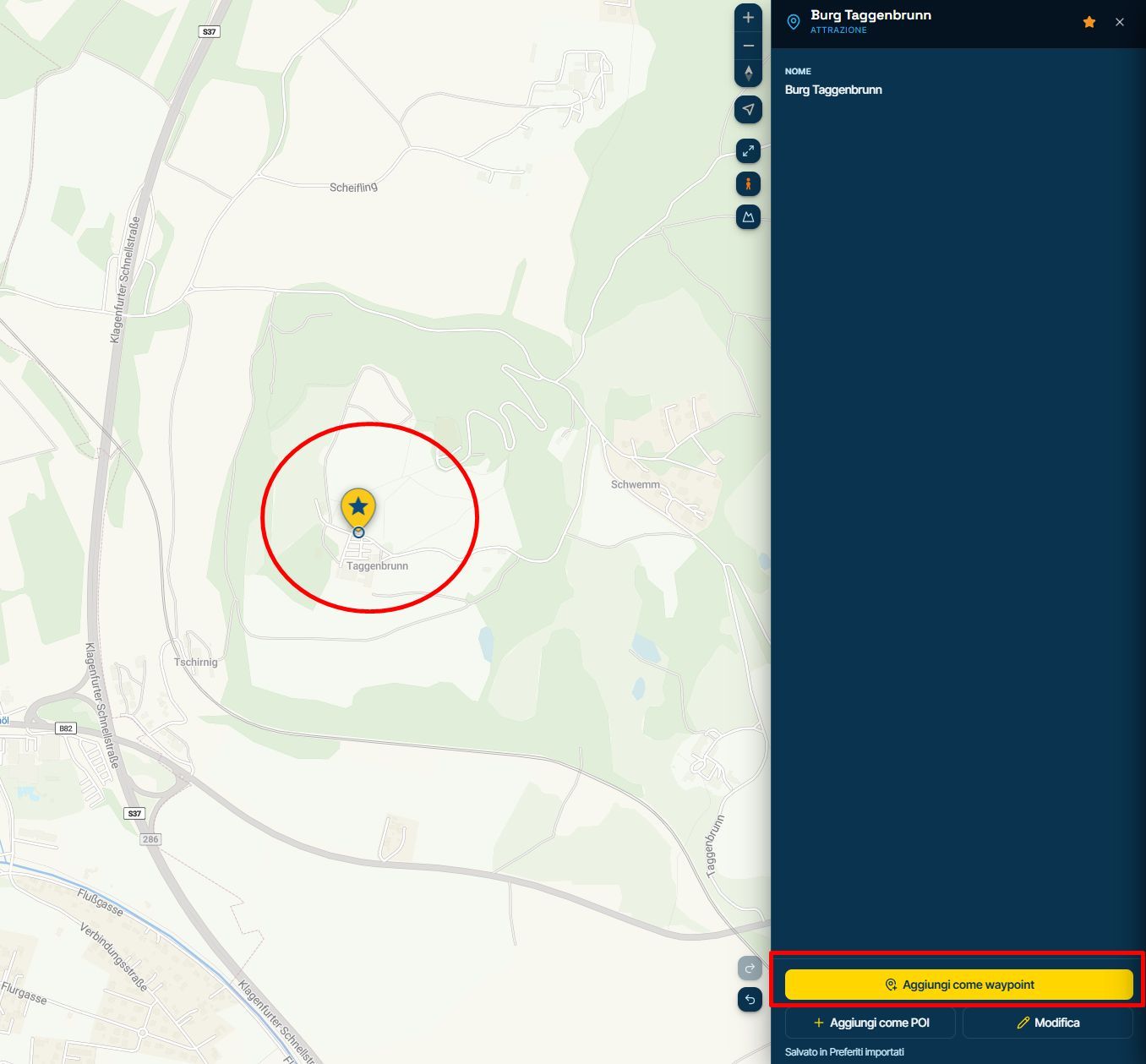
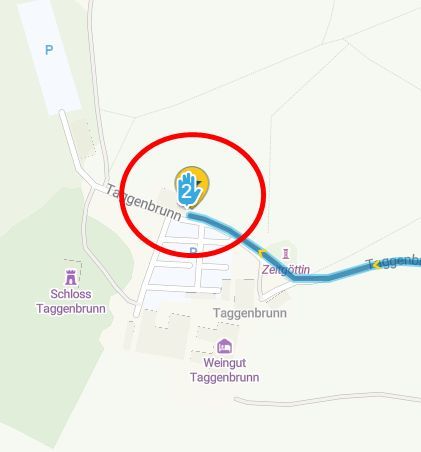
    when a POI is added to the map, it is displayed as a yellow drop icon. However, if the "Add as waypoint" option is selected, the icon is shown as the classic waypoint hand (via point) or shape point symbol placed on top of the yellow POI drop.
    This graphical representation does not look very clean, and I also do not see the practical benefit of displaying both symbols at the same time.
    Furthermore, if both "Show as POI" and "Add as waypoint" are enabled from the POI menu, the icon is displayed with three overlapping layers, making the map even more cluttered.
    Since the POI has already been converted into a waypoint, would it be possible to display only the standard waypoint or shape point icon and remove the additional graphics?
    This would make the map clearer and improve readability.
    1.jpg
    2.jpg
    3.jpg

    Thanks a lot

    1 Reply Last reply
    0
    • Corjan Meijerink
      Corjan Meijerink
      Corjan Meijerink
      Developer
      wrote last edited by
      #2

      Hi Corrado, thanks for the clear screenshots! The yellow star pin isn't part of the waypoint: it's the pin of your Favourites list ("Preferiti importati"), which you have switched on to show on the planner map. When you add a favourite as a waypoint, the route gets its own waypoint pin, and the favourite stays where it is, because it's still saved. "Add as POI" puts a third pin there for the route's own POI. If you'd rather not see your favourites while planning, switch the list off in the map's Layers menu, and you'll see only the waypoints. Hope that helps!

      1 Reply Last reply
      0

      Hello! It looks like you're interested in this conversation, but you don't have an account yet.

      Getting fed up of having to scroll through the same posts each visit? When you register for an account, you'll always come back to exactly where you were before, and choose to be notified of new replies (either via email, or push notification). You'll also be able to save bookmarks and upvote posts to show your appreciation to other community members.

      With your input, this post could be even better 💗

      Register Login
      Reply
      • Reply as topic
      Log in to reply
      • Oldest to Newest
      • Newest to Oldest
      • Most Votes


      ACTIVE USERS
      Corjan Meijerink
      Corjan Meijerink
      Corrado Miniati
      Corrado Miniati
      POPULAR TOPICS
      • Map lock
        tfdahazellgmail.com
        tfdahazellgmail.com
        0
        16
        98

      • Beta abonnement
        Jan Jeuring
        Jan Jeuring
        0
        11
        181

      • Website update - Waypoint list export, routetracks from tracklogs and more of your feedback
        CD130
        CD130
        9
        10
        62

      • How to export GPX files to Zumo XT without recalculation
        Travellexxie
        Travellexxie
        2
        35
        2.2k

      • Route opslaan in Plan.TomTom lukt niet meer.
        Gerard van der Veer
        Gerard van der Veer
        0
        15
        495

      • Uitnodiging
        Hanza 0
        Hanza 0
        0
        6
        42

      • Suggestion: Make the layer icon permanently visible
        Hans Kremers
        Hans Kremers
        3
        6
        83

      • SilverFox Controller C2
        Hans Lamers
        Hans Lamers
        0
        7
        97

      MY GROUPS
      • Login

      • Login or register to search.
      • First post
        Last post
      0
      • Categories
      • Recent
      • Popular
      • Support
      • MyRoute-app