Export To My Nav 5 Fails
-

I have been trying to upload to my BMW Nav 5 a file that has a 7 day loop of Sardinia. I have many many attempts. I have deleted old map files from the Nav, checked available space and charged the battery. I have an extra SD card with about 32G installed in the Nav 5 with lots of space. I split the route into 7 individual days and all of the 7 day routes uploaded with out issue. The complete master will not upload. Before I split the route I checked it on a Here Map through animation and all of the 50 Way and Via points are on the route. Is it too large or does it have too many way and via points? I keep getting the message “Completed. The Route is exported to your device”. The time line is very short, much shorter than the one day exports. When I open my Nav I get this message “Cannot Save GRAND TOUR OLBIA MASTER”.
Your comments are welcome. -

The BMW Nav 5 can handle a maximum of 30 announcing waypoints (via points) per route, you can also include up to 125 unannounced shaping points between any two waypoints. You have probably exceeded the Via point (announced waypoint limit.). If you MUST have a route overview you'd probably be better exporting the master route as a Track to the Nav 5 and displaying it beneath the magenta line of your routes.
-
The BMW Nav 5 can handle a maximum of 30 announcing waypoints (via points) per route, you can also include up to 125 unannounced shaping points between any two waypoints. You have probably exceeded the Via point (announced waypoint limit.). If you MUST have a route overview you'd probably be better exporting the master route as a Track to the Nav 5 and displaying it beneath the magenta line of your routes.
@Mzokk Your suggestion seems to make sense. I did not know that there was a difference between an announcing way point (via point) and an unannounced shaping point. Could you advise me on how to identify them and is it possible to change them over to unannounced? There are about 7 way points and 49 via points.
Thank you -
@Mzokk Your suggestion seems to make sense. I did not know that there was a difference between an announcing way point (via point) and an unannounced shaping point. Could you advise me on how to identify them and is it possible to change them over to unannounced? There are about 7 way points and 49 via points.
Thank you
@Brian-Dingsdale-0 the manuals page waypoints
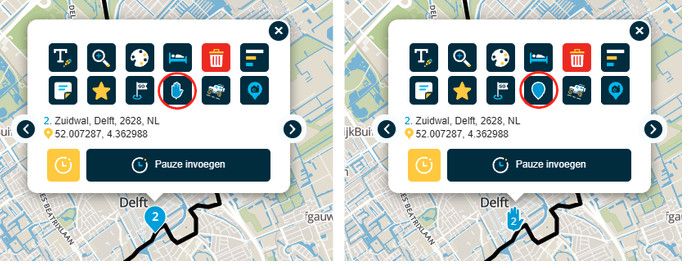
just click on a waypoint, expand the options with the three dot menu button
then just toggle the "hand" & "teardrop" symbols to switch between "via" & "shaping" points respectively -
@Mzokk Your suggestion seems to make sense. I did not know that there was a difference between an announcing way point (via point) and an unannounced shaping point. Could you advise me on how to identify them and is it possible to change them over to unannounced? There are about 7 way points and 49 via points.
Thank you
@Brian-Dingsdale-0 The reason I suggest a track for the 7day overview of the route is that you can enable it on the NAV5 and have it visible beneath the route. For the 7 day route segments I would suggest that each day you start the route at least 1/2 mile from your accommodation, in the direction of travel, to ensure that you pass through the start point. If you try and start the route from where you are located you might accidently not pass through the start of the route and the device will keep trying to return you to the beginning. By placing the start some way away the unit knows where you are can route you to and through the start of the route.
Hello! It looks like you're interested in this conversation, but you don't have an account yet.
Getting fed up of having to scroll through the same posts each visit? When you register for an account, you'll always come back to exactly where you were before, and choose to be notified of new replies (either via email, or push notification). You'll also be able to save bookmarks and upvote posts to show your appreciation to other community members.
With your input, this post could be even better 💗
Register Login-
 0825
0825
-
 011235
-
 115124
-
0519
-
0750
-
 0490
0490
-
 0669
0669
-
 18413
18413