Skip to content
  • Categories
  • Recent
  • Popular
  • Support
  • MyRoute-app
Collapse
Brand Logo

MRA Community Forum

  1. Home
  2. General Discussion
  3. Recalculation woes

Recalculation woes

Scheduled Pinned Locked Moved General Discussion
16 Posts 4 Posters 4.1k Views 3 Watching
  • Oldest to Newest
  • Newest to Oldest
  • Most Votes
Reply
  • Reply as topic
Log in to reply
This topic has been deleted. Only users with topic management privileges can see it.
  • Stefan Hummelink Stefan Hummelink

    @Con-Hennekens Or adjust the route in MRA Nav by using the in-built route editor in MRA Nav to fix the route issues that are caused by the map problem you describe.
    One can therefore create the route in OSM map with basic membership and then fine tune it in the MRA Nav app, which is offcourse a hassle but it will do the trick.

    Graeme 3 Offline
    Graeme 3 Offline
    Graeme 3
    wrote on last edited by
    #7

    @StefanHummelink I guess, but that’s a major pain in the ass for a long route. The web route planner is great, I love how you can drag routes to make them how you want, but once I’ve done that I expect the app to navigate me down the route I have planned, not take me where it wants to go! I will try to get some screen shots to illustrate the problem.

    1 Reply Last reply
    0
    • Graeme 3 Offline
      Graeme 3 Offline
      Graeme 3
      wrote on last edited by
      #8

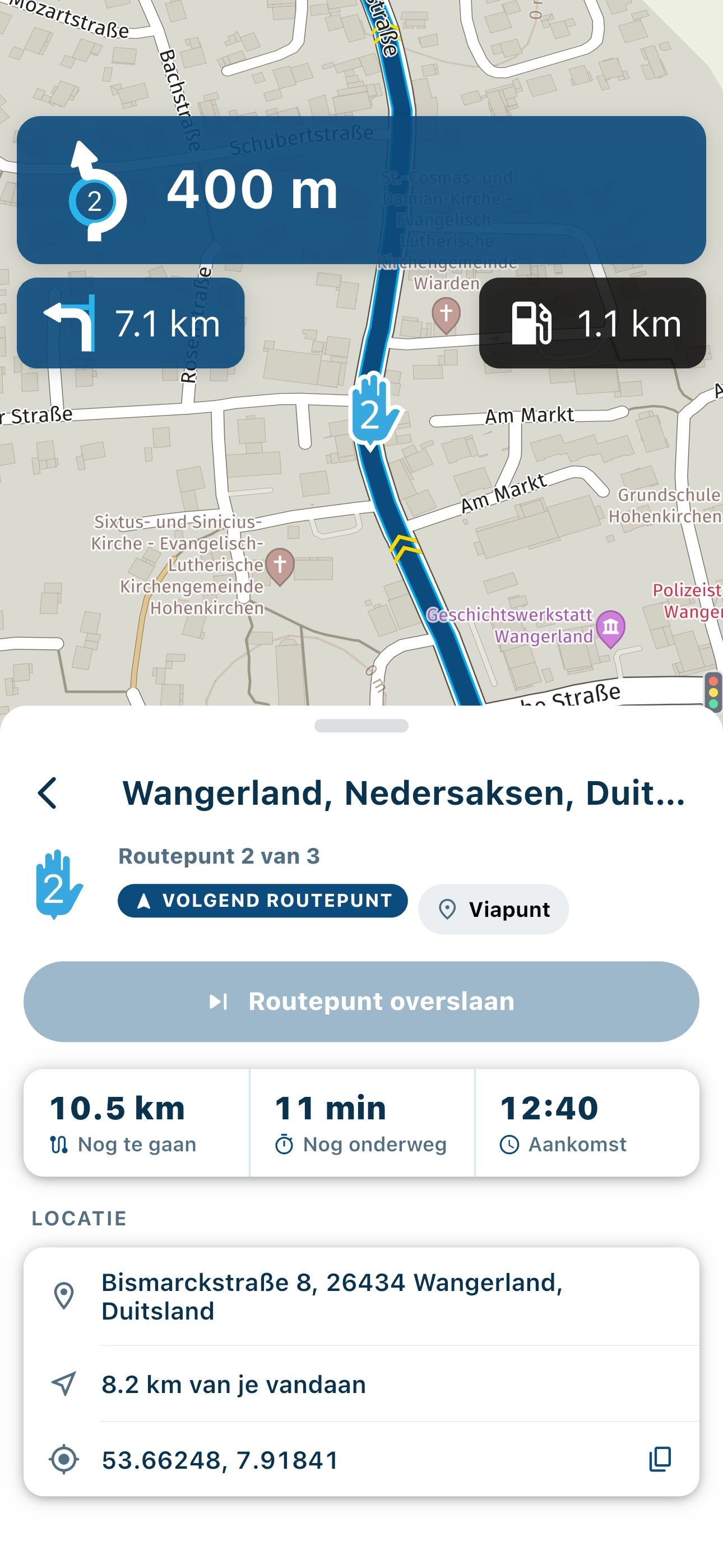
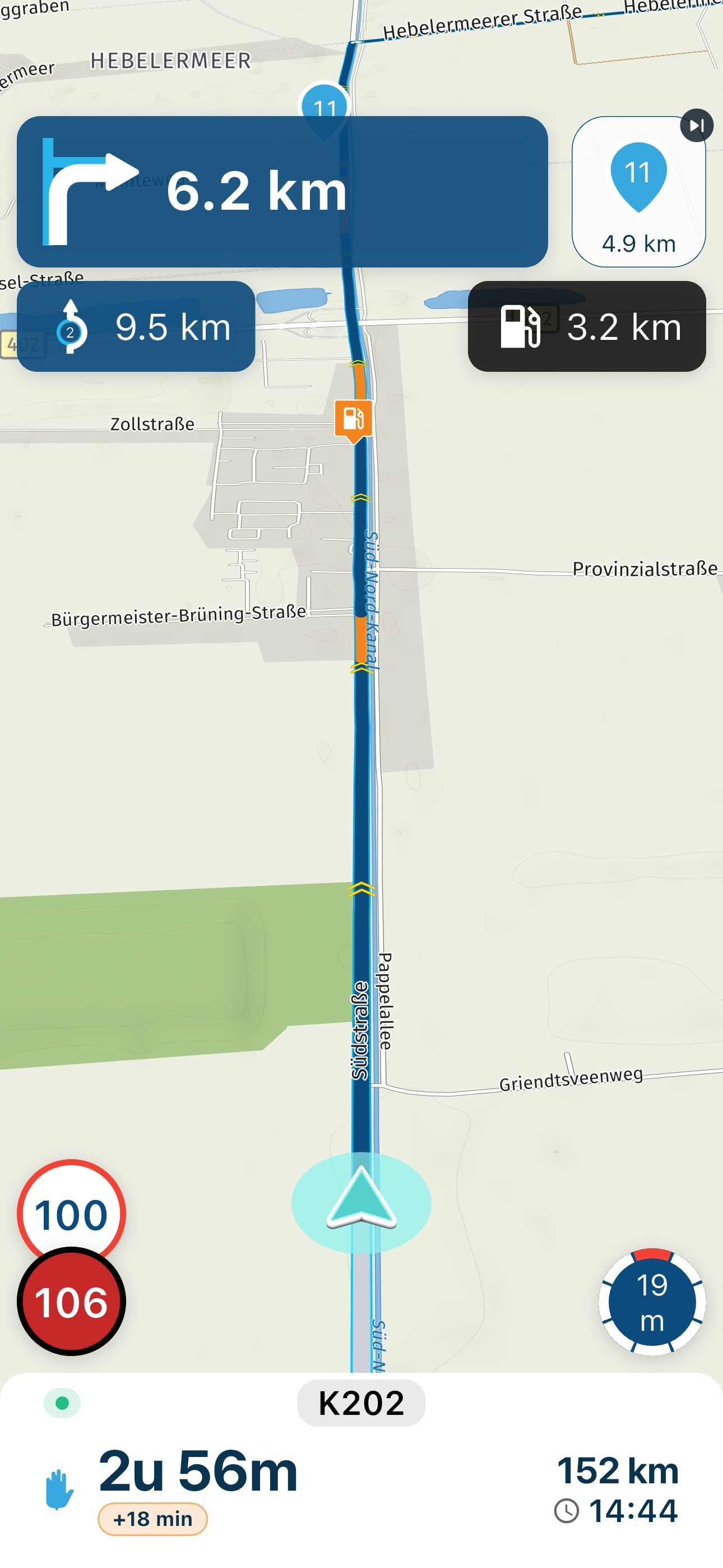
      Ok so here’s the route I planned on the web

      63A44DDB-3DB5-4B5F-B1C2-3CDB3754F4FB.jpeg

      Here’s what I see when I open the route in the Navigator app

      A9D720EF-878F-475F-BA9A-8F3E3CA28122.png

      The app wants to take me by a more direct route, but I don’t want that, it’s dull.

      Con Hennekens 2 Replies Last reply
      0
      • Hans van de Ven MR.MRA Offline
        Hans van de Ven MR.MRA Offline
        Hans van de Ven MR.MRA
        Valued contributor
        wrote on last edited by
        #9

        @Graeme-3 Place an extra waypoint on the road that you want to cross, so that you enforce this

        Garmin Zumo XT3/XT2/XT/BMW Connected Ride Navigator/Tourstart/ MyRouteapp (The App)/...
        Een dag niet gelachen is een dag niet geleefd / Een route is net zo goed als deze uitgezet is.

        Graeme 3 1 Reply Last reply
        0
        • Graeme 3 Graeme 3

          @Con-Hennekens I have Gold, I think the default is Here and I go between that and Google Maps generally.

          Stefan Hummelink Offline
          Stefan Hummelink Offline
          Stefan Hummelink
          Alpha tester
          wrote on last edited by Stefan Hummelink
          #10

          @Graeme-3 hmmmm....

          "I think Here is default.... And Google Maps" in your response sort of triggers me ...are you sure you've selected the Here map for route calculation or are you simply using the here and Google Maps overlays? These are not the same thing! There is no Google Maps map/calculation algorithm available in MRA but solely the overlay...

          If so, it surprises me as well that a for route made with MRA Routeplanner by using the Here map, still discrepancies between routeplanner and MRA Navigation are present. They should not be possible... Now I'm not sure of my routes anymore... Yet, from memory this issue never had been reported on this forum before...

          Can you confirm the above questions and perhaps make a screenshot of the toolkit menu as shown below?
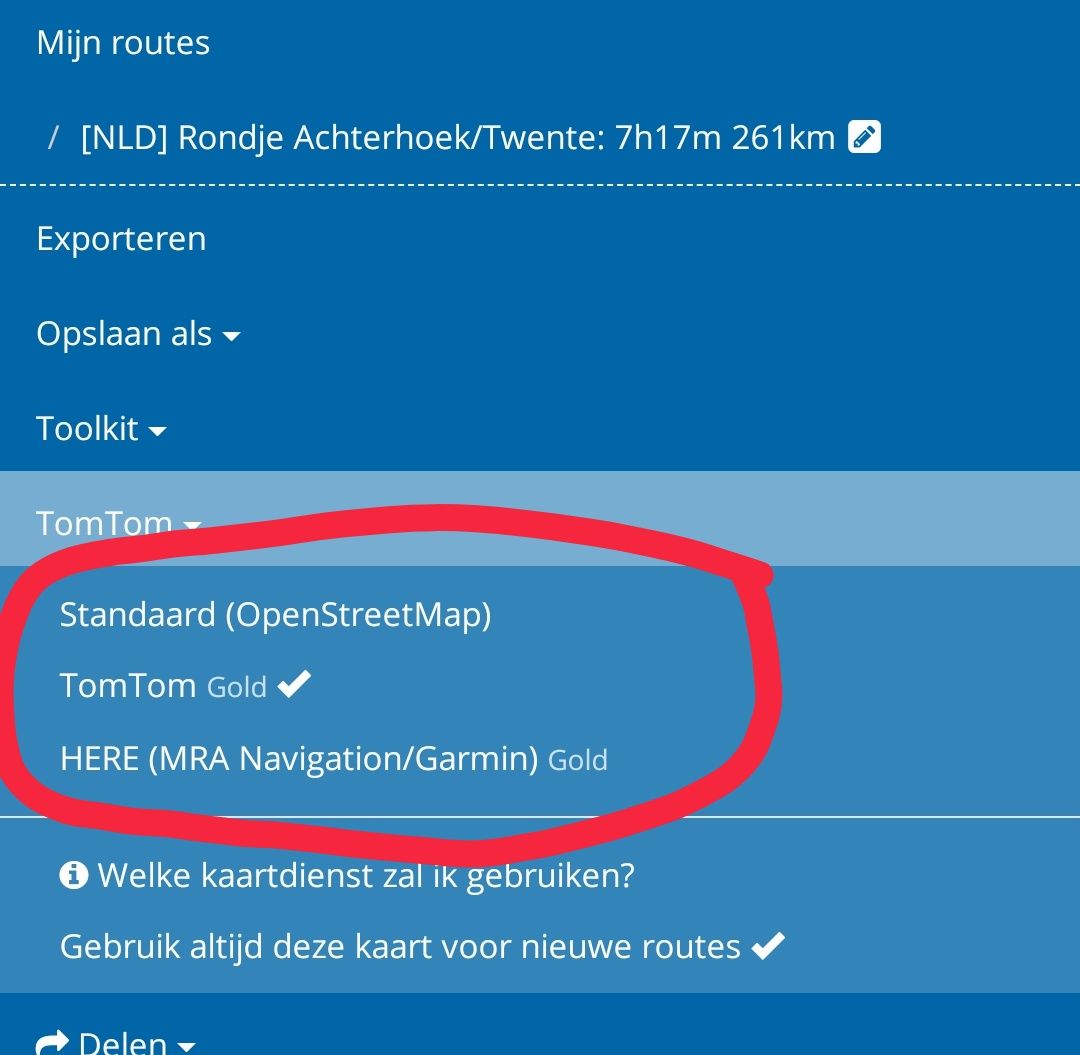
          Screenshot_20210427-085329.jpg

          Manks bu'j te bange.

          Graeme 3 1 Reply Last reply
          0
          • Hans van de Ven MR.MRA Hans van de Ven MR.MRA

            @Graeme-3 Place an extra waypoint on the road that you want to cross, so that you enforce this

            Graeme 3 Offline
            Graeme 3 Offline
            Graeme 3
            wrote on last edited by
            #11

            @Hans-van-de-Ven-MRA-Master said in Recalculation woes:

            @Graeme-3 Place an extra waypoint on the road that you want to cross, so that you enforce this

            I could do that, but I would have to guess where the app was going to take me and then potentially place lots of extra waypoints - on a 3-400km route that just isn't practical.

            1 Reply Last reply
            0
            • Stefan Hummelink Stefan Hummelink

              @Graeme-3 hmmmm....

              "I think Here is default.... And Google Maps" in your response sort of triggers me ...are you sure you've selected the Here map for route calculation or are you simply using the here and Google Maps overlays? These are not the same thing! There is no Google Maps map/calculation algorithm available in MRA but solely the overlay...

              If so, it surprises me as well that a for route made with MRA Routeplanner by using the Here map, still discrepancies between routeplanner and MRA Navigation are present. They should not be possible... Now I'm not sure of my routes anymore... Yet, from memory this issue never had been reported on this forum before...

              Can you confirm the above questions and perhaps make a screenshot of the toolkit menu as shown below?
              Screenshot_20210427-085329.jpg

              Graeme 3 Offline
              Graeme 3 Offline
              Graeme 3
              wrote on last edited by
              #12

              @StefanHummelink Thanks, I think you've pointed me to the problem. I had habitually used the Here map & Overlay because I previously used a Garmin Satnav and it matches the Garmin routing. Now I'm using the phone app, and I'm guessing that the app uses Open Street Map? Certainly if I plan the route using OSM (or Tom Tom) the app routing matches what's planned as far as I can tell. I just assumed that the phone app would understand whatever was done in the web planner.

              An additional workaround, which I may also use, is to use the Expand function, which adds in as many extra waypoints along the way as you want. Presumably these would enforce the routing - I'll find out tomorrow!

              Thanks for all the help

              Graeme 3 Stefan Hummelink 2 Replies Last reply
              0
              • Graeme 3 Graeme 3

                @StefanHummelink Thanks, I think you've pointed me to the problem. I had habitually used the Here map & Overlay because I previously used a Garmin Satnav and it matches the Garmin routing. Now I'm using the phone app, and I'm guessing that the app uses Open Street Map? Certainly if I plan the route using OSM (or Tom Tom) the app routing matches what's planned as far as I can tell. I just assumed that the phone app would understand whatever was done in the web planner.

                An additional workaround, which I may also use, is to use the Expand function, which adds in as many extra waypoints along the way as you want. Presumably these would enforce the routing - I'll find out tomorrow!

                Thanks for all the help

                Graeme 3 Offline
                Graeme 3 Offline
                Graeme 3
                wrote on last edited by
                #13
                This post is deleted!
                1 Reply Last reply
                0
                • Graeme 3 Graeme 3

                  @StefanHummelink Thanks, I think you've pointed me to the problem. I had habitually used the Here map & Overlay because I previously used a Garmin Satnav and it matches the Garmin routing. Now I'm using the phone app, and I'm guessing that the app uses Open Street Map? Certainly if I plan the route using OSM (or Tom Tom) the app routing matches what's planned as far as I can tell. I just assumed that the phone app would understand whatever was done in the web planner.

                  An additional workaround, which I may also use, is to use the Expand function, which adds in as many extra waypoints along the way as you want. Presumably these would enforce the routing - I'll find out tomorrow!

                  Thanks for all the help

                  Stefan Hummelink Offline
                  Stefan Hummelink Offline
                  Stefan Hummelink
                  Alpha tester
                  wrote on last edited by Stefan Hummelink
                  #14

                  @Graeme-3 hmmmm. Great to see you've solves your provlem but it still makes no sense though since the MRA Navigation app makes use of the Garmin Here map ... Any route designed in either OSM or TomTom is guaranteed to have mismatches with the same route in MRA Navigation.

                  Hmmm.

                  How about sharing you're with use here so maybe we can give it a try? Make sure your route is set to "public".

                  Manks bu'j te bange.

                  1 Reply Last reply
                  0
                  • Graeme 3 Graeme 3

                    Ok so here’s the route I planned on the web
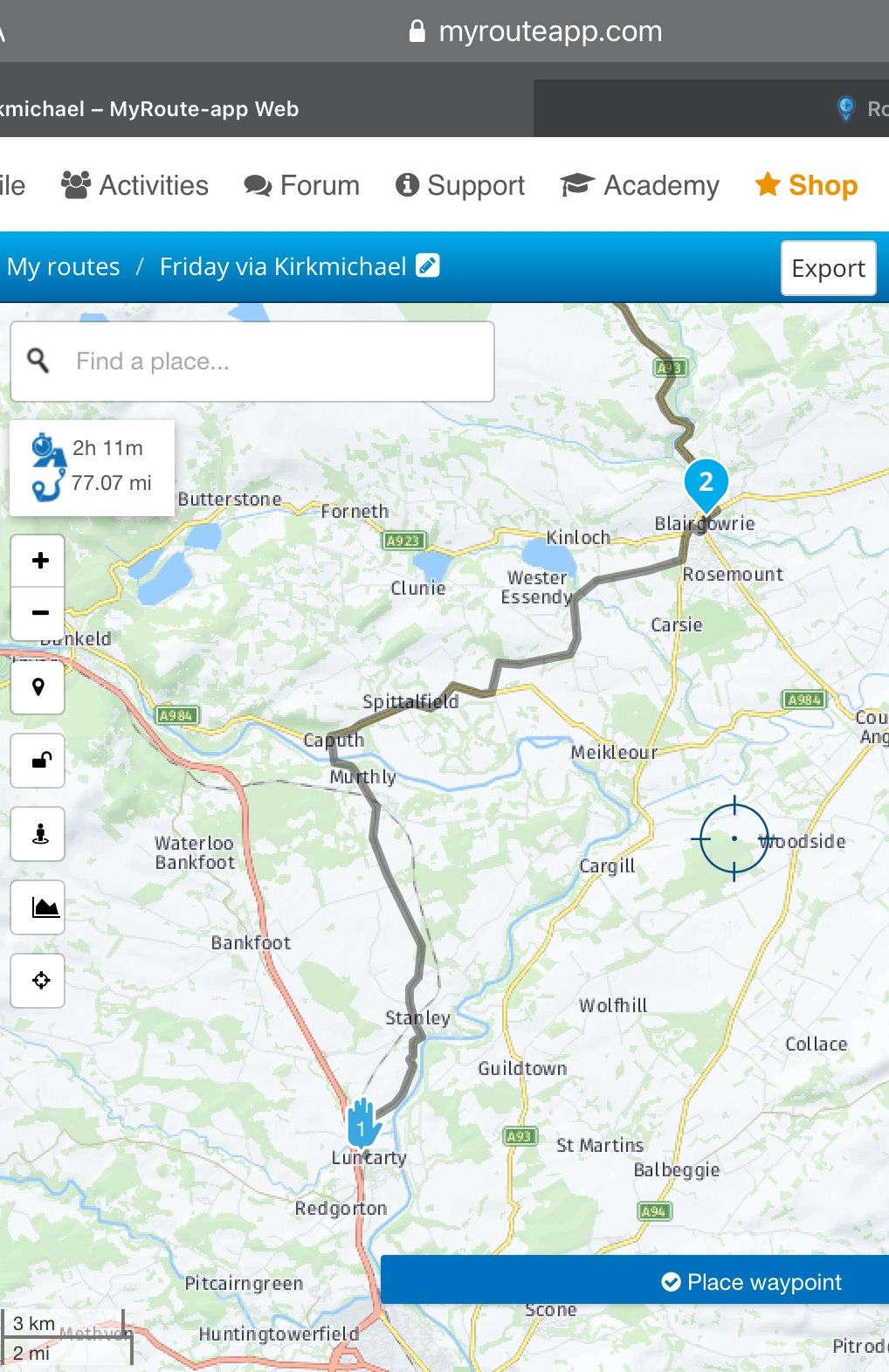
                    63A44DDB-3DB5-4B5F-B1C2-3CDB3754F4FB.jpeg

                    Here’s what I see when I open the route in the Navigator app
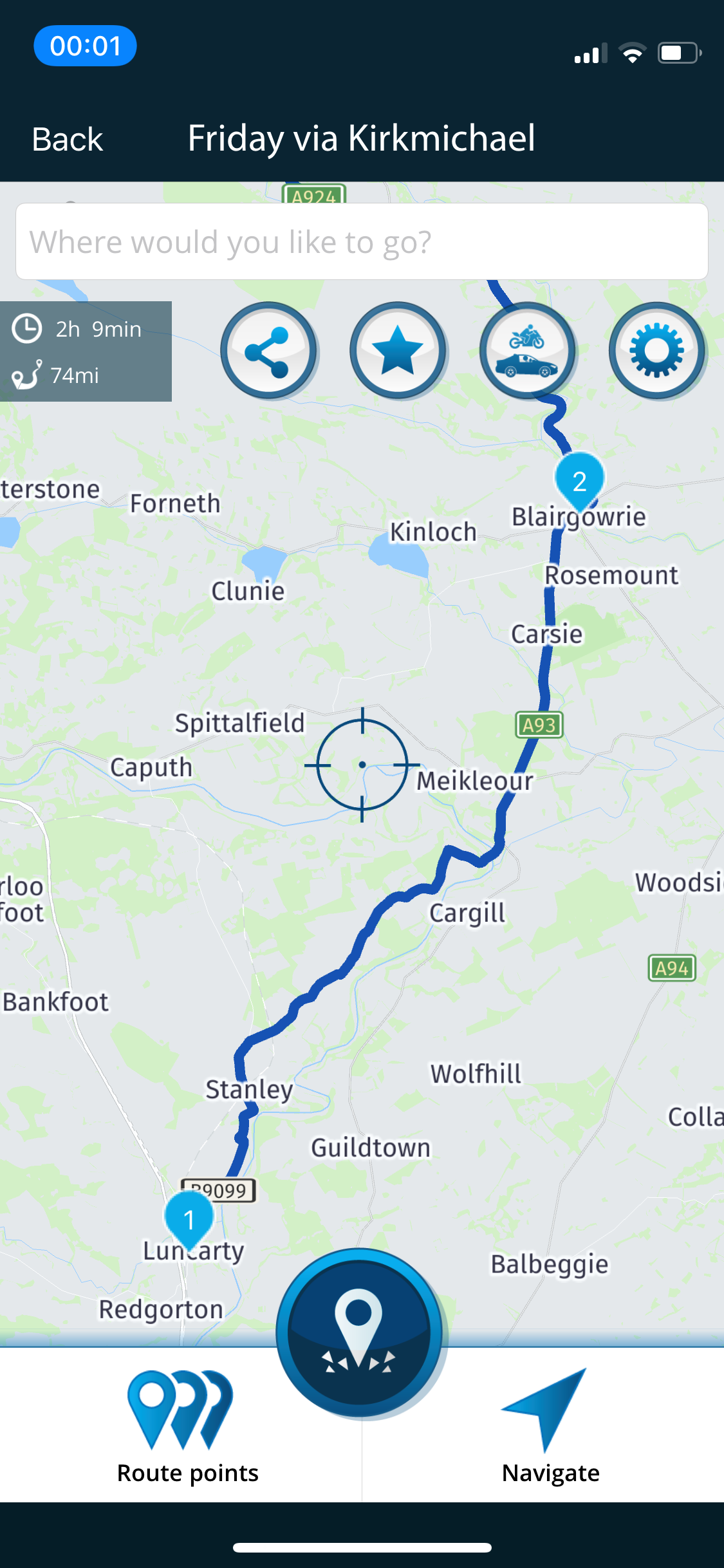
                    A9D720EF-878F-475F-BA9A-8F3E3CA28122.png

                    The app wants to take me by a more direct route, but I don’t want that, it’s dull.

                    Con Hennekens Offline
                    Con Hennekens Offline
                    Con Hennekens
                    Alpha tester
                    wrote on last edited by
                    #15

                    @Graeme-3, I placed the same to waypoints in my MRA planner. Your upper picture clearly depicts the Here Map calculation. Both TT and OSM maps equal your lower picture. To switch maps, you must NOT use the maps icon on the map-screen, that's for ovrlays. You must use the pagemenu:
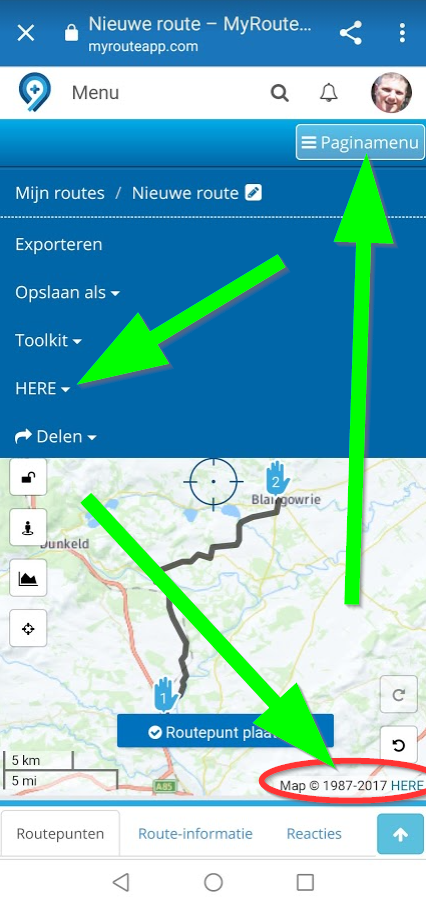
                    3da04742-45ac-4764-b6ba-1ac48cde1c7f-image.png

                    I am just an enthusiastic MRA user, and hope you will be one too!

                    Most motorcycle problems are caused by the nut that connects the handlebar to the saddle.

                    Check out RideSleepRepeat.eu, a biker community for sharing stays across Europe

                    1 Reply Last reply
                    0
                    • Graeme 3 Graeme 3

                      Ok so here’s the route I planned on the web

                      63A44DDB-3DB5-4B5F-B1C2-3CDB3754F4FB.jpeg

                      Here’s what I see when I open the route in the Navigator app

                      A9D720EF-878F-475F-BA9A-8F3E3CA28122.png

                      The app wants to take me by a more direct route, but I don’t want that, it’s dull.

                      Con Hennekens Offline
                      Con Hennekens Offline
                      Con Hennekens
                      Alpha tester
                      wrote on last edited by Con Hennekens
                      #16

                      @Graeme-3,
                      Also the distance between the waypoints is almost 20km. That leaves A LOT of interpretation for routing to the navigation settings. It is best to have waypoints each 1 to 5 km depending on the kind of roads in your route, and of course to use the same map in the route-planner (which is Here if you are using MRA Navigation). But even when using the same map, navigation over 20km can be off dramatically of the navigation settings are unequal. I make it best practice to never touch the navigation settings, but place enough waypoints to to guarantee the correct route. The navigation settings in MRA Navigator jump to defaults each time you load a route anyway, so it is nu use for detailed routing.

                      Some time ago I have put an idea in the "good idea's box" to have the navigation settings be part of the route-file. That will guarantee that navigation settings you set in the planner will be loaded in MRA Navigation for each route independently. But I have no idea if that will be picked up.

                      I am just an enthusiastic MRA user, and hope you will be one too!

                      Most motorcycle problems are caused by the nut that connects the handlebar to the saddle.

                      Check out RideSleepRepeat.eu, a biker community for sharing stays across Europe

                      1 Reply Last reply
                      0

                      Hello! It looks like you're interested in this conversation, but you don't have an account yet.

                      Getting fed up of having to scroll through the same posts each visit? When you register for an account, you'll always come back to exactly where you were before, and choose to be notified of new replies (either via email, or push notification). You'll also be able to save bookmarks and upvote posts to show your appreciation to other community members.

                      With your input, this post could be even better 💗

                      Register Login
                      Reply
                      • Reply as topic
                      Log in to reply
                      • Oldest to Newest
                      • Newest to Oldest
                      • Most Votes


                      ACTIVE USERS
                      Con Hennekens
                      Con Hennekens
                      Hans van de Ven MR.MRA
                      Hans van de Ven MR.MRA
                      Stefan Hummelink
                      Stefan Hummelink
                      Graeme 3
                      Graeme 3
                      POPULAR TOPICS
                      • How to share route with another member.
                        BertM
                        BertM
                        0
                        6
                        88

                      • Routes en verblijf Zwitserland
                        Travellexxie
                        Travellexxie
                        0
                        22
                        706

                      • The most important rule: all content is to be posted in English 🇬🇧 unless the post is made in the language specific area in the Self Support forum.
                        BertM
                        BertM
                        2
                        14
                        401

                      • No navigation instructions
                        superg
                        superg
                        0
                        2
                        39

                      • Route doesn’t recalculate to my destination
                        Peter Zehentreiter
                        Peter Zehentreiter
                        0
                        2
                        53

                      • App probleem scenic route niet mogelijk
                        Philip Verbeek
                        Philip Verbeek
                        1
                        14
                        380

                      • Ideetje voor kaartthema van Google Maps
                        0
                        1
                        24

                      • Skipping waypoints for no reason
                        richtea999
                        richtea999
                        0
                        7
                        508

                      MY GROUPS
                      • Login

                      • Login or register to search.
                      • First post
                        Last post
                      0
                      • Categories
                      • Recent
                      • Popular
                      • Support
                      • MyRoute-app