Skip to content
  • Categories
  • Recent
  • Popular
  • Support
  • MyRoute-app
Collapse
Brand Logo

MRA Community Forum

  1. Home
  2. MyRoute-app Routeplanner
  3. [Web] Problems, Bugs and other Issues
  4. Garmin Basecamp gpx to MRA - how?

Garmin Basecamp gpx to MRA - how?

Scheduled Pinned Locked Moved [Web] Problems, Bugs and other Issues
12 Posts 4 Posters 3.2k Views 3 Watching
  • Oldest to Newest
  • Newest to Oldest
  • Most Votes
Reply
  • Reply as topic
Log in to reply
This topic has been deleted. Only users with topic management privileges can see it.
  • Carl Lee Offline
    Carl Lee Offline
    Carl Lee
    wrote on last edited by
    #2

    @Gary-Hargraves it should be possible to use the MRA website to click 'Upload' the Route-track GPX from wherever you have it stored on your PC. Then from memory, I think it might be 'Use' or convert to a route - or similar. Anyway, I've done it before so try that and see where it leads.

    1 Reply Last reply
    0
    • Gary Hargraves Gary Hargraves

      Hi all, apologies if this is the wrong place ot post this but I have been sent (ahead of a four day ride in southern Spain) four GPX files that have been created in Garmin Basecamp (i know, i know, how dare they?!!!). How do I import them into MRA in a working/readable/legable/navigable format? I have tried on my phone but the route/track doesn't snap to roads, it takes the most direct route between way points. Any help would be most welcome. Thanks a lot - Gary
      Mzokk Offline
      Mzokk Offline
      Mzokk
      wrote on last edited by
      #3

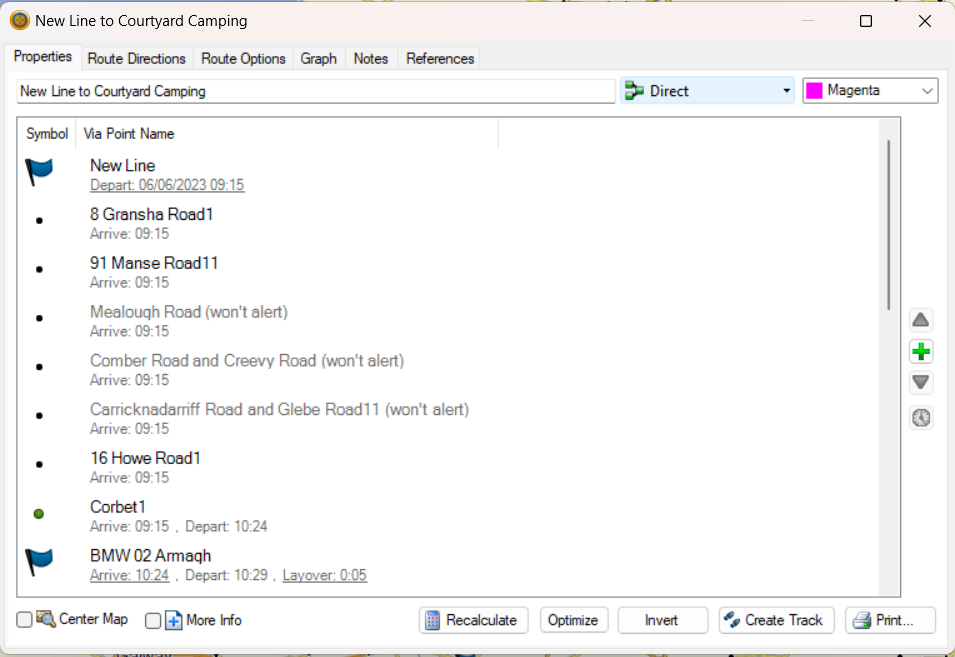
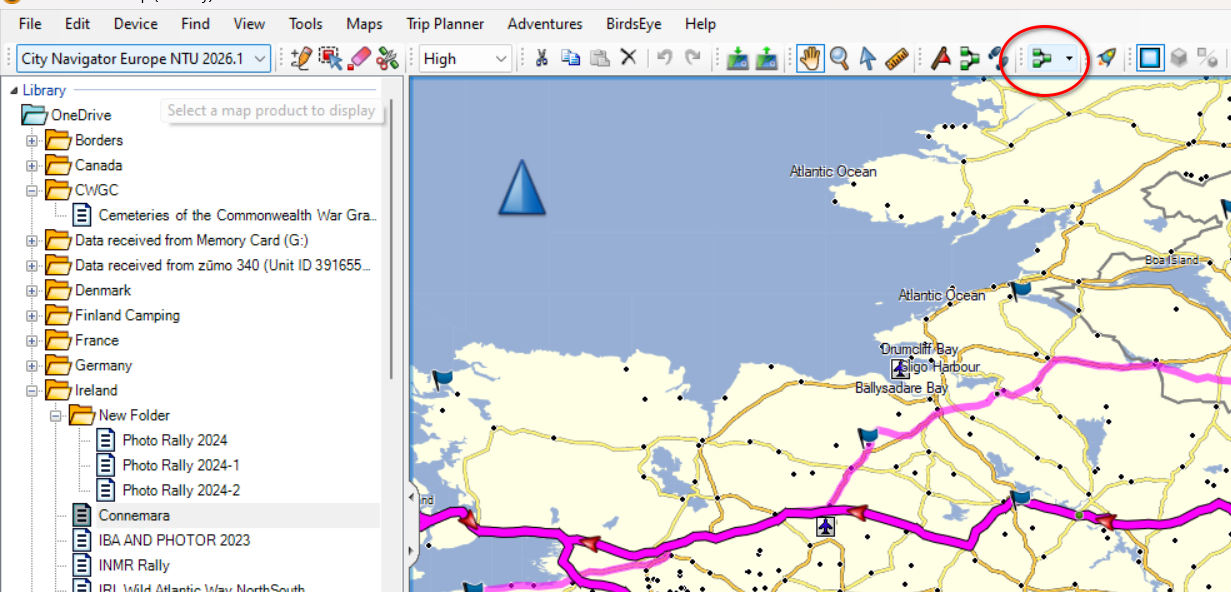
      @Gary-Hargraves I often export files from basecamp and upload them to MRA route planner. They come into MRA and preserve the shaping points and waypoints (Garmin Speak) as waypoints and via points (MRA speak) perfectly and route as planned. In Basecamp check that you don't have the navigation mode set as direct.
      ef626ddc-082c-4191-ad58-186e050c9e43-image.png

      Or for the route properties

      c3780fd7-6a8e-434d-8639-623659d989b3-image.png

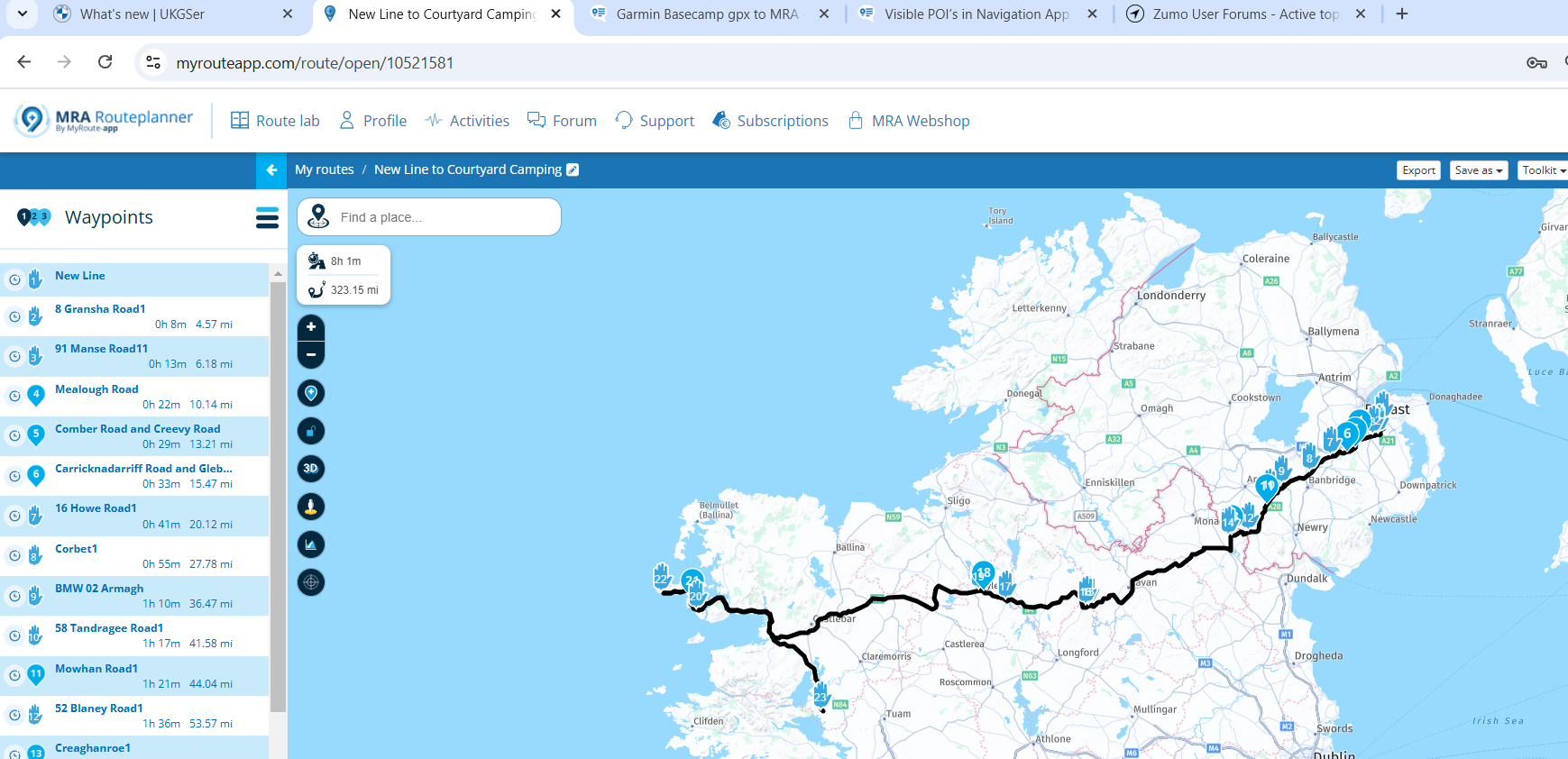
      This is the route designed in Basecamp imported into MRA
      6bc17e80-3ff9-4e8c-80de-204a6d3dc309-image.png

      Garry Davis 1 Reply Last reply
      1
      • Gary Hargraves Gary Hargraves

        Hi all, apologies if this is the wrong place ot post this but I have been sent (ahead of a four day ride in southern Spain) four GPX files that have been created in Garmin Basecamp (i know, i know, how dare they?!!!). How do I import them into MRA in a working/readable/legable/navigable format? I have tried on my phone but the route/track doesn't snap to roads, it takes the most direct route between way points. Any help would be most welcome. Thanks a lot - Gary

        Carl Lee Offline
        Carl Lee Offline
        Carl Lee
        wrote on last edited by
        #4

        @Gary-Hargraves Screenshot 2025-02-04 20.10.38.png

        Gary Hargraves 1 Reply Last reply
        0
        • Mzokk Mzokk

          @Gary-Hargraves I often export files from basecamp and upload them to MRA route planner. They come into MRA and preserve the shaping points and waypoints (Garmin Speak) as waypoints and via points (MRA speak) perfectly and route as planned. In Basecamp check that you don't have the navigation mode set as direct.

          ef626ddc-082c-4191-ad58-186e050c9e43-image.png

          Or for the route properties

          c3780fd7-6a8e-434d-8639-623659d989b3-image.png

          This is the route designed in Basecamp imported into MRA

          6bc17e80-3ff9-4e8c-80de-204a6d3dc309-image.png

          Garry Davis Offline
          Garry Davis Offline
          Garry Davis
          wrote on last edited by
          #5

          @Mzokk This is very interesting. Could you explain just how you do it. I've got as far as the above, but I'm at a loss as to what's next to get it into MRA. Nice one. 👍 👍

          Mzokk 1 Reply Last reply
          0
          • Garry Davis Garry Davis

            @Mzokk This is very interesting. Could you explain just how you do it. I've got as far as the above, but I'm at a loss as to what's next to get it into MRA. Nice one. 👍 👍

            Mzokk Offline
            Mzokk Offline
            Mzokk
            wrote on last edited by
            #6

            @Garry-Davis

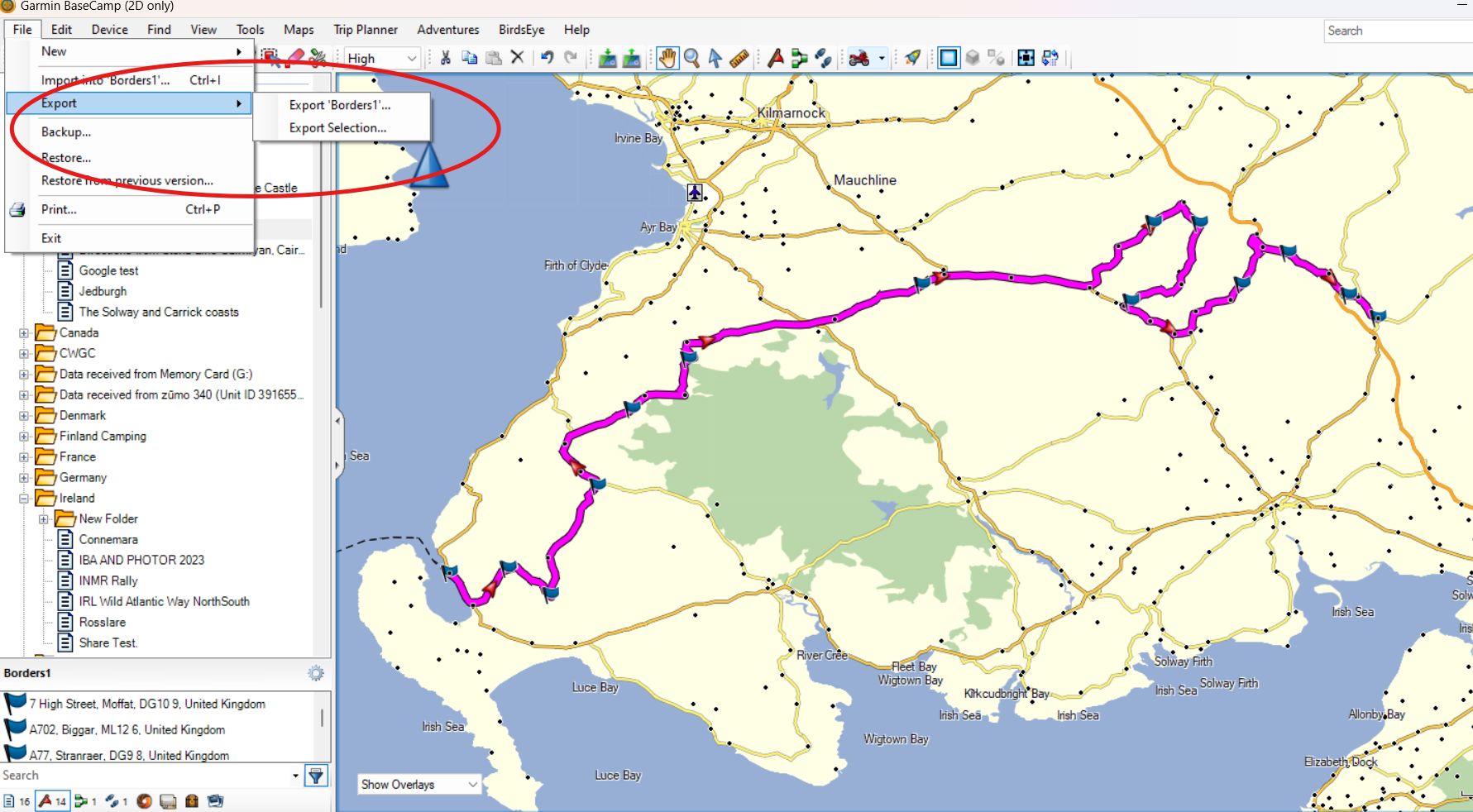
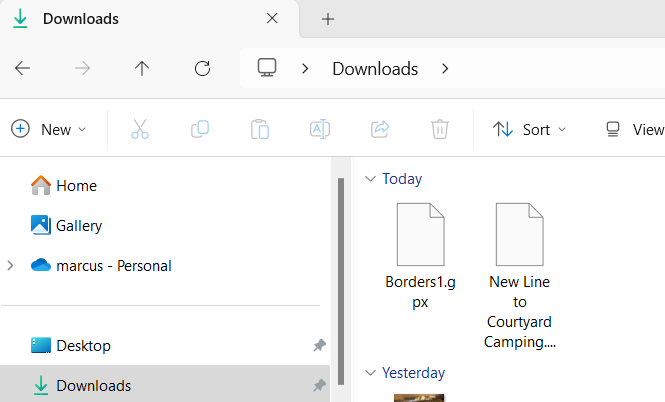
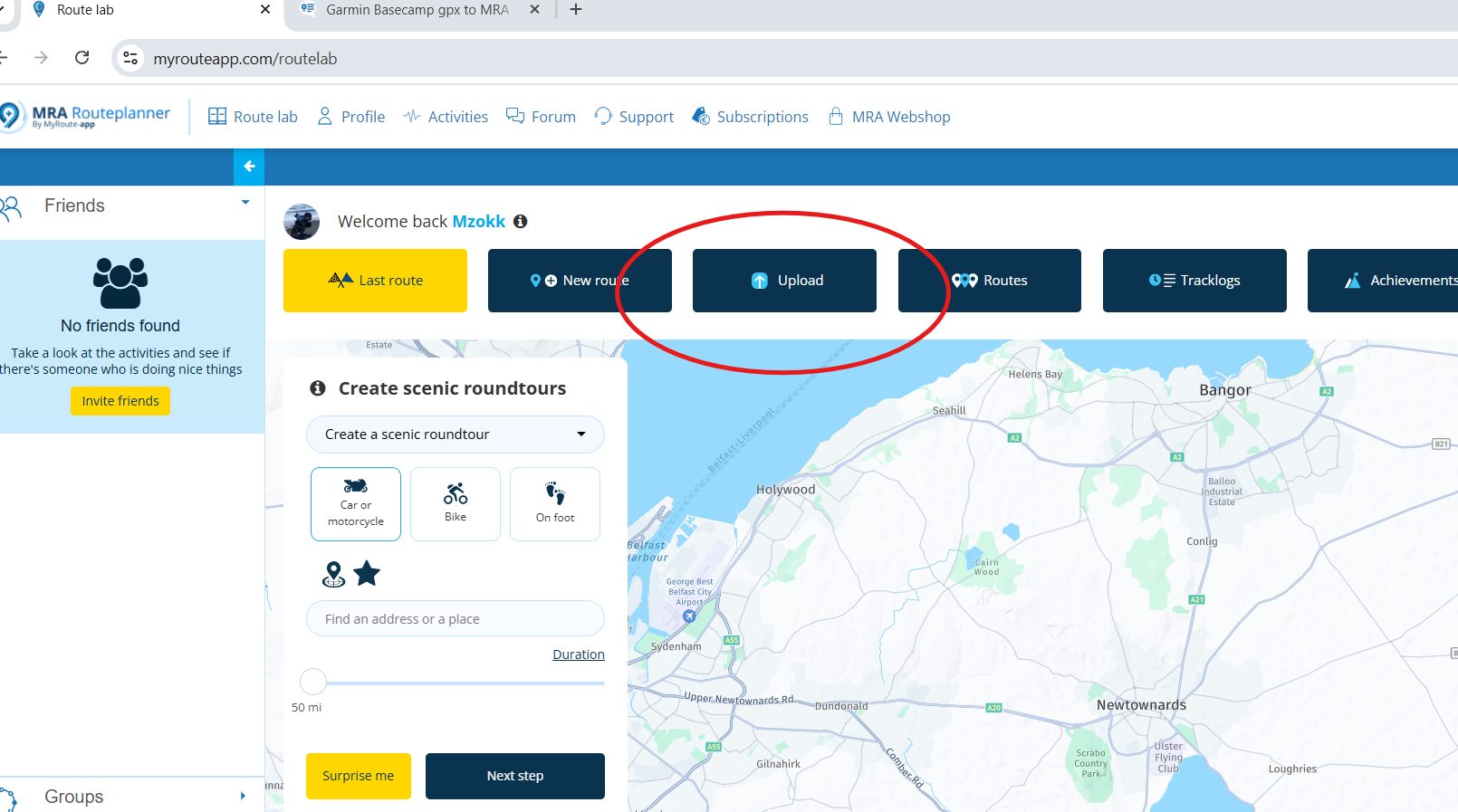
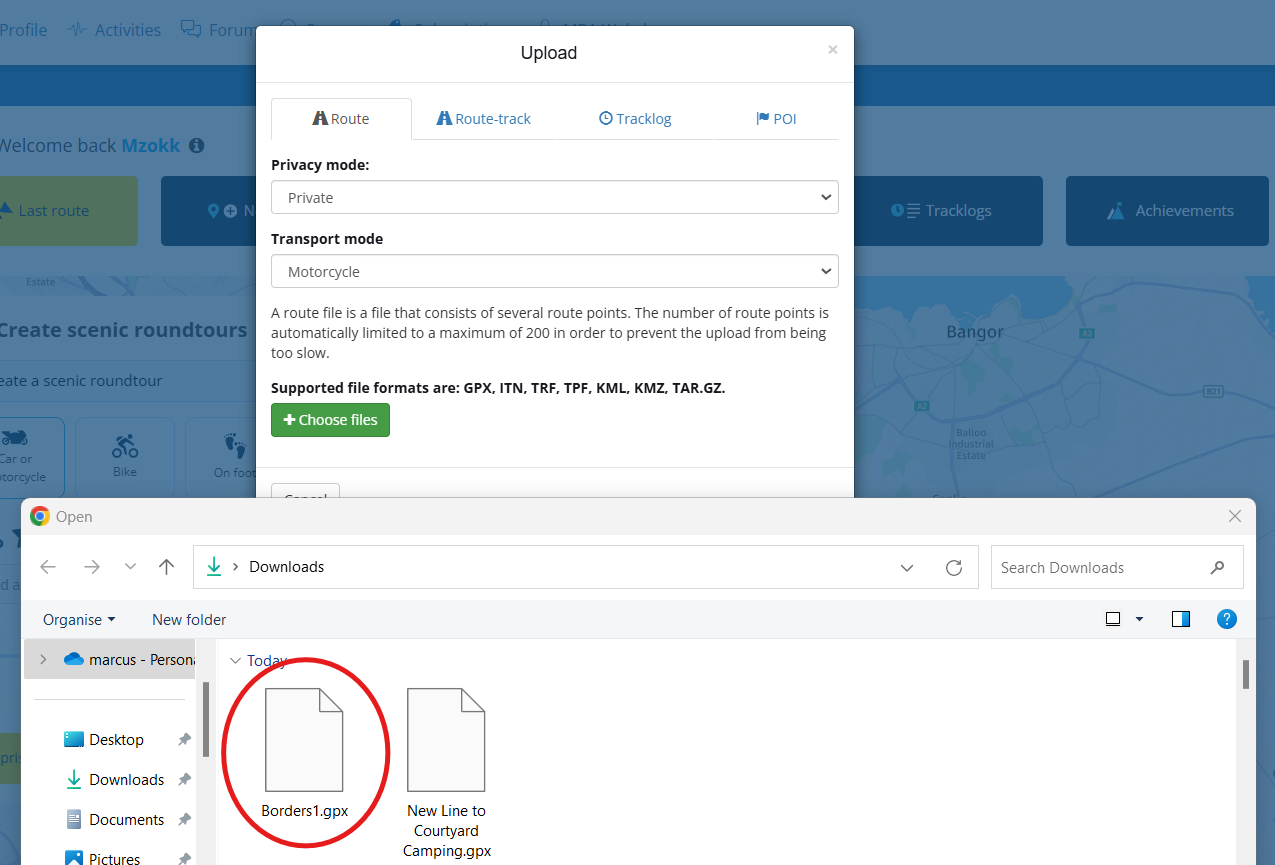
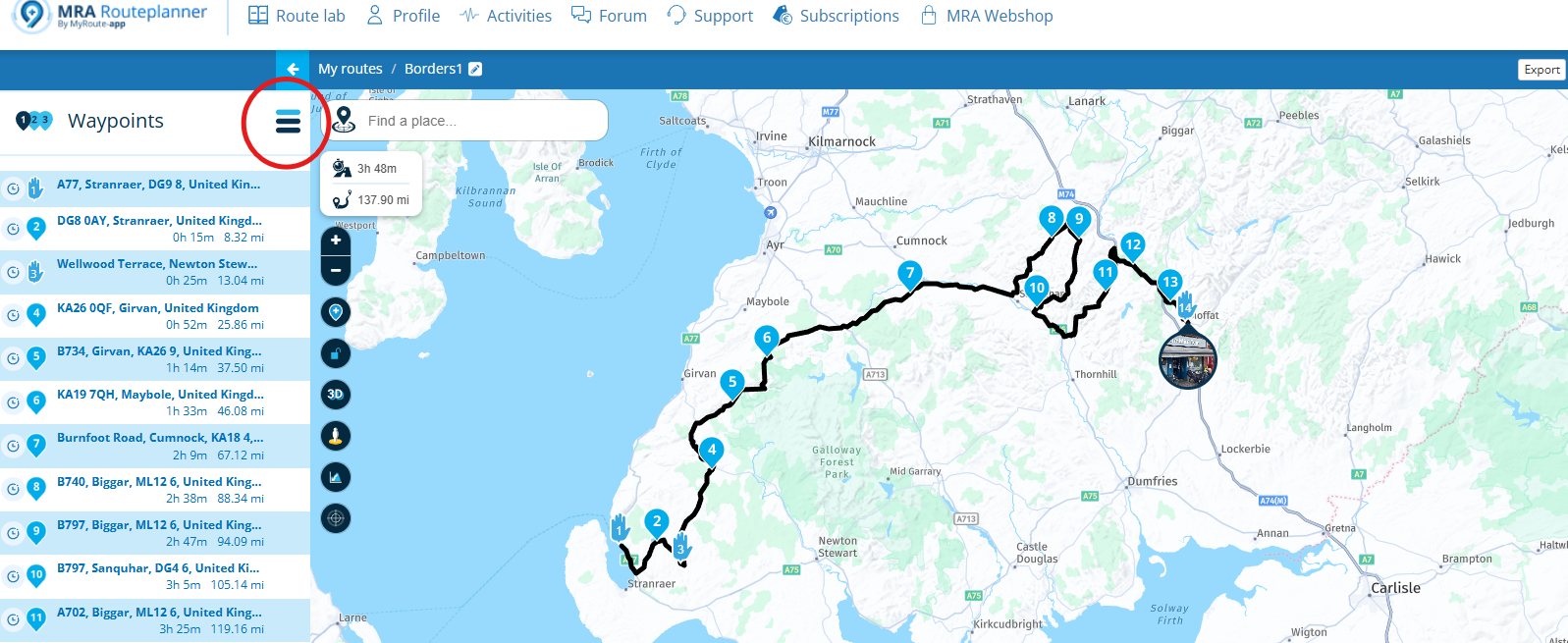
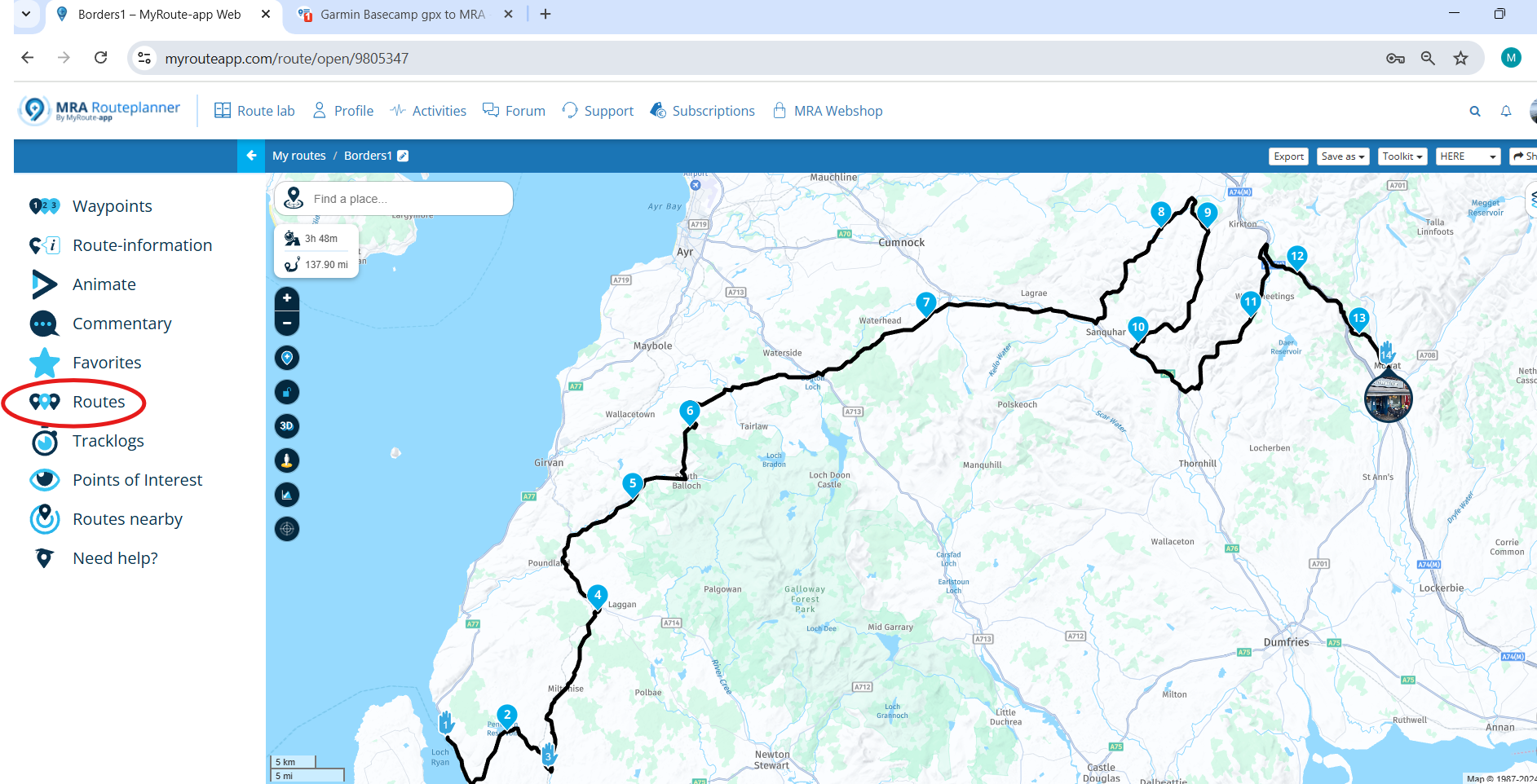
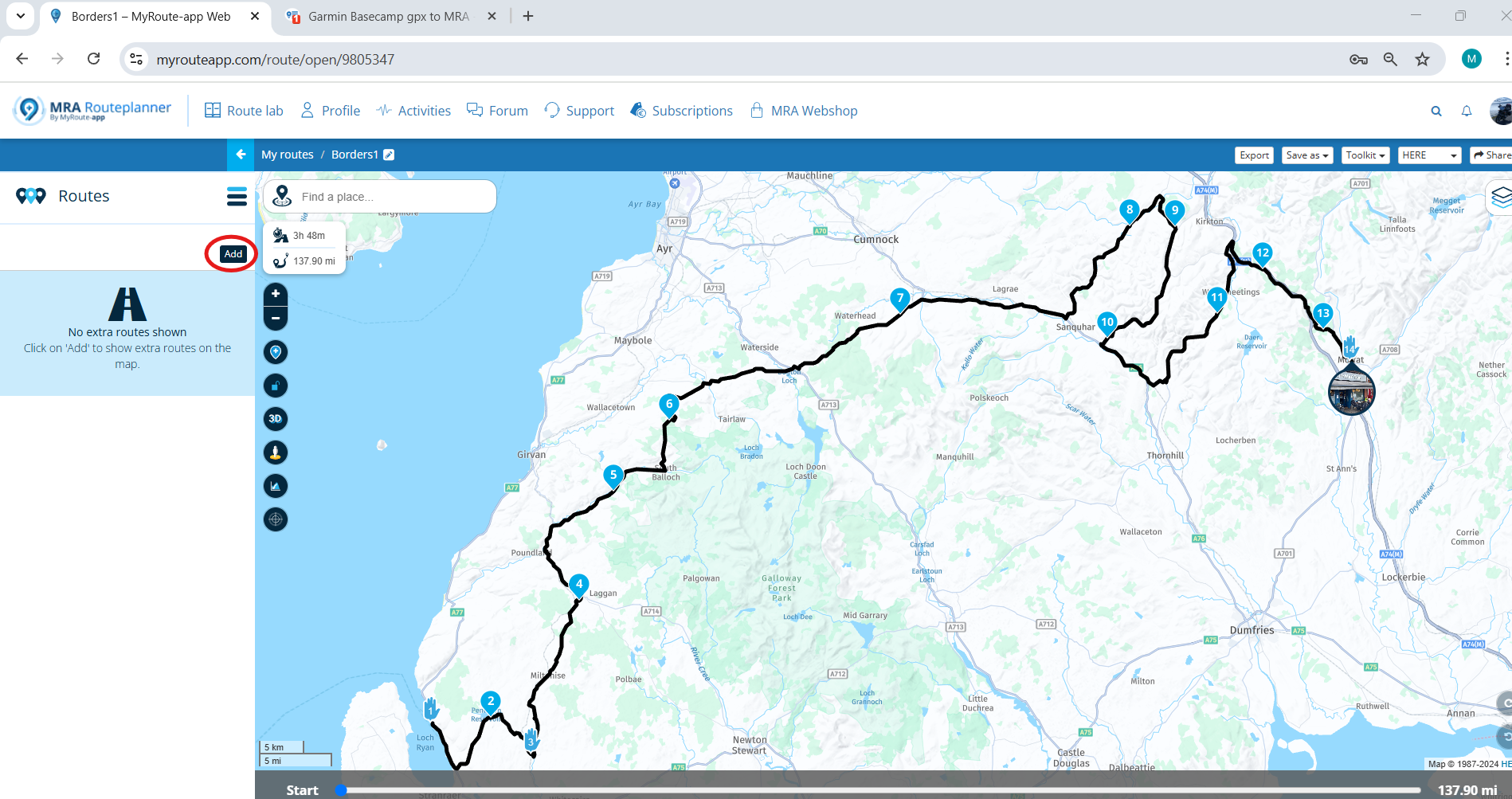
            Step by step.

            1. Create Route
            2. Export route

            7c038644-8dec-4008-9540-dd73a54823ae-image.png
            3. exported route
            97ed44ca-7ca7-4901-8dd5-2498a4267614-image.png
            4. Import Route into MRA
            1f8a8c24-6097-4399-b8f2-89dbaa2e64dd-image.png

            1. Select File
              844f6516-2ccd-4678-b0b5-fc1514d76e63-image.png

            2. Open file in Routes.
              b16fcf6f-5a11-4065-a1a4-405122663c46-image.png

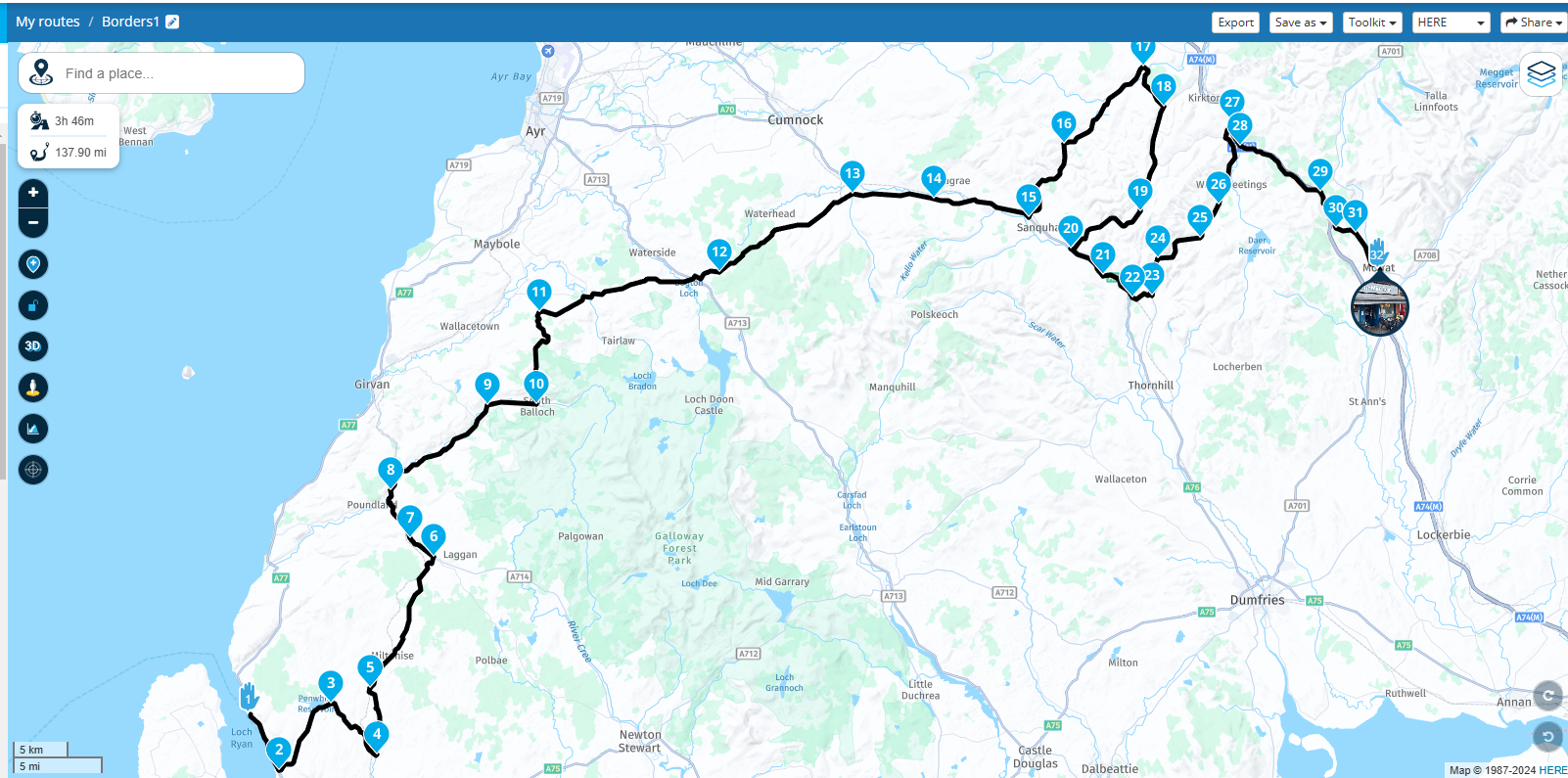
            Now in MRA same route as Basecamp using the same roads.
            7be96dc7-d438-474a-bb88-72dca3c137fa-image.png

            1 Reply Last reply
            2
            • Garry Davis Offline
              Garry Davis Offline
              Garry Davis
              wrote on last edited by Garry Davis
              #7

              @Mzokk
              Hi there Mzokk,
              Well I'll be buggered, ( Not literally I might add ) I've been using Basecamp for a long time now, and I never knew that could be done, I've got lots of routes in Basecamp, that I've always wanted to put into MRA, and now thanks to you, I can spend the next rainy day ( Won't have to wait too long in the UK will I ) transferring them over.
              Thanks again for coming up with solutions to my problems 😂😂👍👍

              Mzokk 1 Reply Last reply
              1
              • Garry Davis Garry Davis

                @Mzokk
                Hi there Mzokk,
                Well I'll be buggered, ( Not literally I might add ) I've been using Basecamp for a long time now, and I never knew that could be done, I've got lots of routes in Basecamp, that I've always wanted to put into MRA, and now thanks to you, I can spend the next rainy day ( Won't have to wait too long in the UK will I ) transferring them over.
                Thanks again for coming up with solutions to my problems 😂😂👍👍

                Mzokk Offline
                Mzokk Offline
                Mzokk
                wrote on last edited by
                #8

                @Garry-Davis No issue. Basecamp and MRA Routeplanner are great tools. I use MRA a lot particularly when on tour as its handy for creating routes/amending routes on the fly without having to carry a device capable of running Basecamp. I still use basecamp for handling POI's and some track handling as Basecamp is the better tool for this compared to MRA.

                1 Reply Last reply
                1
                • Carl Lee Carl Lee

                  @Gary-Hargraves Screenshot 2025-02-04 20.10.38.png

                  Gary Hargraves Offline
                  Gary Hargraves Offline
                  Gary Hargraves
                  wrote on last edited by
                  #9

                  @Carl-Lee thanks a lot Carl 🙂

                  1 Reply Last reply
                  0
                  • Gary Hargraves Offline
                    Gary Hargraves Offline
                    Gary Hargraves
                    wrote on last edited by
                    #10

                    Thanks everyone, a great help and the advice looks to be sport on. One more question! How do I display four seperate gpx files on one screen as a tour? Thanks again all 🙂

                    Mzokk 1 Reply Last reply
                    0
                    • Gary Hargraves Gary Hargraves

                      Thanks everyone, a great help and the advice looks to be sport on. One more question! How do I display four seperate gpx files on one screen as a tour? Thanks again all 🙂

                      Mzokk Offline
                      Mzokk Offline
                      Mzokk
                      wrote on last edited by
                      #11

                      @Gary-Hargraves

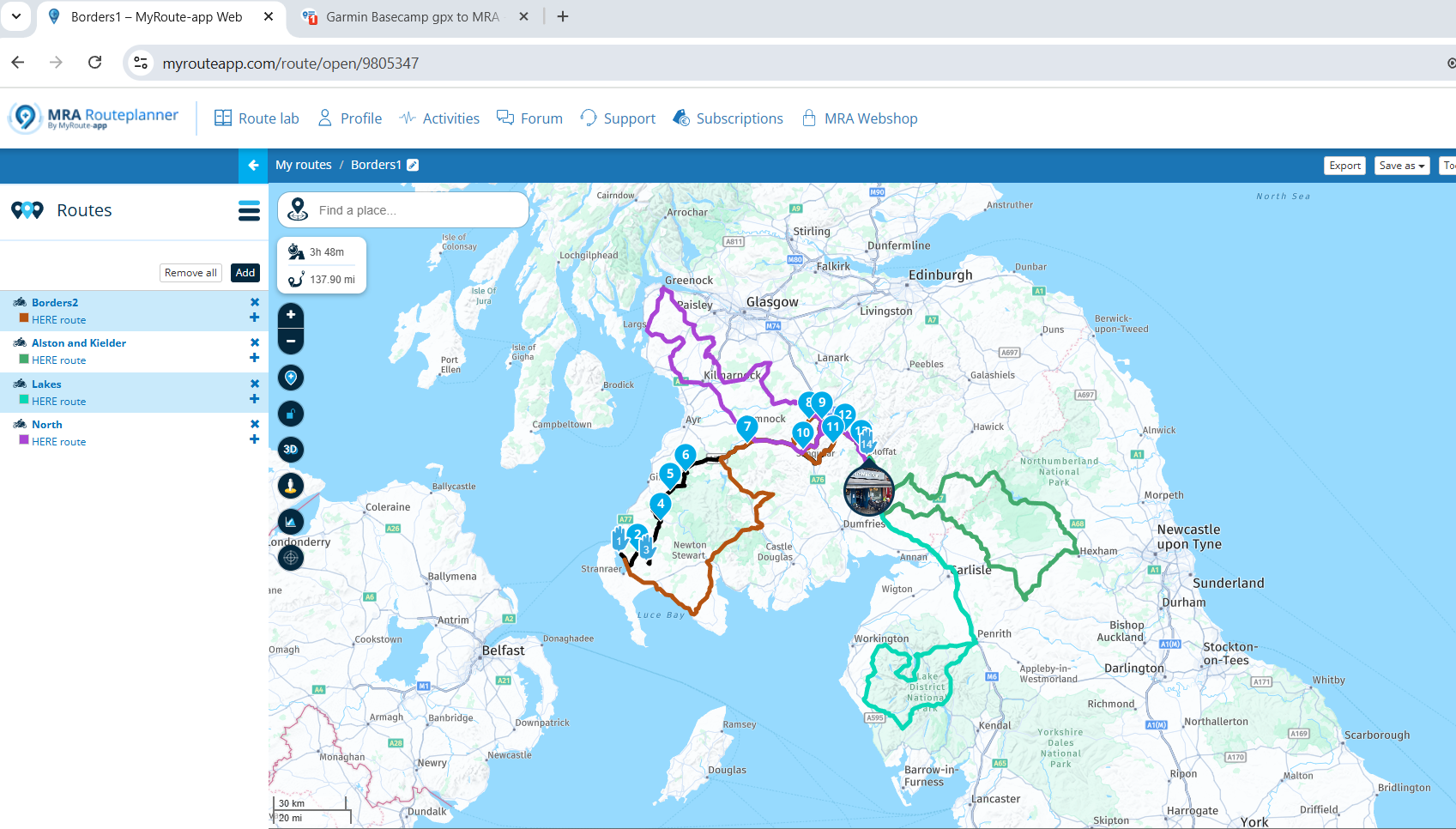
                      e2d4f3f2-242d-4ea7-b732-5455b3cdfc25-image.png

                      a9bd390a-981b-4982-bbe6-1942a55bff24-image.png

                      d4c00fa3-4d8e-4492-9d8b-8dd7da897f18-image.png

                      d2b6f7ba-2683-4930-91e4-30a65a11d5e2-image.png

                      👍

                      Gary Hargraves 1 Reply Last reply
                      0
                      • Mzokk Mzokk

                        @Gary-Hargraves

                        e2d4f3f2-242d-4ea7-b732-5455b3cdfc25-image.png

                        a9bd390a-981b-4982-bbe6-1942a55bff24-image.png

                        d4c00fa3-4d8e-4492-9d8b-8dd7da897f18-image.png

                        d2b6f7ba-2683-4930-91e4-30a65a11d5e2-image.png

                        👍

                        Gary Hargraves Offline
                        Gary Hargraves Offline
                        Gary Hargraves
                        wrote on last edited by
                        #12

                        @Mzokk - thanks a million 🙂

                        1 Reply Last reply
                        0

                        Hello! It looks like you're interested in this conversation, but you don't have an account yet.

                        Getting fed up of having to scroll through the same posts each visit? When you register for an account, you'll always come back to exactly where you were before, and choose to be notified of new replies (either via email, or push notification). You'll also be able to save bookmarks and upvote posts to show your appreciation to other community members.

                        With your input, this post could be even better 💗

                        Register Login
                        Reply
                        • Reply as topic
                        Log in to reply
                        • Oldest to Newest
                        • Newest to Oldest
                        • Most Votes


                        ACTIVE USERS
                        Mzokk
                        Mzokk
                        Carl Lee
                        Carl Lee
                        Garry Davis
                        Garry Davis
                        Gary Hargraves
                        Gary Hargraves
                        POPULAR TOPICS
                        • Duur van de route klopt niet
                          Nick Carthew
                          Nick Carthew
                          0
                          10
                          113

                        • It was not possible to find a correct route to Wheels Through Time
                          Stevedo 6 0
                          Stevedo 6 0
                          0
                          7
                          97

                        • Gidday from New Zealand.
                          Marinus van Deudekom
                          Marinus van Deudekom
                          1
                          5
                          101

                        • Beeld loopt achter
                          Marinus van Deudekom
                          Marinus van Deudekom
                          0
                          8
                          136

                        • Carpuride BMW unit stalling or restarting
                          Maarten van de Wijdeven
                          Maarten van de Wijdeven
                          0
                          14
                          349

                        • GPX Versions 1.1 vs 1.2 for Garmin Visually Explained
                          Steve Jarrell
                          Steve Jarrell
                          7
                          190
                          28.1k

                        • Opening Route Direct from Android Auto Screen
                          Mzokk
                          Mzokk
                          0
                          4
                          175

                        • Traject controle
                          Nick Carthew
                          Nick Carthew
                          0
                          2
                          46

                        MY GROUPS
                        • Login

                        • Login or register to search.
                        • First post
                          Last post
                        0
                        • Categories
                        • Recent
                        • Popular
                        • Support
                        • MyRoute-app