
Skip to content
  • Categories
  • Recent
  • Popular
  • Support
  • MyRoute-app
Collapse
Brand Logo

MRA Community Forum

  1. Home
  2. MyRoute-app Routeplanner
  3. [Web] Problems, Bugs and other Issues
  4. Routenpunkte

Routenpunkte

Scheduled Pinned Locked Moved [Web] Problems, Bugs and other Issues
10 Posts 6 Posters 3.3k Views 4 Watching
  • Oldest to Newest
  • Newest to Oldest
  • Most Votes
Reply
  • Reply as topic
Log in to reply
This topic has been deleted. Only users with topic management privileges can see it.
  • Kronland
    Kronland
    Kronland
    wrote on last edited by
    #1

    Hallo,

    da gibt es ein Riesenproblem mit den Routenpunkten.

    Wenn ich diese genau auf der Strasse setze und die Route das nächste Mal kontrolliere sind diese teilweise neben den Strassen.
    Das gibt aber ein Riesenproblem mit dem ZUMO XT Navi.

    Ist das normal - dann wäre der Routenplaner unbrauchbar ....

    Bitte um Rückinfo.

    Danke

    Joachim

    RetiredWingMan Rob Verhoeff luf HABVEN aka MrMRA 4 Replies Last reply
    0
    • Kronland Kronland

      Hallo,

      da gibt es ein Riesenproblem mit den Routenpunkten.

      Wenn ich diese genau auf der Strasse setze und die Route das nächste Mal kontrolliere sind diese teilweise neben den Strassen.
      Das gibt aber ein Riesenproblem mit dem ZUMO XT Navi.

      Ist das normal - dann wäre der Routenplaner unbrauchbar ....

      Bitte um Rückinfo.

      Danke

      Joachim

      RetiredWingMan
      RetiredWingMan
      RetiredWingMan
      Valued contributor
      wrote on last edited by RetiredWingMan
      #2

      @Kronland I've never seen this issue. If you change between Tomtom and Here maps the way points may appear to move but just opening a route with the same planning maps should not cause the wapoints to move.

      2010 GL1800 Goldwing using Samsung Galaxy S20 5G Android 13.

      1 Reply Last reply
      0
      • Kronland Kronland

        Hallo,

        da gibt es ein Riesenproblem mit den Routenpunkten.

        Wenn ich diese genau auf der Strasse setze und die Route das nächste Mal kontrolliere sind diese teilweise neben den Strassen.
        Das gibt aber ein Riesenproblem mit dem ZUMO XT Navi.

        Ist das normal - dann wäre der Routenplaner unbrauchbar ....

        Bitte um Rückinfo.

        Danke

        Joachim

        Rob Verhoeff
        Rob Verhoeff
        Rob Verhoeff
        Alpha tester
        wrote on last edited by
        #3

        @Kronland Which map are you using to create the route? If you set the Here map as the default map, there shouldn't be any issues. To check the points after creating the route, zoom in as much as possible on a route point. You can then move forward and backward to the route points (< and >) using the arrow keys on your keyboard.

        For the standard map, choose the red arrow. Blue for the overlay maps.
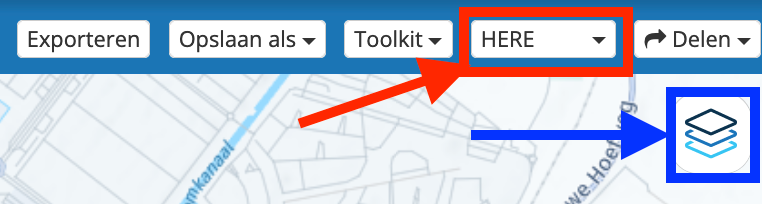
        Menubalk met overlay.png

        🏍️ BMW K1600GT-P (2013) | Nolan N100-5 with Sena 30K
        📱 iOS on iPhone 13 & 16 (mounted on Quadlock or AliExpress extention on BMW-cradle)
        🚙 Apple CarPlay in VW T-Roc
        💻 Routelab on MacBook Air & iMac (Golden Gate & Ventura)

        1 Reply Last reply
        0
        • Kronland Kronland

          Hallo,

          da gibt es ein Riesenproblem mit den Routenpunkten.

          Wenn ich diese genau auf der Strasse setze und die Route das nächste Mal kontrolliere sind diese teilweise neben den Strassen.
          Das gibt aber ein Riesenproblem mit dem ZUMO XT Navi.

          Ist das normal - dann wäre der Routenplaner unbrauchbar ....

          Bitte um Rückinfo.

          Danke

          Joachim

          luf
          luf
          luf
          wrote on last edited by
          #4

          @Kronland if the Zumo XT Navi behaves the same as the regular Zumo XT, then I am not surprised at small misplacements of any points
          The XT can change the location of a point if you simply switch it from a Via point to Shaping point
          Basically an XT cannot be trusted, they have a mind of there own

          Kronland 1 Reply Last reply
          0
          • Kronland Kronland

            Hallo,

            da gibt es ein Riesenproblem mit den Routenpunkten.

            Wenn ich diese genau auf der Strasse setze und die Route das nächste Mal kontrolliere sind diese teilweise neben den Strassen.
            Das gibt aber ein Riesenproblem mit dem ZUMO XT Navi.

            Ist das normal - dann wäre der Routenplaner unbrauchbar ....

            Bitte um Rückinfo.

            Danke

            Joachim

            HABVEN aka MrMRA
            HABVEN aka MrMRA
            HABVEN aka MrMRA
            Valued contributor
            wrote on last edited by
            #5

            @Kronland

            Zoomen Sie bei der Überprüfung der Routenpunkte so weit wie möglich hinein und platzieren Sie diese korrekt auf der Routenlinie.
            Das funktioniert mit allen Navigationsgeräten einwandfrei.

            BMW BMW Connected Ride Navigator/Garmin Zumo XT3/XT2/XT//Tourstart/ MyRouteapp (The App)/...
            Een dag niet gelachen is een dag niet geleefd / Een route is net zo goed als deze uitgezet is.

            Kronland 1 Reply Last reply
            0
            • HABVEN aka MrMRA HABVEN aka MrMRA

              @Kronland

              Zoomen Sie bei der Überprüfung der Routenpunkte so weit wie möglich hinein und platzieren Sie diese korrekt auf der Routenlinie.
              Das funktioniert mit allen Navigationsgeräten einwandfrei.

              Kronland
              Kronland
              Kronland
              wrote on last edited by
              #6

              @Hans-van-de-Ven-MRA-Master

              Ich werde es versuchen. Was jedoch eigenartig ist, ist, wenn ich heute eine Route plane und diese morgen kontrolliere, kann es sein, dass die Punkte auf einmal neben der Strasse sind.

              Das irritiert mich ein wenig.

              Die Planung findet mit der HERE Karte statt.

              lg

              Joachim

              Hubert Thoring 1 Reply Last reply
              0
              • Kronland Kronland

                @Hans-van-de-Ven-MRA-Master

                Ich werde es versuchen. Was jedoch eigenartig ist, ist, wenn ich heute eine Route plane und diese morgen kontrolliere, kann es sein, dass die Punkte auf einmal neben der Strasse sind.

                Das irritiert mich ein wenig.

                Die Planung findet mit der HERE Karte statt.

                lg

                Joachim

                Hubert Thoring
                Hubert Thoring
                Hubert Thoring
                Valued contributor
                wrote on last edited by
                #7

                @Kronland : Hallo, wenn Du die Punkte in Ruhe planst sollte es bei den selbst gesetzten WP eigentlich nicht passieren. Nutzt du dann zusätzlich WP automatisch auffüllen dann landen manche Punkte abseits der Straße, das ist mir schon öfter aufgefallen, bedeutet diese Art von WP sind zu kontrollieren. So meine Erfahrung ❗️

                VG Hubert
                Beta Test "Next App" dazu die Hardware .
                iPad 9. Gen iOS 27.0.1/ iPhone 16e iOS 27.0.1/ Navi iPhone Xr iOS 18.7.10 / PC mit MS Win11 /❗️MyRoute-App im Cradel und Remotek-One❗️ Info zu MRA & Remotek One

                1 Reply Last reply
                0
                • luf luf

                  @Kronland if the Zumo XT Navi behaves the same as the regular Zumo XT, then I am not surprised at small misplacements of any points
                  The XT can change the location of a point if you simply switch it from a Via point to Shaping point
                  Basically an XT cannot be trusted, they have a mind of there own

                  Kronland
                  Kronland
                  Kronland
                  wrote on last edited by
                  #8

                  @luf Hi Luf ... can you help me with my zumo. Where can I change this. Now I have on my Garmin only the track zu drive. The planned points are - so it looks like - only via points.
                  I want to change this.

                  Thanks for your help.

                  In Garmin Basecamp I didn't have this problem.

                  Joachim

                  luf 1 Reply Last reply
                  0
                  • Kronland Kronland

                    @luf Hi Luf ... can you help me with my zumo. Where can I change this. Now I have on my Garmin only the track zu drive. The planned points are - so it looks like - only via points.
                    I want to change this.

                    Thanks for your help.

                    In Garmin Basecamp I didn't have this problem.

                    Joachim

                    luf
                    luf
                    luf
                    wrote on last edited by
                    #9

                    @Kronland I am not sure what you exactly want to change.

                    If you are using a track to navigate then you will have no points except for the begining & end points.

                    This MRA blog/video explains the difference between Via & Shaping points as well as the the GPX formats 1.1 & 1.2 & how to transfer them to the Garmin

                    On the garmin device if you open a route you can change a Shaping point to a Via point (or vice versa) by pressing the point in the list as shown where I have circled in red
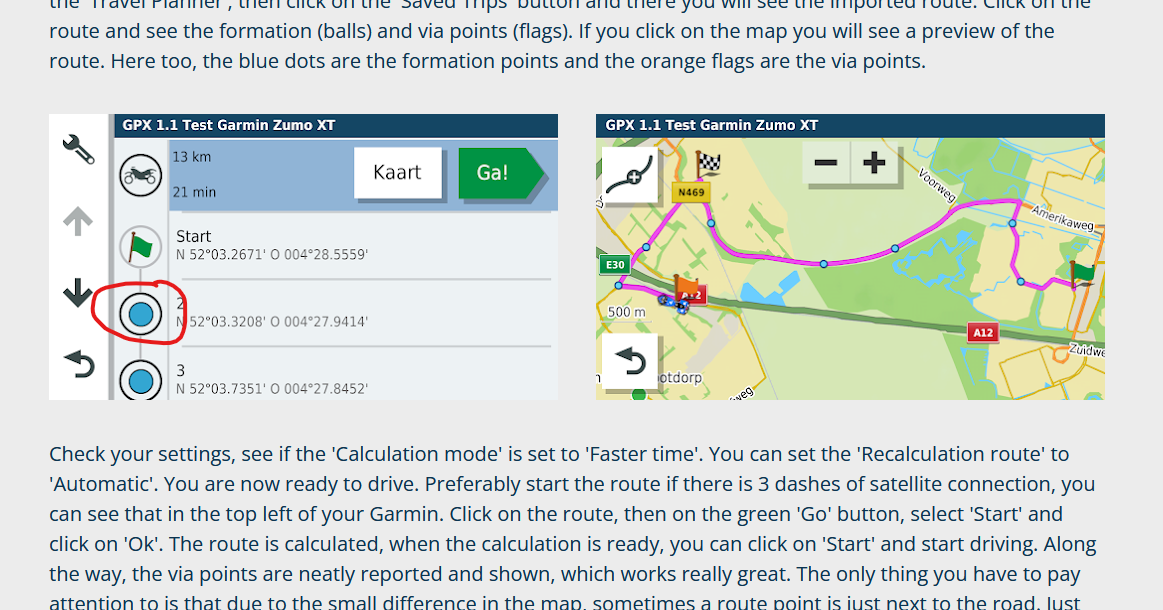
                    83e5d7fc-b782-4b74-a08d-34f1ec3f5d05-image.png

                    Kronland 1 Reply Last reply
                    0
                    • luf luf

                      @Kronland I am not sure what you exactly want to change.

                      If you are using a track to navigate then you will have no points except for the begining & end points.

                      This MRA blog/video explains the difference between Via & Shaping points as well as the the GPX formats 1.1 & 1.2 & how to transfer them to the Garmin

                      On the garmin device if you open a route you can change a Shaping point to a Via point (or vice versa) by pressing the point in the list as shown where I have circled in red
                      83e5d7fc-b782-4b74-a08d-34f1ec3f5d05-image.png

                      Kronland
                      Kronland
                      Kronland
                      wrote on last edited by
                      #10

                      @luf
                      Thanks for your reply. I got another Tip, i want to Test First.

                      I wanted, that all Points must be joined, without the work on the zumo to change every Blue Mark by Hand.

                      Joachim

                      1 Reply Last reply
                      0

                      Hello! It looks like you're interested in this conversation, but you don't have an account yet.

                      Getting fed up of having to scroll through the same posts each visit? When you register for an account, you'll always come back to exactly where you were before, and choose to be notified of new replies (either via email, or push notification). You'll also be able to save bookmarks and upvote posts to show your appreciation to other community members.

                      With your input, this post could be even better 💗

                      Register Login
                      Reply
                      • Reply as topic
                      Log in to reply
                      • Oldest to Newest
                      • Newest to Oldest
                      • Most Votes


                      ACTIVE USERS
                      RetiredWingMan
                      RetiredWingMan
                      Hubert Thoring
                      Hubert Thoring
                      Rob Verhoeff
                      Rob Verhoeff
                      HABVEN aka MrMRA
                      HABVEN aka MrMRA
                      Kronland
                      Kronland
                      luf
                      luf
                      POPULAR TOPICS
                      • Route wordt afgesneden
                        Corjan Meijerink
                        Corjan Meijerink
                        0
                        5
                        61

                      • Map blurred when editing POIs
                        Lluis Arasanz
                        Lluis Arasanz
                        0
                        5
                        7

                      • Problem with HERE, getting the route correct ??
                        BertM
                        BertM
                        0
                        4
                        60

                      • Maps Michelin
                        Jacob Waterweg
                        Jacob Waterweg
                        1
                        10
                        378

                      • opslaan naar Plan-TomTom werkt niet meer; wat is er gewijzigd!
                        M. Schrijver
                        M. Schrijver
                        0
                        6
                        123

                      • App failed to start; reinstall locked me out!
                        Anonymouse
                        Anonymouse
                        0
                        3
                        61

                      • A10 POIs - Text field for text and WebLink
                        Hubert Thoring
                        Hubert Thoring
                        0
                        8
                        74

                      • Enduro off-road opportunities?
                        Pedro de Cleen
                        Pedro de Cleen
                        0
                        3
                        115

                      MY GROUPS
                      • Login

                      • Login or register to search.
                      • First post
                        Last post
                      0
                      • Categories
                      • Recent
                      • Popular
                      • Support
                      • MyRoute-app