Skip to content
  • Categories
  • Recent
  • Popular
  • Support
  • MyRoute-app
Collapse
Brand Logo

MRA Community Forum

  1. Home
  2. [Beta] The MyRoute-app
  3. [Beta] Problems, Bugs and other Issues
  4. CarPlay Screen Picture - Route position

CarPlay Screen Picture - Route position

Scheduled Pinned Locked Moved [Beta] Problems, Bugs and other Issues
2 Posts 2 Posters 63 Views 1 Watching
  • Oldest to Newest
  • Newest to Oldest
  • Most Votes
Reply
  • Reply as topic
Log in to reply
This topic has been deleted. Only users with topic management privileges can see it.
  • Dave J 0undefined Offline
    Dave J 0undefined Offline
    Dave J 0
    Valued contributor
    wrote on last edited by Dave J 0
    #1

    I have had this happen a number of times now where the route is displayed dead centre (instead of slightly left of centre) and then obscured by the directions. Pictures are of iPhone 12 Pro and CarPlay screenshots:
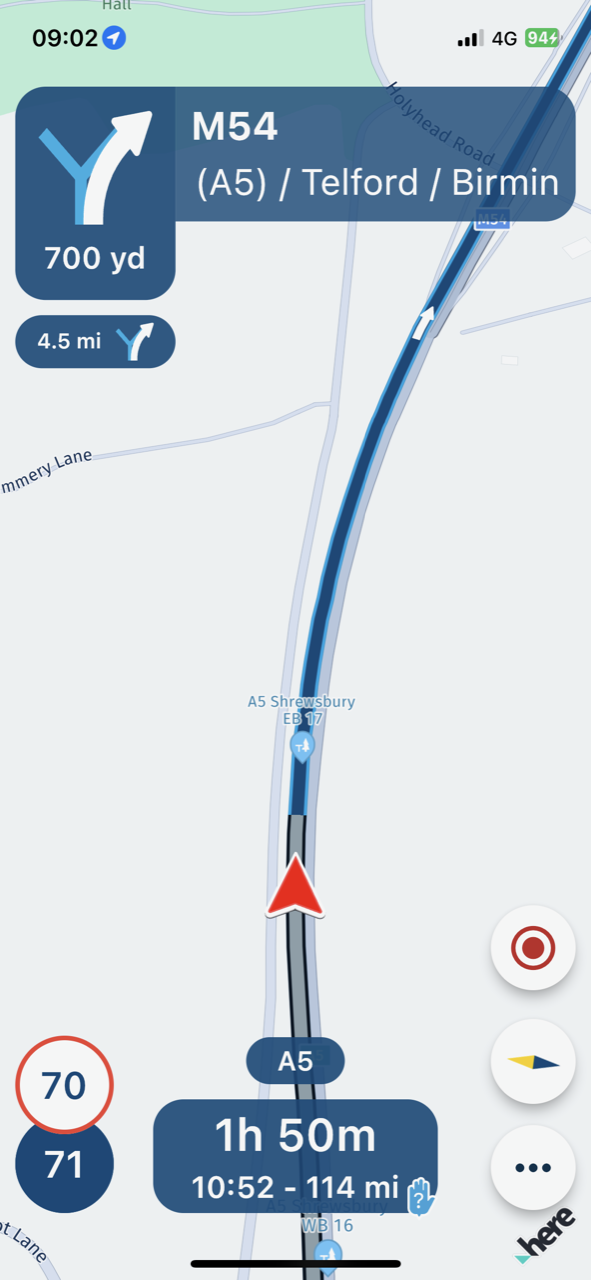
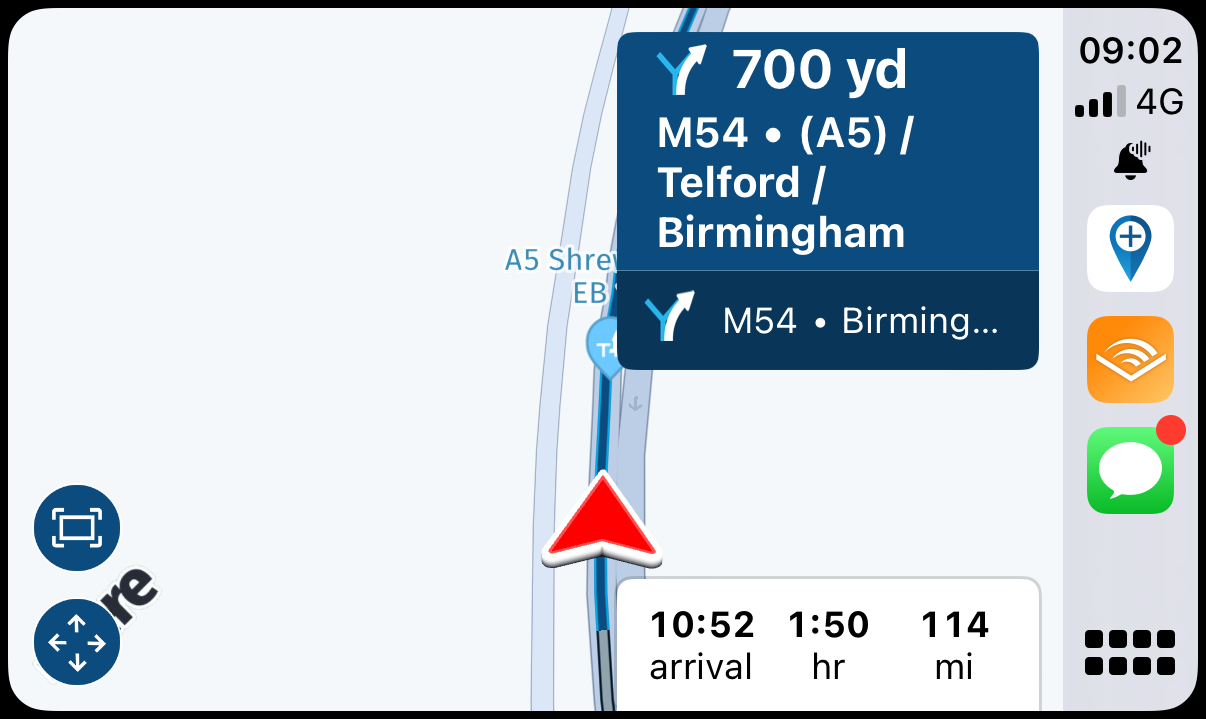
    IMG_3395.png IMG_3394.png

    The problem can usually be solved by disconnecting from CarPlay and restarting the app and then reconnecting.
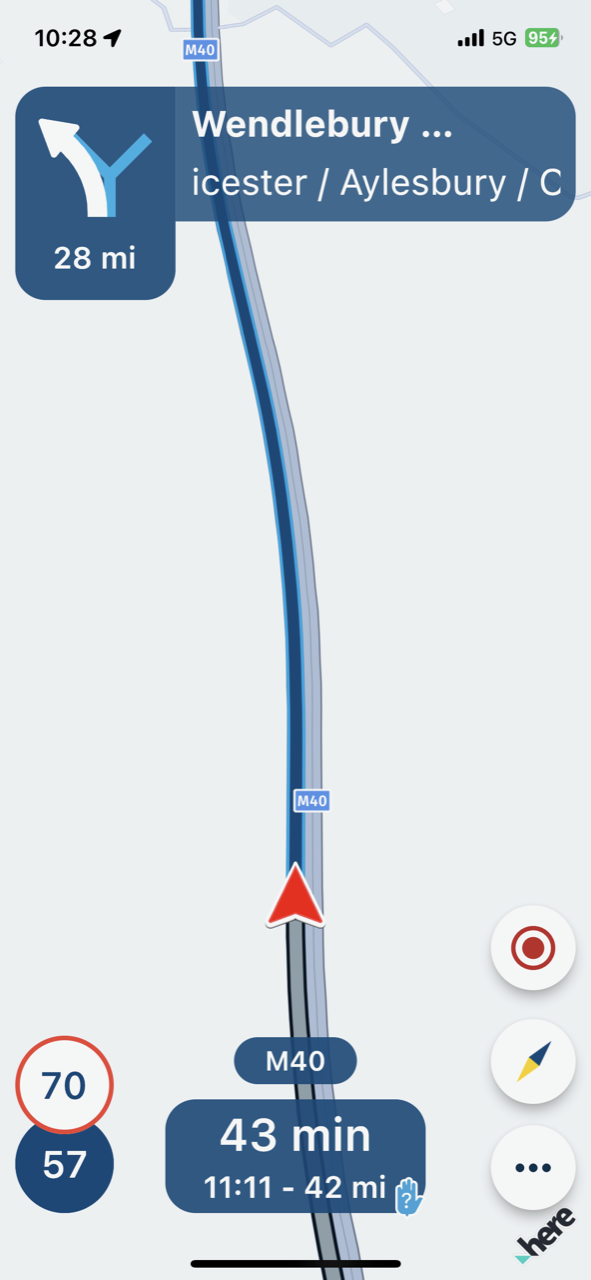
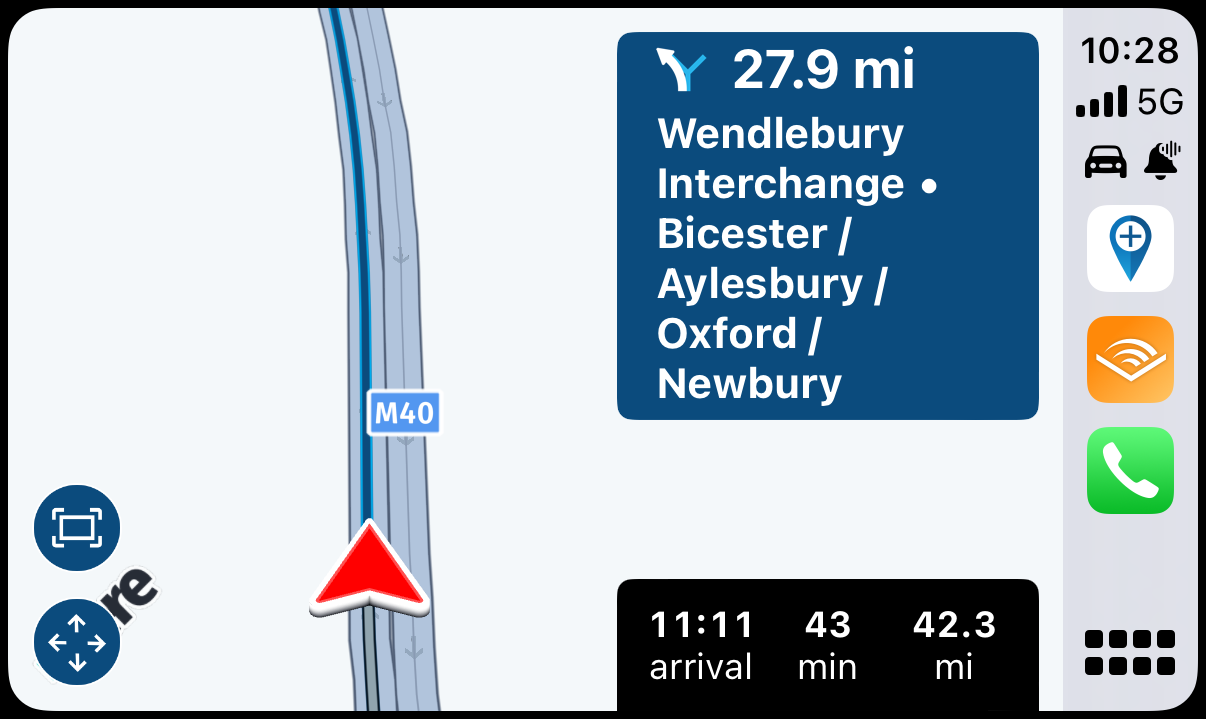
    IMG_3397.png IMG_3396.png

    Kind Regards. Help where I can.
    Ducati Multistrada V4 Rally
    iPhone 15 Pro
    CHIGEE AIO-6 LTE
    Google Pixel 6 Pro - mounted on SP Connect Plus
    Ex Garmin XT2 and XT1 as well as Ex TomTom Rider User

    Corjan Meijerinkundefined 1 Reply Last reply
    0
    • Dave J 0undefined Dave J 0

      I have had this happen a number of times now where the route is displayed dead centre (instead of slightly left of centre) and then obscured by the directions. Pictures are of iPhone 12 Pro and CarPlay screenshots:

      IMG_3395.png IMG_3394.png

      The problem can usually be solved by disconnecting from CarPlay and restarting the app and then reconnecting.

      IMG_3397.png IMG_3396.png

      Corjan Meijerinkundefined Online
      Corjan Meijerinkundefined Online
      Corjan Meijerink
      Developer
      wrote on last edited by Corjan Meijerink
      #2

      @Dave-J-0 yeah, this is indeed a known and annoying issue. You also “fix” the positioning by tapping any of the buttons bottom left (and then “done”).

      1 Reply Last reply
      0
      Reply
      • Reply as topic
      Log in to reply
      • Oldest to Newest
      • Newest to Oldest
      • Most Votes


      ACTIVE USERS
      Corjan Meijerinkundefined
      Corjan Meijerink
      Dave J 0undefined
      Dave J 0
      POPULAR TOPICS
      • What is this symbol?
        Aiello antoninoundefined
        Aiello antonino
        0
        7
        207

      • Carpuride
        b0hd1undefined
        b0hd1
        0
        5
        120

      • Re-calculating ... for a VERY long time
        Marcel Versluisundefined
        Marcel Versluis
        0
        4
        82

      • mra route afsluiting naderland
        Nick Carthewundefined
        Nick Carthew
        0
        2
        12

      • Sections orange sur ma route
        Marinus van Deudekomundefined
        Marinus van Deudekom
        0
        2
        24

      • schaal bij gebruik navigatie op de gsm
        Peter Zehentreiterundefined
        Peter Zehentreiter
        0
        14
        600

      • Routepunten en viapunten in carpuride
        undefined
        0
        1
        1

      • "Route as Track" wird nicht wie geplant navigiert
        Martin Wilckeundefined
        Martin Wilcke
        0
        18
        600
      MY GROUPS
      • Login

      • Login or register to search.
      • First post
        Last post
      0
      • Categories
      • Recent
      • Popular
      • Support
      • MyRoute-app