Skip to content
  • Categories
  • Recent
  • Popular
  • Support
  • MyRoute-app
Collapse
Brand Logo

MRA Community Forum

  1. Home
  2. [Beta] The MyRoute-app
  3. [Beta] Problems, Bugs and other Issues
  4. Tablet and landscape mode

Tablet and landscape mode

Scheduled Pinned Locked Moved [Beta] Problems, Bugs and other Issues
8 Posts 4 Posters 105 Views 2 Watching
  • Oldest to Newest
  • Newest to Oldest
  • Most Votes
Reply
  • Reply as topic
Log in to reply
This topic has been deleted. Only users with topic management privileges can see it.
  • Jörgenundefined Offline
    Jörgenundefined Offline
    Jörgen
    Valued contributor
    wrote on last edited by
    #1

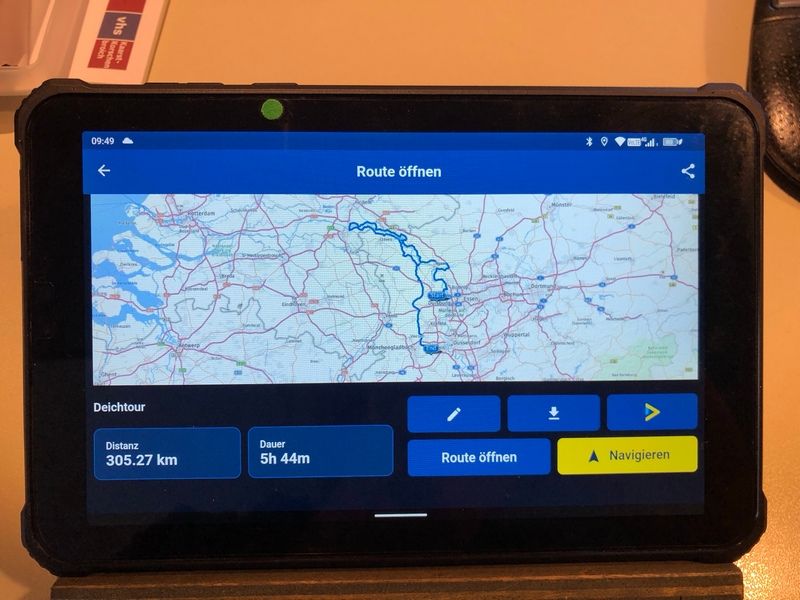
    Again, I may be one of the rare people using an Android tablet and have the following issue.

    App start, route loading and routing works fine.
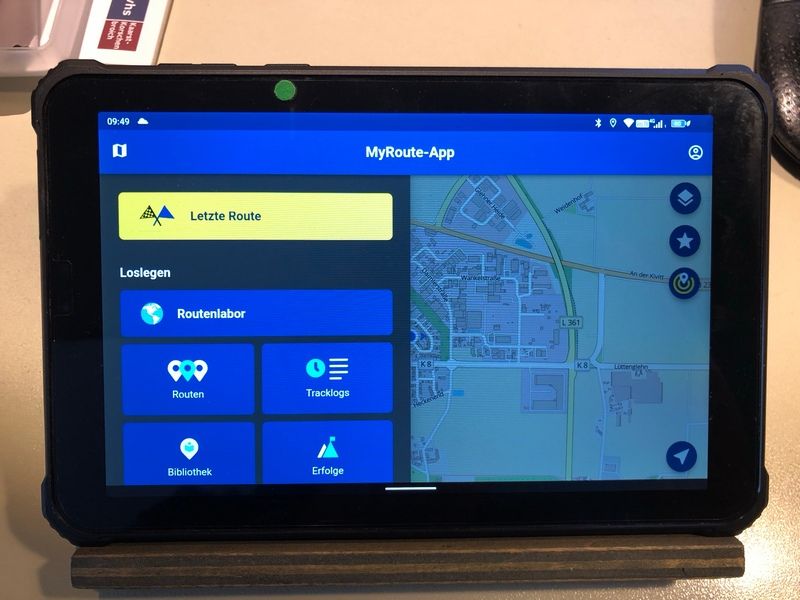
    IMG_3631_1.JPG

    IMG_3632.JPG

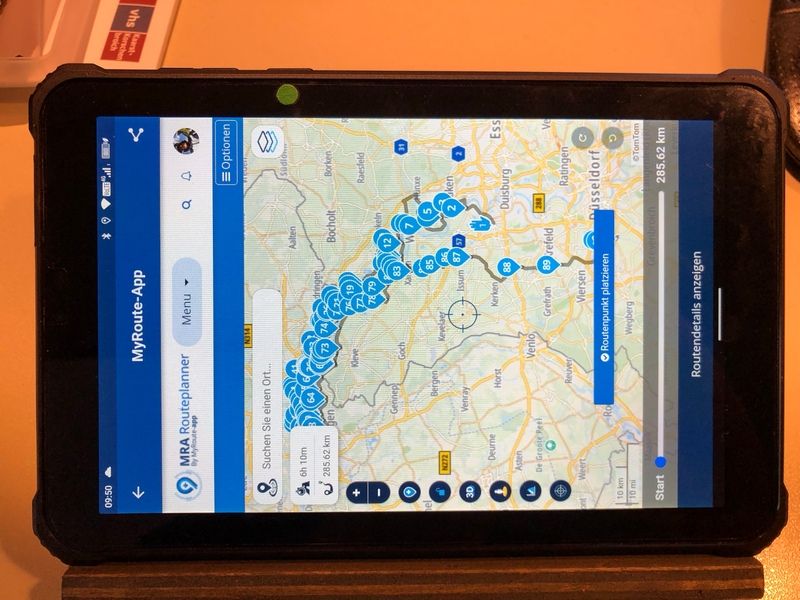
    But if I want to edit something ( add a waypoint e.g. ) the screen goes into portrait mode. 😞

    IMG_3633.JPG

    Difficult to edit if the tablet is mounted in landscape. 😞

    Hardware
    iPhone 12 pro (iOS 26.2.1)
    iPad (7.Gen.) 18.7.3
    Oukitel RT3 Pro (Andr. 14)
    Wireless CarPlay mit (Elebest C650)
    Wired CarPlay (SEAT Arona - 2021)
    MRA Workshops in Deutsch sind hier zu finden

    Rob Verhoeffundefined Corjan Meijerinkundefined 2 Replies Last reply
    0
    • Jörgenundefined Jörgen

      Again, I may be one of the rare people using an Android tablet and have the following issue.

      App start, route loading and routing works fine.
      IMG_3631_1.JPG

      IMG_3632.JPG

      But if I want to edit something ( add a waypoint e.g. ) the screen goes into portrait mode. 😞

      IMG_3633.JPG

      Difficult to edit if the tablet is mounted in landscape. 😞

      Rob Verhoeffundefined Offline
      Rob Verhoeffundefined Offline
      Rob Verhoeff
      Alpha tester
      wrote on last edited by Rob Verhoeff
      #2

      @Jörgen I presume it's Android? Is there an option in the settings menu of the tablet to set the screen display to landscape or portrait?

      BMW K1600GT-P (2013) | Nolan N100-5 with Sena 30K
      iOS on iPhone 13 & 16 (mounted on Quadlock or AliExpress extention on BMW-cradle)
      Apple CarPlay in VW T-Roc
      Routelab on MacBook Air & iMac (Tahoe & Ventura)

      1 Reply Last reply
      0
      • Jörgenundefined Offline
        Jörgenundefined Offline
        Jörgen
        Valued contributor
        wrote on last edited by
        #3

        Hi Rob, yes Android ( I wrote it above) 😉

        You can only switch off auto turn, then it is always in portrait.

        It will not turn around on iPad. Something on the website forces this.

        Hardware
        iPhone 12 pro (iOS 26.2.1)
        iPad (7.Gen.) 18.7.3
        Oukitel RT3 Pro (Andr. 14)
        Wireless CarPlay mit (Elebest C650)
        Wired CarPlay (SEAT Arona - 2021)
        MRA Workshops in Deutsch sind hier zu finden

        1 Reply Last reply
        0
        • Jörgenundefined Jörgen

          Again, I may be one of the rare people using an Android tablet and have the following issue.

          App start, route loading and routing works fine.

          IMG_3631_1.JPG

          IMG_3632.JPG

          But if I want to edit something ( add a waypoint e.g. ) the screen goes into portrait mode. 😞
          IMG_3633.JPG

          Difficult to edit if the tablet is mounted in landscape. 😞

          Corjan Meijerinkundefined Offline
          Corjan Meijerinkundefined Offline
          Corjan Meijerink
          Developer
          wrote on last edited by
          #4

          @Jörgen the browser access (route editing in this case) is forced in portrait when the resolution of the screen is too low for landscape.

          Believe me, this is better than having the routeplanner website open in landscape mode on screens with no enough resolution 😉

          1 Reply Last reply
          0
          • Jörgenundefined Offline
            Jörgenundefined Offline
            Jörgen
            Valued contributor
            wrote on last edited by
            #5

            But I cannot turn my bracket. 😢

            Hardware
            iPhone 12 pro (iOS 26.2.1)
            iPad (7.Gen.) 18.7.3
            Oukitel RT3 Pro (Andr. 14)
            Wireless CarPlay mit (Elebest C650)
            Wired CarPlay (SEAT Arona - 2021)
            MRA Workshops in Deutsch sind hier zu finden

            Corjan Meijerinkundefined Con Hennekensundefined 2 Replies Last reply
            0
            • Jörgenundefined Jörgen

              But I cannot turn my bracket. 😢

              Corjan Meijerinkundefined Offline
              Corjan Meijerinkundefined Offline
              Corjan Meijerink
              Developer
              wrote on last edited by
              #6

              @Jörgen you can remove it from the bracket 😉 And route planning using a mounted tablet on a bike isn’t really a use case for us too 🙂

              1 Reply Last reply
              0
              • Jörgenundefined Jörgen

                But I cannot turn my bracket. 😢

                Con Hennekensundefined Offline
                Con Hennekensundefined Offline
                Con Hennekens
                Alpha tester
                wrote on last edited by
                #7

                @Jörgen, you are not editing routes while driving, are you? 😉

                I am just an enthusiastic MRA user, and hope you will be one too!

                Most motorcycle problems are caused by the nut that connects the handlebar to the saddle.

                Check out RideSleepRepeat.eu, a biker community for sharing stays across Europe

                1 Reply Last reply
                0
                • Jörgenundefined Offline
                  Jörgenundefined Offline
                  Jörgen
                  Valued contributor
                  wrote on last edited by
                  #8

                  No, not while driving. 🙄
                  But there are cases where I want to add or remove something.
                  Yes it is not a common use.

                  But it should work, because the web version via FireFox browser works. See below. And yes the screen not that big. But in my opinion better to use than on the mobile phone.
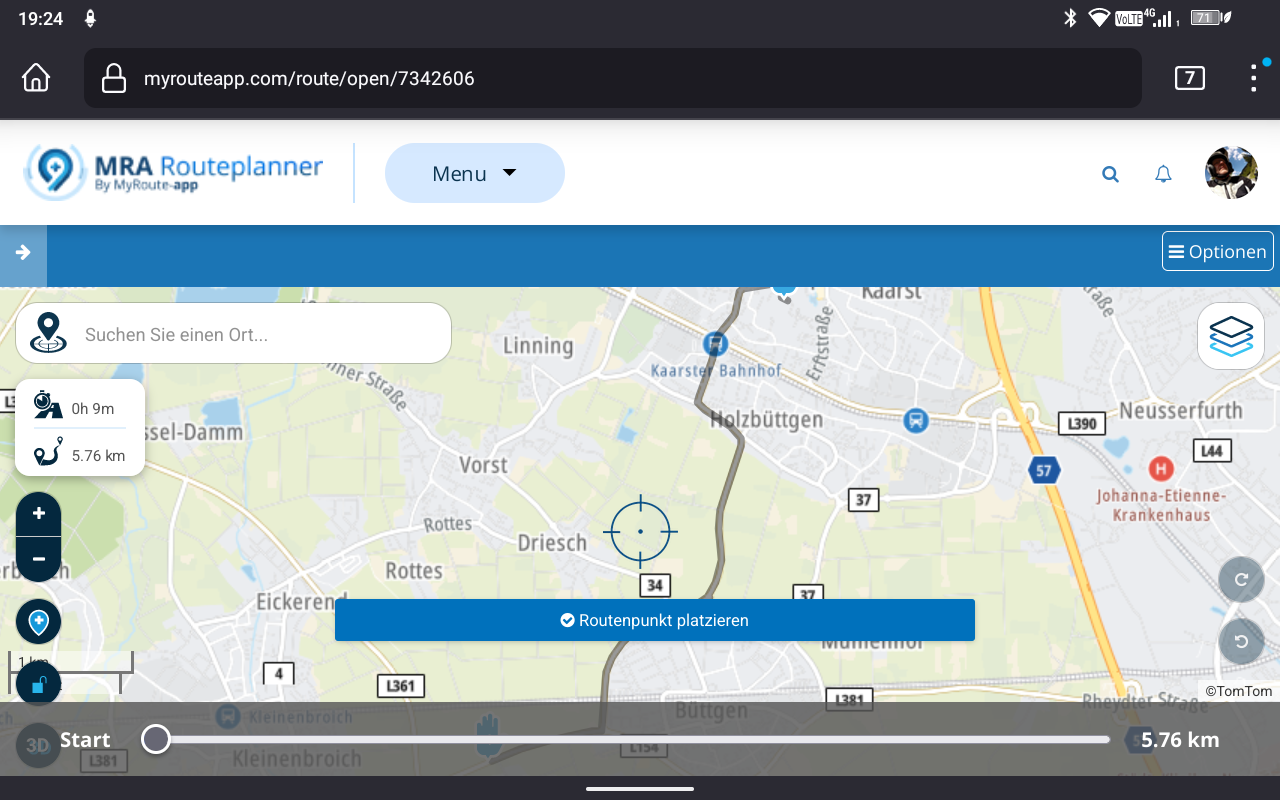
                  Screenshot_20230428-192400.png

                  Hardware
                  iPhone 12 pro (iOS 26.2.1)
                  iPad (7.Gen.) 18.7.3
                  Oukitel RT3 Pro (Andr. 14)
                  Wireless CarPlay mit (Elebest C650)
                  Wired CarPlay (SEAT Arona - 2021)
                  MRA Workshops in Deutsch sind hier zu finden

                  1 Reply Last reply
                  0

                  Hello! It looks like you're interested in this conversation, but you don't have an account yet.

                  Getting fed up of having to scroll through the same posts each visit? When you register for an account, you'll always come back to exactly where you were before, and choose to be notified of new replies (either via email, or push notification). You'll also be able to save bookmarks and upvote posts to show your appreciation to other community members.

                  With your input, this post could be even better 💗

                  Register Login
                  Reply
                  • Reply as topic
                  Log in to reply
                  • Oldest to Newest
                  • Newest to Oldest
                  • Most Votes


                  ACTIVE USERS
                  Corjan Meijerinkundefined
                  Corjan Meijerink
                  Rob Verhoeffundefined
                  Rob Verhoeff
                  Jörgenundefined
                  Jörgen
                  Con Hennekensundefined
                  Con Hennekens
                  POPULAR TOPICS
                  • deleting entries from the device limit list
                    Corjan Meijerinkundefined
                    Corjan Meijerink
                    0
                    5
                    49

                  • Using Folders
                    Keith Hofgartnerundefined
                    Keith Hofgartner
                    0
                    8
                    149

                  • Exporteren vanuit MRA naar Garmin XT lukt niet.
                    Travellexxieundefined
                    Travellexxie
                    0
                    4
                    56

                  • POI import anomalies
                    Mzokkundefined
                    Mzokk
                    0
                    4
                    111

                  • Who has a Mac computer to answer this question?
                    Nick Carthew RouteXpert Seniorundefined
                    Nick Carthew RouteXpert Senior
                    0
                    3
                    78

                  • Hulp gevraagd bij instellingen
                    Rob Verhoeffundefined
                    Rob Verhoeff
                    0
                    5
                    236

                  • Navigation stopped working during Tour
                    Rob Verhoeffundefined
                    Rob Verhoeff
                    1
                    24
                    2.2k

                  • MRA Fitz Unterstützung ist genial
                    undefined
                    1
                    1
                    43

                  MY GROUPS
                  • Login

                  • Login or register to search.
                  • First post
                    Last post
                  0
                  • Categories
                  • Recent
                  • Popular
                  • Support
                  • MyRoute-app