
Navigation v1.6.10 won;t switch to SD Card for maps
-

Hi Steve
I don't think that option is there, and the cards are placed on your phone. Could you add a print screen to this post?
BMW BMW Connected Ride Navigator/Garmin Zumo XT3/XT2/XT//Tourstart/ MyRouteapp (The App)/...
Een dag niet gelachen is een dag niet geleefd / Een route is net zo goed als deze uitgezet is. -
Hi Steve
I don't think that option is there, and the cards are placed on your phone. Could you add a print screen to this post?
@Hans-van-de-Ven-MRA-Master
Maybe this option only appears if an SD Card is installed on the Android phone.
My Samsung S10 5G only has a Sim Card slot no SD Card Slot
I can find no SD Card Map options in my version of V1.6.10 Beta.
I also downloaded another map to see but nothing appeared regarding SD Cards.
There are 2 threads now indicating that the option appears, unless users are actually looking at an Android setting? -

Hi,
it works on all my phones:
Ulefone Amor X5 (Android 9)
Oukitel WP5 (Android 9)
Xiaomi Redmi Note 9s (Android 11)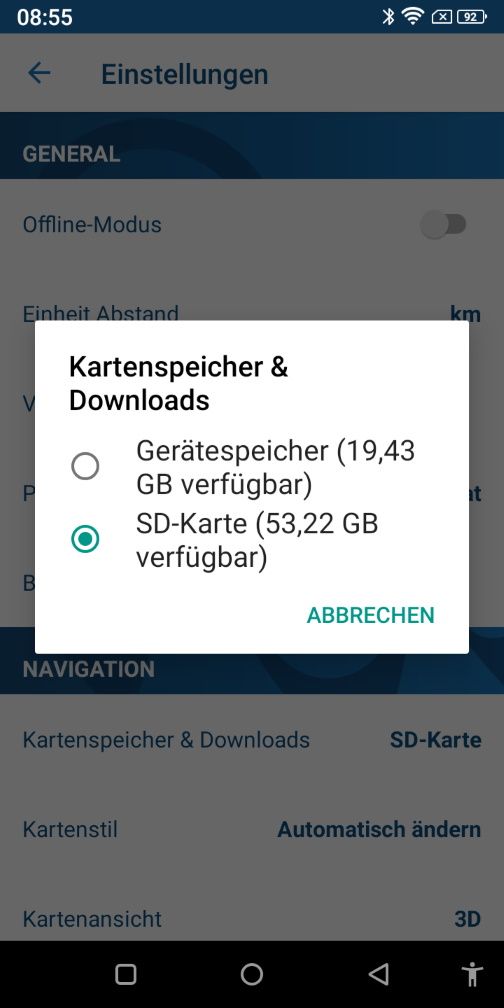
-
@Hans-van-de-Ven-MRA-Master
Maybe this option only appears if an SD Card is installed on the Android phone.
My Samsung S10 5G only has a Sim Card slot no SD Card Slot
I can find no SD Card Map options in my version of V1.6.10 Beta.
I also downloaded another map to see but nothing appeared regarding SD Cards.
There are 2 threads now indicating that the option appears, unless users are actually looking at an Android setting?
@Steve-Lynch
Aha, there is no card installed on my phone, thanks
Hello! It looks like you're interested in this conversation, but you don't have an account yet.
Getting fed up of having to scroll through the same posts each visit? When you register for an account, you'll always come back to exactly where you were before, and choose to be notified of new replies (either via email, or push notification). You'll also be able to save bookmarks and upvote posts to show your appreciation to other community members.
With your input, this post could be even better 💗
Register Login-
 0745
0745
-
 1514
1514
-
 0524
0524
-
 06259
06259
-
 06237
06237
-
04137
-
 17214
17214
-
0359