Skip to content

[Export] Garmin

25 Topics 363 Posts

For all Garmin questions

  • GPX Versions 1.1 vs 1.2 for Garmin Visually Explained

    Pinned Moved gpx 1.1 gpx 1.2 garmin xt
    191
    4
    7 Votes
    191 Posts
    36k Views
    John S Parry
    @Mzokk said: To my surprise, and delight, I was able to go off route and be routed back using prompted recalculation without the XT recalculating the remainder of the route, or recalculating the route to the next via point. As expected adding a detour to the route will force a recalculation to the next via point but a casual detour does not. Congratulations on getting back on the bike. I hope the Cataract surgery went as expected. In my mind, prompted recalculation is one of the strengths of the XTs. I'm glad you were able to experience that yourself.
  • Mac to Garmin Zumo XT* GPX Transfer

    Pinned Moved mac gpx file transfer import export
    17
    2
    3 Votes
    17 Posts
    2k Views
    Steve Jarrell
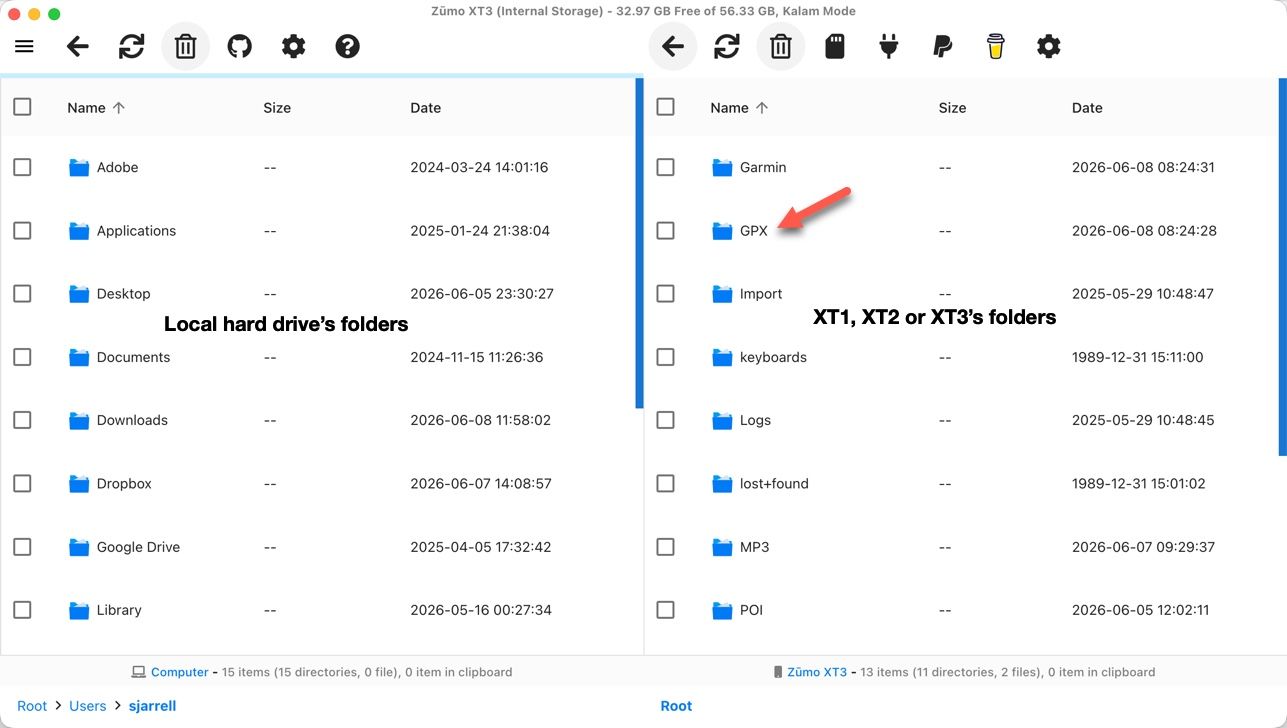
    What type of computer are you using?
  • transfer from phone to zoom xt

    13
    0 Votes
    13 Posts
    401 Views
    J2FK
    Ik was reeds terug gegaan naar een vorige versie en ga die denk ik nog wat houden, tenzij er een meerwaarde is aan de nieuwe versie. Wat mag die dan eventueel zijn?
  • Verkeers Informatie Garmin en GPX 1.2

    16
    0 Votes
    16 Posts
    729 Views
    John S Parry
    @Carl-Lee said: I wanted to add this comment in case anyone is offering a solution that is XT2/3 only. I wish I had solid input to provide you, but I don't. For most of my time on the XT, I didn't use the Drive app. And in my time with the XT3, I have Traffic enabled in Tread, but I haven't run into any road closures. I understand (now) that road closures (as opposed to major traffic jams) trigger an automatic route recalculation. As users, we can't turn this behavior off. From my standpoint it's a terrible design, but Garmin views this as a feature, and not a bug. In any case, I found a great thread on the Zumo User Forums that gets into the guts of it: https://zumouserforums.co.uk/viewtopic.php?p=17562&hilit=road+closure#p17562 There is a saying that "The best defense is a good offense". In my case, before leaving for a day of riding, I use Google Maps to do a complete scan of the area I'll be traveling for any closures. If you know up front, it's much easier to adjust than dealing with it in real-time. An added benefit is that Google will expose closures that Garmin Traffic Services (or HERE notifications in MRA) don't even know about. I've found out the hard way that Google is the gold standard other sources will never equal. Catch these things early, and life on the road will be happier.

  • Drive app fails to send GPX file - again...

    14
    0 Votes
    14 Posts
    616 Views
    Thomas Schäfer
    Garmin Drive works perfectly for me when it comes to tracks and routes, now that I’ve replaced the latest version, v4.29.25, with the older v4.28.14.
  • Garmin Drive app update route fail

    4
    0 Votes
    4 Posts
    322 Views
    jmbprinceton.edu
    I realize that I will have perform a master reset on my Garmin XT to get rid of the Garmin Explore integration. Which I have tried multiple times and also deleted the Garmin Drive app from an Android phone. Unfortunately, the latest Garmin Drive app version 4.29 from the Google play store re-enables Garmin Explore. My question is where can I get a safe copy of the Garmin Drive version 4.28 APK for Android.
  • Export naar ZUMO XT2 verandert routes

    9
    0 Votes
    9 Posts
    521 Views
    John S Parry
    @Barteld-Hartstra said: Thank you very much for your answer. For the first time, a clear explanation of what happens to your routes when you use Tread, including the storage in the cloud. And more importantly: a solution that I can use. You're welcome. There is another use here who documented his nightmare with Tread/Explore, and how he corrected his situation. It can be viewed in post #11: https://forum.myrouteapp.com/topic/11124/gpx-versions-1.1-vs-1.2-for-garmin-visually-explained?page=1 It's clear that Garmin is deemphasizing external GPX route imports in favor of doing all route creation directly on their GPS navigation devices. They've officially cut out transfers from Basecamp to XT2/XT3 devices. And it's also clear there is a glitchy hit/miss problem transferring with Tread/Explore. If they ever change their Garmin/GPX file structure to eliminate allowing wired GPX file copies, that will be it for me. I think they're smart enough to not completely block outside transfers moving forward, but who knows?
  • Garmin XT2 - losing my mind!

    8
    0 Votes
    8 Posts
    371 Views
    John S Parry
    @Marinus-van-Deudekom Interesting. in the Garmin, "Traffic" is a real-time service that alerts me to conditions up ahead. If an accident happened 10-minutes ago and is backing everything up, I'm alerted on the device. This service has nothing to do with how my route was originally imported into the Garmin and calculated. Traffic related Recalculation can only happen if I allow it. in the Optimize Route navigation setting, I have the "On Request" set. In other words, I'm prompted (asked) if I want to route around the delay. Again, nothing happens unless I say yes to the reroute. If I do nothing, I'll sit with everyone else until the delay is resolved. But again (for emphasis), this has nothing to do with the original import/route calculation. So, please explain the "Traffic info has a serious impact on the way Garmin treats the route".
  • How do i export or 'save as' a file into Garmin Camper 770 - Help

    4
    0 Votes
    4 Posts
    303 Views
    Hubert Thoring
    To get a GPX route to the Garmin Camper 770, copy the GPX file via USB cable into the GPX folder on the device or a memory card and then import the route directly in the navigation menu under Apps -> Route Planner -> Import Save the route via Save as in 1.1 GPX format to the PC and then transfer as described ..
  • GPX1.2 & Garmin Tread

    13
    0 Votes
    13 Posts
    831 Views
    Danny 1d
    Sorry Stevedo 6 0 that I replied in Dutch, and thanks for the kind comment about this.
  • MRA favorites, not POIs, as waypoints in a Garmin XT2 or GPX file?

    2
    0 Votes
    2 Posts
    206 Views
    Hubert Thoring
    Unfortunately, this is currently not possible.... —-## Das geht aktuell leider nicht….
  • Zumo XT3/Tread

    2
    0 Votes
    2 Posts
    207 Views
    nomko
    Je mist niks Bedraad overbrengen werkt niet zo, zelfs nog beter.
  • Showing Tracks with Routes on the Garmin XT3

    7
    6
    0 Votes
    7 Posts
    554 Views
    Steve Jarrell
    @Carl-Lee I agree. Less is absolutely more in that case. I have been doing a lot of testing with my XT3 hence all of the collections and routes. I normally don't have anywhere near that many collections, routes or track on the Garmin although the XT3 can easily handle them. I just don't like the clutter!
  • Export To My Nav 5 Fails

    5
    0 Votes
    5 Posts
    468 Views
    Mzokk
    @Brian-Dingsdale-0 The reason I suggest a track for the 7day overview of the route is that you can enable it on the NAV5 and have it visible beneath the route. For the 7 day route segments I would suggest that each day you start the route at least 1/2 mile from your accommodation, in the direction of travel, to ensure that you pass through the start point. If you try and start the route from where you are located you might accidently not pass through the start of the route and the device will keep trying to return you to the beginning. By placing the start some way away the unit knows where you are can route you to and through the start of the route.
  • exporteren naar xt2

    6
    0 Votes
    6 Posts
    473 Views
    toni ccc
    @Mzokk yep, also a longterm garmin user but i recently got myself an XT2 and the sh.t began, i have had (almost) no problems with the XT1 but now i am thinking of going another path as carpuride or similar to use MRA...
  • MRA en Garmin GPSmap 60CSx

    2
    0 Votes
    2 Posts
    266 Views
    Con Hennekens
    @Marc-Notredame, Dat zou zomaar kunnen. De GPSmaps zijn outdoor toestellen. Ik gebruik zelf een Oregon, maar ik heb nooit geprobeerd routes vanuit MRA daarin te krijgen Je kunt natuurlijk wel gewoon je GPX opslaan op het toestel, in de map \garmin\gpx.
  • New roads visible in Google map but not Garmin Here

    3
    0 Votes
    3 Posts
    334 Views
    Guzzist
    @Simon-James-Hancock...if you wrote about "Google map" - do you mean google map layer in MRA rootplanner? You need to know: in map layers, you can select different ones; also google map. But this are only graphics for better information and doesn't have effects to route planning but in "options", you can select OSM, TomTom or HERE. This are different routing engines (with map data). You can plan a route by engine you prefer, then may switch to another engine to compare, if the route line is still the same. That's an advantage if you woul like to share your route to others, which uses different navigation devices. In your case - if you want to transfer your route to your Garmin device - you should use the HERE routing engine for planning (map layer doesn't matter). But please use enough waypoints, because after transmitting to your Garmin device, still the device is going to interpret your route. This can end up in a slightly different route in the Garmin device... [image: 1000004089.jpg] [image: 1000004087.jpg]
  • Rij met XT3 maar bestand 1.2 heeft altijd problemen

    8
    0 Votes
    8 Posts
    934 Views
    Tony Haezebrouck
    @Hans-van-de-Ven-MR.MRA ok bedankt maar dat doe ik zeker op 100km heb ik de 200 punten nodig en dan nog lukt het niet altijd ik gebruik ook de HERE kaarten, denk dat ik altijd wel dichter bij de oplossing komt overmorgen nog eens een route van 550 km testen alvast bedankt
  • Is It Me?

    15
    0 Votes
    15 Posts
    1k Views
    D A Wakefield
    I used the Drive app when I am away from my PC. I did have the exporter working, but it stopped with the device not found error. Thought is was my PC so rebuilt it, but got the same. I use drag and drop in windows explorer from now . Just wondered whey the exporter wasn't working as advertised.
  • export several routes at on time

    2
    0 Votes
    2 Posts
    220 Views
    Albert van den Elsen
    Hi @charles-henson, No, you don't have to export the routes one by one! Just open the list where the routes are located, select the routes you want, and click the 'Save' button at the bottom. From there, choose your desired format, and MRA will automatically create a compressed file containing all of your selected routes. [image: 2026-06-28_15-27-45.jpg]
ACTIVE USERS POPULAR TOPICS MY GROUPS