Skip to content
  • Categories
  • Recent
  • Popular
  • Support
  • MyRoute-app
Collapse
Brand Logo

MRA Community Forum

  1. Home
  2. [Beta] The MyRoute-app
  3. [Beta] Problems, Bugs and other Issues
  4. Zoom level in CarPlay useless

Zoom level in CarPlay useless

Scheduled Pinned Locked Moved [Beta] Problems, Bugs and other Issues
15 Posts 5 Posters 189 Views 3 Watching
  • Oldest to Newest
  • Newest to Oldest
  • Most Votes
Reply
  • Reply as topic
Log in to reply
This topic has been deleted. Only users with topic management privileges can see it.
  • Jörgen Online
    Jörgen Online
    Jörgen
    Valued contributor
    wrote on last edited by Jörgen
    #1

    Hi, I tried the latest version today in my car.
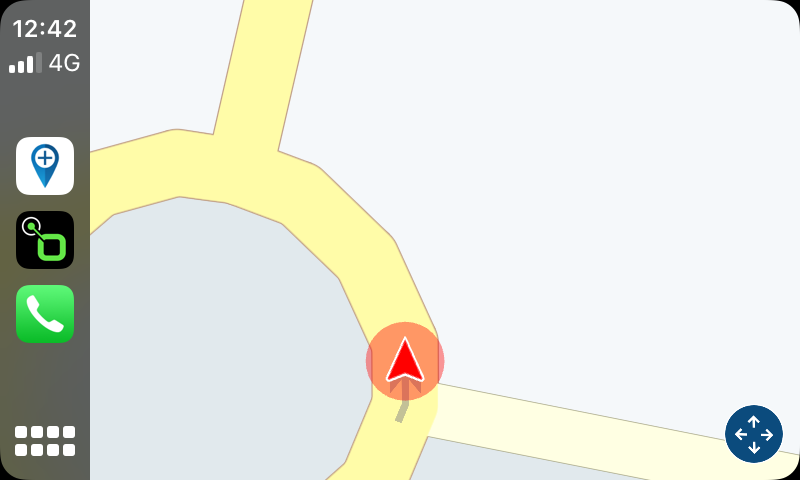
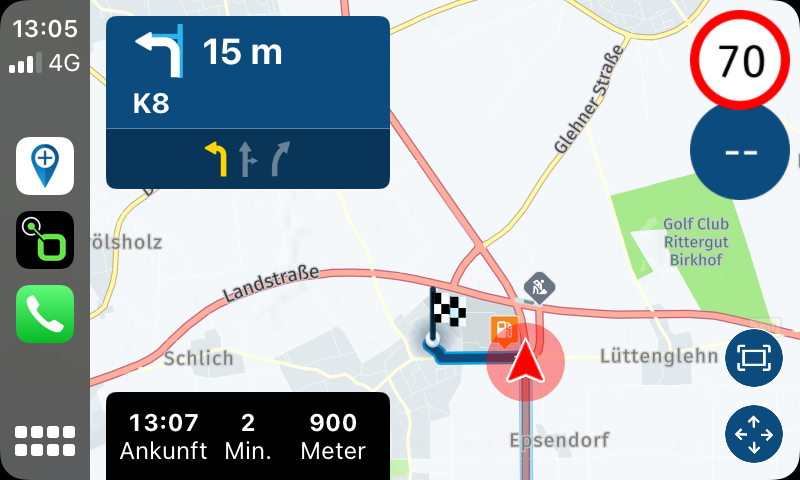
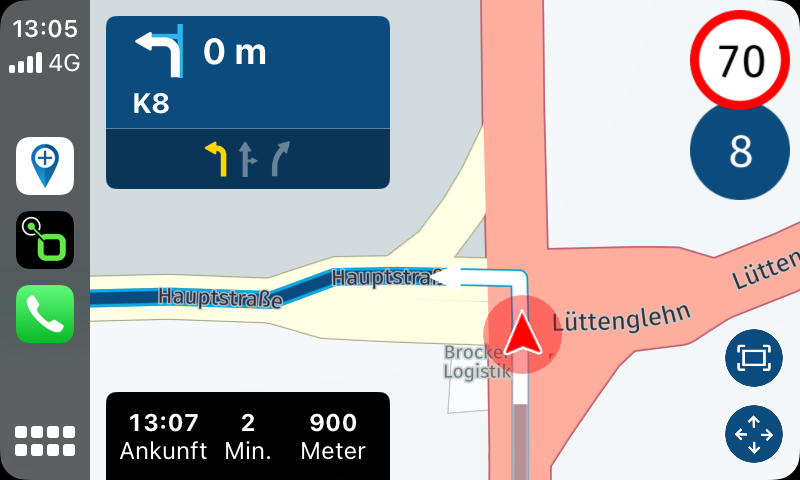
    As you can see on the screenshots, the zoom level is that big and useless.
    Changes on the phone will not change the display in CarPlay.
    First it looks ok when you change the zoom level, but then it went back in little steps to too much zoom level.
    Here are some screenshots:
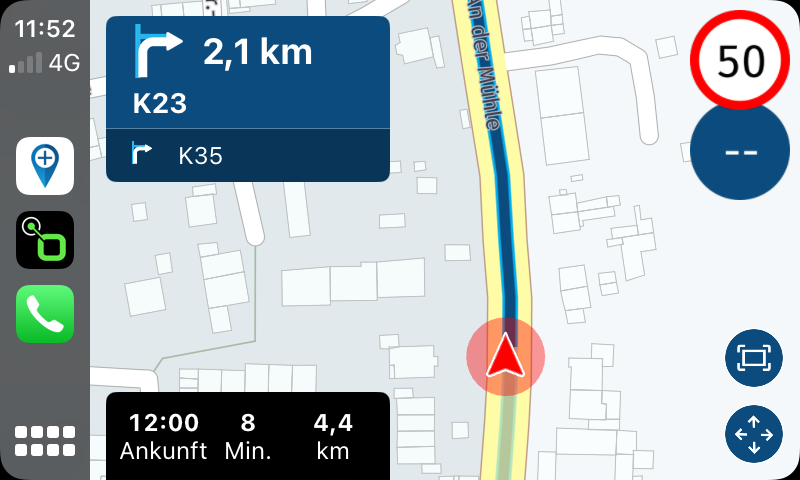
    IMG_6657.PNG
    IMG_6661.PNG

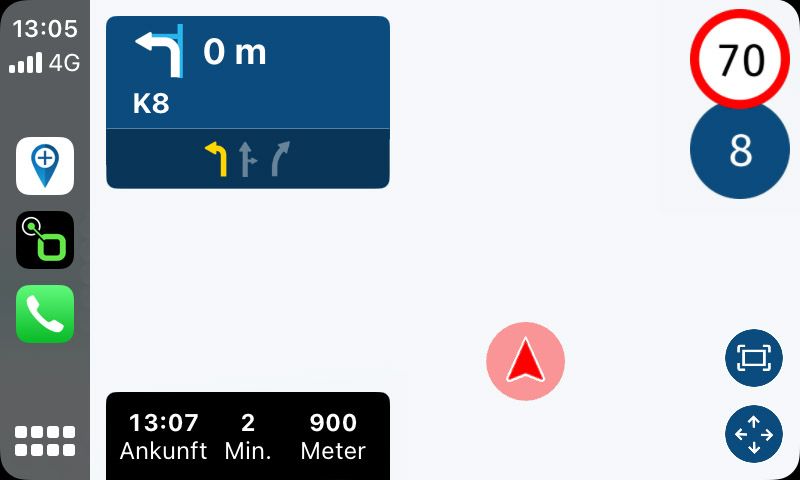
    At second try the map disappeared also. (no street anymore)
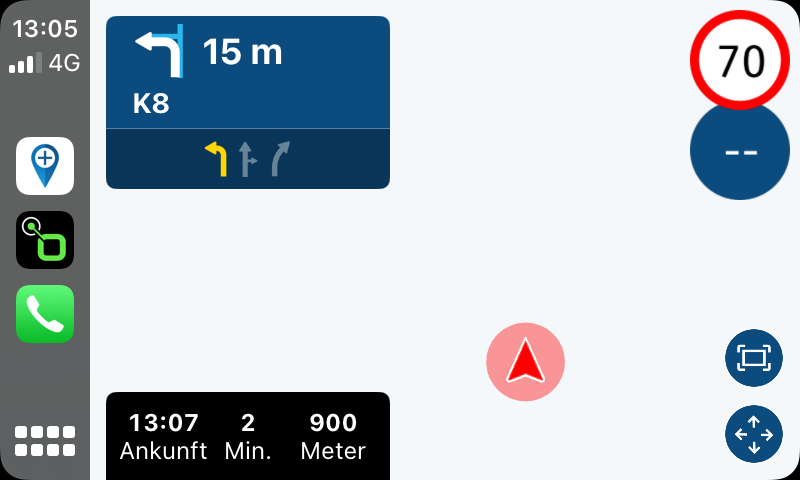
    IMG_6663.PNG

    When you change the level on the phone, it looks ok in the first time.
    Phone
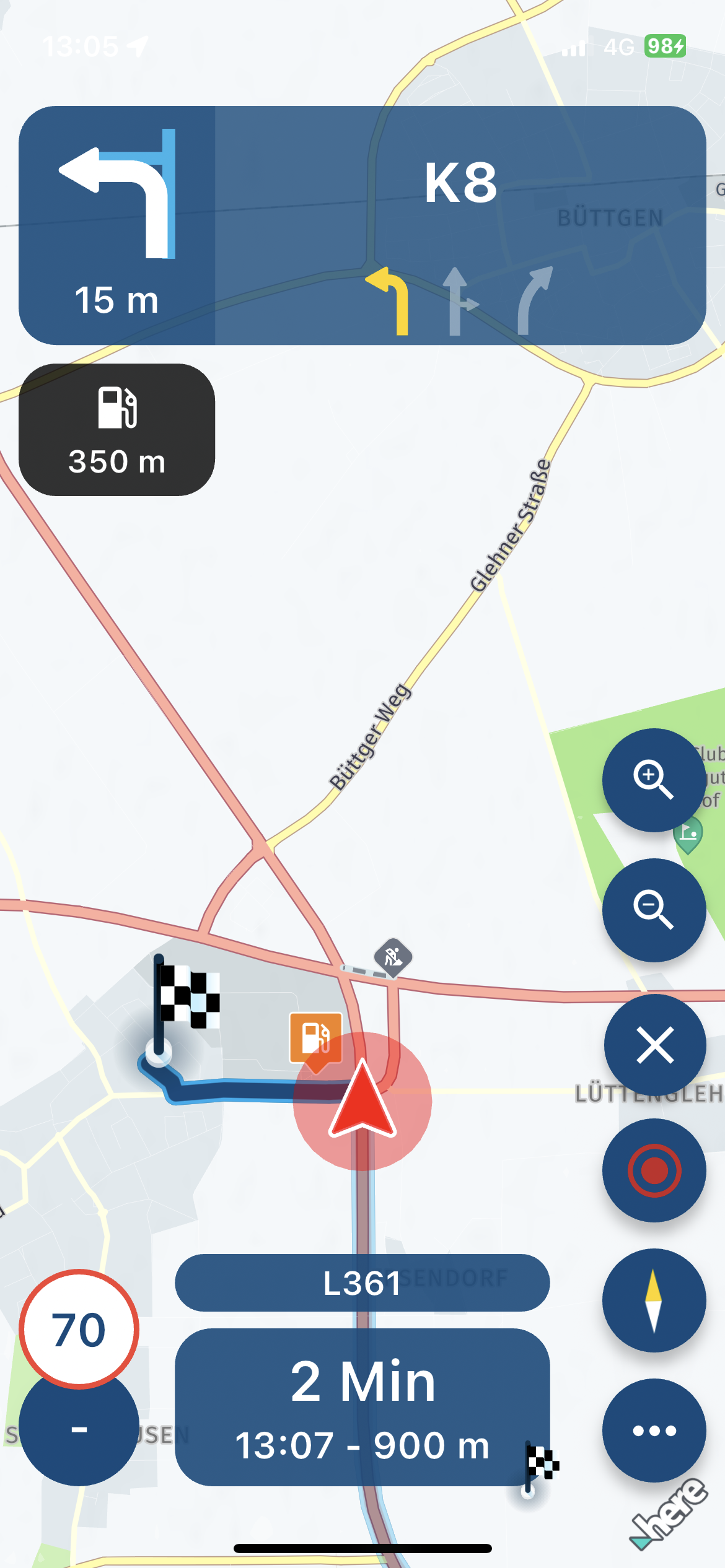
    IMG_6664.PNG
    CarPlay
    IMG_6665.PNG

    Then it jumps back in small steps until you see nothing
    1.
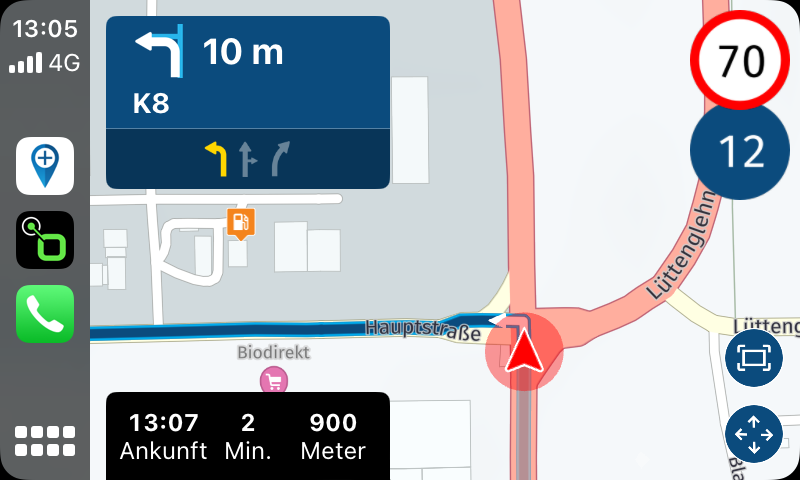
    IMG_6668.PNG
    2.
    IMG_6670.PNG
    3.
    IMG_6671.jpg

    The same when you use the zoom level change on the CarPlay display, it always jumps back.

    A video with another phone will follow.

    Hardware
    iPhone 12 pro (iOS 26.2.1)
    iPad (7.Gen.) 18.7.3
    Oukitel RT3 Pro (Andr. 14)
    Wireless CarPlay mit (Elebest C650)
    Wired CarPlay (SEAT Arona - 2021)
    MRA Workshops in Deutsch sind hier zu finden

    1 Reply Last reply
    0
    • Jörgen Online
      Jörgen Online
      Jörgen
      Valued contributor
      wrote on last edited by Jörgen
      #2

      Hi,

      here video 1

      https://youtube.com/shorts/-NXv5NE1s74?feature=share

      As you can see, the used Zoom level jumps always back by itself.

      here video 2

      https://youtube.com/shorts/c0md61NA2qM?feature=share

      Zoom is not reacting directly, only after some clicks. And the same it jumps back by itself.

      Hardware
      iPhone 12 pro (iOS 26.2.1)
      iPad (7.Gen.) 18.7.3
      Oukitel RT3 Pro (Andr. 14)
      Wireless CarPlay mit (Elebest C650)
      Wired CarPlay (SEAT Arona - 2021)
      MRA Workshops in Deutsch sind hier zu finden

      Gos Kuus Dave J 0 2 Replies Last reply
      0
      • Jörgen Jörgen

        Hi,

        here video 1

        https://youtube.com/shorts/-NXv5NE1s74?feature=share

        As you can see, the used Zoom level jumps always back by itself.

        here video 2

        https://youtube.com/shorts/c0md61NA2qM?feature=share

        Zoom is not reacting directly, only after some clicks. And the same it jumps back by itself.

        Gos Kuus Offline
        Gos Kuus Offline
        Gos Kuus
        wrote on last edited by
        #3

        @Jörgen Here the same experience. Plus or minus on CP-screen could only make 1 step.

        1 Reply Last reply
        0
        • Jörgen Jörgen

          Hi,

          here video 1

          https://youtube.com/shorts/-NXv5NE1s74?feature=share

          As you can see, the used Zoom level jumps always back by itself.

          here video 2

          https://youtube.com/shorts/c0md61NA2qM?feature=share

          Zoom is not reacting directly, only after some clicks. And the same it jumps back by itself.

          Dave J 0 Offline
          Dave J 0 Offline
          Dave J 0
          Valued contributor
          wrote on last edited by
          #4

          @Jörgen Same here. You always have to zoom in once before you can zoom out. Not able to zoom straight out.

          Kind Regards. Help where I can.
          Ducati Multistrada V4 Rally
          iPhone 15 Pro
          CHIGEE AIO-6 LTE
          Google Pixel 6 Pro - mounted on SP Connect Plus
          Ex Garmin XT2 and XT1 as well as Ex TomTom Rider User

          Dae 0 1 Reply Last reply
          0
          • Dave J 0 Dave J 0

            @Jörgen Same here. You always have to zoom in once before you can zoom out. Not able to zoom straight out.

            Dae 0 Online
            Dae 0 Online
            Dae 0
            wrote on last edited by
            #5

            CarPlay zooming is my biggest gripe at the minute.

            I use MRA exclusively through CarPlay. My phone is hidden away, so there’s no way to adjust the zoom when riding.

            1 Reply Last reply
            0
            • Jörgen Online
              Jörgen Online
              Jörgen
              Valued contributor
              wrote on last edited by
              #6

              Hi, I tried it today with the Elebest CarPlay Display, see video:

              https://youtu.be/sdUqzUdaqDw

              When you start the route, it zooms in until the map disappeared without doing anything from outside.

              Hardware
              iPhone 12 pro (iOS 26.2.1)
              iPad (7.Gen.) 18.7.3
              Oukitel RT3 Pro (Andr. 14)
              Wireless CarPlay mit (Elebest C650)
              Wired CarPlay (SEAT Arona - 2021)
              MRA Workshops in Deutsch sind hier zu finden

              1 Reply Last reply
              0
              • Corjan Meijerink Offline
                Corjan Meijerink Offline
                Corjan Meijerink
                Developer
                wrote on last edited by
                #7

                I've been able to reproduce the issue! 🙂
                I will ensure a fix in the future update, might push that a bit more forward to get this fixed shortly.

                The issue is caused by the top-down specific camera mode.
                Switch to dynamic (or north up) to work around the issue:

                • Tap the compass on your phone to cycle through these modes
                • Tap the settings icon in CarPlay and then the camera setting icon (whatever says topdown / northup / dynamic) to switch between them

                The future update will fix and improve the top-down setting.
                For now, it's indeed broken.

                Sorry for the inconvenience ❤

                Dae 0 1 Reply Last reply
                1
                • Corjan Meijerink Corjan Meijerink

                  I've been able to reproduce the issue! 🙂
                  I will ensure a fix in the future update, might push that a bit more forward to get this fixed shortly.

                  The issue is caused by the top-down specific camera mode.
                  Switch to dynamic (or north up) to work around the issue:

                  • Tap the compass on your phone to cycle through these modes
                  • Tap the settings icon in CarPlay and then the camera setting icon (whatever says topdown / northup / dynamic) to switch between them

                  The future update will fix and improve the top-down setting.
                  For now, it's indeed broken.

                  Sorry for the inconvenience ❤

                  Dae 0 Online
                  Dae 0 Online
                  Dae 0
                  wrote on last edited by
                  #8

                  @Corjan-Meijerink Do you plan to allow the zooming in/out via CarPlay without having to use the phone (mine is locked away when riding)?

                  Corjan Meijerink 1 Reply Last reply
                  0
                  • Dae 0 Dae 0

                    @Corjan-Meijerink Do you plan to allow the zooming in/out via CarPlay without having to use the phone (mine is locked away when riding)?

                    Corjan Meijerink Offline
                    Corjan Meijerink Offline
                    Corjan Meijerink
                    Developer
                    wrote on last edited by
                    #9

                    @Dae-0 yes, I plan on keeping the zoomlevel selected while panning.

                    Dae 0 1 Reply Last reply
                    0
                    • Corjan Meijerink Corjan Meijerink

                      @Dae-0 yes, I plan on keeping the zoomlevel selected while panning.

                      Dae 0 Online
                      Dae 0 Online
                      Dae 0
                      wrote on last edited by
                      #10

                      @Corjan-Meijerink said in Zoom level in CarPlay useless:

                      @Dae-0 yes, I plan on keeping the zoomlevel selected while panning.

                      Thanks - that’s good news.

                      It’s better than what we have now, but slightly less than ideal for me personally - purely based on what I’m used to with other apps. They have the +/- buttons on the main map, so a quick zoom in/out doesn’t require multiple button presses (into panning, zoom, exit panning)

                      Corjan Meijerink 1 Reply Last reply
                      0
                      • Dae 0 Dae 0

                        @Corjan-Meijerink said in Zoom level in CarPlay useless:

                        @Dae-0 yes, I plan on keeping the zoomlevel selected while panning.

                        Thanks - that’s good news.

                        It’s better than what we have now, but slightly less than ideal for me personally - purely based on what I’m used to with other apps. They have the +/- buttons on the main map, so a quick zoom in/out doesn’t require multiple button presses (into panning, zoom, exit panning)

                        Corjan Meijerink Offline
                        Corjan Meijerink Offline
                        Corjan Meijerink
                        Developer
                        wrote on last edited by
                        #11

                        @Dae-0 Yes, that would be a good idea too 😉
                        Will require some more changes and not sure how that will all start to fit with the amount of buttons others are still requesting.

                        Dae 0 1 Reply Last reply
                        0
                        • Corjan Meijerink Corjan Meijerink

                          @Dae-0 Yes, that would be a good idea too 😉
                          Will require some more changes and not sure how that will all start to fit with the amount of buttons others are still requesting.

                          Dae 0 Online
                          Dae 0 Online
                          Dae 0
                          wrote on last edited by
                          #12

                          @Corjan-Meijerink said in Zoom level in CarPlay useless:

                          @Dae-0 Yes, that would be a good idea too 😉
                          Will require some more changes and not sure how that will all start to fit with the amount of buttons others are still requesting.

                          It does run the risk of looking like a fighter airplane cockpit🤣 Luckily Apple limit it for you.

                          Personally, I prefer other apps that have the skip waypoint button behind a “more stuff” button, as I frequently alter zoom but rarely skip waypoints. Probably a decisive opinion!

                          1 Reply Last reply
                          0
                          • Corjan Meijerink Corjan Meijerink referenced this topic on
                          • Corjan Meijerink Offline
                            Corjan Meijerink Offline
                            Corjan Meijerink
                            Developer
                            wrote on last edited by Corjan Meijerink
                            #13

                            @Jörgen feel free to test this in the newest beta! (when available)

                            Jörgen 2 Replies Last reply
                            1
                            • Corjan Meijerink Corjan Meijerink

                              @Jörgen feel free to test this in the newest beta! (when available)

                              Jörgen Online
                              Jörgen Online
                              Jörgen
                              Valued contributor
                              wrote on last edited by
                              #14

                              @Corjan-Meijerink I will, thanks.

                              Hardware
                              iPhone 12 pro (iOS 26.2.1)
                              iPad (7.Gen.) 18.7.3
                              Oukitel RT3 Pro (Andr. 14)
                              Wireless CarPlay mit (Elebest C650)
                              Wired CarPlay (SEAT Arona - 2021)
                              MRA Workshops in Deutsch sind hier zu finden

                              1 Reply Last reply
                              0
                              • Corjan Meijerink Corjan Meijerink

                                @Jörgen feel free to test this in the newest beta! (when available)

                                Jörgen Online
                                Jörgen Online
                                Jörgen
                                Valued contributor
                                wrote on last edited by
                                #15

                                @Corjan-Meijerink said in Zoom level in CarPlay useless:

                                @Jörgen feel free to test this in the newest beta! (when available)

                                Looks very good.
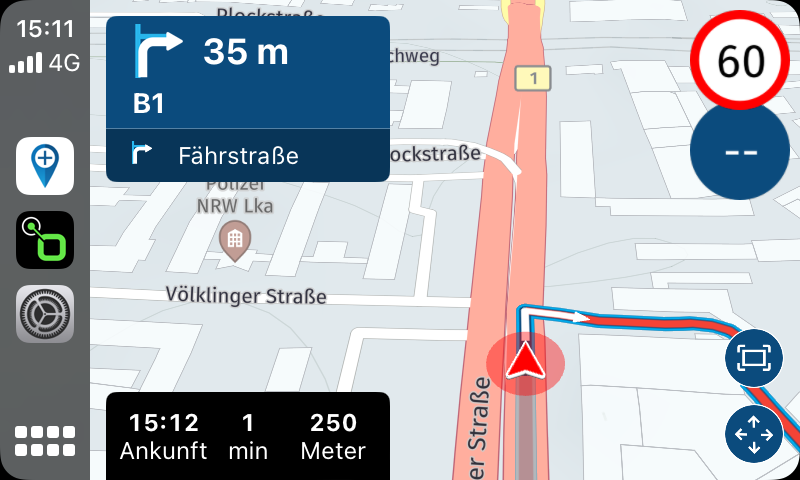
                                IMG_6705.png

                                Hardware
                                iPhone 12 pro (iOS 26.2.1)
                                iPad (7.Gen.) 18.7.3
                                Oukitel RT3 Pro (Andr. 14)
                                Wireless CarPlay mit (Elebest C650)
                                Wired CarPlay (SEAT Arona - 2021)
                                MRA Workshops in Deutsch sind hier zu finden

                                1 Reply Last reply
                                0
                                • Corjan Meijerink Corjan Meijerink referenced this topic on

                                Hello! It looks like you're interested in this conversation, but you don't have an account yet.

                                Getting fed up of having to scroll through the same posts each visit? When you register for an account, you'll always come back to exactly where you were before, and choose to be notified of new replies (either via email, or push notification). You'll also be able to save bookmarks and upvote posts to show your appreciation to other community members.

                                With your input, this post could be even better 💗

                                Register Login
                                Reply
                                • Reply as topic
                                Log in to reply
                                • Oldest to Newest
                                • Newest to Oldest
                                • Most Votes


                                ACTIVE USERS
                                Dave J 0
                                Dave J 0
                                Corjan Meijerink
                                Corjan Meijerink
                                Jörgen
                                Jörgen
                                Gos Kuus
                                Gos Kuus
                                Dae 0
                                Dae 0
                                POPULAR TOPICS
                                • Linker in MRA kleurt blauw (alles geselecteerd)
                                  LennyO
                                  LennyO
                                  0
                                  23
                                  463

                                • The compas direction on the elevation circle is wrong
                                  LennyO
                                  LennyO
                                  0
                                  38
                                  1.3k

                                • GPX Versions 1.1 vs 1.2 for Garmin Visually Explained
                                  Mzokk
                                  Mzokk
                                  7
                                  180
                                  14.9k

                                • New update 5.2.1
                                  white.mouse
                                  white.mouse
                                  16
                                  20
                                  842

                                • Wegwerkzaamheden / Road works
                                  veghelvan 0
                                  veghelvan 0
                                  0
                                  5
                                  104

                                • Problem with Route Animate/Video maker
                                  Marinus van Deudekom
                                  Marinus van Deudekom
                                  0
                                  4
                                  76

                                • Auto skip many waypoints by itself while I was on route. [5.2.0 - 474]
                                  paul69
                                  paul69
                                  0
                                  37
                                  1.8k

                                • Hiding home address / waypoint for shared routes
                                  Nick Carthew
                                  Nick Carthew
                                  0
                                  2
                                  22

                                MY GROUPS
                                • Login

                                • Login or register to search.
                                • First post
                                  Last post
                                0
                                • Categories
                                • Recent
                                • Popular
                                • Support
                                • MyRoute-app