POI improvements!
-

Hi all

The website has received a nice update

We have implemented a long requested improvement to our POI library!Custom icon
When adding your own POI icon, you can now select any icon you like from the existing icon set
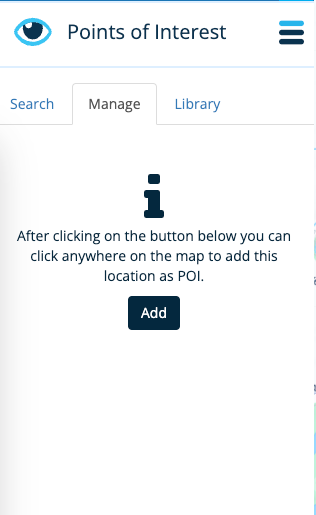
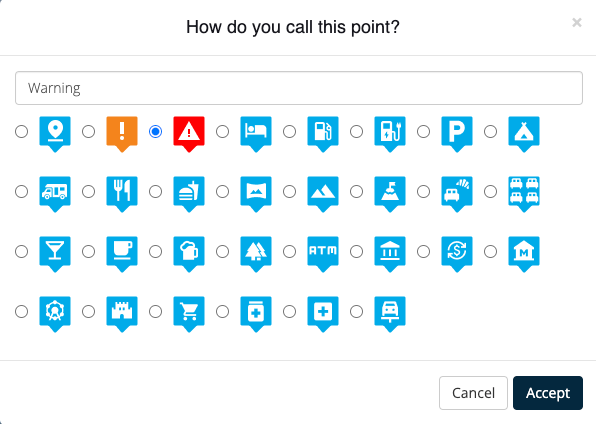
Show your own libraries
You could display your own POI libraries already.
The difference now is that we keep displaying them!
Even after refreshing the page / using another computer.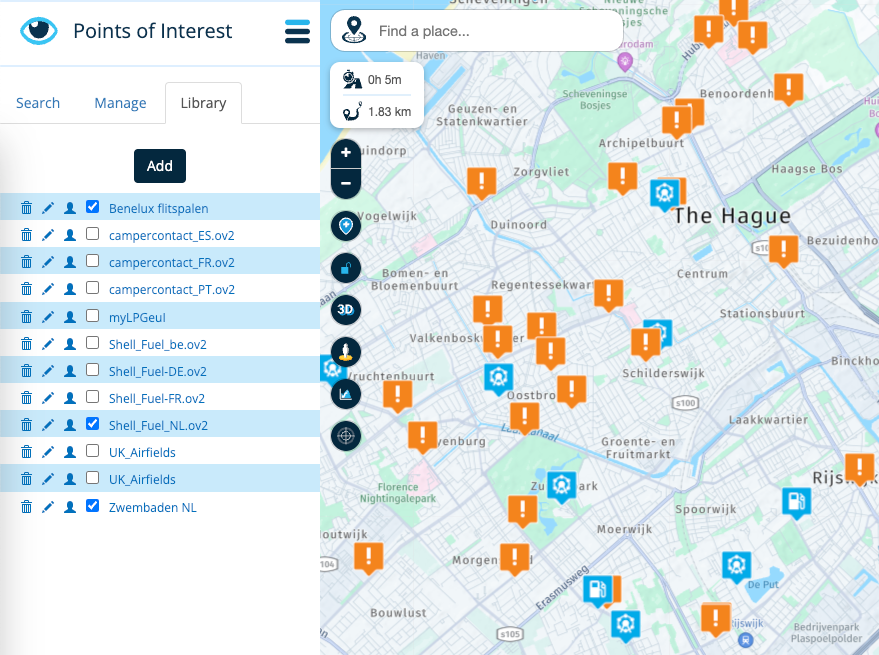
Edit: as there seems to be quite some confusement about this, the functionality that stores what POI libraries to show for routes is limited to your own POI libraries, not the general POI search categories (tab #1)
Change icons of POI libraries
Yes indeed, add a custom icon to any of your POI libraries

Now you can add a nice icon to reflect the meaning of your POI library.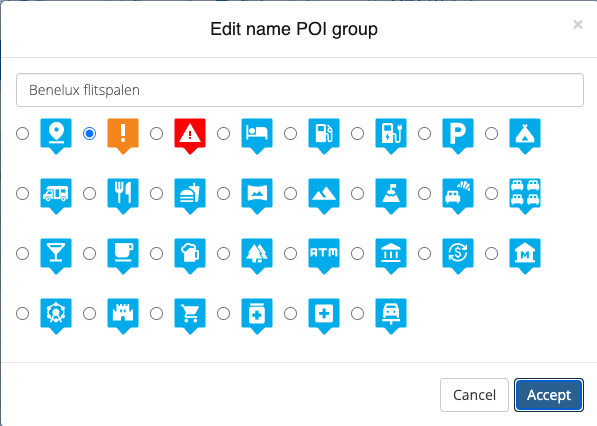
Default account libraries
Even better!

Do you always want to show a certain POI library? Why not?
Simply click the account icon to add them to your default POI set.
Any POI library within that group will be displayed at all times.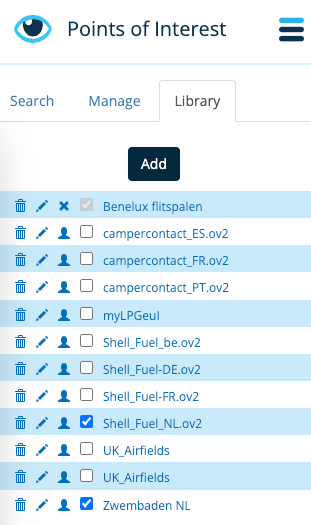
In the example above, all speed traps in the region will be displayed on all my routes.
Edit: as there seems to be quite some confusement about this, you can only add your own POI libraries to be shown by default for all your route. Not the general POI search categories (tab #1)
Displayed in MyRoute-app
Obviously our app will also remember your choices.
When you've selected those POI libraries and view them in our app, the relevant POI's will be displayed too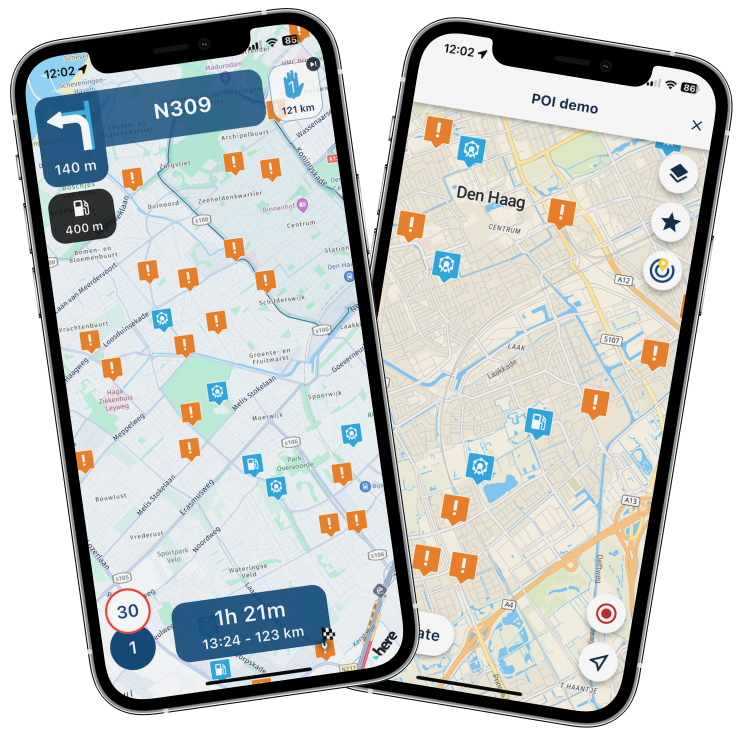
Isn't this an amazing update?
In short:
- Choose custom POI icons
- Select an icon for an entire POI library
- Display POI libraries by default for a route
- Display POI libraries by default for your account
- Synced with our app (for routes only)
This saves so many time compared to constantly adding POI's one by one.
Cheers,
CorjanFrom MRA with

-
Hi all
The website has received a nice update
We have implemented a long requested improvement to our POI library!Custom icon
When adding your own POI icon, you can now select any icon you like from the existing icon setShow your own libraries
You could display your own POI libraries already.
The difference now is that we keep displaying them!
Even after refreshing the page / using another computer.Edit: as there seems to be quite some confusement about this, the functionality that stores what POI libraries to show for routes is limited to your own POI libraries, not the general POI search categories (tab #1)
Change icons of POI libraries
Yes indeed, add a custom icon to any of your POI libraries
Now you can add a nice icon to reflect the meaning of your POI library.Default account libraries
Even better!
Do you always want to show a certain POI library? Why not?Simply click the account icon to add them to your default POI set.
Any POI library within that group will be displayed at all times.In the example above, all speed traps in the region will be displayed on all my routes.
Edit: as there seems to be quite some confusement about this, you can only add your own POI libraries to be shown by default for all your route. Not the general POI search categories (tab #1)
Displayed in MyRoute-app
Obviously our app will also remember your choices.
When you've selected those POI libraries and view them in our app, the relevant POI's will be displayed tooIsn't this an amazing update?
In short:
- Choose custom POI icons
- Select an icon for an entire POI library
- Display POI libraries by default for a route
- Display POI libraries by default for your account
- Synced with our app (for routes only)
This saves so many time compared to constantly adding POI's one by one.
Cheers,
CorjanFrom MRA with

@Corjan-Meijerink Awesomesauce!

-
Hi all
The website has received a nice update
We have implemented a long requested improvement to our POI library!Custom icon
When adding your own POI icon, you can now select any icon you like from the existing icon setShow your own libraries
You could display your own POI libraries already.
The difference now is that we keep displaying them!
Even after refreshing the page / using another computer.Edit: as there seems to be quite some confusement about this, the functionality that stores what POI libraries to show for routes is limited to your own POI libraries, not the general POI search categories (tab #1)
Change icons of POI libraries
Yes indeed, add a custom icon to any of your POI libraries
Now you can add a nice icon to reflect the meaning of your POI library.Default account libraries
Even better!
Do you always want to show a certain POI library? Why not?Simply click the account icon to add them to your default POI set.
Any POI library within that group will be displayed at all times.In the example above, all speed traps in the region will be displayed on all my routes.
Edit: as there seems to be quite some confusement about this, you can only add your own POI libraries to be shown by default for all your route. Not the general POI search categories (tab #1)
Displayed in MyRoute-app
Obviously our app will also remember your choices.
When you've selected those POI libraries and view them in our app, the relevant POI's will be displayed tooIsn't this an amazing update?
In short:
- Choose custom POI icons
- Select an icon for an entire POI library
- Display POI libraries by default for a route
- Display POI libraries by default for your account
- Synced with our app (for routes only)
This saves so many time compared to constantly adding POI's one by one.
Cheers,
CorjanFrom MRA with

@Corjan-Meijerink Cool!
-

This is great! Thanks!
-

This is very useful. It might even help my fuel problem if I add in the 24 hr self help stations. Thanks for adding the feature.
-
Hi all
The website has received a nice update
We have implemented a long requested improvement to our POI library!Custom icon
When adding your own POI icon, you can now select any icon you like from the existing icon setShow your own libraries
You could display your own POI libraries already.
The difference now is that we keep displaying them!
Even after refreshing the page / using another computer.Edit: as there seems to be quite some confusement about this, the functionality that stores what POI libraries to show for routes is limited to your own POI libraries, not the general POI search categories (tab #1)
Change icons of POI libraries
Yes indeed, add a custom icon to any of your POI libraries
Now you can add a nice icon to reflect the meaning of your POI library.Default account libraries
Even better!
Do you always want to show a certain POI library? Why not?Simply click the account icon to add them to your default POI set.
Any POI library within that group will be displayed at all times.In the example above, all speed traps in the region will be displayed on all my routes.
Edit: as there seems to be quite some confusement about this, you can only add your own POI libraries to be shown by default for all your route. Not the general POI search categories (tab #1)
Displayed in MyRoute-app
Obviously our app will also remember your choices.
When you've selected those POI libraries and view them in our app, the relevant POI's will be displayed tooIsn't this an amazing update?
In short:
- Choose custom POI icons
- Select an icon for an entire POI library
- Display POI libraries by default for a route
- Display POI libraries by default for your account
- Synced with our app (for routes only)
This saves so many time compared to constantly adding POI's one by one.
Cheers,
CorjanFrom MRA with

@Corjan-Meijerink
these are good additions and save a few "clicks"! -
Thanks for the great POI update
 . Would it be possible to add the latest version of the road block POI's to the list by default? E.g. the POI list that can be downloaded from the MRA Facebook page.
@Arno-0 That might be a good idea however something we do not support yet
I'll check how easy it will be to create some default [MRA] POI lists!
-

Ziet er top uit!
-
Hi all
The website has received a nice update
We have implemented a long requested improvement to our POI library!Custom icon
When adding your own POI icon, you can now select any icon you like from the existing icon setShow your own libraries
You could display your own POI libraries already.
The difference now is that we keep displaying them!
Even after refreshing the page / using another computer.Edit: as there seems to be quite some confusement about this, the functionality that stores what POI libraries to show for routes is limited to your own POI libraries, not the general POI search categories (tab #1)
Change icons of POI libraries
Yes indeed, add a custom icon to any of your POI libraries
Now you can add a nice icon to reflect the meaning of your POI library.Default account libraries
Even better!
Do you always want to show a certain POI library? Why not?Simply click the account icon to add them to your default POI set.
Any POI library within that group will be displayed at all times.In the example above, all speed traps in the region will be displayed on all my routes.
Edit: as there seems to be quite some confusement about this, you can only add your own POI libraries to be shown by default for all your route. Not the general POI search categories (tab #1)
Displayed in MyRoute-app
Obviously our app will also remember your choices.
When you've selected those POI libraries and view them in our app, the relevant POI's will be displayed tooIsn't this an amazing update?
In short:
- Choose custom POI icons
- Select an icon for an entire POI library
- Display POI libraries by default for a route
- Display POI libraries by default for your account
- Synced with our app (for routes only)
This saves so many time compared to constantly adding POI's one by one.
Cheers,
CorjanFrom MRA with

@Corjan-Meijerink Would be nice when selecting POI categories at the POI search tab, that the selection would be permanent and stored too, so when I go back to the waypoint section, I would still be able to see the POIs. And there should be an option to create POIs from the route planner in addition to just be able to add waypoints.
Secondly, it would be nice to create custom POI libraries within the route planner, not only by uploading a POI library.
-
@Corjan-Meijerink Would be nice when selecting POI categories at the POI search tab, that the selection would be permanent and stored too, so when I go back to the waypoint section, I would still be able to see the POIs. And there should be an option to create POIs from the route planner in addition to just be able to add waypoints.
Secondly, it would be nice to create custom POI libraries within the route planner, not only by uploading a POI library.
This post is deleted! -
Toch een klein puntje van "kritiek". Ik begrijp, dat de grootste gemene deler binnen MRA toch wel het motorrijden is. Dan is het wel jammer, dat ik bij de POI-icoontjes geen motor zie

-
Corjan Meijerink referenced this topic on
-
@Corjan-Meijerink Would be nice when selecting POI categories at the POI search tab, that the selection would be permanent and stored too, so when I go back to the waypoint section, I would still be able to see the POIs. And there should be an option to create POIs from the route planner in addition to just be able to add waypoints.
Secondly, it would be nice to create custom POI libraries within the route planner, not only by uploading a POI library.
@Cookie-On-Tour said in POI improvements!:
Secondly, it would be nice to create custom POI libraries within the route planner, not only by uploading a POI library.
Ooohhh this one! +1.
-

Mooie update, gaaf!! Nu nog de mogelijkheid om POI’s toe te voegen en te verwijderen in een bestaande lijst/bibliotheek

-

It's not clear to me where I can find:
- POI libraries (e.g. th Shell_Fuel_NL.ov2" and "Benelux Flitspalen""
- (own) icons to upload
Any help is appreciated!
BMW R1300 GS, BMW Connect Ride Next navigator; Quad Lock with Samsung Galaxy Ultra, iPad Pro (iPadOS 18.0 bèta version) MacBook Pro (MacOS Sequoia 15.2 bèta version), iMac (MacOS Monterey 12.7.6)
-
It's not clear to me where I can find:
- POI libraries (e.g. th Shell_Fuel_NL.ov2" and "Benelux Flitspalen""
- (own) icons to upload
Any help is appreciated!
- google
- not possible
-
Deze tekst in misschien handig voor belangstellenden:
Er zijn twee manieren om in MRA Routeplanner een groep POI's in de bibliotheek toe te voegen:
1. POI-bestand importeren:
Klik op het tabblad 'POI's' in de Bibliotheek.
Klik op de knop 'Importeren'.
Selecteer het POI-bestand dat je wilt importeren (meestal in .ov2 of .csv of .txt formaat).
Klik op 'Openen'.
De POI's worden in de bibliotheek geïmporteerd en gegroepeerd op basis van het type of de categorie die in het bestand is gedefinieerd.2. Handmatig toevoegen:
Klik op het tabblad 'POI's' in de Bibliotheek.
Klik op de knop 'Toevoegen'.
Vul de details van de POI in, inclusief naam, locatie, type, categorie en andere relevante informatie.
Klik op 'Opslaan'.
De POI wordt toegevoegd aan de bibliotheek en niet gegroepeerd, tenzij je deze handmatig toevoegt aan een bestaande groep.Tips:
-
list itemJe kunt POI-bestanden vinden om te importeren op verschillende websites, zoals POI-Factory (http://www.poi-factory.com/)
-
Zorg ervoor dat het POI-bestand dat je importeert compatibel is met MRA Routeplanner. Het bestand moet ten minste de kolommen 'naam' en 'coördinaten' bevatten.
-
Je kunt POI's bewerken en verwijderen in de bibliotheek.
-
Je kunt groepen POI's maken en beheren in de bibliotheek.
Extra informatie:
MRA Routeplanner ondersteunt het importeren van POI-bestanden in verschillende formaten, waaronder OV2, CSV, TXT, GPX en ITN.Je kunt POI's exporteren vanuit de bibliotheek naar een bestand voor gebruik in andere applicaties.
Je kunt POI's in je routes gebruiken om ze te markeren als interessante locaties of tussenstops. -
-
MotoCon referenced this topic on
-

@Corjan-Meijerink Hi Corjan, are there any specific websites that keep up-to-date POI lists? Most I have found are very old. Maybe we can have a forum here for sharing POI files?
Porsche 911 and VW Transporter T6.1 running CarPlay.
iPhone 17 Pro running Waze and MRA.
MRA Routeplanner on web via Mac -
@Corjan-Meijerink Hi Corjan, are there any specific websites that keep up-to-date POI lists? Most I have found are very old. Maybe we can have a forum here for sharing POI files?
@Tom-Grzelinski I enjoy this: https://www.gps-data-team.com/poi/
Feel free to start a forum post to aggregate good sites
-
Corjan Meijerink referenced this topic on
-
 Brian McG referenced this topic on
Hello! It looks like you're interested in this conversation, but you don't have an account yet.
Getting fed up of having to scroll through the same posts each visit? When you register for an account, you'll always come back to exactly where you were before, and choose to be notified of new replies (either via email, or push notification). You'll also be able to save bookmarks and upvote posts to show your appreciation to other community members.
With your input, this post could be even better 💗
Register Login-
 28104
28104
-
 01582
01582
-
 014771
-
06120
-
017843
-
 0318
0318
-
09245
-
0352