Tracklog Recording - No Auto Resume After Pause
-

Whilst testing tracklog recording on an iOS device (iPhone 15 Pro - iOS 17.3.1), I paused the recording whilst at a coffee stop but the app did not resume recoding after I set off again on my ride. Whilst functional settings were not set to automatically route record, I had been on an A to B route where I had commenced tracklog recording manually.
Functional Settings:
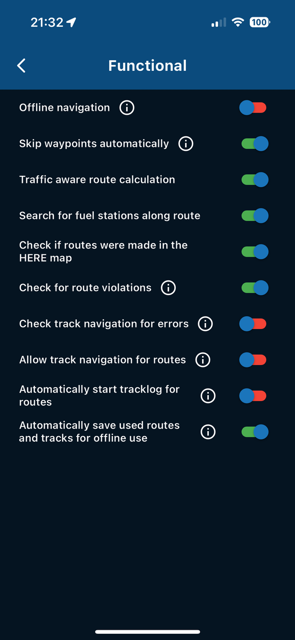
This was not what i expected from previous versions of the app where the recoding resumed automatically. In this instance, the recording remained on pause.
Kind Regards. Help where I can.
Ducati Multistrada V4 Rally
iPhone 18 Pro
CHIGEE AIO-6 LTE
Google Pixel 6 Pro - mounted on SP Connect Plus
Ex Garmin XT2 and XT1 as well as Ex TomTom Rider User -
Whilst testing tracklog recording on an iOS device (iPhone 15 Pro - iOS 17.3.1), I paused the recording whilst at a coffee stop but the app did not resume recoding after I set off again on my ride. Whilst functional settings were not set to automatically route record, I had been on an A to B route where I had commenced tracklog recording manually.
Functional Settings:
This was not what i expected from previous versions of the app where the recoding resumed automatically. In this instance, the recording remained on pause.

@Dave-J-0 if you manually paused recording, I would expect it to remain paused until you restart recording.
2010 GL1800 Goldwing using Samsung Galaxy S20 5G Android 13.
-
@Dave-J-0 if you manually paused recording, I would expect it to remain paused until you restart recording.
@RetiredWingMan Sorry but one of the features was that the app would restart recording once on the move again. Worked brilliantly before.
-

Can confirm this was an issue and will be fixed before release

Hello! It looks like you're interested in this conversation, but you don't have an account yet.
Getting fed up of having to scroll through the same posts each visit? When you register for an account, you'll always come back to exactly where you were before, and choose to be notified of new replies (either via email, or push notification). You'll also be able to save bookmarks and upvote posts to show your appreciation to other community members.
With your input, this post could be even better 💗
Register Login-
 01576
01576
-
 0691
0691
-
 017805
-
 1796
1796
-
09225
-
012728
-
 0333
0333
-
 1221.2k