Observations yesterday
-

While driving a route yesterday, I noticed a few things. Samsung Galaxy S7 Android 8.
-
Had a couple of pop-ups saying WPs were skipped ... but I did not miss any WPs. May be related to the lag in route following updates?
-
Displayed current speed is slow to respond and can jump up & down. Again related to the lag in navigation?
-
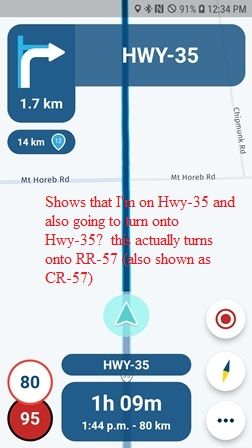
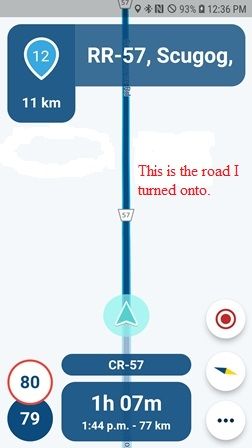
At one point the screen showed me on Hwy-35 and turning onto Hwy-35?? I was actually turning onto RR-57 between WPs 11 & 12.
Route: https://www.myrouteapp.com/en/social/route/7603964?mode=share
See screen shots below.
-
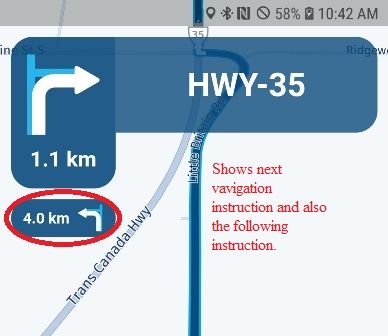
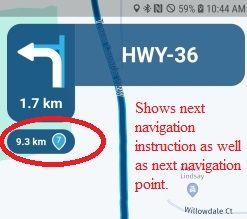
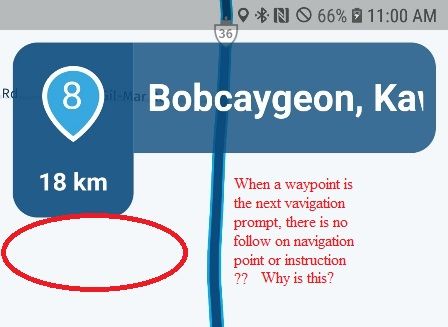
and finally, why when the next navigation instruction is a turn, the following turn is also shown, when the next instruction is a turn and the following instruction is a WP it is also shown ... but when the next navigation instruction is a WP ... there is no following instruction? See screen shots below:
2010 GL1800 Goldwing using Samsung Galaxy S20 5G Android 13.
-
-
While driving a route yesterday, I noticed a few things. Samsung Galaxy S7 Android 8.
-
Had a couple of pop-ups saying WPs were skipped ... but I did not miss any WPs. May be related to the lag in route following updates?
-
Displayed current speed is slow to respond and can jump up & down. Again related to the lag in navigation?
-
At one point the screen showed me on Hwy-35 and turning onto Hwy-35?? I was actually turning onto RR-57 between WPs 11 & 12.
Route: https://www.myrouteapp.com/en/social/route/7603964?mode=share
See screen shots below.
-
and finally, why when the next navigation instruction is a turn, the following turn is also shown, when the next instruction is a turn and the following instruction is a WP it is also shown ... but when the next navigation instruction is a WP ... there is no following instruction? See screen shots below:

@Doug-Robinson Thanks for posting this!
1: Coming update has some stability changes with regards to the automatic waypoint skipping
2: That is directly related to GPS information so I don't believe that is the case. However, position delay is fixed in the upcoming update
3: Interesting
4: That will be improved in another (not the upcoming) update!Thanks for the feedback
-
-
@Doug-Robinson Thanks for posting this!
1: Coming update has some stability changes with regards to the automatic waypoint skipping
2: That is directly related to GPS information so I don't believe that is the case. However, position delay is fixed in the upcoming update
3: Interesting
4: That will be improved in another (not the upcoming) update!Thanks for the feedback
@Corjan-Meijerink thanks for the reply and update. Glad to hear that the position delay is fixed. Now, about map updates ...

2010 GL1800 Goldwing using Samsung Galaxy S20 5G Android 13.
-
@Corjan-Meijerink thanks for the reply and update. Glad to hear that the position delay is fixed. Now, about map updates ...
-
@Doug-Robinson Working on it as I type!
@Corjan-Meijerink I was out for a 400 km ride today. For the most part everything worked well.
- I still had a couple of times when a pop-up appeared saying a waypoint was being skipped ... but I had not yet reached the waypoint ... ?? It was just ahead on the road.
- The tracking delay was much better but still seemed a little slow following me around corners.
- Voice prompts still not working on my S7 Android 8 phone, I just get a screeching noise.
- I always felt that auto zoom should look further ahead as speed increases. I tried the new zoom feature to zoom out further. It appears that this disables auto zoom. Is there a way to reset the auto zoom?
I'm really happy with the beta. Looking forward to future releases. Great work by the team.
2010 GL1800 Goldwing using Samsung Galaxy S20 5G Android 13.
-
@Corjan-Meijerink I was out for a 400 km ride today. For the most part everything worked well.
- I still had a couple of times when a pop-up appeared saying a waypoint was being skipped ... but I had not yet reached the waypoint ... ?? It was just ahead on the road.
- The tracking delay was much better but still seemed a little slow following me around corners.
- Voice prompts still not working on my S7 Android 8 phone, I just get a screeching noise.
- I always felt that auto zoom should look further ahead as speed increases. I tried the new zoom feature to zoom out further. It appears that this disables auto zoom. Is there a way to reset the auto zoom?
I'm really happy with the beta. Looking forward to future releases. Great work by the team.
@Doug-Robinson thanks!
1: can happen after multiple recalculations
2: could very well be - issue is resolved for most but some (especially android) still have some minor delay
3: working on it this week
4: reset auto zoom: click on compass again
Hello! It looks like you're interested in this conversation, but you don't have an account yet.
Getting fed up of having to scroll through the same posts each visit? When you register for an account, you'll always come back to exactly where you were before, and choose to be notified of new replies (either via email, or push notification). You'll also be able to save bookmarks and upvote posts to show your appreciation to other community members.
With your input, this post could be even better 💗
Register Login-
 01540
01540
-
 911410.6k
-
0925
-
 01037
01037
-
0727
-
 0713
0713
-
 0726
0726
-
0617