Planner: Convert batches of shaping points into via points and vice versa
-

Hi,
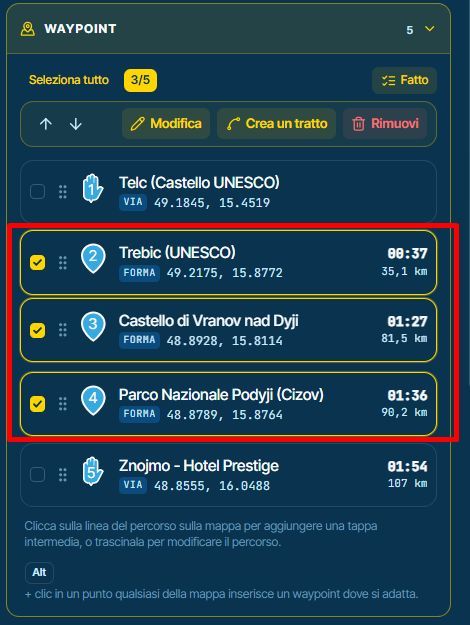
It would be very useful to provide a way to convert a selection of shaping points into via points, and possibly vice versa, with a single command.Thanks
-

Good news: you can already do this, and the button is right there in your screenshot. With the points ticked, press "Modifica" (Edit). The window that opens has a Type choice: pick Via, and every selected shaping point becomes a via point at once. Pick Shaping to go the other way. The start and finish always stay via points, and Undo takes the change back in one step. You can set an icon and a colour for all of them at the same time too.
-
Corjan Meijerink locked this topic
Hello! It looks like you're interested in this conversation, but you don't have an account yet.
Getting fed up of having to scroll through the same posts each visit? When you register for an account, you'll always come back to exactly where you were before, and choose to be notified of new replies (either via email, or push notification). You'll also be able to save bookmarks and upvote posts to show your appreciation to other community members.
With your input, this post could be even better 💗
Register Login-
04105
-
 0338
-
 0327
-
0345
-
029
-
 0214
-
0216
-
0229