Website update - Best order, daylight on your ride, edit several waypoints at once and more
-

Hi everyone!

Another website update is live, again with a good handful of your forum topics in it
 Here's what changed since yesterday's update.
New
- Best order in the planner's toolkit puts your waypoints in the order that takes the least time or distance. Your start and finish stay where they are, and Undo puts the old order back.
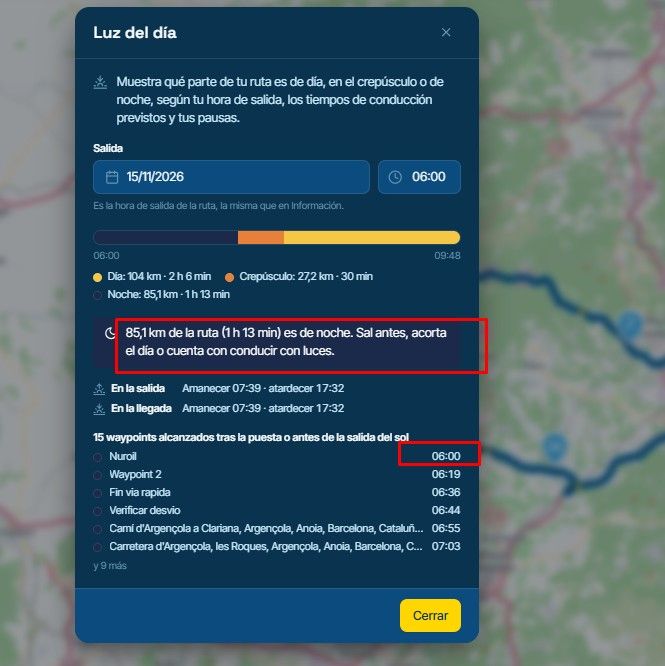
- Daylight in the toolkit shows which part of your ride is in daylight, twilight or the dark, from your departure time, the riding times and your pauses. It also lists the waypoints you reach after sunset.
- Edit several waypoints at once. Select waypoints in the list and press Edit to give them all one type, icon and colour.
- Turn POIs into via points. A route POI's button now says Turn into a via point, and you can select several POIs in the list and turn them all into via points in one step, each where it fits the route.
- Snap all waypoints now, in the planner's settings, moves every waypoint of a route onto the road it follows. Handy for imported routes.
- Directions for a route from your library. The Directions section now shows on a route you open from the library, with a button that gets the turn-by-turn directions.
- Sync a whole folder with the app from its ⋯ menu in the library. Every route in it goes to your phone, subfolders and routes added later included. A phone mark shows what syncs.
- An event's trip can be Unlisted or Public, not only Private. Outsiders then see the days, the story, the routes and what the organisers wrote and rode. A participant's own tracklogs only show when that participant made them public.
- Club members can open a private event of their club and see what it is about, instead of "Event not found". Club managers can read the whole event without being on it.
- The browser tab names what you're looking at: the route open in the planner, the trip, folder, club or page you're on.
- The route page shows its author's profile picture, and clicking the name opens their profile.
- For RouteXperts and mentors: a RouteXpert's work now goes to one mentor. The first mentor to decide on it becomes their mentor, seniors can change that in the new Mentors tab, and nobody reviews their own work. Approvals can be filtered by person and kind, and the cards show the route's map.
Improvements and changes
- On HERE the planner says that curves and hills need another engine, with a button to switch to TomTom.
- Arrange sections shows Warnings as a fixed first row, and says when a section that isn't in the sidebar yet will appear.
- Trips: a day with its own date keeps it, and the builder says when the days before it no longer fit. A day without a date counts on from the nearest dated day before it.
- A published trip without a start date now shows under Upcoming on the Trips page.
- Split into days only makes a trip when you tick the box, and every day route keeps its waypoint photos.
- The trip book shows every route of a day on its map, and no longer draws a ferry crossing as a road.
- Preview as participant no longer offers to make or edit the event's trip.
- Compare engines draws each engine's route in full detail, and aligning now works on every leg it can.
- Notification settings only show an Email box where something is actually emailed, and the digest has its own block.
- The At a glance card on your profile says it counts only tracklogs recorded with the app.
- Search engines no longer show unlisted routes, tracklogs and trips, or profiles that don't open.
Fixed
- A large collection of POIs no longer freezes the planner or the search box.
That's it! Thanks again for all your feedback

Cheers,
Corjan -
Hi everyone!
Another website update is live, again with a good handful of your forum topics in it
Here's what changed since yesterday's update.New
- Best order in the planner's toolkit puts your waypoints in the order that takes the least time or distance. Your start and finish stay where they are, and Undo puts the old order back.
- Daylight in the toolkit shows which part of your ride is in daylight, twilight or the dark, from your departure time, the riding times and your pauses. It also lists the waypoints you reach after sunset.
- Edit several waypoints at once. Select waypoints in the list and press Edit to give them all one type, icon and colour.
- Turn POIs into via points. A route POI's button now says Turn into a via point, and you can select several POIs in the list and turn them all into via points in one step, each where it fits the route.
- Snap all waypoints now, in the planner's settings, moves every waypoint of a route onto the road it follows. Handy for imported routes.
- Directions for a route from your library. The Directions section now shows on a route you open from the library, with a button that gets the turn-by-turn directions.
- Sync a whole folder with the app from its ⋯ menu in the library. Every route in it goes to your phone, subfolders and routes added later included. A phone mark shows what syncs.
- An event's trip can be Unlisted or Public, not only Private. Outsiders then see the days, the story, the routes and what the organisers wrote and rode. A participant's own tracklogs only show when that participant made them public.
- Club members can open a private event of their club and see what it is about, instead of "Event not found". Club managers can read the whole event without being on it.
- The browser tab names what you're looking at: the route open in the planner, the trip, folder, club or page you're on.
- The route page shows its author's profile picture, and clicking the name opens their profile.
- For RouteXperts and mentors: a RouteXpert's work now goes to one mentor. The first mentor to decide on it becomes their mentor, seniors can change that in the new Mentors tab, and nobody reviews their own work. Approvals can be filtered by person and kind, and the cards show the route's map.
Improvements and changes
- On HERE the planner says that curves and hills need another engine, with a button to switch to TomTom.
- Arrange sections shows Warnings as a fixed first row, and says when a section that isn't in the sidebar yet will appear.
- Trips: a day with its own date keeps it, and the builder says when the days before it no longer fit. A day without a date counts on from the nearest dated day before it.
- A published trip without a start date now shows under Upcoming on the Trips page.
- Split into days only makes a trip when you tick the box, and every day route keeps its waypoint photos.
- The trip book shows every route of a day on its map, and no longer draws a ferry crossing as a road.
- Preview as participant no longer offers to make or edit the event's trip.
- Compare engines draws each engine's route in full detail, and aligning now works on every leg it can.
- Notification settings only show an Email box where something is actually emailed, and the digest has its own block.
- The At a glance card on your profile says it counts only tracklogs recorded with the app.
- Search engines no longer show unlisted routes, tracklogs and trips, or profiles that don't open.
Fixed
- A large collection of POIs no longer freezes the planner or the search box.
That's it! Thanks again for all your feedback
Cheers,
Corjan
@Corjan-Meijerink The changes are very interesting.
Interestingly, it detects that we’re heading out and that it’s nighttime, yet the recommendation it gives is to "leave earlier."
Best regards
-
Some really great additions there that will make many of the small steps in planning easier. Thanks.
Hello! It looks like you're interested in this conversation, but you don't have an account yet.
Getting fed up of having to scroll through the same posts each visit? When you register for an account, you'll always come back to exactly where you were before, and choose to be notified of new replies (either via email, or push notification). You'll also be able to save bookmarks and upvote posts to show your appreciation to other community members.
With your input, this post could be even better 💗
Register Login-
 2513.1k
-
 055
-
 0555
-
014350
-
 0534
-
 0544
-
 05152
-
 0555