Skip to content
  • Categories
  • Recent
  • Popular
  • Support
  • MyRoute-app
Collapse
Brand Logo

MRA Community Forum

  1. Home
  2. MRA Routeplanner Next Beta
  3. [Web-Beta] Suggestions and Discussions
  4. Undo/Redo tool is hidden

Undo/Redo tool is hidden

Scheduled Pinned Locked Moved [Web-Beta] Suggestions and Discussions
7 Posts 4 Posters 12 Views 2 Watching
  • Oldest to Newest
  • Newest to Oldest
  • Most Votes
Reply
  • Reply as topic
Log in to reply
This topic has been deleted. Only users with topic management privileges can see it.
  • b0hd1
    b0hd1
    b0hd1
    wrote last edited by
    #1

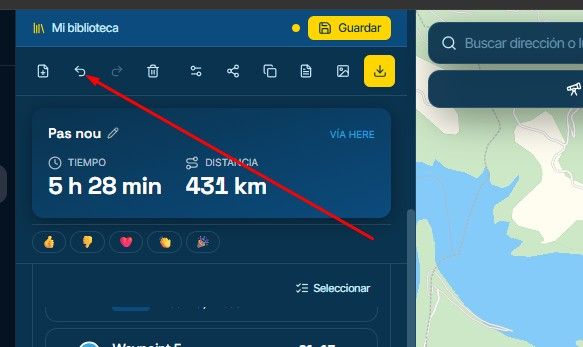
    When working on the points, the "undo or redo" tool is hidden. I think it would be better if it were always visible.
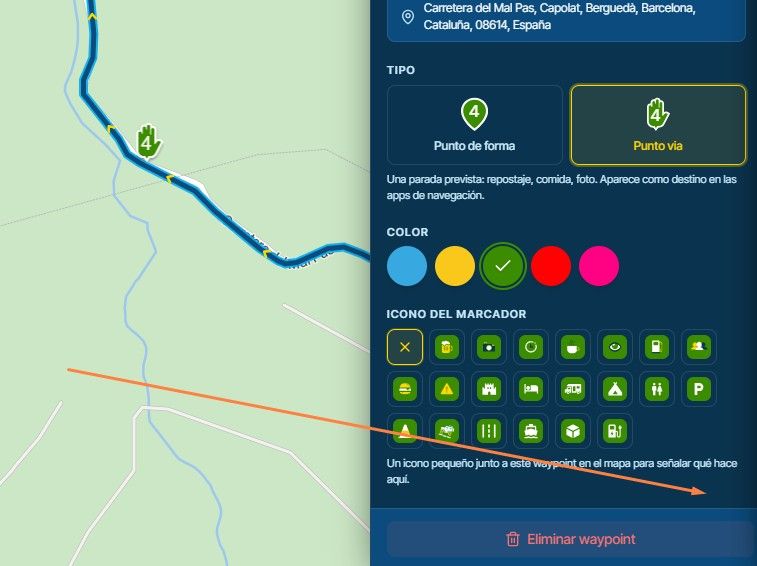
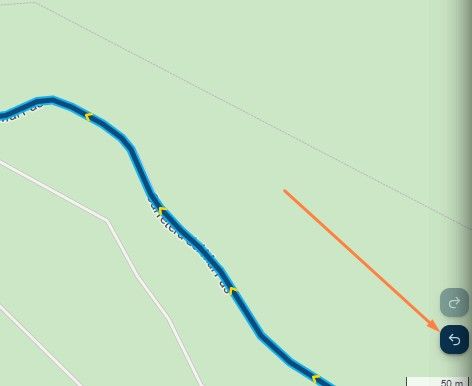
    image.jpeg

    image.jpeg

    Creator and administrator of the largest MRA groups.

    • https://t.me/MRa_by_b0hd1
    • https://www.myrouteapp.com/group/messages/7007
    • YouTube: @demco17
    • Ex-routexpert, current beta tester and MRA expert. Creator of tutorials, manuals, and MRA user trainer.
    Stefan Hummelink 1 Reply Last reply
    0
    • b0hd1 b0hd1

      When working on the points, the "undo or redo" tool is hidden. I think it would be better if it were always visible.

      image.jpeg

      image.jpeg

      Stefan Hummelink
      Stefan Hummelink
      Stefan Hummelink
      Alpha tester
      wrote last edited by
      #2

      @b0hd1 Try ctrl+z 😉

      Manks bu'j te bange.

      b0hd1 1 Reply Last reply
      0
      • Stefan Hummelink Stefan Hummelink

        @b0hd1 Try ctrl+z 😉

        b0hd1
        b0hd1
        b0hd1
        wrote last edited by
        #3

        @Stefan-Hummelink Right, right. I know the keyboard shortcuts in Windows, but what if you're using a tablet or a smartphone? The on-screen icon is very useful. Thanks for the recommendation anyway.

        Creator and administrator of the largest MRA groups.

        • https://t.me/MRa_by_b0hd1
        • https://www.myrouteapp.com/group/messages/7007
        • YouTube: @demco17
        • Ex-routexpert, current beta tester and MRA expert. Creator of tutorials, manuals, and MRA user trainer.
        Stefan Hummelink 1 Reply Last reply
        1
        • b0hd1 b0hd1

          @Stefan-Hummelink Right, right. I know the keyboard shortcuts in Windows, but what if you're using a tablet or a smartphone? The on-screen icon is very useful. Thanks for the recommendation anyway.

          Stefan Hummelink
          Stefan Hummelink
          Stefan Hummelink
          Alpha tester
          wrote last edited by
          #4

          @b0hd1 Haha I know, was simply pointing out the obvious. I still have to get used to the ctrlz in MRA myself. 😉

          Manks bu'j te bange.

          1 Reply Last reply
          1
          • Corjan Meijerink
            Corjan Meijerink
            Corjan Meijerink
            Developer
            wrote last edited by
            #5

            Don’t feel like changing this now.
            Not like you actively have that menu open all the time.

            That said, have you seen the top of the main left sidebar?

            b0hd1 1 Reply Last reply
            0
            • Lluis Arasanz
              Lluis Arasanz
              Lluis Arasanz
              wrote last edited by
              #6

              I see that “undo” and “redo” buttons are there, but, if open only waypoints info to do all work with them and collapse left menu to gain space on tablet, could be a problem on tablet editing.

              Anyway is something to have in mind, but not urgent now

              Lluis Arasanz

              • BMW F750GS
                MotoMediaLink HW Interface for BMW's WonderWheel device
              • Samsung A14 with Beta MyRoute-App (primary bike use)
                Tasker and MMLink SW for Android App Control
              • iPhone 14 with Beta MyRoute-App (personal and primary CP use)
              1 Reply Last reply
              0
              • Corjan Meijerink Corjan Meijerink

                Don’t feel like changing this now.
                Not like you actively have that menu open all the time.

                That said, have you seen the top of the main left sidebar?

                b0hd1
                b0hd1
                b0hd1
                wrote last edited by
                #7

                @Corjan-Meijerink Perfect!! thx

                image.jpeg

                Creator and administrator of the largest MRA groups.

                • https://t.me/MRa_by_b0hd1
                • https://www.myrouteapp.com/group/messages/7007
                • YouTube: @demco17
                • Ex-routexpert, current beta tester and MRA expert. Creator of tutorials, manuals, and MRA user trainer.
                1 Reply Last reply
                0

                Hello! It looks like you're interested in this conversation, but you don't have an account yet.

                Getting fed up of having to scroll through the same posts each visit? When you register for an account, you'll always come back to exactly where you were before, and choose to be notified of new replies (either via email, or push notification). You'll also be able to save bookmarks and upvote posts to show your appreciation to other community members.

                With your input, this post could be even better 💗

                Register Login
                Reply
                • Reply as topic
                Log in to reply
                • Oldest to Newest
                • Newest to Oldest
                • Most Votes


                ACTIVE USERS
                Corjan Meijerink
                Corjan Meijerink
                Lluis Arasanz
                Lluis Arasanz
                b0hd1
                b0hd1
                Stefan Hummelink
                Stefan Hummelink
                POPULAR TOPICS
                • Strange translation
                  Jörgen
                  Jörgen
                  0
                  14
                  31

                • Add delete route button to library
                  Corjan Meijerink
                  Corjan Meijerink
                  0
                  9
                  23

                • [EN] MyRoute-app Routeplanner Next (Beta)
                  martin-phogel.de
                  martin-phogel.de
                  9
                  112
                  10.5k

                • Undo/Redo tool is hidden
                  b0hd1
                  b0hd1
                  0
                  7
                  12

                • Crazy routing
                  Hubert Thoring
                  Hubert Thoring
                  0
                  7
                  26

                • Compatibility and synchronization of the "old" database with the new beta
                  b0hd1
                  b0hd1
                  1
                  5
                  19

                • Which route is shown?
                  Corjan Meijerink
                  Corjan Meijerink
                  1
                  4
                  23

                • A07 Shared Route Collaboration – Change Log?
                  Corjan Meijerink
                  Corjan Meijerink
                  0
                  4
                  13

                MY GROUPS
                • Login

                • Login or register to search.
                • First post
                  Last post
                0
                • Categories
                • Recent
                • Popular
                • Support
                • MyRoute-app