
MRA 5.0.4 (451) Menü Reihenfolge - Überlagerung - BT Controller
-

Hallo liebes MRA Team,
ich würde vorschlagen das vielleicht doch mal im System anzuschauen und vielleicht auch anzupassen. Da hat sich vielleicht noch ein Fehler verbogen den man nur bemerkt wenn man einen BT Controller verwendet.Menüs die sich überlagern oder doppelt beständig werden müssen, lassen sich nicht anwählen.
In der Reihenfolge der Menüs:
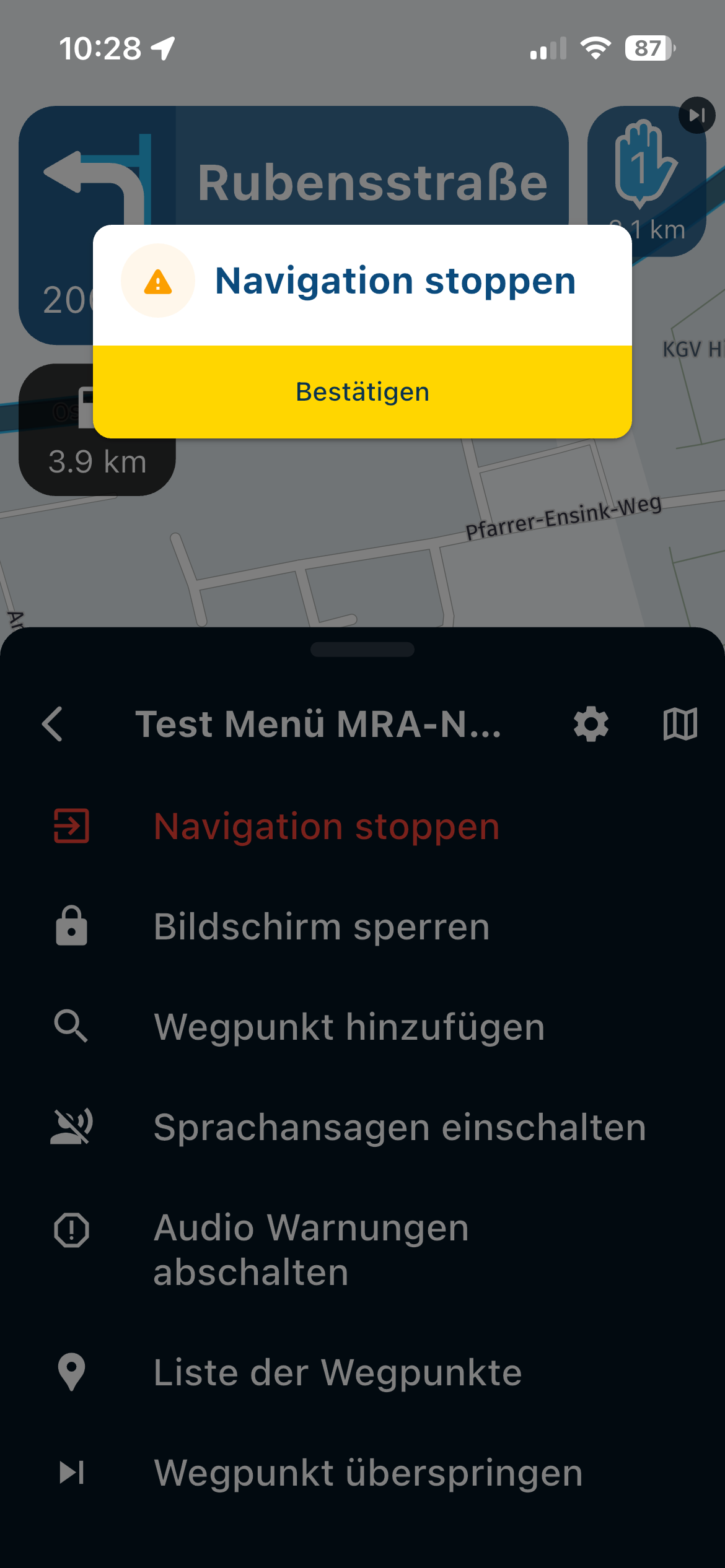
1.) Beende ich eine Route über das Menü kommt die Frage zur Bestätigung s. Bild 1 das ist okay so !! Ich kann es mit dem BT Controller bestätigen. !!
Bild 1 Stop Route
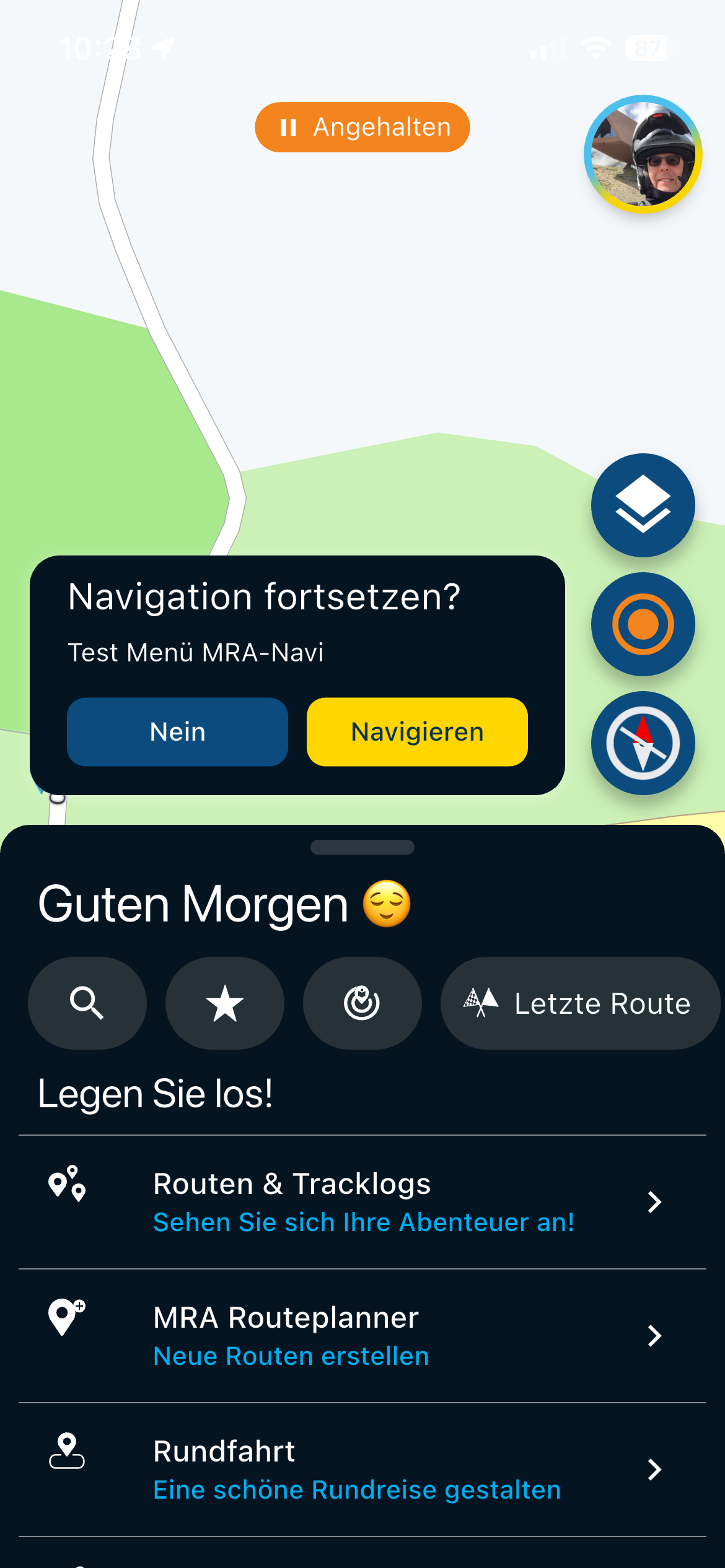
2.) Ich bestätige das und es kommt erneut eine Abfrage s. Bild 2 aber es kommt auch das Hauptmenü, das ist schwierig für einen BT Controller, da nur das Hauptmenü erkannt wird, das überlagerte kann aber nicht angewählt werden.
Bild 2 Erneute Abfrage - warum das ? Und das im zweiten Menüs auf dem Display, das sich nicht anwählen lässt ?
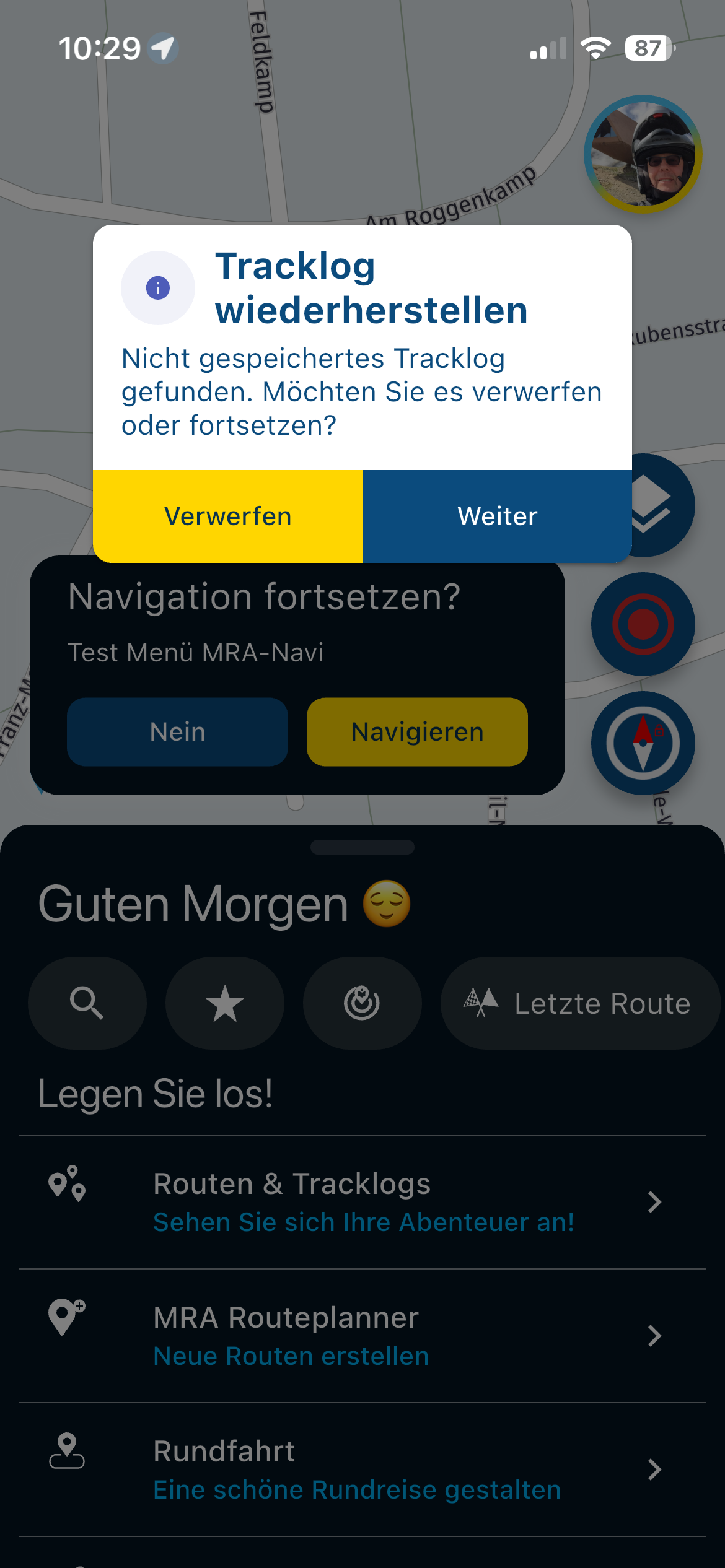
3.) Stoppe ich jetzt einfach die MRA App und starte neu habe ich drei Menüs …s.Bild 3
Bild 3 Menü, da der Tracklog ja noch nicht gespeichert wurde, das ist okay , aber die anderen Menüs sind unterlagert. Ich kann es aber mit dem BT Controller nicht bestätigen ?
Vorschlag: BT Controller in den Menüs berücksichtigen
Für eine BT Controller Anwendung wäre es sinnvoll wenn es immer nur ein Menü auf dem Display gibt.
Vielleicht ein Fehler:
Worin unterscheidet sich die Auswahl in der Bedienung wenn es in Bild 1 ja funktioniert und die Bedienung in Bild 2 und Bild 3 nicht funktioniert… Zu Bild 1, die Auswahl zum Beispiel im Menü geht ja ohne Probleme obwohl die Abfrage dann zum Bestätigten eingeblendet wird kann man es mit dem BT Controller bestätigen
 Zu Bild 2, da lässt sich mit einem BT Controller nur das Hauptmenü bedienen 🥴Zu Bild 3, da lässt sich mit dem BT Controller nichts bedienen 🥴
 -
@Corjan-Meijerink :
A question regarding the first post: Navigating the menu with a Bluetooth Remote One controller sometimes works, and sometimes it doesn't.1.) The menu shown in image 1 works perfectly; menu navigation and confirmation are possible.
2.) This doesn't work in the menus shown in images 2 and 3.
Is this a menu mapping error?
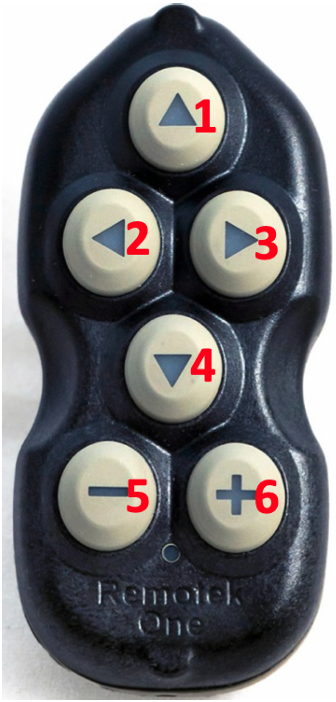
For your information: I'm using the Remotek One V1.1.2, which allows me to access the menu as shown in image 1 by pressing the DC button and the up arrow (1), navigating with the arrow keys (1, 2, 3, 4), and confirming with + (6). However, this doesn't work with the menus in images 2 and 3.
Remotek One version V2.1 can do everything that V1.1.2 can do!
VG Hubert
Beta Test "Next App" dazu die Hardware .
iPad 9. Gen iOS 26.7.1/ iPhone 16e iOS 26.7.1/ Navi iPhone Xr iOS 18.7.10 / PC mit MS Win11 /❗️MyRoute-App im Cradel und Remotek-One❗️ Info zu MRA & Remotek One -
@Corjan-Meijerink :
A question regarding the first post: Navigating the menu with a Bluetooth Remote One controller sometimes works, and sometimes it doesn't.1.) The menu shown in image 1 works perfectly; menu navigation and confirmation are possible.
2.) This doesn't work in the menus shown in images 2 and 3.
Is this a menu mapping error?
For your information: I'm using the Remotek One V1.1.2, which allows me to access the menu as shown in image 1 by pressing the DC button and the up arrow (1), navigating with the arrow keys (1, 2, 3, 4), and confirming with + (6). However, this doesn't work with the menus in images 2 and 3.
Remotek One version V2.1 can do everything that V1.1.2 can do!

@Hubert-Thoring said in MRA 5.0.4 (451) Menü Reihenfolge - Überlagerung - BT Controller:
Remotek One version V2.1 can do everything that V1.1.2 can do!
It seems, that those missing menu functions, which where present in 1.1.2, where missing in 2.0.0, but re-added in 2.1.0 according to changelog.
Shiny!
-
@Hubert-Thoring said in MRA 5.0.4 (451) Menü Reihenfolge - Überlagerung - BT Controller:
Remotek One version V2.1 can do everything that V1.1.2 can do!
It seems, that those missing menu functions, which where present in 1.1.2, where missing in 2.0.0, but re-added in 2.1.0 according to changelog.
@ConiKost said in MRA 5.0.4 (451) Menü Reihenfolge - Überlagerung - BT Controller:
@Hubert-Thoring said in MRA 5.0.4 (451) Menü Reihenfolge - Überlagerung - BT Controller:
Remotek One version V2.1 can do everything that V1.1.2 can do!
It seems, that those missing menu functions, which where present in 1.1.2, where missing in 2.0.0, but re-added in 2.1.0 according to changelog.
Yes that is so !!
-
Hey @Corjan-Meijerink ,
Is there perhaps an adjustment / improvement in the next MRA update, or is it an unsolvable problem?
Hello! It looks like you're interested in this conversation, but you don't have an account yet.
Getting fed up of having to scroll through the same posts each visit? When you register for an account, you'll always come back to exactly where you were before, and choose to be notified of new replies (either via email, or push notification). You'll also be able to save bookmarks and upvote posts to show your appreciation to other community members.
With your input, this post could be even better 💗
Register Login-
 0815
0815
-
0518
-
 1514
1514
-
0615
-
 0524
0524
-
 0460
0460
-
 0419
0419
-
 24111
24111




