
Skip to content
  • Categories
  • Recent
  • Popular
  • Support
  • MyRoute-app
Collapse
Brand Logo

MRA Community Forum

  1. Home
  2. [Beta] The MyRoute-app
  3. [Beta] Problems, Bugs and other Issues
  4. MRA 5.0.1-430 Back from setup

MRA 5.0.1-430 Back from setup

Scheduled Pinned Locked Moved [Beta] Problems, Bugs and other Issues
7 Posts 3 Posters 41 Views 3 Watching
  • Oldest to Newest
  • Newest to Oldest
  • Most Votes
Reply
  • Reply as topic
Log in to reply
This topic has been deleted. Only users with topic management privileges can see it.
  • Jörgenundefined Offline
    Jörgenundefined Offline
    Jörgen
    Valued contributor
    wrote last edited by
    #1

    Hi,

    Is that on purpose?

    When you go from start / Setup / Navigation Setting / Map Layer and then tap the back arrow, you are at "start" and not back in Navigation settup.
    In other submenus you are one step back.

    Hardware
    iPhone 12 pro (iOS 18.7.1)
    Oukitel RT3 pro (Andr. 14)
    Samsung XCover 4 (Andr. 9 Pie)
    Wireless CarPlay mit (Elebest C650)
    Wired CarPlay (SEAT Arona - 2021)
    More information about Workshops here

    Rob Verhoeffundefined 1 Reply Last reply
    0
    • Jörgenundefined Jörgen

      Hi,

      Is that on purpose?

      When you go from start / Setup / Navigation Setting / Map Layer and then tap the back arrow, you are at "start" and not back in Navigation settup.
      In other submenus you are one step back.

      Rob Verhoeffundefined Offline
      Rob Verhoeffundefined Offline
      Rob Verhoeff
      Alpha tester
      wrote last edited by Rob Verhoeff
      #2

      @Jörgen On iOS I do go one step back. But if I long press that button I go to the map at the beginning. Isn't that a great feature 😉

      BMW K1600GT-P (2013) with BMW Navigator | Nolan N100-5 with Sena 30K
      iOS on iPhone 13 & 16 (mounted on Quadlock)
      Apple CarPlay in VW T-Roc (wired)
      Routelab on MacBook Air & iMac (Tahoe & Ventura)

      Jörgenundefined 1 Reply Last reply
      0
      • Jörgenundefined Offline
        Jörgenundefined Offline
        Jörgen
        Valued contributor
        wrote last edited by
        #3

        Are you sure?
        What you describe works for me on my iPhone for all menus except Map Layer.
        Map Layer behaves exactly as I described above (on Android).
        And long press on back arrow does not work here.

        Hardware
        iPhone 12 pro (iOS 18.7.1)
        Oukitel RT3 pro (Andr. 14)
        Samsung XCover 4 (Andr. 9 Pie)
        Wireless CarPlay mit (Elebest C650)
        Wired CarPlay (SEAT Arona - 2021)
        More information about Workshops here

        1 Reply Last reply
        0
        • Jörgenundefined Offline
          Jörgenundefined Offline
          Jörgen
          Valued contributor
          wrote last edited by
          #4

          On the Android tablet, same as you describe for all other menus except Map Layer.

          Hardware
          iPhone 12 pro (iOS 18.7.1)
          Oukitel RT3 pro (Andr. 14)
          Samsung XCover 4 (Andr. 9 Pie)
          Wireless CarPlay mit (Elebest C650)
          Wired CarPlay (SEAT Arona - 2021)
          More information about Workshops here

          1 Reply Last reply
          0
          • Jörgenundefined Offline
            Jörgenundefined Offline
            Jörgen
            Valued contributor
            wrote last edited by
            #5

            It looks like it is by purpose. In older version it is the same.

            Hardware
            iPhone 12 pro (iOS 18.7.1)
            Oukitel RT3 pro (Andr. 14)
            Samsung XCover 4 (Andr. 9 Pie)
            Wireless CarPlay mit (Elebest C650)
            Wired CarPlay (SEAT Arona - 2021)
            More information about Workshops here

            1 Reply Last reply
            0
            • Rob Verhoeffundefined Rob Verhoeff

              @Jörgen On iOS I do go one step back. But if I long press that button I go to the map at the beginning. Isn't that a great feature 😉

              Jörgenundefined Offline
              Jörgenundefined Offline
              Jörgen
              Valued contributor
              wrote last edited by
              #6

              @Rob-Verhoeff said in MRA 5.0.1-430 Back from setup:

              Isn't that a great feature

              But yeah, nice hidden feature the long press...

              Hardware
              iPhone 12 pro (iOS 18.7.1)
              Oukitel RT3 pro (Andr. 14)
              Samsung XCover 4 (Andr. 9 Pie)
              Wireless CarPlay mit (Elebest C650)
              Wired CarPlay (SEAT Arona - 2021)
              More information about Workshops here

              1 Reply Last reply
              0
              • Hubert Thoringundefined Offline
                Hubert Thoringundefined Offline
                Hubert Thoring
                Valued contributor
                wrote last edited by
                #7

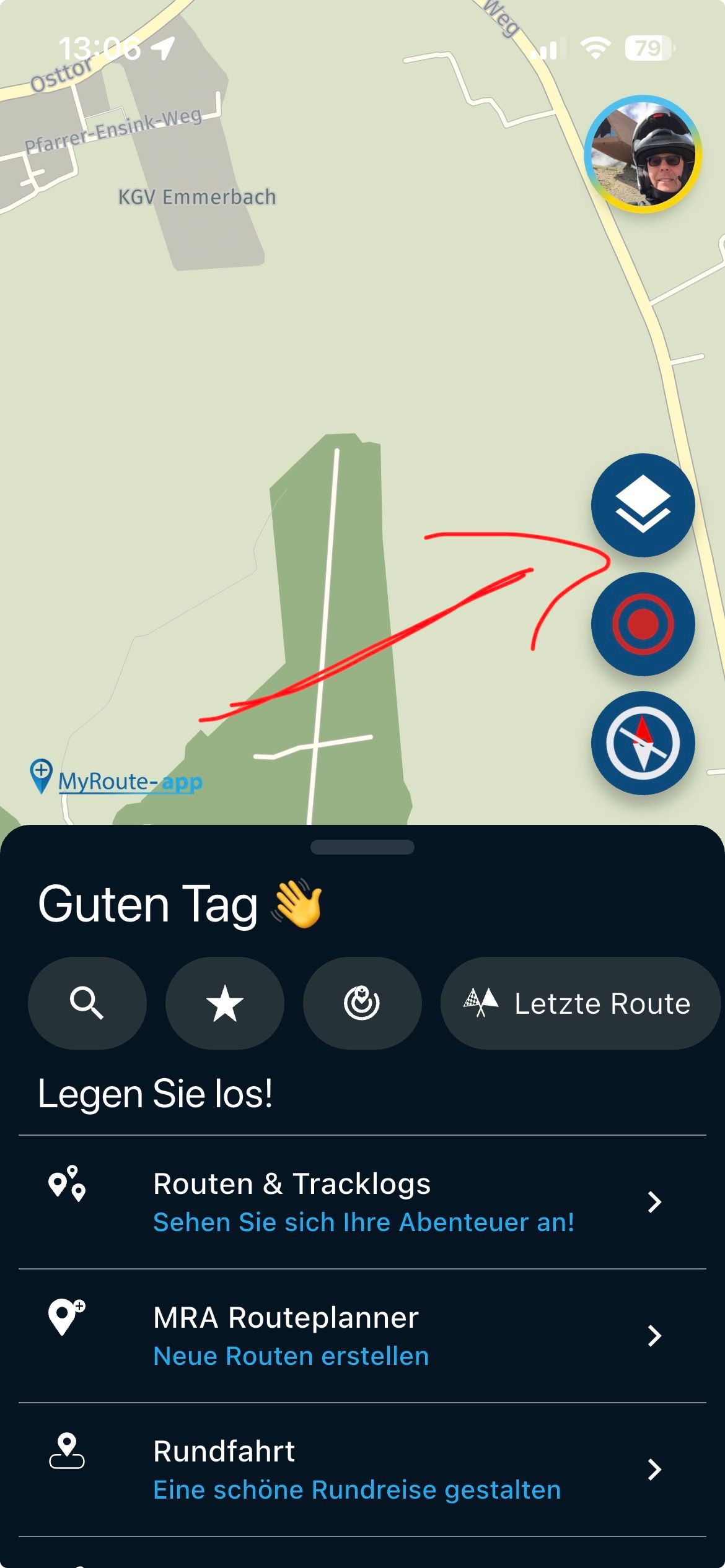
                This is the same function, that's why it will be so 😉
                IMG_5007.jpeg

                VG Hubert
                Info Beta Test "Next App" dazu die Hardware .
                iPad 9. Gen iOS 26.1 / iPhone 16e iOS 26.1 / iPhone Xr iOS 18.7.2 / PC mit MS Win11 /❗️MyRoute-App im Cradel und Remotek-One❗️ Info zu MRA & Remotek One

                1 Reply Last reply
                0
                Reply
                • Reply as topic
                Log in to reply
                • Oldest to Newest
                • Newest to Oldest
                • Most Votes


                ACTIVE USERS
                Hubert Thoringundefined
                Hubert Thoring
                Rob Verhoeffundefined
                Rob Verhoeff
                Jörgenundefined
                Jörgen
                POPULAR TOPICS
                • MRA and Color
                  Hubert Thoringundefined
                  Hubert Thoring
                  0
                  4
                  81

                • Map "spinning" when standing still
                  M. Schrijverundefined
                  M. Schrijver
                  0
                  38
                  2.2k

                • I don't need AA to run the app on a phone, right?
                  Peter Zehentreiterundefined
                  Peter Zehentreiter
                  0
                  17
                  384

                • Why does the current location finder disappear
                  undefined
                  0
                  1
                  19

                • Reverse route
                  undefined
                  0
                  1
                  15

                • using GPS coordinates for planning not always correct
                  Con Hennekensundefined
                  Con Hennekens
                  0
                  15
                  433

                • Anyone with CPMC B6?
                  Con Hennekensundefined
                  Con Hennekens
                  0
                  2
                  65
                MY GROUPS
                • Login

                • Login or register to search.
                • First post
                  Last post
                0
                • Categories
                • Recent
                • Popular
                • Support
                • MyRoute-app










