
Skip to content
  • Categories
  • Recent
  • Popular
  • Support
  • MyRoute-app
Collapse
Brand Logo

MRA Community Forum

  1. Home
  2. [Beta] The MyRoute-app
  3. [Beta] Problems, Bugs and other Issues
  4. V5.0.0 (424) - MRA Route Planner - Unable to Exit

V5.0.0 (424) - MRA Route Planner - Unable to Exit

Scheduled Pinned Locked Moved [Beta] Problems, Bugs and other Issues
6 Posts 4 Posters 56 Views 3 Watching
  • Oldest to Newest
  • Newest to Oldest
  • Most Votes
Reply
  • Reply as topic
Log in to reply
This topic has been deleted. Only users with topic management privileges can see it.
  • Dave J 0undefined Offline
    Dave J 0undefined Offline
    Dave J 0
    Valued contributor
    wrote on last edited by
    #1

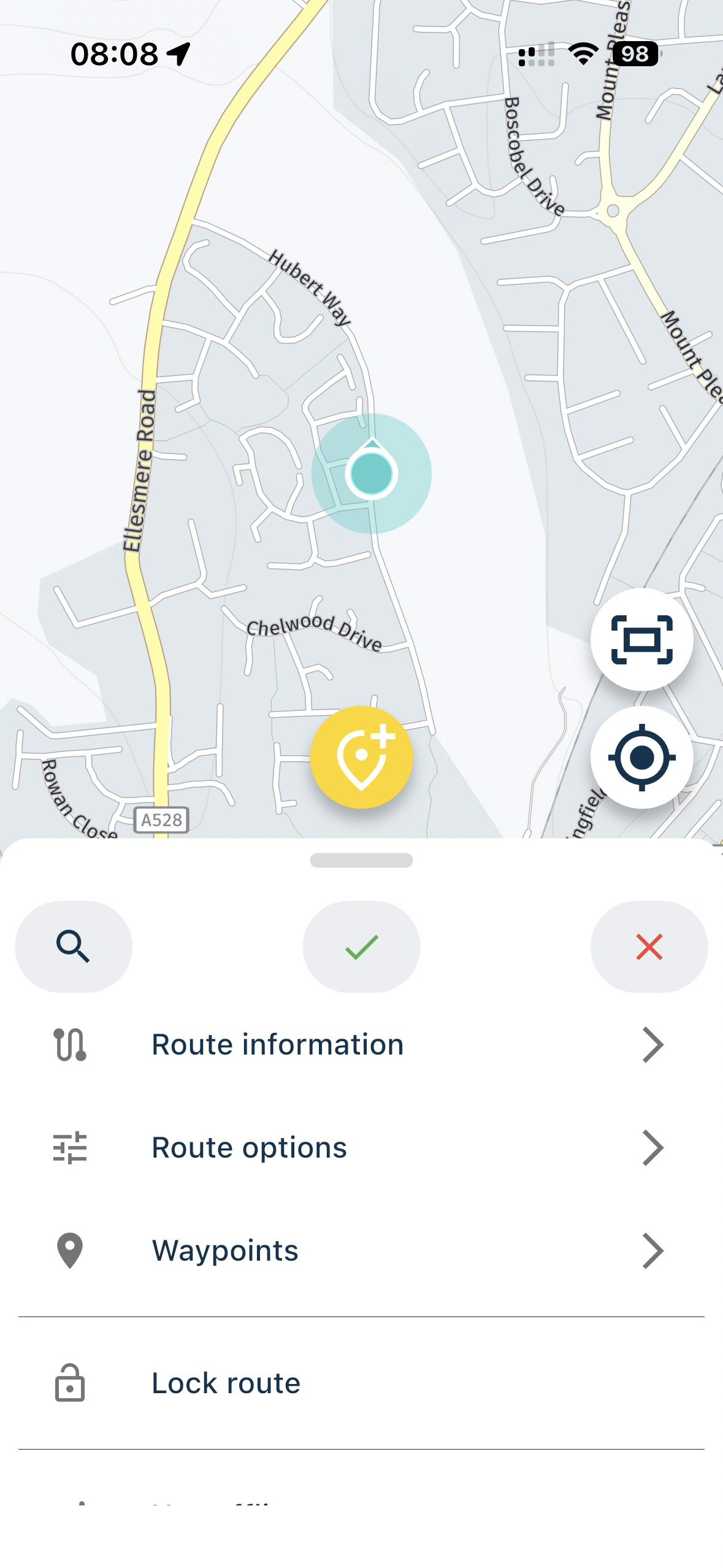
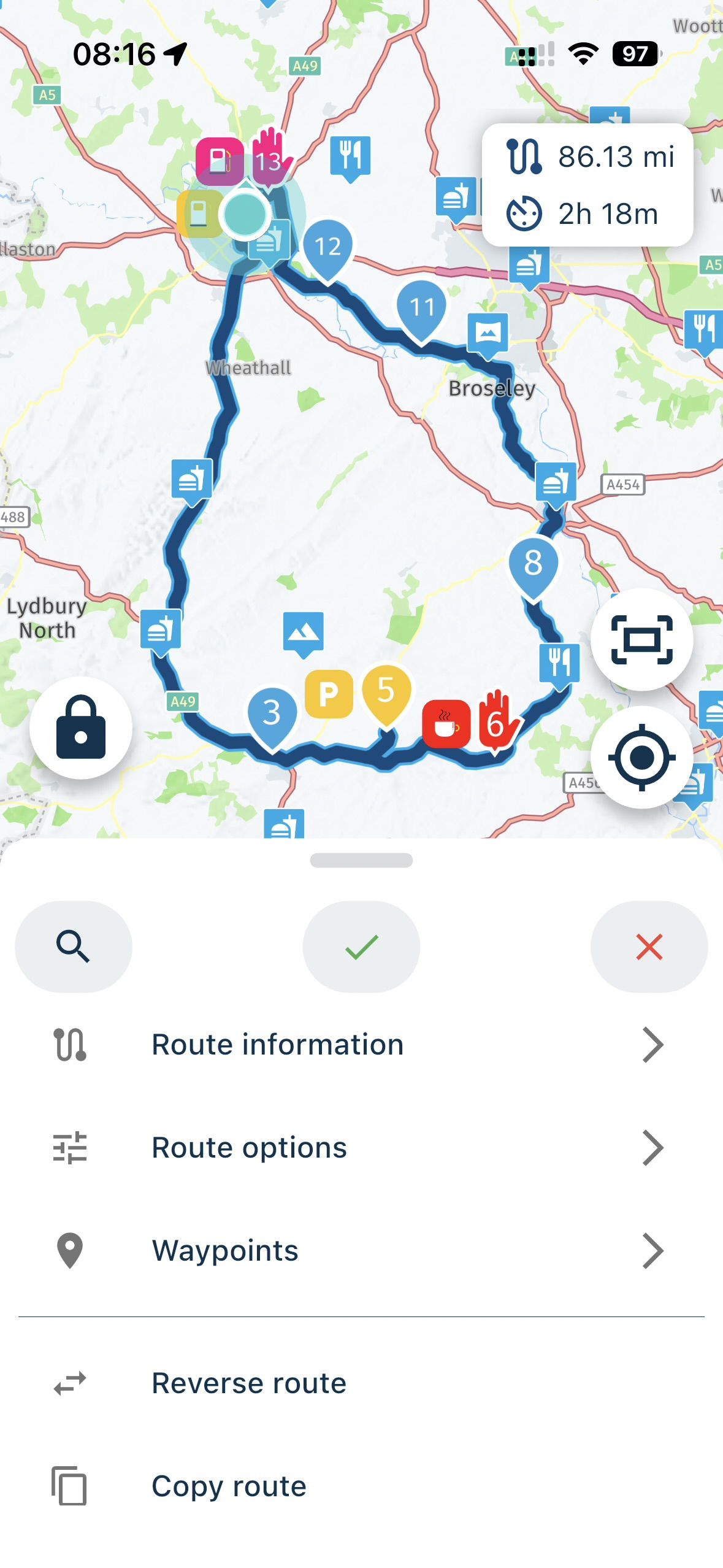
    @Corjan-Meijerink I have undertaken a reinstall of the app but the problem still exists for me when entering the MRA Route Planner from within the app. On entering the editor page to either create a new route or edit and existing route I am presented with following and not the normal save icons with and exit button:
    IMG_2236.jpeg
    IMG_2237.jpeg

    The only way to exit the planner is for me to close the app down and restart the app again.

    Kind Regards. Help where I can.
    Ducati Multistrada V4 Rally
    iPhone 15 Pro
    CHIGEE AIO-6 LTE
    Google Pixel 6 Pro - mounted on SP Connect Plus
    Ex Garmin XT2 and XT1 as well as Ex TomTom Rider User

    Con Hennekensundefined 1 Reply Last reply
    1
    • Hubert Thoringundefined Offline
      Hubert Thoringundefined Offline
      Hubert Thoring
      Valued contributor
      wrote on last edited by Hubert Thoring
      #2

      I had already reported it and Corjan will clarify it for the next update….

      Link click here to the post

      VG Hubert
      Info Beta Test "Next App" dazu die Hardware .
      iPad 9. Gen iOS 26.1 / iPhone 16e iOS 26.1 / iPhone Xr iOS 18.7.2 / PC mit MS Win11 /❗️MyRoute-App im Cradel und Remotek-One❗️ Info zu MRA & Remotek One

      1 Reply Last reply
      1
      • Corjan Meijerinkundefined Offline
        Corjan Meijerinkundefined Offline
        Corjan Meijerink
        Developer
        wrote on last edited by
        #3

        Indeed, will be fixed!

        1 Reply Last reply
        0
        • Dave J 0undefined Dave J 0

          @Corjan-Meijerink I have undertaken a reinstall of the app but the problem still exists for me when entering the MRA Route Planner from within the app. On entering the editor page to either create a new route or edit and existing route I am presented with following and not the normal save icons with and exit button:

          IMG_2236.jpeg
          IMG_2237.jpeg

          The only way to exit the planner is for me to close the app down and restart the app again.

          Con Hennekensundefined Online
          Con Hennekensundefined Online
          Con Hennekens
          Alpha tester
          wrote on last edited by
          #4

          @Dave-J-0 said in V5.0.0 (424) - MRA Route Planner - Unable to Exit:

          The only way to exit the planner is for me to close the app down and restart the app again.

          The phones back-button or back-gesture will close the planner and get you back to the main menu.

          I am just an enthusiastic MRA user, and hope you will be one too!

          Most motorcycle problems are caused by the nut that connects the handlebar to the saddle.

          Streetpilot 2610 / Zumo 660 / Zumo 395 / Motorola Thinkphone + MRA app

          Dave J 0undefined 1 Reply Last reply
          0
          • Con Hennekensundefined Con Hennekens

            @Dave-J-0 said in V5.0.0 (424) - MRA Route Planner - Unable to Exit:

            The only way to exit the planner is for me to close the app down and restart the app again.

            The phones back-button or back-gesture will close the planner and get you back to the main menu.

            Dave J 0undefined Offline
            Dave J 0undefined Offline
            Dave J 0
            Valued contributor
            wrote on last edited by
            #5

            @Con-Hennekens Thank you. I had forgotten about the back gesture. 😀

            Kind Regards. Help where I can.
            Ducati Multistrada V4 Rally
            iPhone 15 Pro
            CHIGEE AIO-6 LTE
            Google Pixel 6 Pro - mounted on SP Connect Plus
            Ex Garmin XT2 and XT1 as well as Ex TomTom Rider User

            1 Reply Last reply
            0
            • Corjan Meijerinkundefined Offline
              Corjan Meijerinkundefined Offline
              Corjan Meijerink
              Developer
              wrote on last edited by
              #6

              Fixed in the upcoming update

              1 Reply Last reply
              1
              • Corjan Meijerinkundefined Corjan Meijerink locked this topic on
              Reply
              • Reply as topic
              Log in to reply
              • Oldest to Newest
              • Newest to Oldest
              • Most Votes


              ACTIVE USERS
              Con Hennekensundefined
              Con Hennekens
              Dave J 0undefined
              Dave J 0
              Corjan Meijerinkundefined
              Corjan Meijerink
              Hubert Thoringundefined
              Hubert Thoring
              POPULAR TOPICS
              • I don't need AA to run the app on a phone, right?
                Con Hennekensundefined
                Con Hennekens
                0
                12
                212

              • using GPS coordinates for planning not always correct
                Robert Laudensackundefined
                Robert Laudensack
                0
                13
                266

              • MRA Einstellungen sichern
                Hubert Thoringundefined
                Hubert Thoring
                0
                3
                66

              • Map "spinning" when standing still
                white.mouseundefined
                white.mouse
                0
                35
                2.0k

              • iPad - Changing Text for an Waypoint closes the Waypoints list.
                Corjan Meijerinkundefined
                Corjan Meijerink
                0
                5
                164

              • WAYPOINT Announcements
                Nick Carthewundefined
                Nick Carthew
                0
                2
                63

              • Does waypoint have to be on Route Line?
                Nick Carthewundefined
                Nick Carthew
                0
                2
                70

              • CarPlay and app not showing route
                F Nickundefined
                F Nick
                0
                4
                178
              MY GROUPS
              • Login

              • Login or register to search.
              • First post
                Last post
              0
              • Categories
              • Recent
              • Popular
              • Support
              • MyRoute-app












