Skip to content
  • Categories
  • Recent
  • Popular
  • Support
  • MyRoute-app
Collapse
Brand Logo

MRA Community Forum

  1. Home
  2. [App-Beta] The MyRoute-app
  3. [App-Beta] Problems, Bugs and other Issues
  4. No skip waypoint on an A to B route

No skip waypoint on an A to B route

Scheduled Pinned Locked Moved [App-Beta] Problems, Bugs and other Issues
3 Posts 2 Posters 33 Views 2 Watching
  • Oldest to Newest
  • Newest to Oldest
  • Most Votes
Reply
  • Reply as topic
Log in to reply
This topic has been deleted. Only users with topic management privileges can see it.
  • Jörgen
    Jörgen
    Jörgen
    Valued contributor
    wrote last edited by
    #1

    Hello,

    Apologies if this has already been reported. With the number of reports over the last few weeks, it’s impossible to keep track of everything.
    I’ve noticed the following reproducible bug on Android and iOS.
    I have a route from A to B and tap ‘Navigate’, then I add a waypoint and tap ‘Start’.
    The navigation starts, but the waypoint doesn’t appear as a waypoint in the top right-hand corner, so it can’t be skipped.
    There’s no waypoint list, and whilst navigating, you’re always directed back to this point.
    To skip the waypoint, you have to cancel the navigation.
    I’ve tried it again – this even happens with three waypoints.
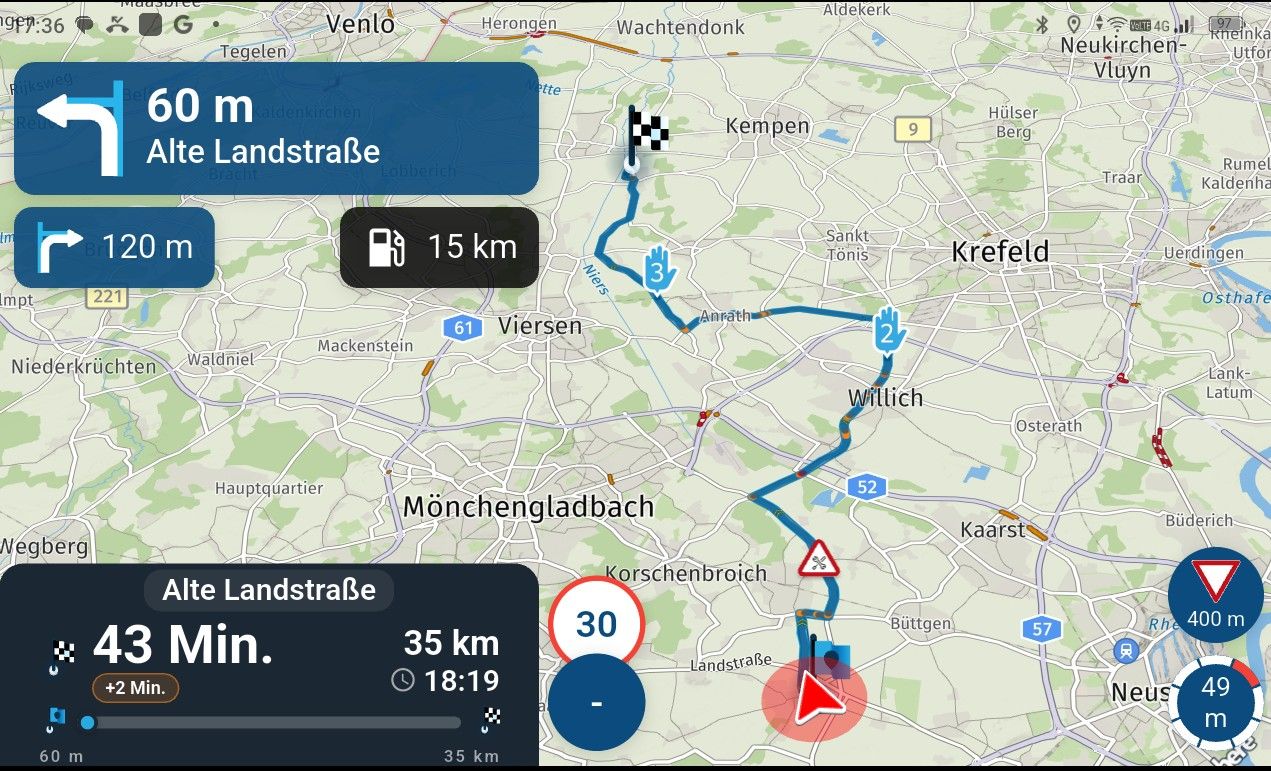
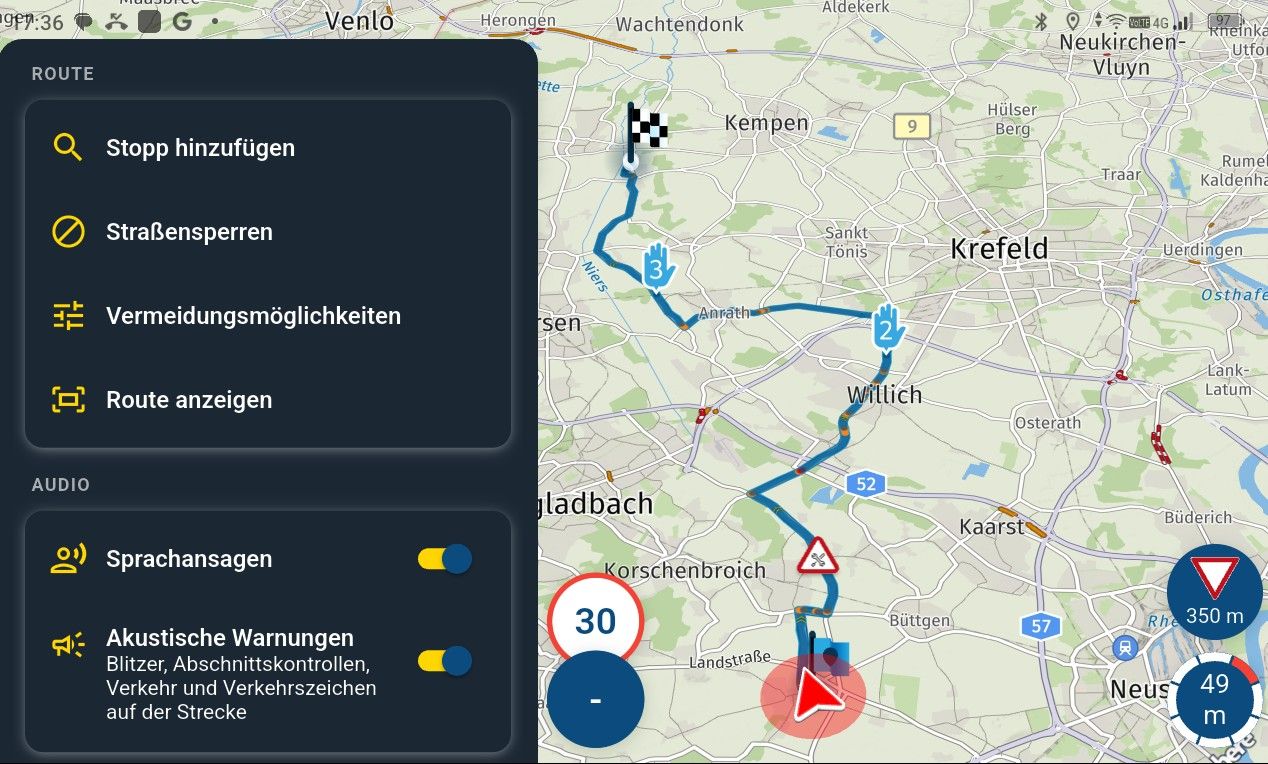
    image.jpeg

    image.jpeg

    Hardware
    iPhone 12 pro (iOS 26.2.1)
    iPad (7.Gen.) 18.7.3
    Oukitel RT3 Pro (Andr. 14)
    Wireless CarPlay mit (Elebest C650)
    Wired CarPlay (SEAT Arona - 2021)
    MRA Workshops in Deutsch sind hier zu finden

    1 Reply Last reply
    0
    • Jörgen
      Jörgen
      Jörgen
      Valued contributor
      wrote last edited by
      #2

      A Step by step explanation:
      I launch MRA Next (my current location is shown on the screen)
      I zoom out on the map and tap on a road about 30 km away (it doesn’t matter where)
      A waypoint appears on a road and I can then tap ‘Navigate’.
      A new menu then appears with the ‘Start’ button
      I scroll down first and tap ‘Add stop’
      I then set a waypoint somewhere to the left or right of the displayed route.
      ‘Add to route’ then appears; I tap on it.
      The waypoint becomes Waypoint 2 and the route goes via it.
      Now I tap ‘Start’ at the top and navigation begins.
      Neither Waypoint 1 nor Waypoint 2 appears in the top right-hand corner.
      There is no waypoint list and I cannot skip the waypoint or do anything else with it.

      Hardware
      iPhone 12 pro (iOS 26.2.1)
      iPad (7.Gen.) 18.7.3
      Oukitel RT3 Pro (Andr. 14)
      Wireless CarPlay mit (Elebest C650)
      Wired CarPlay (SEAT Arona - 2021)
      MRA Workshops in Deutsch sind hier zu finden

      Dave J 0 1 Reply Last reply
      0
      • Jörgen Jörgen

        A Step by step explanation:
        I launch MRA Next (my current location is shown on the screen)
        I zoom out on the map and tap on a road about 30 km away (it doesn’t matter where)
        A waypoint appears on a road and I can then tap ‘Navigate’.
        A new menu then appears with the ‘Start’ button
        I scroll down first and tap ‘Add stop’
        I then set a waypoint somewhere to the left or right of the displayed route.
        ‘Add to route’ then appears; I tap on it.
        The waypoint becomes Waypoint 2 and the route goes via it.
        Now I tap ‘Start’ at the top and navigation begins.
        Neither Waypoint 1 nor Waypoint 2 appears in the top right-hand corner.
        There is no waypoint list and I cannot skip the waypoint or do anything else with it.

        Dave J 0
        Dave J 0
        Dave J 0
        Valued contributor
        wrote last edited by Dave J 0
        #3

        @Jörgen. Hi. I think this is the same issue which should be fixed with the next update.

        Kind Regards. Help where I can.
        Ducati Multistrada V4 Rally
        iPhone 18 Pro
        CHIGEE AIO-6 LTE
        Google Pixel 6 Pro
        Ex Garmin XT2 and XT1 as well as Ex TomTom Rider user

        1 Reply Last reply
        0

        Hello! It looks like you're interested in this conversation, but you don't have an account yet.

        Getting fed up of having to scroll through the same posts each visit? When you register for an account, you'll always come back to exactly where you were before, and choose to be notified of new replies (either via email, or push notification). You'll also be able to save bookmarks and upvote posts to show your appreciation to other community members.

        With your input, this post could be even better 💗

        Register Login
        Reply
        • Reply as topic
        Log in to reply
        • Oldest to Newest
        • Newest to Oldest
        • Most Votes


        ACTIVE USERS
        Dave J 0
        Dave J 0
        Jörgen
        Jörgen
        POPULAR TOPICS
        • Online map settings
          MartinW
          MartinW
          0
          14
          326

        • Real-time traffic
          Òscar
          Òscar
          0
          7
          167

        • Map Layer: 'HERE could not be loaded...'
          Andy Nicholson
          Andy Nicholson
          0
          6
          46

        • Navigatie met DMD tablet
          Arjan de Vries
          Arjan de Vries
          0
          5
          148

        • Club-Event: Incorrect Number of Participants
          Corjan Meijerink
          Corjan Meijerink
          0
          7
          54

        • HERE map not calibrated
          MartinW
          MartinW
          0
          6
          241

        • Myrouteappstay
          Bé Jeuring
          Bé Jeuring
          0
          4
          33

        • Show on the maps's button
          Peter Zehentreiter
          Peter Zehentreiter
          0
          4
          158

        MY GROUPS
        • Login

        • Login or register to search.
        • First post
          Last post
        0
        • Categories
        • Recent
        • Popular
        • Support
        • MyRoute-app