Compass with direction
-

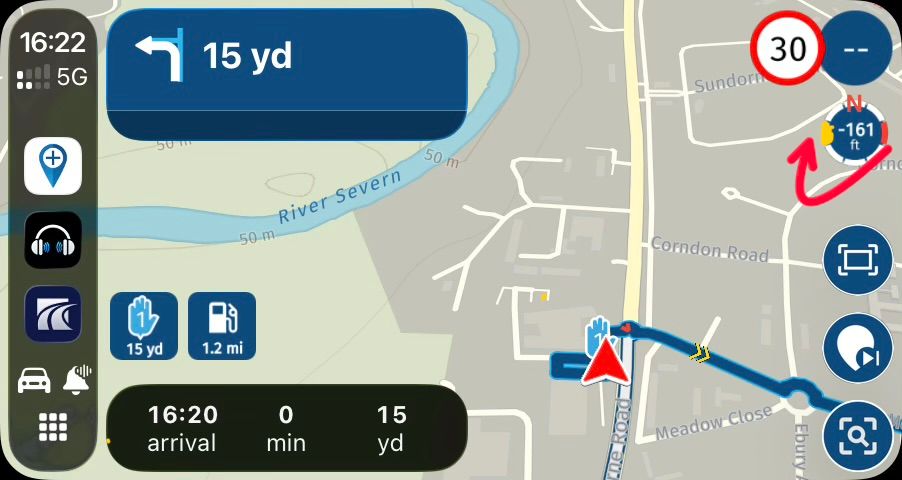
In version 5.1 on carplay, information about the altitude has been added that can be activated or deactivated at will. I propose that you could choose if the information shown was the altitude or a compass that would indicate the course that is being followed. Only a needle that indicates where the north is, without the need to include a numerical value
-

The needle is showing north in Dynamic and Top Down view already.
Hardware
iPhone 12 pro (iOS 26.2.1)
iPad (7.Gen.) 18.7.3
Oukitel RT3 Pro (Andr. 14)
Wireless CarPlay mit (Elebest C650)
Wired CarPlay (SEAT Arona - 2021)
MRA Workshops in Deutsch sind hier zu finden -
The needle is showing north in Dynamic and Top Down view already.

@Jörgen not in CarPlay

@arcangelenruta thanks for the suggestion
-
Sorry, I missed CarPlay.

-
I can confirm that in the final 5.1 release this will actually be included!

We thought it was a great idea so we implemented it straight away. -
I can confirm that in the final 5.1 release this will actually be included!
We thought it was a great idea so we implemented it straight away.
@Corjan-Meijerink Really like what has been done with the inclusion of the compass in V5.1.
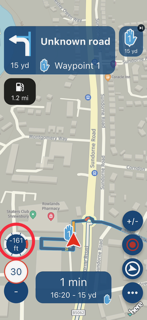
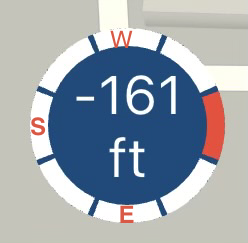
I have been using the new version and, for me, I found it difficult to quickly recognise the direction of travel given that the indicator shows N position and you have to think about where N is in relation to my W direction of travel. Not too bad with this example but when the indicator is SE or NW I had to think a bit as it was not obvious:
This kind of view is easier for a quick look as the direction of travel is up:
Or, what about this with N being annotated up and the indicator showing direction of travel:
Just suggestions and I really like the changes with V5.1.
-
As you see in image one, the needle of the camera mode (bottom right) points in the same direction.
It was a deliberate choice to do so as since day one of the app that icon was pointing north

Any camera mode icon in the app will always have the red part pointing north. Hence this element does so too -
As you see in image one, the needle of the camera mode (bottom right) points in the same direction.
It was a deliberate choice to do so as since day one of the app that icon was pointing north
Any camera mode icon in the app will always have the red part pointing north. Hence this element does so too
@Corjan-Meijerink. But not in CarPlay. I should have made that a little more clearer. Doh
Kind Regards. Help where I can.
Ducati Multistrada V4 Rally
iPhone 18 Pro
CHIGEE AIO-6 LTE
Google Pixel 6 Pro - mounted on SP Connect Plus
Ex Garmin XT2 and XT1 as well as Ex TomTom Rider User -
@Corjan-Meijerink. But not in CarPlay. I should have made that a little more clearer. Doh
@Dave-J-0 now I have no clue what you are talking about.
The heading indicated in the app and on CarPlay are exactly the same right?
-
@Dave-J-0 now I have no clue what you are talking about.
The heading indicated in the app and on CarPlay are exactly the same right?
@Corjan-Meijerink. Yes but what I am trying to say is that N indication (understandably) moves and I have to think about which direction I am moving. The first suggestion gives reference marks to make easier/quicker to understand which direction I am travelling, particularly if I am heading SE or SW. The second suggestion is an alternative way to quickly see direction of travel.
Something similar to this without the middle detail. I can see clearly my direction of travel without having to think and can see my change relative to North:
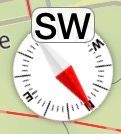
Just used to using a physical compass that allows me to picture this orientation quickly without having to look too hard. Hope I have made myself a little clearer.
-

I really like the new compass and elevation. Works well on my CarPlay. EXCEPT the compass is reversed East/West. I am in the Southern Hemisphere so I assume that is the reason. Can anyone confirm?
Exactly the same on three different devices ( 2 x apple, 1 x android). All have been calibrated. -
Dave J 0 referenced this topic on
Hello! It looks like you're interested in this conversation, but you don't have an account yet.
Getting fed up of having to scroll through the same posts each visit? When you register for an account, you'll always come back to exactly where you were before, and choose to be notified of new replies (either via email, or push notification). You'll also be able to save bookmarks and upvote posts to show your appreciation to other community members.
With your input, this post could be even better 💗
Register Login-
 0836
0836
-
 1425550
-
0516
-
 0571
0571
-
0584
-
 116279
-
 08498
08498
-
0420