MRA 5.0 - 422 Route / RoutesTrack Stop No / Navigate
-

Hello dear successful MRA team,
The app is just great, I just noticed the last little point.
Test - Route / RoutesTrack:
If I start a navigation from A to B in the app, which I select as B via "Search for a favorite or a gas station" ... Then it starts directly via navigation.

Noticed: on the route
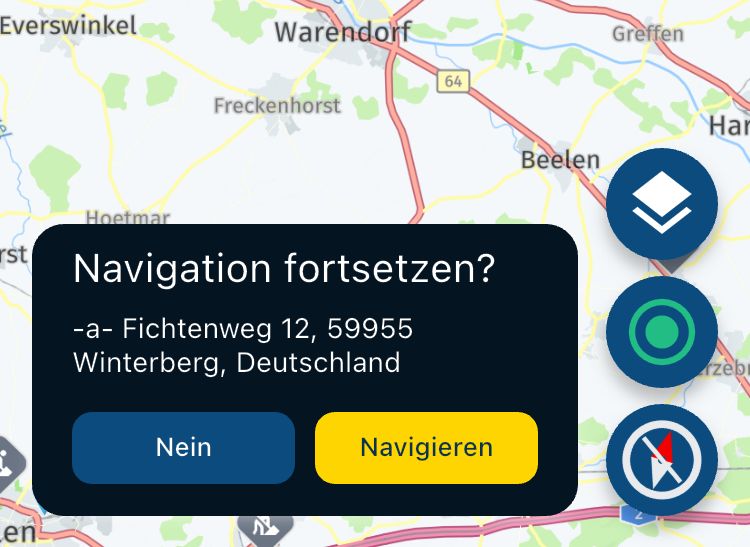
Now I deliberately stop the route, then picture 1 is not offered to me. The route is stopped directly without the "No / Navigate" option.
Wish:
- It would be wonderful if you still had the option.
Noticed: at the routeTrack navigation
- Now I deliberately stop the route track, then I will be offered picture 1. The "No / Navigate" option can be selected.
Selection: No
- then stop the route track ... okay
Selection: Navigation
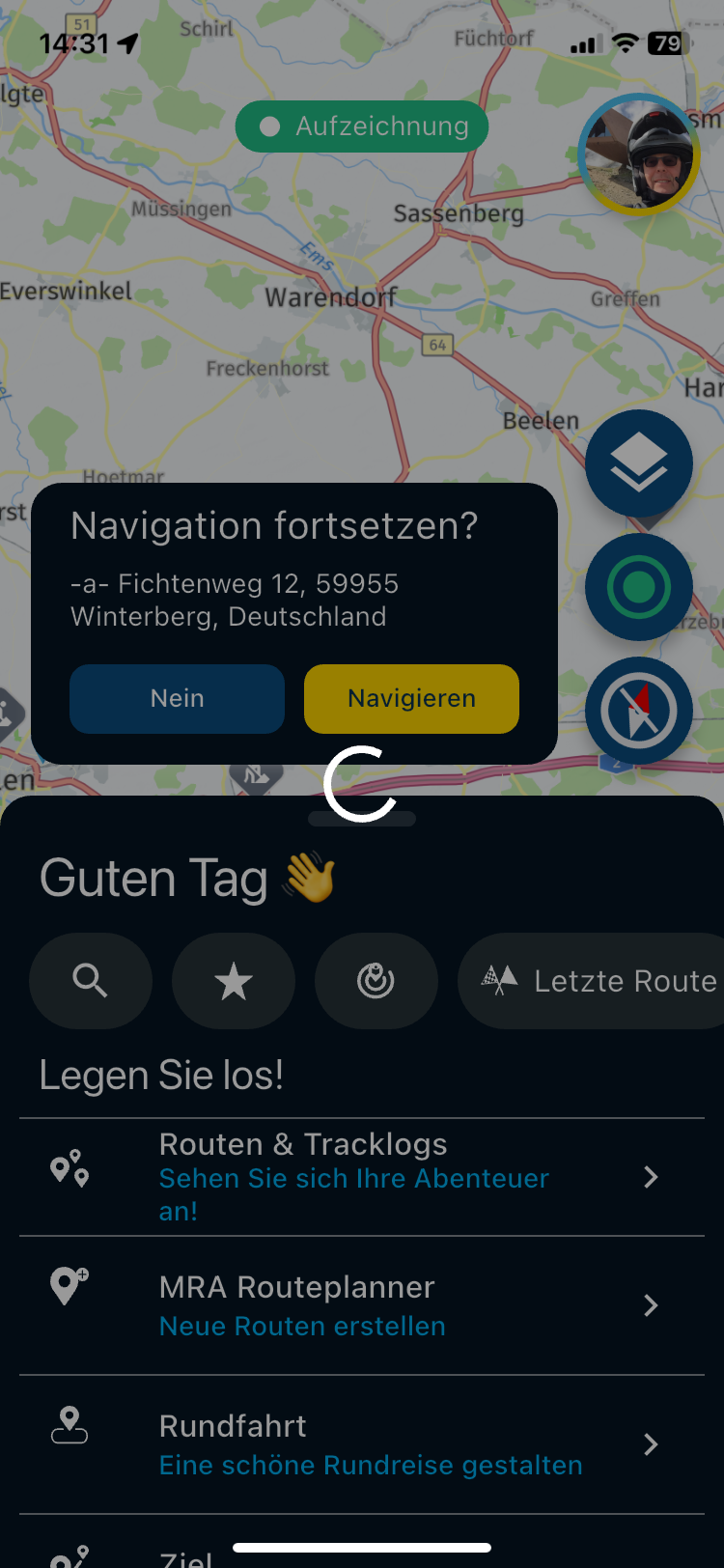
- Error navigation no longer works
- there was a calculation that does not yield a result, the process cannot be stopped ... s. Picture 2
- it's like an endless loop / crash
Solution:
- App must be terminated / aborted with wipe (iPhone).
Restart:
The route appears with the menu picture 1
-
The option "No / Navigate" can be selected.
-
The same error is repeated when you press navigation again
Picture 1
Picture 2
VG Hubert
Beta Test "Next App" dazu die Hardware .
iPad 9. Gen iOS 26.7.1/ iPhone 16e iOS 26.7.1/ Navi iPhone Xr iOS 18.7.10 / PC mit MS Win11 /❗️MyRoute-App im Cradel und Remotek-One❗️ Info zu MRA & Remotek One -
I could make a video if desired because the description seems incomprehensible.
VG

-

Ich verstehe nur Bahnhof! - I don't understand a word!
-
Can you please explain step by step how you get to the error?
-
Hey everyone,
Here is the video about the MRA RouteTrack, and its problems when restarting the navigation...
-
Ok, now I understand.
A restart is not possible. I tried on my iPhone and saw the same problem.
On Android, it is working. -
Sorry correction!
I just updated Android.
With V 422 it is the same on Android. No restart possible. -
Hello dear successful MRA team,
The app is just great, I just noticed the last little point.
Test - Route / RoutesTrack:
If I start a navigation from A to B in the app, which I select as B via "Search for a favorite or a gas station" ... Then it starts directly via navigation.
Noticed: on the route
Now I deliberately stop the route, then picture 1 is not offered to me. The route is stopped directly without the "No / Navigate" option.
Wish:
- It would be wonderful if you still had the option.
Noticed: at the routeTrack navigation
- Now I deliberately stop the route track, then I will be offered picture 1. The "No / Navigate" option can be selected.
Selection: No
- then stop the route track ... okay
Selection: Navigation
- Error navigation no longer works
- there was a calculation that does not yield a result, the process cannot be stopped ... s. Picture 2
- it's like an endless loop / crash
Solution:
- App must be terminated / aborted with wipe (iPhone).
Restart:
The route appears with the menu picture 1
-
The option "No / Navigate" can be selected.
-
The same error is repeated when you press navigation again
Picture 1
Picture 2

@Hubert-Thoring, a simple "resume navigation after a stopped route does not work" would have sufficed. It saves a lot of pictures and a video. This problem is already being discussed with devs.
-
-

This is now fixed, thanks for reporting
-
Corjan Meijerink locked this topic on

Hello! It looks like you're interested in this conversation, but you don't have an account yet.
Getting fed up of having to scroll through the same posts each visit? When you register for an account, you'll always come back to exactly where you were before, and choose to be notified of new replies (either via email, or push notification). You'll also be able to save bookmarks and upvote posts to show your appreciation to other community members.
With your input, this post could be even better 💗
Register Login-
 01222
01222
-
0817
-
0724
-
 0628
0628
-
057
-
 1517
1517
-
049
-
0418