Removal of Android buttons
-

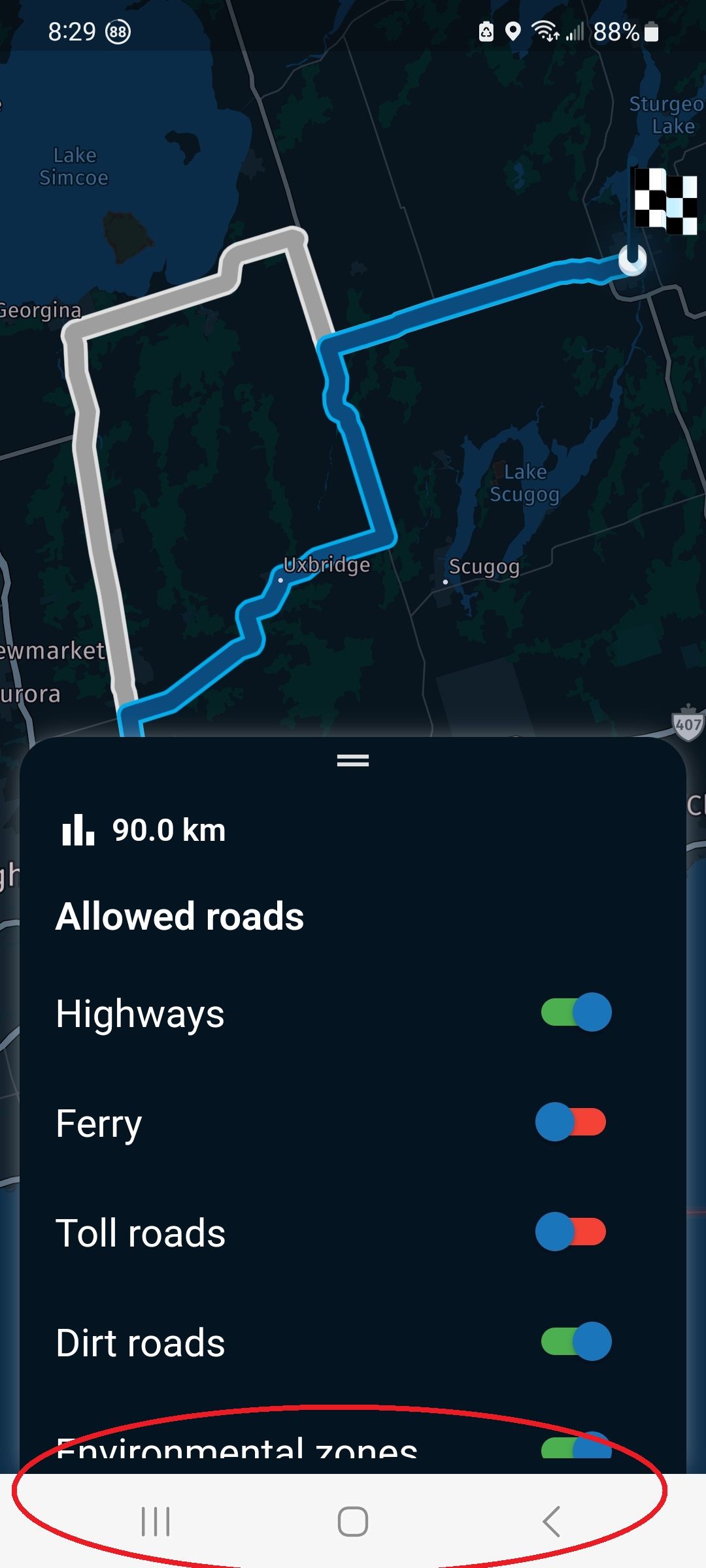
On my Android phone, there are soft buttons at the bottom of the screen. I've seen where some apps hide the buttons which can then be recalled by swiping up from the bottom. I was wondering if it would be possible for MRA to hide the soft buttons. I did find an option to hide them but it has side effects I don't like. See the screen shot below the red circled area. Cheers!
-

Is it not possible to move the menu up?
Hardware
iPhone 12 pro (iOS 26.2.1)
iPad (7.Gen.) 18.7.3
Oukitel RT3 Pro (Andr. 14)
Wireless CarPlay mit (Elebest C650)
Wired CarPlay (SEAT Arona - 2021)
MRA Workshops in Deutsch sind hier zu finden -
Is it not possible to move the menu up?
@Jörgen I presume you mean the App menu and not the Android buttons. Yes, the buttons don't really interfere with the App. I would just like to have them hidden while I'm running the app.
-
Ah, OK.
It is maybe an issue of the Android system, but there must be other, knowing this better. -

Noted

No clue yet so we'll have a somewhere in the near future!
-
Noted
No clue yet so we'll have a somewhere in the near future!

@Corjan-Meijerink said in Removal of Android buttons:
Noted
No clue yet so we'll have a somewhere in the near future!
At risk of teaching Grandma to suck eggs:
SystemChrome.setEnabledSystemUIMode(SystemUiMode.immersiveSticky);
Swipe up from offscreen to make both top and bottom menus appear. If not used they disappear after approx 2 seconds.
Works on Android 10 upwards for me, didn't work on Android 8, and I don't have an Android 9 to hand.
Ref: https://api.flutter.dev/flutter/services/SystemUiMode.html
-
@Corjan-Meijerink said in Removal of Android buttons:
Noted
No clue yet so we'll have a somewhere in the near future!
At risk of teaching Grandma to suck eggs:
SystemChrome.setEnabledSystemUIMode(SystemUiMode.immersiveSticky);
Swipe up from offscreen to make both top and bottom menus appear. If not used they disappear after approx 2 seconds.
Works on Android 10 upwards for me, didn't work on Android 8, and I don't have an Android 9 to hand.
Ref: https://api.flutter.dev/flutter/services/SystemUiMode.html

@richtea999, Great! But if this works, chances ar big that option is also available from the Android System Menu?
I am just an enthusiastic MRA user, and hope you will be one too!
Most motorcycle problems are caused by the nut that connects the handlebar to the saddle.
Check out RideSleepRepeat.eu, a biker community for sharing stays across Europe
-
@richtea999, Great! But if this works, chances ar big that option is also available from the Android System Menu?
@Con-Hennekens said in Removal of Android buttons:
@richtea999, Great! But if this works, chances ar big that option is also available from the Android System Menu?
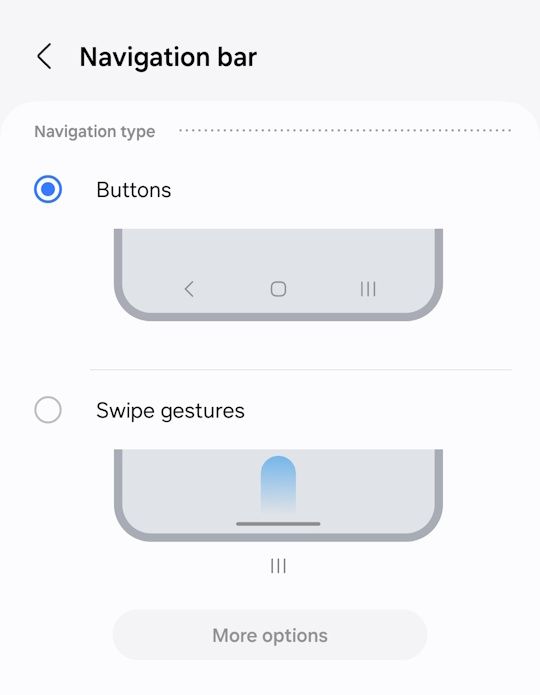
True. In the more recent versions of Android there are options to either have buttons or swipes for navigation, where the swipe-only option releases more screen space. From about Android 12, IIRC.
But that does affect every app.
This is the option on Android 14 (Samsung A54):
-
@Corjan-Meijerink said in Removal of Android buttons:
Noted
No clue yet so we'll have a somewhere in the near future!
At risk of teaching Grandma to suck eggs:
SystemChrome.setEnabledSystemUIMode(SystemUiMode.immersiveSticky);
Swipe up from offscreen to make both top and bottom menus appear. If not used they disappear after approx 2 seconds.
Works on Android 10 upwards for me, didn't work on Android 8, and I don't have an Android 9 to hand.
Ref: https://api.flutter.dev/flutter/services/SystemUiMode.html
@richtea999 hahaha thanks

-
@Con-Hennekens said in Removal of Android buttons:
@richtea999, Great! But if this works, chances ar big that option is also available from the Android System Menu?
True. In the more recent versions of Android there are options to either have buttons or swipes for navigation, where the swipe-only option releases more screen space. From about Android 12, IIRC.
But that does affect every app.
This is the option on Android 14 (Samsung A54):
@richtea999 I had previously found that option but I found that swiping up from the home screen brings up Samsung wallet which i don't like. I could not find a way to change it. I guess i will just have to learn to not swipe up on the home screen. Cheers.
2010 GL1800 Goldwing using Samsung Galaxy S20 5G Android 13.
-
@richtea999 I had previously found that option but I found that swiping up from the home screen brings up Samsung wallet which i don't like. I could not find a way to change it. I guess i will just have to learn to not swipe up on the home screen. Cheers.
@Doug-Robinson said in Removal of Android buttons:
@richtea999 I had previously found that option but I found that swiping up from the home screen brings up Samsung wallet which i don't like. I could not find a way to change it. I guess i will just have to learn to not swipe up on the home screen. Cheers.
Off-topic, but try this:
https://www.androidauthority.com/enable-disable-samsung-pay-swipe-up-feature-3225247/#1 -
@Doug-Robinson said in Removal of Android buttons:
@richtea999 I had previously found that option but I found that swiping up from the home screen brings up Samsung wallet which i don't like. I could not find a way to change it. I guess i will just have to learn to not swipe up on the home screen. Cheers.
Off-topic, but try this:
https://www.androidauthority.com/enable-disable-samsung-pay-swipe-up-feature-3225247/#1
@richtea999 interesting. Thanks for the tip. When I tried to open Samsung Wallet, it wanted to override my Google pay before I could get to the Options. I decided to just uninstall Samsung Wallet. That works great. No more issue. Cheers!
2010 GL1800 Goldwing using Samsung Galaxy S20 5G Android 13.
-
@richtea999 interesting. Thanks for the tip. When I tried to open Samsung Wallet, it wanted to override my Google pay before I could get to the Options. I decided to just uninstall Samsung Wallet. That works great. No more issue. Cheers!
@Doug-Robinson, Yeah, manufacturers thinking up all kinds of bad alternatives for what Android already has is a terrible thing. When my wife changed her Samsung for a Huawei some years ago, her calendar looked different and would not sync. "This is an Android phone, isn't it? Why is this different!" I told her "Well, you weren't using the Google apps..."
Okay, okay, I will admit: Android has a few drawbacks too...

I am just an enthusiastic MRA user, and hope you will be one too!
Most motorcycle problems are caused by the nut that connects the handlebar to the saddle.
Check out RideSleepRepeat.eu, a biker community for sharing stays across Europe
-
@Doug-Robinson, Yeah, manufacturers thinking up all kinds of bad alternatives for what Android already has is a terrible thing. When my wife changed her Samsung for a Huawei some years ago, her calendar looked different and would not sync. "This is an Android phone, isn't it? Why is this different!" I told her "Well, you weren't using the Google apps..."
Okay, okay, I will admit: Android has a few drawbacks too...
@Con-Hennekens like the early days of Unix. It's standard! Well yea, depending on which stand you pick.

Hello! It looks like you're interested in this conversation, but you don't have an account yet.
Getting fed up of having to scroll through the same posts each visit? When you register for an account, you'll always come back to exactly where you were before, and choose to be notified of new replies (either via email, or push notification). You'll also be able to save bookmarks and upvote posts to show your appreciation to other community members.
With your input, this post could be even better 💗
Register Login-
 0730
0730
-
0869
-
81655.5k
-
0348
-
0273
-
 16274
16274
-
 0265
0265
-
1215