Seasonal Closures - App versus Planner Problem?
-

@Corjan-Meijerink I know this was discussed in a previous thread (sorry, I cannot find that) but I am still confused by the toggle for seasonal closures being red in ‘Allowed Roads” when I have NOT selected ‘Disable Seasonal Closures’. This does not seem right as I would have expected the toggle to be green in this instance.
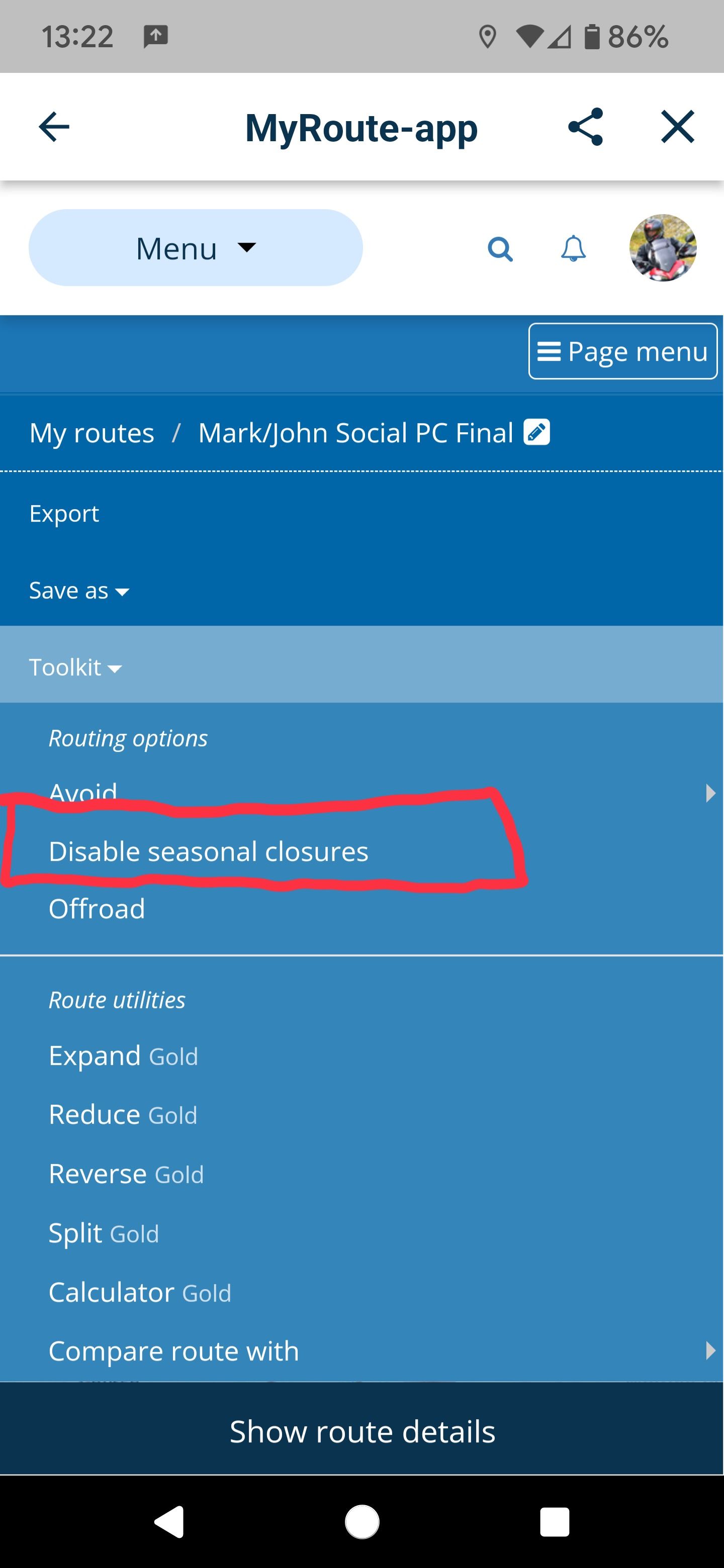
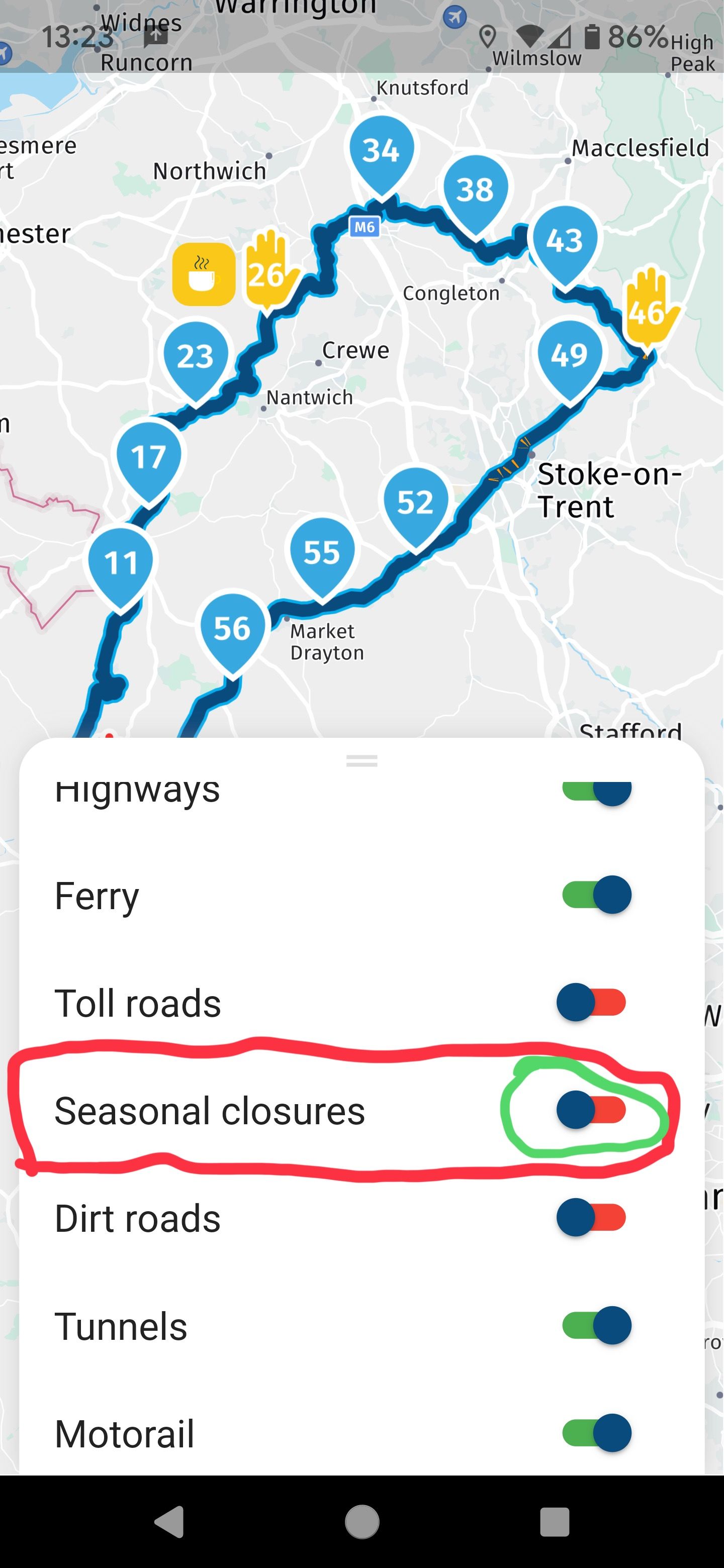
Sorry for raising this again but this does not seem right.
Kind Regards. Help where I can.
Ducati Multistrada V4 Rally
iPhone 18 Pro
CHIGEE AIO-6 LTE
Google Pixel 6 Pro - mounted on SP Connect Plus
Ex Garmin XT2 and XT1 as well as Ex TomTom Rider User -
@Corjan-Meijerink I know this was discussed in a previous thread (sorry, I cannot find that) but I am still confused by the toggle for seasonal closures being red in ‘Allowed Roads” when I have NOT selected ‘Disable Seasonal Closures’. This does not seem right as I would have expected the toggle to be green in this instance.
Sorry for raising this again but this does not seem right.

@Dave-J-0 I truly understand the confusion.
To be fair, the website is more confusing. Yet, that’s what people are used to.“Disable seasonal closures” means that if activated you ARE allowed to drive over seasonally closed roads. If deactivated, you aren’t allowed.
The app doesn’t show “Disable seasonal closures” but just “Seasonal closure” (like the other allowed roads).
If checked, seasonal closures are therefore allowed (which means not disabled for the website). If unchecked, they aren’t allowed (and thus disabled in the website logic).Confusing: yes

Incorrect: noI’d prefer to change the website to be honest (but people are so used to how it is)

Edit: the app shows what is allowed, which inverts the logic.
-
@Dave-J-0 I truly understand the confusion.
To be fair, the website is more confusing. Yet, that’s what people are used to.“Disable seasonal closures” means that if activated you ARE allowed to drive over seasonally closed roads. If deactivated, you aren’t allowed.
The app doesn’t show “Disable seasonal closures” but just “Seasonal closure” (like the other allowed roads).
If checked, seasonal closures are therefore allowed (which means not disabled for the website). If unchecked, they aren’t allowed (and thus disabled in the website logic).Confusing: yes
Incorrect: noI’d prefer to change the website to be honest (but people are so used to how it is)
Edit: the app shows what is allowed, which inverts the logic.
@Corjan-Meijerink perhaps it would be an option to change the website so all current "Avoid" options become "Allowed" options. That would make it match up with the app exactly. People can then uncheck the road types they don't want to use, like in the app.
Currently, the double "negative" ("Avoid"+"Disable", which makes seasonal closures allowed) is already very confusing, regardless of how the app does it, and even more confusing because the app does the opposite.
-
@Dave-J-0 I truly understand the confusion.
To be fair, the website is more confusing. Yet, that’s what people are used to.“Disable seasonal closures” means that if activated you ARE allowed to drive over seasonally closed roads. If deactivated, you aren’t allowed.
The app doesn’t show “Disable seasonal closures” but just “Seasonal closure” (like the other allowed roads).
If checked, seasonal closures are therefore allowed (which means not disabled for the website). If unchecked, they aren’t allowed (and thus disabled in the website logic).Confusing: yes
Incorrect: noI’d prefer to change the website to be honest (but people are so used to how it is)
Edit: the app shows what is allowed, which inverts the logic.

@Corjan-Meijerink Just add one word, name it "Seasonal closure allowed" with a check box on the web, the answer could only be yes or no.
Hardware
iPhone 12 pro (iOS 26.2.1)
iPad (7.Gen.) 18.7.3
Oukitel RT3 Pro (Andr. 14)
Wireless CarPlay mit (Elebest C650)
Wired CarPlay (SEAT Arona - 2021)
MRA Workshops in Deutsch sind hier zu finden -
@Dave-J-0 I truly understand the confusion.
To be fair, the website is more confusing. Yet, that’s what people are used to.“Disable seasonal closures” means that if activated you ARE allowed to drive over seasonally closed roads. If deactivated, you aren’t allowed.
The app doesn’t show “Disable seasonal closures” but just “Seasonal closure” (like the other allowed roads).
If checked, seasonal closures are therefore allowed (which means not disabled for the website). If unchecked, they aren’t allowed (and thus disabled in the website logic).Confusing: yes
Incorrect: noI’d prefer to change the website to be honest (but people are so used to how it is)
Edit: the app shows what is allowed, which inverts the logic.
@Corjan-Meijerink totally understand what you are saying. Changing the website would be my preferred option as work is needed downstream to reflect the app. I agree with @Jörgen with having an 'Allowed Road' approach to reflect the app. Just makes more sense.
Furthermore, I also meant to say that in the screenshots that I have not selected 'Disable Seasonal Closures' but the app selection says that seasonal closures are not allowed - in other words 'disabled'. Surely this is wrong.
-
I agree with you all
The enabling / disable of a "disable" setting which is then change to an "allowed" setting is hard to understand.I'll see what we can do in the website.
Might add the extra word in the app.@Dave-J-0 said in Seasonal Closures - App versus Planner Problem?:
not selected 'Disable Seasonal Closures' but the app selection says that seasonal closures are not allowed
And that is indeed correct.
Not selected "Disable seasonal closures" means that the disabling is disabled => thus seasonal closures are avoided by default => therefore not allowed -
@Corjan-Meijerink Just add one word, name it "Seasonal closure allowed" with a check box on the web, the answer could only be yes or no.

@Jörgen said in Seasonal Closures - App versus Planner Problem?:
Just add one word, name it "Seasonal closure allowed" with a check box on the web, the answer could only be yes or no.
If so, you can still debate what it exactly means. Are the closures allowed or is driving through it allowed? Since accounting for closures is the default and have "not allowed" intrinsically in the name the term "disabling" suits better. It is very contradicting to allow driving through a closure while that is intrinsically forbidden.
The problem is caused by the different intentions. In the webplanner you are planning for a time that can be outside the closure. In th app you are navigating, and only the NOW counts.
It is a nice discussion, but I think there is no real solution that always works. Using the same wording in the planner and in the app would sure help. Calling the one option "avoid" and the other "allow" already is a contradiction in itself.
-
I agree with you all
The enabling / disable of a "disable" setting which is then change to an "allowed" setting is hard to understand.I'll see what we can do in the website.
Might add the extra word in the app.@Dave-J-0 said in Seasonal Closures - App versus Planner Problem?:
not selected 'Disable Seasonal Closures' but the app selection says that seasonal closures are not allowed
And that is indeed correct.
Not selected "Disable seasonal closures" means that the disabling is disabled => thus seasonal closures are avoided by default => therefore not allowed
@Corjan-Meijerink said in Seasonal Closures - App versus Planner Problem?:
means that the disabling is disabled
Hmm.

There must be a better way.'Enable seasonal closures' in both planner and app has got to be the clearest text.
And ticked / on is enabled - everyone will understand that double postive.
Pre-ticked on will read OK if that's the default - I think it is, but even I'm starting to doubt myself now.
 )
) -
Or "seasonol closures ignored"?
@Arno-0, YES! "Ignore closure" enabled/disabled is the clearest wording I think! It intrinsically shows what is default and what enabling exactly does. Good thought!
-
@Corjan-Meijerink said in Seasonal Closures - App versus Planner Problem?:
means that the disabling is disabled
Hmm.
There must be a better way.'Enable seasonal closures' in both planner and app has got to be the clearest text.
And ticked / on is enabled - everyone will understand that double postive.
Pre-ticked on will read OK if that's the default - I think it is, but even I'm starting to doubt myself now.
)
@richtea999 that is the problem I have. I confused myself as to what is selected and what is not. Just messy the way it is at the moment when moving between the planner and the app.
Enabled/disabled works for me. Should help new users as well.
-
 John S Parry referenced this topic on
Hello! It looks like you're interested in this conversation, but you don't have an account yet.
Getting fed up of having to scroll through the same posts each visit? When you register for an account, you'll always come back to exactly where you were before, and choose to be notified of new replies (either via email, or push notification). You'll also be able to save bookmarks and upvote posts to show your appreciation to other community members.
With your input, this post could be even better 💗
Register Login-
 01232
01232
-
 0649
0649
-
 0514
0514
-
0830
-
05164
-
 0326
0326
-
0320
-
0430