GENERATOR II: less clicks
-

The user is generally lazy, he wants to work as little as possible, but get the information as fast as possible. So, See the following suggestions for adapting the Generator.
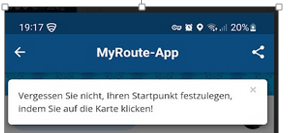
Opening the generator, a message appears, not to forget to set the starting point on the actual screen. In order to proceed, this message must be clicked away. 1 click too much!
If you now want to call up the tour settings to create the tour, you have to click again: show roundtour settings. Another click too much!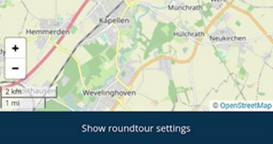
That means, you need 2 clicks to come to the settings! Isn’t it possible to immediately open the settings page after opening the generator? Ideally, you can now make all the settings required by the system to plan a round trip / route on this one page! That would be great!
Let`s try to show you what i mean.
After the click on the "Generator"-Button the following screen appears.
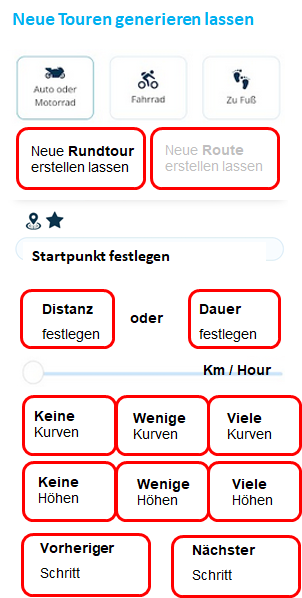
when round trip is selected "Set starting point" appears, with the two symbols for current position or position from favorites. Then 2 buttons appear to determine the distance in km or the duration in hours. Below that is the slider for the corresponding detailed settingDepending on what you select, roundtour or route, the screen looks a littlebit different.
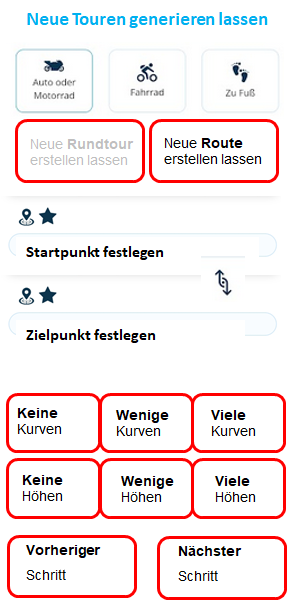
when route is selected, "set start point" and "set destination point" appear. The slider is omitted
Below that, there are now 3 buttons for the curves and below again three buttons for the heights.
With "Nächster Schritt" a new page will open.
Ex: Can the next step buttons be described in more detail? E.g. "Continue to Vermeidungen" and "go to streets on / off", or "back to generate menu". Something like that.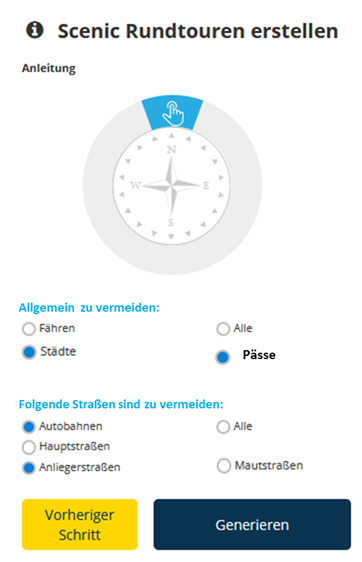
After generating the new roundtrip/route, a screen appears, showing the map, one route in dark blue and other route(s) in different colors and the elevation difference (much too big!) I miss the 3 variants and their buttons as on Laptop/PC or tablet. I do have to open the tour setting at the bottom of the page to see and select them. I want to have them on the screen with the map, too.
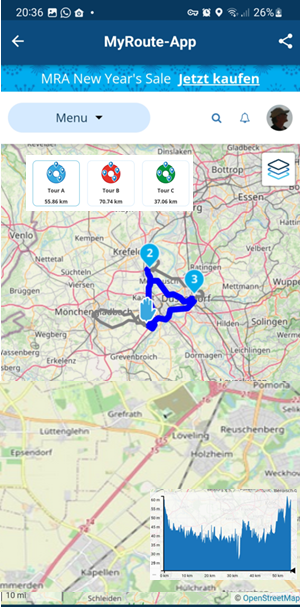
Following that, i do have only 2 Screens to let the system generate a roundtrip or route for me. And a lot of less clicks.
That would be nice.
Look at my post "GENERATOR I" too, describing some translations in to german.greetings
Ronni
Hello! It looks like you're interested in this conversation, but you don't have an account yet.
Getting fed up of having to scroll through the same posts each visit? When you register for an account, you'll always come back to exactly where you were before, and choose to be notified of new replies (either via email, or push notification). You'll also be able to save bookmarks and upvote posts to show your appreciation to other community members.
With your input, this post could be even better 💗
Register Login-
 08175
08175
-
 01331
01331
-
 09259
09259
-
 0310
0310
-
0319
-
 0333
0333
-
 016781
-
0211