Skip to content
  • Categories
  • Recent
  • Popular
  • Support
  • MyRoute-app
Collapse
Brand Logo

MRA Community Forum

  1. Home
  2. The MyRoute-app
  3. [App] Android Auto & CarPlay
  4. Another day MyRoute-app screwed up My Route

Another day MyRoute-app screwed up My Route

Scheduled Pinned Locked Moved [App] Android Auto & CarPlay
52 Posts 6 Posters 32.1k Views 2 Watching
  • Oldest to Newest
  • Newest to Oldest
  • Most Votes
Reply
  • Reply as topic
Log in to reply
This topic has been deleted. Only users with topic management privileges can see it.
  • Ton Machielsen Ton Machielsen

    @M-Schrijver Where can I find this setting?

    Con Hennekens Offline
    Con Hennekens Offline
    Con Hennekens
    Alpha tester
    wrote on last edited by
    #33

    @Ton-Machielsen, I guess this thread gives some "food for thought" 😉
    Great thread, that shows the power of an "old-fashioned" forum! 💪

    I am just an enthusiastic MRA user, and hope you will be one too!

    Most motorcycle problems are caused by the nut that connects the handlebar to the saddle.

    Check out RideSleepRepeat.eu, a biker community for sharing stays across Europe

    1 Reply Last reply
    1
    • M. Schrijver M. Schrijver

      @Ton-Machielsen
      No. If you want route to be riden reliable. The route itself should be made reliable. A navigation cannot fix a badly made route.

      Ton Machielsen Offline
      Ton Machielsen Offline
      Ton Machielsen
      wrote on last edited by
      #34

      @M-Schrijver said in Another day MyRoute-app screwed up My Route:

      @Ton-Machielsen
      No. If you want route to be riden reliable. The route itself should be made reliable. A navigation cannot fix a badly made route.

      Ok, i'll bite. Define "a badly made route".
      My take is that if the app shows the route i want to ride, the app should follow that route.
      What's your take?

      Marinus van Deudekom 1 Reply Last reply
      0
      • Marinus van Deudekom Marinus van Deudekom

        @Ton-Machielsen Due to restrictions by Apple and Google the viapoint sign is NOT on Androis Auto and Carplay

        Ton Machielsen Offline
        Ton Machielsen Offline
        Ton Machielsen
        wrote on last edited by
        #35

        @Marinus-van-Deudekom said in Another day MyRoute-app screwed up My Route:

        @Ton-Machielsen Due to restrictions by Apple and Google the viapoint sign is NOT on Androis Auto and Carplay

        Meaning the "Skip Waypoint" icon is also not? So how do i skip waypoints? Stopping, taking my gloves off, taking my phone out of my pocket, click "Skip waypoint", dress up and continue?

        Marinus van Deudekom M. Schrijver 3 Replies Last reply
        0
        • Ton Machielsen Ton Machielsen

          @Marinus-van-Deudekom said in Another day MyRoute-app screwed up My Route:

          @Ton-Machielsen Due to restrictions by Apple and Google the viapoint sign is NOT on Androis Auto and Carplay

          Meaning the "Skip Waypoint" icon is also not? So how do i skip waypoints? Stopping, taking my gloves off, taking my phone out of my pocket, click "Skip waypoint", dress up and continue?

          Marinus van Deudekom Do not disturb
          Marinus van Deudekom Do not disturb
          Marinus van Deudekom
          RouteXpert
          wrote on last edited by
          #36

          @Ton-Machielsen yep unfortunately that's the case when using Android Auto or CarPlay.

          Honda Goldwing GL1500,
          Honda Silverwing GL 650
          DMD2 T865X 8 inch Android tablet using MRA next for navigation
          Garmin XT sold
          Samsung S24FE mounted on a Quadlock and using Android Auto in my car

          1 Reply Last reply
          0
          • Ton Machielsen Ton Machielsen

            @M-Schrijver said in Another day MyRoute-app screwed up My Route:

            @Ton-Machielsen
            No. If you want route to be riden reliable. The route itself should be made reliable. A navigation cannot fix a badly made route.

            Ok, i'll bite. Define "a badly made route".
            My take is that if the app shows the route i want to ride, the app should follow that route.
            What's your take?

            Marinus van Deudekom Do not disturb
            Marinus van Deudekom Do not disturb
            Marinus van Deudekom
            RouteXpert
            wrote on last edited by
            #37

            @Ton-Machielsen not completely true. As long as you stay within MRA its by design that MRA will save the day and keep you on the route, even if the route is not made correctly like in your example. However if you wanted to use that same route in a dedicated device like a Garmin XT you would be in for a real bad day with a messed up route.

            Honda Goldwing GL1500,
            Honda Silverwing GL 650
            DMD2 T865X 8 inch Android tablet using MRA next for navigation
            Garmin XT sold
            Samsung S24FE mounted on a Quadlock and using Android Auto in my car

            Ton Machielsen 1 Reply Last reply
            0
            • Marinus van Deudekom Marinus van Deudekom

              @Ton-Machielsen not completely true. As long as you stay within MRA its by design that MRA will save the day and keep you on the route, even if the route is not made correctly like in your example. However if you wanted to use that same route in a dedicated device like a Garmin XT you would be in for a real bad day with a messed up route.

              Ton Machielsen Offline
              Ton Machielsen Offline
              Ton Machielsen
              wrote on last edited by
              #38

              @Marinus-van-Deudekom Yeah, and that's where i am struggling, apparently. I was assuming that if MyRoute-app drew the correct route, even though my waypoints are besides the road, that the app would prioritise the route over the waypoints. Which is not the case from what i experience and read.
              I guess i will have to either be VERY precise in where i put my waypoints or choose another app which is following a route (route app, remember, not waypoint app) instead of waypoints.

              1 Reply Last reply
              0
              • Ton Machielsen Offline
                Ton Machielsen Offline
                Ton Machielsen
                wrote on last edited by
                #39

                Team!! Thanks for all the suggestions and bearing with my gripes and complaints. I am getting there. I must admit, apart from maybe two or three, all my waypoints were quite far away of the road i was planning to take. I have corrected them and re-uploaded the route here: https://www.myrouteapp.com/en/social/route/10719669 I hope the waypoints are positioned better now.

                While doing this i think that a small fix (not being a programmer) could avoid this situation. I plan on the mobile app, not on the computer, and while correcting the waypoints i came up with two improvements:

                1. When holding the waypoint and moving it, you can not actually see where you place it because your finger is right on top of the waypoint. And since precision is required, it would be helpful if the waypoint on the screen was a bit offset from the finger on the screen. Unless there are more efficient ways of moving a waypoint, of course.
                2. When moving a waypoint, making it snap to the nearest road would be helpful as well. I think that when i double-tap a road a new waypoint is placed on the road. This function would be helpful while moving waypoints as well. Unless there are tricks like double-tap on the road and removing the other one would work as well. Haven't tried that yet.

                Ideas?

                And yes, again, i am getting there, i hope.

                richtea999 Carl Lee 2 Replies Last reply
                0
                • Ton Machielsen Ton Machielsen

                  Team!! Thanks for all the suggestions and bearing with my gripes and complaints. I am getting there. I must admit, apart from maybe two or three, all my waypoints were quite far away of the road i was planning to take. I have corrected them and re-uploaded the route here: https://www.myrouteapp.com/en/social/route/10719669 I hope the waypoints are positioned better now.

                  While doing this i think that a small fix (not being a programmer) could avoid this situation. I plan on the mobile app, not on the computer, and while correcting the waypoints i came up with two improvements:

                  1. When holding the waypoint and moving it, you can not actually see where you place it because your finger is right on top of the waypoint. And since precision is required, it would be helpful if the waypoint on the screen was a bit offset from the finger on the screen. Unless there are more efficient ways of moving a waypoint, of course.
                  2. When moving a waypoint, making it snap to the nearest road would be helpful as well. I think that when i double-tap a road a new waypoint is placed on the road. This function would be helpful while moving waypoints as well. Unless there are tricks like double-tap on the road and removing the other one would work as well. Haven't tried that yet.

                  Ideas?

                  And yes, again, i am getting there, i hope.

                  richtea999 Offline
                  richtea999 Offline
                  richtea999
                  Valued contributor
                  wrote on last edited by richtea999
                  #40

                  @Ton-Machielsen
                  The revised route looks a lot better, Ton. 👍
                  I still advise you to place the start and end points on roads though, and maybe a few metres in the direction you're intending to set off / arrive from, just to guaranteee you pass through them. Especially the start one. 😉

                  On the improvements front, they're good suggestions, but here's one for you in the meantime (because they'll not happen fast, if ever):

                  1. Get a stylus. Something like a basic Wacom one is cheap, pleasant to use, and it's a pen as a bonus:
                    https://www.amazon.co.uk/Wacom-Universal-Ballpoint-Smartphones-Touchscreen/dp/B07YDX6Y24
                    Then you can see what you're doing under the stylus tip!
                  Ton Machielsen 1 Reply Last reply
                  2
                  • richtea999 richtea999

                    @Ton-Machielsen
                    The revised route looks a lot better, Ton. 👍
                    I still advise you to place the start and end points on roads though, and maybe a few metres in the direction you're intending to set off / arrive from, just to guaranteee you pass through them. Especially the start one. 😉

                    On the improvements front, they're good suggestions, but here's one for you in the meantime (because they'll not happen fast, if ever):

                    1. Get a stylus. Something like a basic Wacom one is cheap, pleasant to use, and it's a pen as a bonus:
                      https://www.amazon.co.uk/Wacom-Universal-Ballpoint-Smartphones-Touchscreen/dp/B07YDX6Y24
                      Then you can see what you're doing under the stylus tip!
                    Ton Machielsen Offline
                    Ton Machielsen Offline
                    Ton Machielsen
                    wrote on last edited by
                    #41

                    @richtea999 I think I have an iPad somewhere. Let me try that.

                    Con Hennekens 1 Reply Last reply
                    0
                    • Ton Machielsen Ton Machielsen

                      Team!! Thanks for all the suggestions and bearing with my gripes and complaints. I am getting there. I must admit, apart from maybe two or three, all my waypoints were quite far away of the road i was planning to take. I have corrected them and re-uploaded the route here: https://www.myrouteapp.com/en/social/route/10719669 I hope the waypoints are positioned better now.

                      While doing this i think that a small fix (not being a programmer) could avoid this situation. I plan on the mobile app, not on the computer, and while correcting the waypoints i came up with two improvements:

                      1. When holding the waypoint and moving it, you can not actually see where you place it because your finger is right on top of the waypoint. And since precision is required, it would be helpful if the waypoint on the screen was a bit offset from the finger on the screen. Unless there are more efficient ways of moving a waypoint, of course.
                      2. When moving a waypoint, making it snap to the nearest road would be helpful as well. I think that when i double-tap a road a new waypoint is placed on the road. This function would be helpful while moving waypoints as well. Unless there are tricks like double-tap on the road and removing the other one would work as well. Haven't tried that yet.

                      Ideas?

                      And yes, again, i am getting there, i hope.

                      Carl Lee Offline
                      Carl Lee Offline
                      Carl Lee
                      wrote on last edited by
                      #42

                      @Ton-Machielsen If you are planning on the mobile app, there is a 'place waypoint' icon which is the + sign within a teardrop within a yellow circle bottom centre of the page. Use that for accuracy. If you still mess up, click on the waypoint and use the 'move' 4-arrows icon. All very simple on the iPhone, Android is possibly similar.

                      1 Reply Last reply
                      0
                      • Ton Machielsen Ton Machielsen

                        @Marinus-van-Deudekom said in Another day MyRoute-app screwed up My Route:

                        @Ton-Machielsen Due to restrictions by Apple and Google the viapoint sign is NOT on Androis Auto and Carplay

                        Meaning the "Skip Waypoint" icon is also not? So how do i skip waypoints? Stopping, taking my gloves off, taking my phone out of my pocket, click "Skip waypoint", dress up and continue?

                        M. Schrijver Offline
                        M. Schrijver Offline
                        M. Schrijver
                        Valued contributor
                        wrote on last edited by
                        #43
                        This post is deleted!
                        1 Reply Last reply
                        0
                        • Ton Machielsen Ton Machielsen

                          @Marinus-van-Deudekom said in Another day MyRoute-app screwed up My Route:

                          @Ton-Machielsen Due to restrictions by Apple and Google the viapoint sign is NOT on Androis Auto and Carplay

                          Meaning the "Skip Waypoint" icon is also not? So how do i skip waypoints? Stopping, taking my gloves off, taking my phone out of my pocket, click "Skip waypoint", dress up and continue?

                          M. Schrijver Offline
                          M. Schrijver Offline
                          M. Schrijver
                          Valued contributor
                          wrote on last edited by
                          #44

                          @Ton-Machielsen said in Another day MyRoute-app screwed up My Route:

                          @Marinus-van-Deudekom said in Another day MyRoute-app screwed up My Route:

                          @Ton-Machielsen Due to restrictions by Apple and Google the viapoint sign is NOT on Androis Auto and Carplay

                          Meaning the "Skip Waypoint" icon is also not? So how do i skip waypoints? Stopping, taking my gloves off, taking my phone out of my pocket, click "Skip waypoint", dress up and continue?

                          Depends
                          Viapoints (hand shape) must be skipped manually. So yes, stop, take your glove of and push on the button to skip a waypoint.
                          Shapingpoint (dropplet shape) can be skipped automaticly. But this works only good if the shapingpoint is placed close enough or on the road. If you place your waypoints just somewhere on the map. The navigation can get confused what to do.

                          If you use route as track without visible waypoints, there is nothing to skip.
                          But strange things like riding on both sides of a highway or turn in a sidestreet and then turn back, can still be there in track just because you did place the routepoints not correct enough.

                          1 Reply Last reply
                          0
                          • Ton Machielsen Ton Machielsen

                            @richtea999 I think I have an iPad somewhere. Let me try that.

                            Con Hennekens Offline
                            Con Hennekens Offline
                            Con Hennekens
                            Alpha tester
                            wrote on last edited by
                            #45

                            @Ton-Machielsen, just to be clear about what @M-Schrijver means: Of course ALL waypoints (whether VIA or SHAPING points wil be automatically skipped once you actually HIT them. Your route will continu without manual intervention if you pass a VIA point. It is just that a VIA point will NOT be skipped automatically WITHOUT hitting it, like a shaping point does. 😉

                            I am just an enthusiastic MRA user, and hope you will be one too!

                            Most motorcycle problems are caused by the nut that connects the handlebar to the saddle.

                            Check out RideSleepRepeat.eu, a biker community for sharing stays across Europe

                            Ton Machielsen 1 Reply Last reply
                            1
                            • Con Hennekens Con Hennekens

                              @Ton-Machielsen, just to be clear about what @M-Schrijver means: Of course ALL waypoints (whether VIA or SHAPING points wil be automatically skipped once you actually HIT them. Your route will continu without manual intervention if you pass a VIA point. It is just that a VIA point will NOT be skipped automatically WITHOUT hitting it, like a shaping point does. 😉

                              Ton Machielsen Offline
                              Ton Machielsen Offline
                              Ton Machielsen
                              wrote on last edited by
                              #46

                              @Con-Hennekens So my goal is to create shaping points instead of via points. Any idea on how to do this on the mobile app? Because to me it looks like i can only create via points. Is that correct?

                              Marinus van Deudekom Con Hennekens 2 Replies Last reply
                              0
                              • Ton Machielsen Ton Machielsen

                                @Con-Hennekens So my goal is to create shaping points instead of via points. Any idea on how to do this on the mobile app? Because to me it looks like i can only create via points. Is that correct?

                                Marinus van Deudekom Do not disturb
                                Marinus van Deudekom Do not disturb
                                Marinus van Deudekom
                                RouteXpert
                                wrote on last edited by
                                #47

                                @Ton-Machielsen by design a new adder point on a route, Between start and finish would be a shaping point, not a viapoint (handshape)

                                Honda Goldwing GL1500,
                                Honda Silverwing GL 650
                                DMD2 T865X 8 inch Android tablet using MRA next for navigation
                                Garmin XT sold
                                Samsung S24FE mounted on a Quadlock and using Android Auto in my car

                                Ton Machielsen 1 Reply Last reply
                                1
                                • Ton Machielsen Ton Machielsen

                                  @Con-Hennekens So my goal is to create shaping points instead of via points. Any idea on how to do this on the mobile app? Because to me it looks like i can only create via points. Is that correct?

                                  Con Hennekens Offline
                                  Con Hennekens Offline
                                  Con Hennekens
                                  Alpha tester
                                  wrote on last edited by
                                  #48

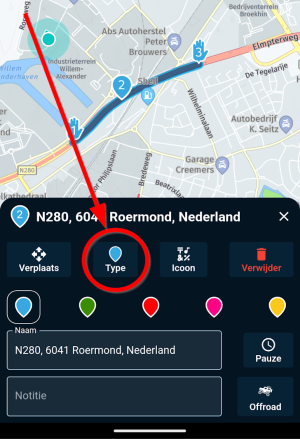
                                  @Ton-Machielsen, certainly NOT 😉 . If you plan a route on the in-ap planner and also on the web-planner ALL waypoints will always be shaping-points initially. Except for the first one and the last one. Those can ONLY be waypoints. The type of a waypoint can be changed in the in-ap planner too. After placing waypoints you tap the quit button (the one with the cross on the lower right, "Annuleren" in Dutch). then you tap the waypoint you want changed and see this:
                                  aba4b2d1-c310-4798-9df8-1b348ecba1f4-image.png

                                  Ultimately I still think the problem you experience is that you don't "hit" the first waypoint, which is a VIA point by default, and therefore are guide back to it. You can place that point further up in your route a bit, so you actually hit it, or you can manually skip it in the app before you drive off.

                                  I am just an enthusiastic MRA user, and hope you will be one too!

                                  Most motorcycle problems are caused by the nut that connects the handlebar to the saddle.

                                  Check out RideSleepRepeat.eu, a biker community for sharing stays across Europe

                                  Ton Machielsen 1 Reply Last reply
                                  1
                                  • Marinus van Deudekom Marinus van Deudekom

                                    @Ton-Machielsen by design a new adder point on a route, Between start and finish would be a shaping point, not a viapoint (handshape)

                                    Ton Machielsen Offline
                                    Ton Machielsen Offline
                                    Ton Machielsen
                                    wrote on last edited by
                                    #49

                                    @Marinus-van-Deudekom I can see that i still have a lot to learn.

                                    Con Hennekens 1 Reply Last reply
                                    0
                                    • Con Hennekens Con Hennekens

                                      @Ton-Machielsen, certainly NOT 😉 . If you plan a route on the in-ap planner and also on the web-planner ALL waypoints will always be shaping-points initially. Except for the first one and the last one. Those can ONLY be waypoints. The type of a waypoint can be changed in the in-ap planner too. After placing waypoints you tap the quit button (the one with the cross on the lower right, "Annuleren" in Dutch). then you tap the waypoint you want changed and see this:

                                      aba4b2d1-c310-4798-9df8-1b348ecba1f4-image.png

                                      Ultimately I still think the problem you experience is that you don't "hit" the first waypoint, which is a VIA point by default, and therefore are guide back to it. You can place that point further up in your route a bit, so you actually hit it, or you can manually skip it in the app before you drive off.

                                      Ton Machielsen Offline
                                      Ton Machielsen Offline
                                      Ton Machielsen
                                      wrote on last edited by
                                      #50

                                      @Con-Hennekens Definitely will be more precise the next time i go out. Raining today, so....

                                      1 Reply Last reply
                                      0
                                      • Ton Machielsen Ton Machielsen

                                        @Marinus-van-Deudekom I can see that i still have a lot to learn.

                                        Con Hennekens Offline
                                        Con Hennekens Offline
                                        Con Hennekens
                                        Alpha tester
                                        wrote on last edited by
                                        #51

                                        @Ton-Machielsen said in Another day MyRoute-app screwed up My Route:

                                        I can see that i still have a lot to learn.

                                        Interesting links:
                                        https://www.myrouteapp.com/support
                                        https://www.youtube.com/@Myrouteappforyou
                                        Have fun! 😉

                                        I am just an enthusiastic MRA user, and hope you will be one too!

                                        Most motorcycle problems are caused by the nut that connects the handlebar to the saddle.

                                        Check out RideSleepRepeat.eu, a biker community for sharing stays across Europe

                                        1 Reply Last reply
                                        1
                                        • richtea999 Offline
                                          richtea999 Offline
                                          richtea999
                                          Valued contributor
                                          wrote on last edited by
                                          #52

                                          @Ton-Machielsen said in Another day MyRoute-app screwed up My Route:

                                          @Marinus-van-Deudekom I can see that i still have a lot to learn.

                                          Everyone does, Ton!
                                          Including me...

                                          1 Reply Last reply
                                          0

                                          Hello! It looks like you're interested in this conversation, but you don't have an account yet.

                                          Getting fed up of having to scroll through the same posts each visit? When you register for an account, you'll always come back to exactly where you were before, and choose to be notified of new replies (either via email, or push notification). You'll also be able to save bookmarks and upvote posts to show your appreciation to other community members.

                                          With your input, this post could be even better 💗

                                          Register Login
                                          Reply
                                          • Reply as topic
                                          Log in to reply
                                          • Oldest to Newest
                                          • Newest to Oldest
                                          • Most Votes


                                          • 1
                                          • 2
                                          • 3
                                          ACTIVE USERS
                                          Carl Lee
                                          Carl Lee
                                          Con Hennekens
                                          Con Hennekens
                                          Marinus van Deudekom
                                          Marinus van Deudekom
                                          M. Schrijver
                                          M. Schrijver
                                          richtea999
                                          richtea999
                                          Ton Machielsen
                                          Ton Machielsen
                                          POPULAR TOPICS
                                          • Interesting behaviour on a pre-planned route that uses the same road in both directions
                                            paul69
                                            paul69
                                            0
                                            10
                                            17

                                          • Er gaat hier iets mis melding
                                            Travellexxie
                                            Travellexxie
                                            0
                                            20
                                            369

                                          • Vormingspunt, viapunt en Eindpunt op Carplay
                                            Huibertus
                                            Huibertus
                                            0
                                            7
                                            97

                                          • Giving folders its own color
                                            Con Hennekens
                                            Con Hennekens
                                            0
                                            12
                                            266

                                          • Oranje wegdelen op de route?
                                            white.mouse
                                            white.mouse
                                            0
                                            5
                                            99

                                          • Update 5.2.1 - Android availability
                                            TomOnTour
                                            TomOnTour
                                            2
                                            10
                                            330

                                          • GPX1.2 & Garmin Tread
                                            Carl Lee
                                            Carl Lee
                                            0
                                            3
                                            61

                                          • Stemgeluid sterker bij afspelen muziek
                                            Huibertus
                                            Huibertus
                                            0
                                            3
                                            28

                                          MY GROUPS
                                          • Login

                                          • Login or register to search.
                                          • First post
                                            Last post
                                          0
                                          • Categories
                                          • Recent
                                          • Popular
                                          • Support
                                          • MyRoute-app